A modern, all-in-one Python tool for converting video files into the AVF format used by AV2PLAY, original movplay or AVFplay on Atari 8-bit computers.
Historically, creating video content for the Atari 8-bit was a painful, multi-step ritual:
ie.
- Open video in VirtualDub.
- Resize, change frame rate, and apply specific filters.
- Export raw audio and raw video separately.
- Run a specific C++ encoder for video (
encvideo). - Run a separate C++ encoder for audio (
encaudio). - Run a muxer (
mux) to combine them. - Repeat everything if you wanted a different TV standard (PAL/NTSC).
avi2atari replaces this entire workflow with a single command.
-
Pipeline Automation: Uses FFmpeg for robust decoding of almost any input format (MP4, MKV, AVI, MOV, etc.).
-
High Performance: Critical encoding loops are JIT-compiled using Numba, making it significantly faster than pure Python implementations.
-
Modern Audio Processing: Implements EBU R128 Loudness Normalization (
--loudnorm) to ensure audio is loud and clear without clipping - a common issue with manual volume adjustment on 8-bit DACs. -
Dual System Support: Generates correct frame structures for both PAL (50Hz) and NTSC (60Hz) systems.
-
Batch Processing: Point it to a directory, and it will convert your entire library automatically.
-
Use URL as input: Program supports URLs as input so you can process online videos (including YouTube) directly.
-
Structure Integrity: Includes automated checks to ensure the output file has byte-perfect alignment required by the Atari player hardware. A standalone validator (
avf_check.py) can re-verify any finished.avffile without booting an emulator.
avi2atari is now the home of a small AVF/AVF2 tool suite, tied
together by one shared format library (avf_format.py) so the converter,
validator and player can never disagree about the container layout:
| Tool | Command | Role |
|---|---|---|
| converter | avf convert <video> [opts] |
video -> AVF/AVF2 (this tool) |
| validator | avf check <file.avf> |
verify the binary layout, no emulator needed |
| player | avf play <file.avf> |
play in a desktop window (needs pygame) |
| metadata | avf meta <file.avf> |
print AVF2 metadata (no pygame needed) |
Tools in this repo:
avi2atari.py- the converter. FFmpeg-fed pipeline, Numba-JIT encode loops, PAL/NTSC, APAC and AVF-C80 profiles, AVF2 metadata, batch and URL input.avf_check.py- structural validator: confirms the on-disk byte layout (header, frame size, block/pad structure) without an emulator.avfplayer.py- desktop player (pygame): plays AVF/AVF2 in a window with an encoder-exact GTIA palette, live phase/saturation tuning, scanlines, blending and looping.avf_format.py- the shared library every tool imports (header build/parse, checksum, frame demux, RGB decoders, Legacy->AVF2).avf.py- umbrella CLI:convert | check | play | meta.web/- the FastAPI web UI (see below).
avf.py is an umbrella CLI over the four; each still runs standalone
(python avi2atari.py ..., python avf_check.py ...,
python avfplayer.py ...). The AVF2 metadata format is the
default; a plain AVF v1 stream is referred to as Legacy
(--avf 1). All three video profiles - APAC, AVF-C80 M4 and
AVF-C80 M4 BTC - are understood across the whole suite.
avf meta film.avf                              # show AVF2 metadata (or "Legacy")
avf meta film.avf --set-title "My Reel" --set-author "Me"   # edit in place
avf meta film.avf --set-comment "note" --out copy.avf       # ...or to a copy
Upgrade a Legacy (plain v1) file to AVF2 - the TV system is a manual choice because a v1 stream carries no marker for it:
avf meta legacy.avf --to-avf2 --system PAL --set-title "Title" --poster-frame 250 --out titled.avf
--poster-frame N lifts frame N's picture into the poster; omit it for
no poster. The video payload is never re-encoded - only the 8 KB header
changes - so the upgrade is instant and lossless.
AVF (v1) - "Legacy". The classic Atari Video Format is a bare,
beam-synchronous stream: no magic number, no header, no metadata - just
rigidly aligned 8704-byte frames that ANTIC races the electron beam to
display straight from storage. Brilliant, but a bag of .avf files
tells you nothing about itself: no title, no author, no preview, not
even whether it is PAL or NTSC. Full spec: spec/AVF_FORMAT.md.
AVF2 - the upgrade. AVF2 fills the 8 KB region that every player already skips with a proper metadata header: magic + checksum, TV system, frame count and duration, title / author / converter / date / comment, a poster frame, and a video-profile byte (APAC or AVF-C80, incl. the BTC flag). It is 100% backward compatible - every existing player skips those 16 sectors unchanged, so an AVF2 file still plays everywhere, while new tools can show a title, a thumbnail and a poster, and pick the right decoder automatically. Full spec: spec/AVF2_HEADER.md.
AVF2 is the default; a plain v1 stream is called Legacy throughout
the suite (--avf 1 produces one), and any Legacy file upgrades to AVF2
losslessly (only the header changes - the video is never re-encoded).
| Profile | --profile |
Resolution | Colour | Plays on |
|---|---|---|---|---|
| APAC (classic) | apac (default) |
80x96 | 256 (16 hues x 16 lumas, line-blended) | every Atari 8-bit |
| AVF-C80 M4 | c80m4 |
80x48 | direct RGB444 per pixel (4096 colours) | GTIA2RGB + AV2PLAY |
| AVF-C80 M4 BTC | c80btc |
160x96 subpixel masks | 2x RGB444 per 8x8 cell (4096 colours) | GTIA2RGB + AV2PLAY |
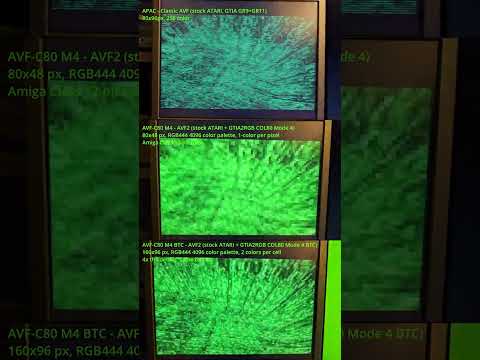
APAC and the GTIA limits. The stock Atari has no framebuffer colour mode anywhere near video-friendly, so APAC (Any Point, Any Color) plays GTIA against itself: it alternates the two GTIA modes every scan line - Graphics 11 (16 hues at a fixed luminance) on one line, Graphics 9 (16 luminances of one hue) on the next - and lets the display blend each chroma+luma pair into one of 256 apparent colours. The price is exactly the GTIA's shape: wide 80-column pixels, vertical resolution halved by the line pairing, colour that only exists as a blend (it needs CRT line-blending, or the BLENDING option on a GTIA2RGB), and hue/luma that cannot change independently within a pair. The converter dithers hard to hide all this, but reds and fine colour detail degrade first - those are GTIA limits, not encoder bugs.
AVF-C80 M4 sidesteps the GTIA palette entirely: with a GTIA2RGB FPGA the picture is built from 80x24 character cells whose colours are direct 12-bit RGB (4096 colours, Amiga-class) - every pixel carries its own colour, no palette, no attribute coupling, no blending required.
AVF-C80 M4 BTC is M4 with the wasted per-cell character byte turned
into a 2x4 subpixel mask (Block-Truncation-style coding): 160x96
mask detail with two RGB444 colours per cell, at the same bitrate and
container as every other profile. The encoder searches all 128 mask
partitions per cell, guarantees the result never scores worse than the
plain half-block cell, and applies temporal hysteresis
(--btc-stability) so static areas do not shimmer. BTC files degrade
gracefully: an older C80 player simply shows them as 80x48 M4.
BTC also has optional ordered dithering (--btc-dither). Static
bayer uses a screen-anchored 8x8 Bayer matrix to trade fine texture
for smoother RGB444 gradients while preserving temporal hysteresis.
bayer-t shifts that matrix one subpixel right per frame; at 50/60 Hz
it can average gradients more accurately, but deliberately creates
full-field temporal activity and may crawl on sample-and-hold LCDs.
Consequently dithering defaults to none, and bayer-t defaults
--btc-stability to 0 unless the user supplies an explicit value.
Hardware verdict (800XL + GTIA2RGB): bayer-t at strength 0.5
looked best - smoother gradients without the static pixel grid -
at the cost of a subtle, deliberate shimmer; masks alone still
carry the most detail, so none remains the default.
--btc-dither-gate targets exactly that trade: it fades the pattern
out of high-detail cells (per-cell variance ramp), so the dither only
works where banding lives.
A FastAPI web front-end wraps the whole suite - convert (single or
batch -> zip), inspect/edit metadata, upgrade Legacy -> AVF2, and a
server-side PNG preview - reusing the exact CLI converter and the shared
avf_format library. It is RAM-only: scratch lives on tmpfs and
nothing about a conversion is persisted (only the client IP and the
submitted file names are logged, for abuse prevention; the UI shows a
disclaimer when SERVER_MODE=1).
Easiest path (one click): run webui.bat (Windows) or ./webui.sh
(Linux/macOS). It creates a local .venv, installs the web dependencies
and opens the UI at http://127.0.0.1:8000 - URL/YouTube input is enabled
by default on a local run.
Or by hand:
pip install -r requirements.txt
python web/app.py                              # http://127.0.0.1:8000
Or with Docker + traefik (copy the examples, then bring it up):
cp .env.example .env                 # set DOMAIN, toggles
cp docker-compose.yml.example docker-compose.yml
docker compose up -d --build
YOUTUBE_ENABLED=1 turns on URL input (a local python web/app.py run
enables it by default). AVF2 is the default output format; a plain v1
stream is called Legacy throughout the UI. The whole suite installs
from one requirements.txt (ffmpeg is a separate system dependency).
Open the Command Prompt, then:
winget install Python.Python.3.11
winget install ffmpeg
winget install Git.Git
git clone https://github.com/HanJammer/avi2atari.git
cd avi2atari
python -m pip install -r requirements.txt
python avi2atari.py --test-gen --system PAL
YouTube instructions:
Rusty Bits - avi2atari - a modern converter for 8-bit Atari AVF files
Install prerequisities:
Python 3.11+
FFmpeg: You must have FFmpeg installed and added to your system's PATH.
- Windows: Download from ffmpeg.org (official site) or gyan.dev (prebuilt binaries with codecs included), extract, and add the
binfolder to your System Environment Variables (PATH). - Linux: ie.
apt install ffmpeg
Then:
-
Clone the repository:
git clone https://github.com/HanJammer/avi2atari.git cd avi2atari -
Create a Virtual Environment (Recommended):
-
Windows (Command Prompt / PowerShell):
python -m venv venv .\venv\Scripts\activate -
Linux / macOS:
python3 -m venv venv
source venv/bin/activate
-
-
Install dependencies:
pip install -r requirements.txt
Convert a single video file to PAL format (default):
python avi2atari.py video.mp4 --system PAL
Convert all videos in a specific folder:
python avi2atari.py D:\MyVideos\ --system PAL
Convert online video:
python avi2atari.py https://some.online/video.mp4
Convert online videos you specified in the file. File format is: one URL per line and optional output file name (tab-separated). URLOutputFileName URL2 URL3SomeotherFileName
python avi2atari.py --urllist onlinevideos.txt
Use loudness normalization and slightly boost saturation for better visuals on CRT screens:
python avi2atari.py matrix.mp4 --system PAL --loudnorm --saturation 1.3
The highest-detail profile - see Video profiles:
python avi2atari.py matrix.mp4 --system PAL --loudnorm --profile c80btc --title "The Matrix (1999)"
--btc-stability K tunes the temporal hysteresis (default 0.10, 0 =
off); --denoise adds a temporal-only source denoise that further calms
glyph shimmer on grainy material.
Ordered dithering is opt-in:
# Static, screen-anchored Bayer 8x8; hysteresis remains enabled.
python avi2atari.py matrix.mp4 --system PAL --profile c80btc --btc-dither bayer

# Bayer shifted right one subpixel per frame; stability defaults to 0.
# The hardware-test winner (at the default strength 0.5).
python avi2atari.py matrix.mp4 --system PAL --profile c80btc --btc-dither bayer-t

# Variance gate: dither only where banding lives (flat cells); cells
# with real detail keep their masks crisp. Composes with either mode.
python avi2atari.py matrix.mp4 --system PAL --profile c80btc --btc-dither bayer-t --btc-dither-gate
--btc-dither-strength S controls the pattern strength (1.0 = one
RGB444 step peak-to-peak, about +/-8.37; default 0.5 - the gentler
pattern that won the hardware tests). The same
threshold is applied to all RGB channels to avoid coloured speckle.
Denoise happens first; Bayer is added afterwards to the final 160x96
encoder target.
Create a synthesized test file (SMPTE bars + 440Hz tone) to verify your hardware/cabling:
python avi2atari.py --test-gen --system PAL
AVF2 - an ID3-like metadata block (title, author, converter, date, duration and a full-resolution poster frame) written into the 8KB header region that every existing player skips unconditionally - is the default output. AVF2 files remain 100% playable by movplay/AVFPLAY and all other AVF v1 consumers:
python avi2atari.py matrix.mp4 --system PAL --loudnorm --title "The Matrix (1999)" --author "HanJammer"
Pass --avf 1 for a plain Legacy v1 stream (no metadata; the header is
zeroed). The poster frame is taken at 10% of the source duration by
default; use --poster SECONDS to pick a different moment. Without
--title the source filename is used. avf_check.py validates and
prints the metadata; the bundled avfplayer.py can display it
(--info, --poster).
avf_check.py is a standalone structural validator. It reads a finished .avf
file and confirms that its binary layout matches exactly what movplay/AVFplay
expect on the Atari - without booting an emulator or real hardware. Use it as a
fast regression check after tweaking encoder settings, or to confirm a file
survived copying/transfer intact.
It checks:
- the optional 8 KB header is present and either fully zeroed (AVF v1) or a valid AVF2 metadata block (magic, checksum, system and frame count are cross-checked against the actual payload; metadata is printed),
- the payload length is an exact multiple of the 8704-byte frame size,
- the fixed padding bytes inside every video block are zero,
- the audio-block tail padding matches the target system (PAL/NTSC differ here).
# Validate a PAL file produced with the default 8KB header:
python avf_check.py video-PAL.avf --system PAL

# NTSC file:
python avf_check.py video-NTSC.avf --system NTSC

# A file produced with --no-header:
python avf_check.py raw.avf --no-header --system PAL
It prints a short report and exits 0 on success or 1 on the first structural
problem it finds (handy in scripts/CI). --system defaults to PAL; it only
affects the audio tail-padding pattern, so pass the correct one for NTSC files.
usage: avi2atari.py [-h] [--test-gen] [--urllist] [--system {PAL,NTSC,BOTH}] [--out OUT] [--no-header] [--profile {apac,c80m4,c80btc}] [--avf N] [--title TITLE] [--author AUTHOR] [--comment COMMENT] [--poster SECONDS] [--saturation SATURATION] [--contrast CONTRAST] [--aspect {stretch,fit}] [--allow-slow] [--denoise] [--btc-stability K] [--btc-dither {none,bayer,bayer-t}] [--btc-dither-strength S] [--volume VOLUME | --loudnorm] [input]
| Parameter | Description |
|---|---|
input |
Input video file path OR a directory for batch processing. |
--system |
Target system: PAL, NTSC, or BOTH (generates two files). Default: BOTH. |
--out |
Custom output filename (ignored in batch mode). |
--loudnorm |
Recommended. Enables EBU R128 loudness normalization. Ensures consistent volume without distortion. |
--urllist |
Takes text file with list of the URLs as an input (described above). |
--volume |
Manual volume gain in dB (e.g., 10). Use only if loudnorm is disabled. Default: 12.0. |
--saturation |
Color saturation. 1.0 is original. Values above 1.0 boost color (e.g. 1.5 is a visible boost, good for washed-out sources on a CRT); 0.0 gives monochrome video. |
--contrast |
Contrast adjustment. 1.0 is default. |
--aspect |
How to fit the source into 160x192: stretch (default, fills the frame - legacy behaviour) or fit (preserves the source aspect ratio and adds black bars). Use fit for 16:9 content to avoid squashing. |
--profile |
Video profile: apac (default), c80m4 or c80btc - see Video profiles. The C80 profiles imply AVF2. |
--avf |
Container version: 2 = AVF2 metadata header (default), 1 = plain Legacy v1 (zeroed header, no metadata). --no-header implies 1. |
--btc-stability |
c80btc temporal hysteresis (0 = off): cells keep their previous mask/colours while the error stays within (1+K) of the per-frame optimum. Default 0.10, except bayer-t defaults to 0; an explicit value is still allowed. |
--btc-dither |
c80btc ordered dither: none (default), static screen-anchored bayer 8x8, or bayer-t shifted one subpixel right per frame. Encoder-side only; the AVF format and player are unchanged. |
--btc-dither-strength |
Bayer strength from 0 to 1. 1.0 spans one RGB444 step peak-to-peak (about +/-8.37); 0.5 keeps more mask detail. Default 0.5 (hardware-tested sweet spot). |
--btc-dither-gate |
Attenuate the Bayer pattern in cells that already carry real detail (per-cell variance gate): gradients get smoothed, detailed cells keep their masks crisp. Off by default. |
--denoise |
Temporal-only denoise of the source (no spatial blur) before encoding - calms glyph shimmer / dither crawl on grainy material, for every profile. |
--title |
AVF2: video title (ASCII, max 64 chars). Default: source filename. |
--author |
AVF2: author of the conversion (ASCII, max 64 chars). |
--comment |
AVF2: free-text comment (ASCII, max 128 chars). Default: the conversion settings (profile, dither, stability, gains, audio mode), so every file self-documents how it was made. |
--poster |
AVF2: source timestamp (seconds) of the poster frame. Default: 10% of duration. |
--no-header |
Disables the 8KB blank header. Warning: This is test/debug option! Only use this if you know exactly how your loader works. Most players (like movplay) require the header for synchronization. |
--test-gen |
Generates a test_tone.mp4 file and converts it. Useful for debugging audio issues and tuning contrast/saturation. |
See the profile-comparison reel (APAC vs C80 M4 vs C80 BTC): (link coming soon)
avf play file.avf (or python avfplayer.py file.avf [PAL|NTSC]) opens a
window. It derives its palette as the exact mathematical inverse of the
encoder's YIQ model, so at the defaults the colours are what the encoder
"meant"; both are live-tunable to match your reference hardware by eye.
| Key | Action |
|---|---|
S |
scanlines on/off (default on) |
B |
pixel blending on/off (default on) |
[ / ] |
tune colour phase (hue) in 0.05 rad steps (0 = encoder-exact) |
Shift+[ / Shift+] |
tune saturation (1.0 = the Atari's chroma; ~2.0 = punchier) |
L |
loop |
D |
oscilloscope overlay |
--info prints AVF2 metadata and exits; --poster shows the poster
frame before playback; --scale N sets the window scale (3 default,
8 fills a 4K screen). This player was previously the standalone
avfplayer repository, now merged into the suite.
Output files are tested extensively on real hardware: Atari 130XE and 800XL (PAL) with SUB Cart, the C80 profiles on the 800XL with a GTIA2RGB.
-
Storage Speed: Playing AVF video requires a data transfer rate of approx. 8.7 KB/frame (over 430 KB/s). This requires fast storage solutions like SUB Cart (tested), AVG Cart (not tested but should work just like SUB Cart), SIDE2/3 (needs testing - SIDE2/SIDE3 do not play AVF "natively". You need an AVF player that supports SIDE access and the correct filesystem setup). Standard floppy emulators (SIO2SD) are too slow. If playback glitches: try a freshly formatted FAT16 card and copy AVF files first to keep them contiguous (fragmentation breaks streaming).
-
Emulator Configuration: If testing on Altirra, you MUST enable "Use burst I/O transfers" in the Hard Disk configuration. Without it, the emulator simulates seek times, causing video glitches. It's very likely to glitch-out/lose synchronisation anyway.
-
Audio Quality: The audio is essentially 4-bit software PCM played through the POKEY chip. A high-pitched carrier whine (~15kHz) is normal and part of the technology, not a bug.
-
Color Palette (APAC): the GTIA constraints described in Video profiles apply to the APAC profile - dithering hides most of it, but some degradation (especially in reds) is expected. The AVF-C80 profiles bypass the GTIA palette entirely (direct RGB444 via GTIA2RGB), so their limit is the 4096-colour depth and, for BTC, two colours per 8x8 cell.
This tool was created to modernize the Atari 8-bit video ecosystem.
Testing and debugging was done on the PAL hardware only. NTSC is mostly untested - if you have NTSC computer and can test the output AVFs - this would be a great help to make this program better.
If you find bugs or have ideas for better dithering algorithms:
-
Fork the repo.
-
Create your feature branch.
-
Submit a Pull Request.
Credits:
-
Original AVF concept and format: Avery Lee (phaeron) - the encvideo/encaudio/mux C++ sources this project grew far beyond.
-
Special thanks to AcidMaker (GTIA2RGB) for hardware testing and a steady stream of good ideas.
Happy streaming!