This application generates equations for the game Graphwar that accurately approximates the path you want your graph to follow. The user plots a path on the screen, and the tool converts it into a chain of step functions, returning an expression that can be directly inserted into the game. The expression is automatically copied to the clipboard for easy use.
Demo video
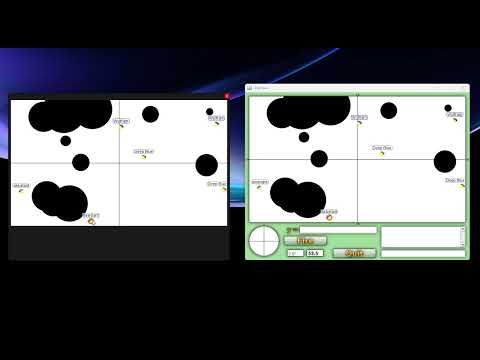
- Automatically detects the Graphwar game window
- Lets you select a player to plot from in the game view.
- Allows point-by-point construction of movement paths
- Converts these paths into step equations
- Automatically copies the result to the clipboard
- A-Star Pathfinding
- Works on Windows only. Tested on Windows 10 and 11.
- Graphwar (https://store.steampowered.com/app/1899700/Graphwar/)
-
Download the executable x64/Release/gw_assistant.exe.
-
Run the application, it will start scanning for the Graphwar window.
-
The app will wait for the battle to start.
-
Game view (Arena) appears, you'll see:
Click on shooter... -
Click on the shooter in the arena. The app will:
- Verify if a player is near the clicked position
- Determine if the shooter is active
- Compute the path origin
-
Start plotting the path:
- Use Left Mouse Button to define horizontal and vertical segments.
- Segments must always progress in the shooter's facing direction.
- Press
Backspaceto undo the last vertex. - Press
Enterto finalize the path.
-
The application will:
- Convert the path into a series of step functions
- Display and copy the equation to the clipboard
-
Press
Spaceat any time to reset the process.
- Top-right corner: A red button ("X") to close the application
- Arena: Game view with the path plotted on top.
- Coordinates: Just below the arena, showing the Graphwar (x,y) at the cursor position.
- Status messages and guidance (e.g. "Cant go backwards", "Click on shooter...")
- Bottom-left corner: Pathfinding control panel. Allows to modify resolution and pathfind.
The output is a string that looks like:
0+step1+step2+...
Each step is computed as
where
k is change in height
a is the steepness, hardcoded 100
c is the x coordinate of the step
Output is automatically copied into clipboard.
- The shooter must be correctly identified based on a pixel color code (
#797979for the eye,#3939FFfor active outline). - You cannot plot backward relative to the shooter's facing direction.
- The arena coordinates are transformed using scaling functions to ensure the path is correctly plotted in the game.
- Shooter not found: Ensure you click directly on the shooter and the game is running in the foreground.
- Equation not copying: Specific error will be displayed in a message box.
- Not enough vertices: At least two vertices are required to generate a path. Also displayed when pathfinding fails due to obstacles. Try decreasing resolution if you believe a path is possible
- Any weird path behavior: Reset the path using space bar. e.g. when path starts drawing in opposite of face direction