Feiyu Zhao†, Yuetong Li†, Chenxi Xiao*
† Equal contribution. * Corresponding author.
Accepted to the Conference on Robot Learning (CoRL) 2026.



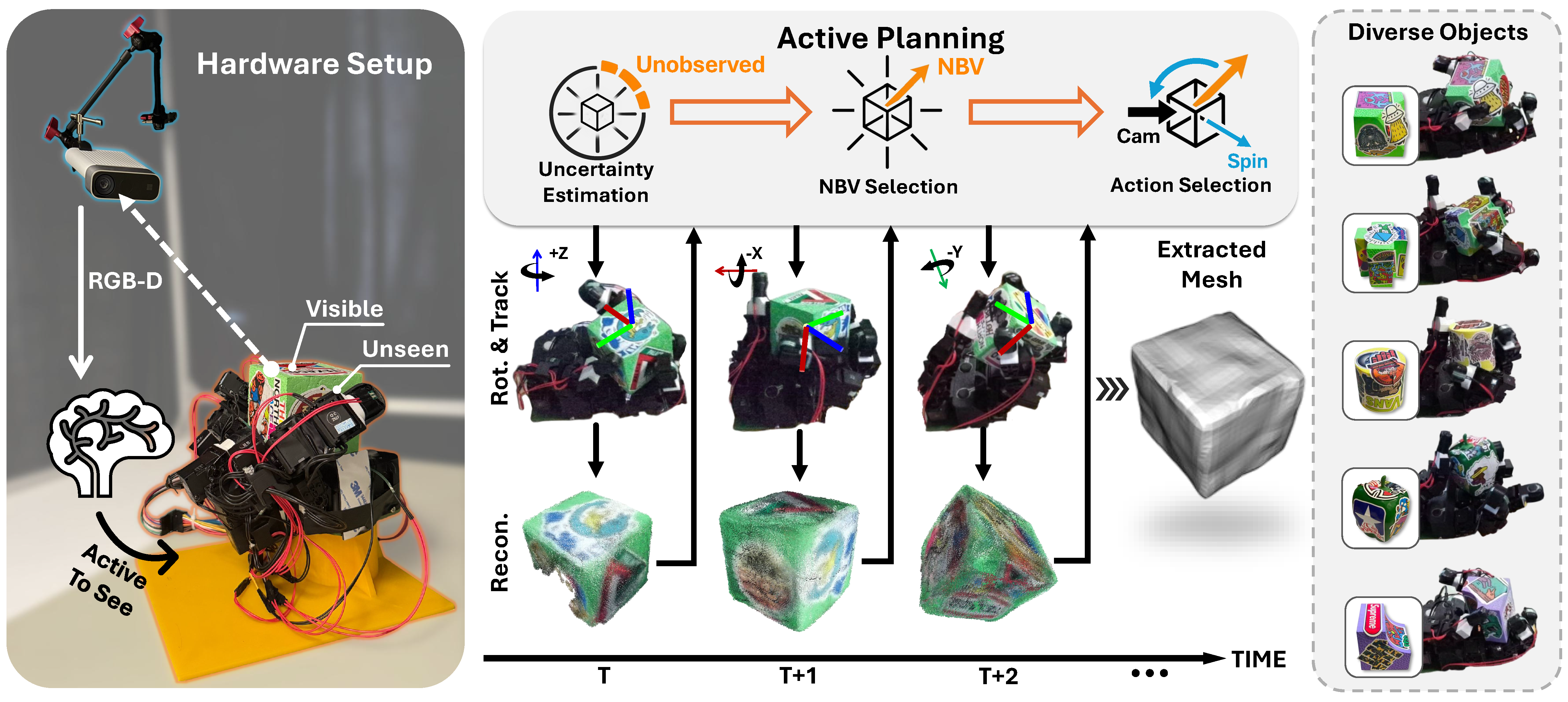
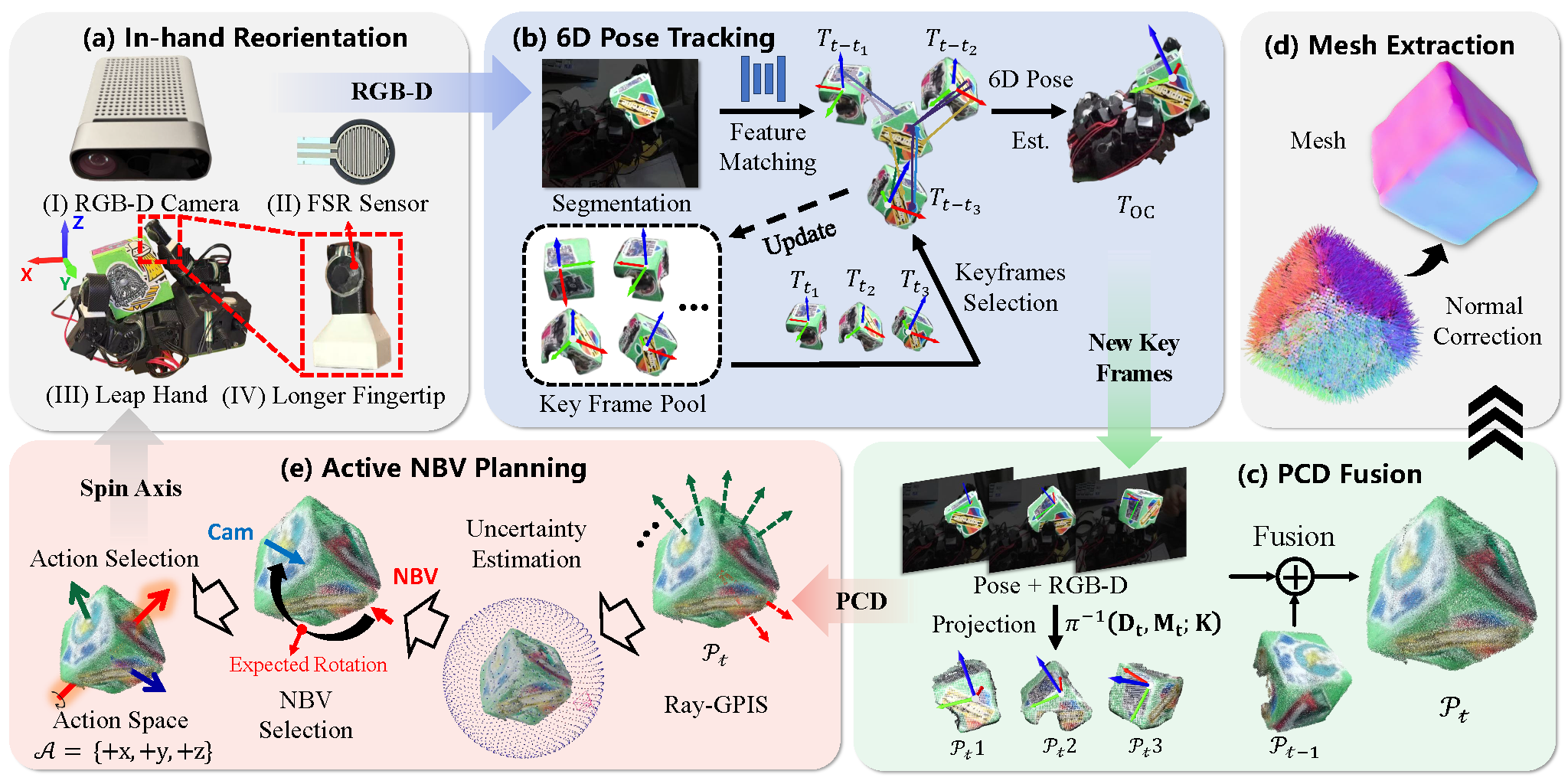
AURORA is an active 3D reconstruction system for objects held in a robot hand. Because the hand severely occludes a grasped object, AURORA closes the perception--action loop: it estimates which object-relative viewing direction remains uncertain, maps that next-best-view target to a feasible in-hand rotation, acquires another RGB-D observation, and incrementally updates the reconstruction.
The core planner, Ray-GPIS, scores candidate viewing rays using reconstruction uncertainty and view novelty. The full system combines:
- RGB-D capture and object segmentation;
- model-free 6D object pose tracking with BundleTrack;
- online reconstruction and uncertainty-driven next-best-view planning; and
- axis-conditioned in-hand reorientation with the Leap Hand.
| Resource | Link | Contents |
|---|---|---|
| Project page | aurorahand.github.io | Method overview, videos, interactive results, and quantitative evaluation |
| Paper | arXiv:2609.08493 | Official AURORA preprint |
| Dataset | FerryZh/AURORA | Real demonstrations, tracking data, reconstructions, ground truth, and evaluation outputs |
| Paper snapshot | rebuttal/paper.pdf | PDF stored with this repository |
| Reproduction guide | rebuttal/README.md | Full baseline, ablation, robustness, runtime, and downstream commands |
| Experiment summary | rebuttal/RESULTS.md | Consolidated benchmark results |
Inhand_Activate/
├── Active/                  # Ray-GPIS, NBV scoring, motion mapping, RGB-D capture
│   └── AzureKinectDK/       # Azure Kinect interface and calibration
├── Tracking/                # Segmentation/tracking wrappers
│   └── BundleTrack/         # BundleTrack and LF-Net services
├── LeapHand_rotation/       # Axis-conditioned policy training and deployment
├── Real_deploy/             # Closed-loop real-robot entry points and baselines
├── reconstruction/          # Online fusion, offline refinement, and evaluation
├── demo/                    # Recorded demonstrations and visualization utilities
├── plot/                    # Paper plotting assets
└── rebuttal/                # Reproducible planner benchmark and analysis suite
    ├── benchmark/           # Environment, planners, fusion, runner, and evaluator
    ├── configs/             # Formal, ablation, stress, and downstream configs
    ├── downstream/          # Place-and-regrasp evaluation
    ├── results/             # Compact result summaries and tables
    ├── scripts/             # Grouped run, preparation, evaluation, and reporting CLIs
    └── tests/               # Deterministic benchmark tests
Important entry points are:
Active/NBV_gpis.pyandActive/NBV_gpis_Field.py: Ray-GPIS planners;Active/motion_planner.py: next-best-view to world-axis action mapping;Tracking/sam3_tracking.py: RGB-D segmentation and BundleTrack client;reconstruction/Reconstructor.py: incremental point-cloud reconstruction;LeapHand_rotation/isaacgymenvs/hand_controller.py: real-hand controller;Real_deploy/main_explore.py: interactive closed-loop AURORA system; andrebuttal/scripts/runners/run_baselines.py: controlled planner benchmark.
The full real system is hardware- and GPU-dependent. The reference setup uses:
- Linux with an NVIDIA GPU and CUDA;
- Python 3.8 in Conda;
- Docker with the NVIDIA container runtime;
- Isaac Gym Preview 4 and PyTorch3D;
- an Azure Kinect DK with aligned color/depth calibration;
- a Leap Hand and its tactile serial interface; and
- BundleTrack plus its LF-Net feature server.
For the benchmark-only path, robot hardware, the camera, and BundleTrack are not required. Its renderer uses deterministic Open3D CPU ray casting, while the formal GP/ActNeRF timing configuration requires CUDA.
Clone the repository and create the reference environment:
git clone https://github.com/FerryRain/Inhand_Activate.git
cd Inhand_Activate

conda create -n robosyn python=3.8
conda activate robosyn
Follow LeapHand_rotation/install.md to install PyTorch, PyTorch3D, Isaac Gym, and the hand-policy dependencies. Then install the packages used by the planner benchmark:
python -m pip install -r rebuttal/requirements-rebuttal.txtThe requirements file is an addition to the robosyn environment, not a
standalone specification. BundleTrack is intentionally isolated in Docker;
follow Tracking/BundleTrack/README.md for its
upstream build details.
The public Hugging Face repository contains roughly 36 GiB of external data.
It intentionally excludes rebuttal/, whose compact code and summaries are
versioned directly in this repository.
Install the Hugging Face CLI:
python -m pip install -U huggingface_hubInspect the full download before transferring it:
hf download hf://datasets/FerryZh/AURORA --dry-runDownload the complete archive repository:
hf download hf://datasets/FerryZh/AURORA --local-dir data/AURORAFor a smaller setup, request only the archives needed for tracking and the planner assets:
hf download FerryZh/AURORA \
  SHA256SUMS tracking_data.tar.gz active_pcd.tar.gz GT_data.zip \
  --repo-type dataset \
  --local-dir data/AURORA
Verify every downloaded archive that is present locally:
cd data/AURORA
sha256sum -c SHA256SUMS --ignore-missing
cd ../..
The main archives map to the repository as follows:
| Archive | Intended content/location |
|---|---|
tracking_data.tar.gz |
BundleTrack inputs/results and Tracking/offline_cache/ |
active_pcd.tar.gz |
Active reconstruction point clouds under Active/pcd/ |
real_demo.zip, ablation.zip |
Real-deployment experiments under Real_deploy/results/ |
recon_results.zip, offline_tracking.zip |
Offline reconstruction outputs under reconstruction/offline/result/ |
GT_data.zip |
Ground-truth meshes and point clouds under reconstruction/offline/GT_data/ |
demo_results.tar.gz |
Recorded RGB-D demonstrations and reconstructions under demo/results/ |
trellis_evaluation_outputs.tar.gz |
TRELLIS alignment/evaluation outputs |
The archives are large. Inspect their paths before extraction, then extract them from the repository root while preserving their directory structure:
tar -tzf data/AURORA/tracking_data.tar.gz | head
unzip -l data/AURORA/GT_data.zip | head
See the dataset card for the complete archive manifest and sizes.
Prepare normalized test assets and run the deterministic unit suite:
conda run -n robosyn python -m rebuttal.scripts.preparation.prepare_assets \
  --config rebuttal/configs/base.yaml

conda run --no-capture-output -n robosyn \
  python -m unittest discover -s rebuttal/tests -v
Run a small CPU smoke test with one object, one initial pose, and two active steps:
conda run --no-capture-output -n robosyn \
  python -m rebuttal.scripts.runners.run_baselines \
  --config rebuttal/configs/base.yaml \
  --planners fixed,pose_novelty,ray_gpis \
  --objects Cube \
  --pose-seeds 0 \
  --steps 2 \
  --overwrite
Run the complete CUDA planner comparison:
conda run --no-capture-output -n robosyn_gpu \
  python -m rebuttal.scripts.runners.run_baselines \
  --config rebuttal/configs/formal_120_sixview_gpu.yaml

conda run -n robosyn_gpu python -m rebuttal.scripts.evaluation.evaluate_visibility_coverage \
  --config rebuttal/configs/formal_120_sixview_gpu.yaml --overwrite

conda run -n robosyn_gpu python -m rebuttal.scripts.summarization.summarize_all_metrics \
  --config rebuttal/configs/formal_120_sixview_gpu.yaml

conda run -n robosyn_gpu python -m rebuttal.scripts.evaluation.paired_statistics_all \
  --config rebuttal/configs/formal_120_sixview_gpu.yaml

conda run -n robosyn_gpu python -m rebuttal.scripts.validation.validate_results \
  --config rebuttal/configs/formal_120_sixview_gpu.yaml
The formal benchmark contains 120 paired scenes over eight objects and uses
one initial observation followed by five planner-selected observations.
Outputs are written to rebuttal/results/. See
rebuttal/README.md for component ablations, sensing and
pose-error stress tests, runtime auditing, and downstream evaluation.
Hardware safety: verify the serial port, policy checkpoints, joint limits, camera workspace, and emergency-stop procedure before enabling the hand. Defaults in this research code are specific to the authors' setup.
The real system uses three logical services: LF-Net, BundleTrack, and the host AURORA process. BundleTrack and LF-Net run in separate containers.
Edit the absolute paths at the top of:
Tracking/BundleTrack/docker/run_container.sh
At minimum, set BUNDLETRACK_DIR, NOCS_DIR, and YCBINEOAT_DIR for your
machine. Also verify:
Tracking/BundleTrack/Real_time_vis/AzureKinectDK/cam_K.txtmatches the color-camera intrinsics; and- depth is aligned to the color stream.
Terminal 1:
cd Tracking/BundleTrack
bash lf-net-release/docker/run_container.sh
Inside the LF-Net container:
cd /path/to/Inhand_Activate/Tracking/BundleTrack/lf-net-release
python run_server.py
Keep this terminal running.
Terminal 2:
cd Tracking/BundleTrack
bash docker/run_container.sh
Inside the BundleTrack container, build once if necessary and start the real-time service:
cd /path/to/Inhand_Activate/Tracking/BundleTrack
mkdir -p build
cd build
cmake ..
make -j
cd ..

python scripts/real_time.py \
  --data_dir /path/to/Inhand_Activate/Tracking/BundleTrack/Real_time_vis/AzureKinectDK \
  --port 5555
The host RGB-D clients connect to the BundleTrack service on port 5550; the
--port 5555 argument above is used for the LF-Net service.
From the repository root on the host:
conda activate robosyn
python Active/AzureKinectDK/realtime_get.py
Controls:
s: select an ROI and initialize segmentation/tracking;r: reset and reinitialize; andq: quit.
Do not run the tracking-only client at the same time, because the full system opens the camera itself. Before deployment:
- set the object text prompt in
Real_deploy/main_explore.py; - verify the hand serial port (default:
/dev/ttyUSB1); - verify the x/y/z policy checkpoints in
LeapHand_rotation/isaacgymenvs/cfg/task/AllegroArmMOAR.yaml; and - start the LF-Net and BundleTrack services above.
Then run:
conda activate robosyn
python Real_deploy/main_explore.py
Interactive controls:
g: select or update the workspace gate polygon;s: initialize the object with the configured text prompt;r: reconstruct the currently acquired observations;a: estimate the next best view and command the selected hand axis; andq: stop the controller and exit.
For the timed, recorded real-world protocol, use Real_deploy/demo.py after
updating its output directory and hardware-specific settings.
| Component | Default output location |
|---|---|
| BundleTrack | Tracking/BundleTrack/results/ or the configured debug_dir |
| Real deployment | Real_deploy/results/ and script-specific demo directories |
| Online/offline reconstruction | reconstruction/offline/result/ |
| Controlled benchmarks | rebuttal/results/<experiment_name>/ |
| Plots and compact tables | rebuttal/results/, rebuttal/figures/, and plot/ |
Docker-created files may be owned by root. Prefer correcting the container user/group mapping; if necessary, update ownership on only the generated output directory instead of applying broad world-writable permissions.
- BundleTrack cannot find data: replace every author-specific absolute path in the Docker launch scripts and the selected experiment script.
- No pose response: confirm that BundleTrack is listening on
5550and LF-Net is listening on5555. - Poor tracking: verify color intrinsics, aligned depth, the initial ROI or text prompt, and mask quality.
- CUDA benchmark fails: use a CUDA-enabled PyTorch environment or select the
CPU
rebuttal/configs/base.yamlsmoke test. - Downloaded archive is corrupt: rerun
sha256sum -c SHA256SUMS --ignore-missingin the dataset directory. - Hand does not start: check
/dev/ttyUSB*, tactile serial permissions, and the three axis-policy checkpoint paths before rerunning.
AURORA builds on BundleTrack for model-free 6D tracking and the Robot Synesthesia codebase for axis-conditioned in-hand manipulation. Please follow their licenses and cite the corresponding works when using those components.