Skip to content

[No QA] Docs updates for E/A#98567 Add Plaid Connect and Fix statuses to Wallet - #105434

Merged
stephanieelliott merged 2 commits into
mainfrom
claude-docsPlaidConnectFixWalletStatus
Oct 30, 2026
Merged

stephanieelliott merged 2 commits into
mainfrom
claude-docsPlaidConnectFixWalletStatus

Conversation

@MelvinBot

Copy link
Copy Markdown
Contributor

Explanation of Change

Help site update for Allow linking Plaid to an existing bank account and fixing existing Plaid connection.

New feature: In Account > Wallet, a US business bank account that is linked to the Expensify Card (the settlement account, or an account on a workspace on the Expensify Card waitlist) now shows a Connect action when it isn't connected through Plaid, and a Fix action when its Plaid connection is broken. Both open a new Connect to Plaid flow. The source PR has no beta gate.

Article updated: docs/articles/new-expensify/wallet-and-payments/Connect-a-Business-Bank-Account.md, section "How business bank accounts appear in Wallet". The existing list says:

Every bank account shows a status badge. A finished account shows Active. An account that still needs your attention shows a badge that tells you what is left to do:

That list didn't cover an Active account that now shows a message and an action. I added two bullets to the existing list (no new sections or FAQs):

  • Active + "Connect to Plaid for a more accurate Expensify Card limit" + Connect
  • Active + "Fix your Plaid connection for a more accurate Expensify Card limit" + Fix

UI labels were checked against src/languages/en.ts on main (walletPage.bankAccountStatus.plaidConnectForLimit, walletPage.bankAccountStatus.plaidBrokenReconnect, walletPage.bankAccountStatus.connect, common.actionBadge.fix, walletPage.bankAccountStatus.active). The test account can't reach this state because it needs an Expensify Card settlement account, so the labels were not checked in the live UI.

Fixed Issues

$ #98567
PROPOSAL:

Tests

// TODO: The human co-author must fill out the tests you ran before marking this PR as "ready for review"
// Please describe what tests you performed that validates your changed worked.

  • Verify that no errors appear in the JS console

Offline tests

QA Steps

// TODO: The human co-author must fill out the QA tests you ran before marking this PR as "ready for review".
// Please describe what QA needs to do to validate your changes and what areas do they need to test for regressions.

  • Verify that no errors appear in the JS console

PR Author Checklist

  • I linked the correct issue in the ### Fixed Issues section above
  • I wrote clear testing steps that cover the changes made in this PR
    • I added steps for local testing in the Tests section
    • I added steps for the expected offline behavior in the Offline steps section
    • I added steps for Staging and/or Production testing in the QA steps section
    • I added steps to cover failure scenarios (i.e. verify an input displays the correct error message if the entered data is not correct)
    • I turned off my network connection and tested it while offline to ensure it matches the expected behavior (i.e. verify the default avatar icon is displayed if app is offline)
    • I tested this PR with a High Traffic account against the staging or production API to ensure there are no regressions (e.g. long loading states that impact usability).
  • I included screenshots or videos for tests on all platforms
  • I ran the tests on all platforms & verified they passed on:
    • Android: Native
    • Android: mWeb Chrome
    • iOS: Native
    • iOS: mWeb Safari
    • MacOS: Chrome / Safari
  • I verified there are no console errors (if there's a console error not related to the PR, report it or open an issue for it to be fixed)
  • I verified any copy / text that was added to the app is either coming verbatim from figma or has been approved by marketing (in order to get marketing approval, ask the Bug Zero team member to add the Waiting for copy label to the issue)
  • If a new code pattern is added I verified it was agreed to be used by multiple Expensify engineers
  • I tested other components that can be impacted by my changes (i.e. if the PR modifies a shared library or component like Avatar, I verified the components using Avatar are working as expected)
  • If new assets were added or existing ones were modified, I verified that:
    • The assets are optimized and compressed (for SVG files, run npm run compress-svg)
    • The assets load correctly across all supported platforms.
  • If the PR modifies code that runs when editing or sending messages, I tested and verified there is no unexpected behavior for all supported markdown - URLs, single line code, code blocks, quotes, headings, bold, strikethrough, and italic.
  • If the PR modifies a generic component, I tested and verified that those changes do not break usages of that component in the rest of the App (i.e. if a shared library or component like Avatar is modified, I verified that Avatar is working as expected in all cases)
  • If the PR modifies a component related to any of the existing Storybook stories, I tested and verified all stories for that component are still working as expected.
  • If the PR modifies a component or page that can be accessed by a direct deeplink, I verified that the code functions as expected when the deeplink is used - from a logged in and logged out account.
  • If the PR modifies the UI (e.g. new buttons, new UI components, changing the padding/spacing/sizing, moving components, etc) or modifies the form input styles:
    • I verified that all the inputs inside a form are aligned with each other.
    • I added Design label and/or tagged @Expensify/design so the design team can review the changes.
  • If the PR adds or modifies the UI:
    • I asked an AI agent to review the changes for accessibility issues and addressed its findings.
    • I tested with a screen reader (VoiceOver on macOS) and verified all new/changed elements are reachable with a logical focus order.
    • I verified all new/changed elements have meaningful accessible names and roles.
    • I verified state changes are announced (e.g. checked/unchecked, expanded/collapsed, selected).
  • I added unit tests for any new feature or bug fix in this PR to help automatically prevent regressions in this user flow.
  • If the main branch was merged into this PR after a review, I tested again and verified the outcome was still expected according to the Test steps.

Screenshots/Videos

Android: Native
Android: mWeb Chrome
iOS: Native
iOS: mWeb Safari
MacOS: Chrome / Safari

@dominictb, please review the files changed and confirm they reflect the current behavior. Then post a new comment saying @MelvinBot mark this PR as ready for review.

… Wallet

Co-authored-by: Dominic Tu <dominictb@users.noreply.github.com>
@MelvinBot
MelvinBot requested a review from a team October 29, 2026 23:23
@MelvinBot MelvinBot added the HelpDot Apply this label if the issue relates to ExpensifyHelp label Oct 29, 2026
Comment on lines +127 to +128
- **Active** with a **Connect to Plaid for a more accurate Expensify Card limit** message and a **Connect** action means the account is linked to the Expensify Card but isn't connected through Plaid. Select **Connect**, log into your bank through Plaid, and choose the matching bank account.
- **Active** with a **Fix your Plaid connection for a more accurate Expensify Card limit** message and a **Fix** action means the account's Plaid connection is broken. Select **Fix**, log into your bank through Plaid again, and choose the matching bank account.

Copy link
Copy Markdown
Contributor

Choose a reason for hiding this comment

The reason will be displayed to describe this comment to others. Learn more.

We can simplify and combine these points into one.

Suggested change
- **Active** with a **Connect to Plaid for a more accurate Expensify Card limit** message and a **Connect** action means the account is linked to the Expensify Card but isn't connected through Plaid. Select **Connect**, log into your bank through Plaid, and choose the matching bank account.
- **Active** with a **Fix your Plaid connection for a more accurate Expensify Card limit** message and a **Fix** action means the account's Plaid connection is broken. Select **Fix**, log into your bank through Plaid again, and choose the matching bank account.
- **Active** with a **Connect to Plaid for a more accurate Expensify Card limit** or **Fix your Plaid connection for a more accurate Expensify Card limit** message and a **Connect**/**Fix** action means the account isn't connected through Plaid or the account's Plaid connection is broken. Select **Connect**/**Fix**, log into your bank through Plaid, and choose the matching bank account.

Copy link
Copy Markdown
Contributor Author

Choose a reason for hiding this comment

The reason will be displayed to describe this comment to others. Learn more.

Done. I applied your suggestion, so the Connect and Fix statuses are now one bullet in 1c3498b.


view run

Co-authored-by: Dominic Tu <dominictb@users.noreply.github.com>
@dominictb

Copy link
Copy Markdown
Contributor

PR Author Checklist

  • I linked the correct issue in the ### Fixed Issues section above
  • I wrote clear testing steps that cover the changes made in this PR
    • I added steps for local testing in the Tests section
    • I added steps for the expected offline behavior in the Offline steps section
    • I added steps for Staging and/or Production testing in the QA steps section
    • I added steps to cover failure scenarios (i.e. verify an input displays the correct error message if the entered data is not correct)
    • I turned off my network connection and tested it while offline to ensure it matches the expected behavior (i.e. verify the default avatar icon is displayed if app is offline)
    • I tested this PR with a High Traffic account against the staging or production API to ensure there are no regressions (e.g. long loading states that impact usability).
  • I included screenshots or videos for tests on all platforms
  • I ran the tests on all platforms & verified they passed on:
    • Android: Native
    • Android: mWeb Chrome
    • iOS: Native
    • iOS: mWeb Safari
    • MacOS: Chrome / Safari
  • I verified there are no console errors (if there's a console error not related to the PR, report it or open an issue for it to be fixed)
  • I verified any copy / text that was added to the app is either coming verbatim from figma or has been approved by marketing (in order to get marketing approval, ask the Bug Zero team member to add the Waiting for copy label to the issue)
  • If a new code pattern is added I verified it was agreed to be used by multiple Expensify engineers
  • I tested other components that can be impacted by my changes (i.e. if the PR modifies a shared library or component like Avatar, I verified the components using Avatar are working as expected)
  • If new assets were added or existing ones were modified, I verified that:
    • The assets are optimized and compressed (for SVG files, run npm run compress-svg)
    • The assets load correctly across all supported platforms.
  • If the PR modifies code that runs when editing or sending messages, I tested and verified there is no unexpected behavior for all supported markdown - URLs, single line code, code blocks, quotes, headings, bold, strikethrough, and italic.
  • If the PR modifies a generic component, I tested and verified that those changes do not break usages of that component in the rest of the App (i.e. if a shared library or component like Avatar is modified, I verified that Avatar is working as expected in all cases)
  • If the PR modifies a component related to any of the existing Storybook stories, I tested and verified all stories for that component are still working as expected.
  • If the PR modifies a component or page that can be accessed by a direct deeplink, I verified that the code functions as expected when the deeplink is used - from a logged in and logged out account.
  • If the PR modifies the UI (e.g. new buttons, new UI components, changing the padding/spacing/sizing, moving components, etc) or modifies the form input styles:
    • I verified that all the inputs inside a form are aligned with each other.
    • I added Design label and/or tagged @Expensify/design so the design team can review the changes.
  • If the PR adds or modifies the UI:
    • I asked an AI agent to review the changes for accessibility issues and addressed its findings.
    • I tested with a screen reader (VoiceOver on macOS) and verified all new/changed elements are reachable with a logical focus order.
    • I verified all new/changed elements have meaningful accessible names and roles.
    • I verified state changes are announced (e.g. checked/unchecked, expanded/collapsed, selected).
  • I added unit tests for any new feature or bug fix in this PR to help automatically prevent regressions in this user flow.
  • If the main branch was merged into this PR after a review, I tested again and verified the outcome was still expected according to the Test steps.

@dominictb

Copy link
Copy Markdown
Contributor

@MelvinBot mark this PR as ready for review

@dominictb
dominictb requested review from joekaufmanexpensify and removed request for a team October 30, 2026 03:19
@MelvinBot
MelvinBot marked this pull request as ready for review October 30, 2026 03:21
@MelvinBot

Copy link
Copy Markdown
Contributor Author

This PR is now marked as ready for review. GitHub shows it is no longer a draft, and joekaufmanexpensify is requested as a reviewer.


view run

@chatgpt-codex-connector

chatgpt-codex-connector Bot commented Oct 30, 2026 •

Copy link
Copy Markdown

Codex Review Summary

This comment shows the latest Codex review activity on this pull request.

Review Status Commit Review trigger
📝 Code Review ✅ Completed 2026-10-30T03:26:49.513987Z 1c3498b Draft marked ready
ℹ️ About Codex in GitHub

Your team has set up Codex to review pull requests in this repo. Reviews are triggered when you

  • Open a pull request for review
  • Mark a draft as ready
  • Comment "@codex review" or "@codex security review".

Codex reacts with 👀 while any review is running, comments if it has suggestions, and reacts with 👍 once all reviews finish with no findings.

@OSBotify

Copy link
Copy Markdown
Contributor

A preview of your ExpensifyHelp changes have been deployed to https://8ed06e29.helpdot.pages.dev ⚡️

Updated articles:

- **Pending** with a **Please confirm test transactions** message and a **Confirm** action means the account was submitted and is waiting on test transactions. Click the account row to open **Validate your bank account**. If **Continue setup** and **Start over** appear first, click **Continue setup** to reach it. Learn how to [validate a business bank account](/articles/new-expensify/wallet-and-payments/Validate-a-Business-Bank-Account).
- **Verifying** means Expensify is reviewing your documentation and no action is needed from you.
- **Locked** means the account requires attention before it can be used. Learn how to [unlock a business bank account](/articles/new-expensify/wallet-and-payments/Unlock-a-Business-Bank-Account).
- **Active** with a **Connect to Plaid for a more accurate Expensify Card limit** or **Fix your Plaid connection for a more accurate Expensify Card limit** message and a **Connect**/**Fix** action means the account isn't connected through Plaid or the account's Plaid connection is broken. Select **Connect**/**Fix**, log into your bank through Plaid, and choose the matching bank account.

Copy link
Copy Markdown
Contributor

Choose a reason for hiding this comment

The reason will be displayed to describe this comment to others. Learn more.

Readability / deterministic writing: This bullet combines two distinct states (Connect vs. Fix) and uses slash notation (**Connect**/**Fix**), which conflicts with the surrounding list where each bullet describes a single status and action. The Deterministic Writing Rule (HELPSITE_NAMING_CONVENTIONS.md) calls for being literal, exact, and consistent. Consider splitting into two bullets matching the pattern of the others, e.g.:

  • Active with a Connect to Plaid for a more accurate Expensify Card limit message and a Connect action means the account isn't connected through Plaid. Select Connect, then log into your bank through Plaid and choose the matching bank account.
  • Active with a Fix your Plaid connection for a more accurate Expensify Card limit message and a Fix action means the account's Plaid connection is broken. Select Fix, then log into your bank through Plaid and choose the matching bank account.

@github-actions

Copy link
Copy Markdown
Contributor

HelpDot Documentation Review

Overall Assessment

This PR adds a single bullet to the existing "How business bank accounts appear in Wallet" status list in Connect-a-Business-Bank-Account.md. It documents the new Active state that surfaces a Connect to Plaid for a more accurate Expensify Card limit or Fix your Plaid connection for a more accurate Expensify Card limit message with a Connect/Fix action. The change is minimal, well-scoped, and consistent with the surrounding list.

Scores Summary

  • Readability: 8/10 - Clear and scannable, follows the existing badge + message + action + explanation pattern. The one weakness is that it compresses two distinct states (Connect vs. Fix) into a single bullet with **Connect**/**Fix** constructions, slightly denser than neighboring bullets.
  • AI Readiness: 9/10 - The diff adds body content only; no headings, metadata, or hierarchy changed, so the article's existing AI structure is preserved. The new text uses full feature names (Plaid, Expensify Card) and UI-exact labels that map to real search intent.
  • Style Compliance: 9/10 - UI labels are bolded and match src/languages/en.ts exactly. Correctly uses Select for the action (an improvement over older sibling bullets that still say "Click").

Key Findings

  • Positive: UI strings verified against en.ts and rendered in bold per the naming conventions.
  • Positive: Uses Select correctly, whereas the pre-existing bullets in the same list use "Click" - the new line is more compliant than its neighbors.
  • Positive: Change is tightly scoped to one workflow and reuses the established list format; no scope creep, no new sections or FAQs.
  • Minor: The single bullet covers two states (Connect when not linked, Fix when broken). Splitting into two bullets, mirroring the one-state-per-bullet style of the rest of the list, would read more cleanly.
  • Note: Author flagged labels could not be verified in the live UI because the test account cannot reach this state; reviewer should confirm the exact strings.

Recommendations

  • Consider splitting the combined Connect/Fix bullet into two separate bullets for consistency with the existing list.
  • Have a reviewer with UI access confirm the two message strings and the Connect/Fix action labels render exactly as written.
  • Optional (outside this diff): migrate the older "Click" bullets in this list to "Select" in a future cleanup.

Files Reviewed

  • docs/articles/new-expensify/wallet-and-payments/Connect-a-Business-Bank-Account.md - One bullet added; compliant and well-scoped, minor readability suggestion only.

Note: Detailed line-by-line feedback has been provided as inline comments.

@stephanieelliott

Copy link
Copy Markdown
Contributor

@MelvinBot test this PR on web and post screenshots of the UI change

@MelvinBot

MelvinBot commented Oct 30, 2026 •

Copy link
Copy Markdown
Contributor Author

🤖 Web test steps verification results: ⚠️ partial

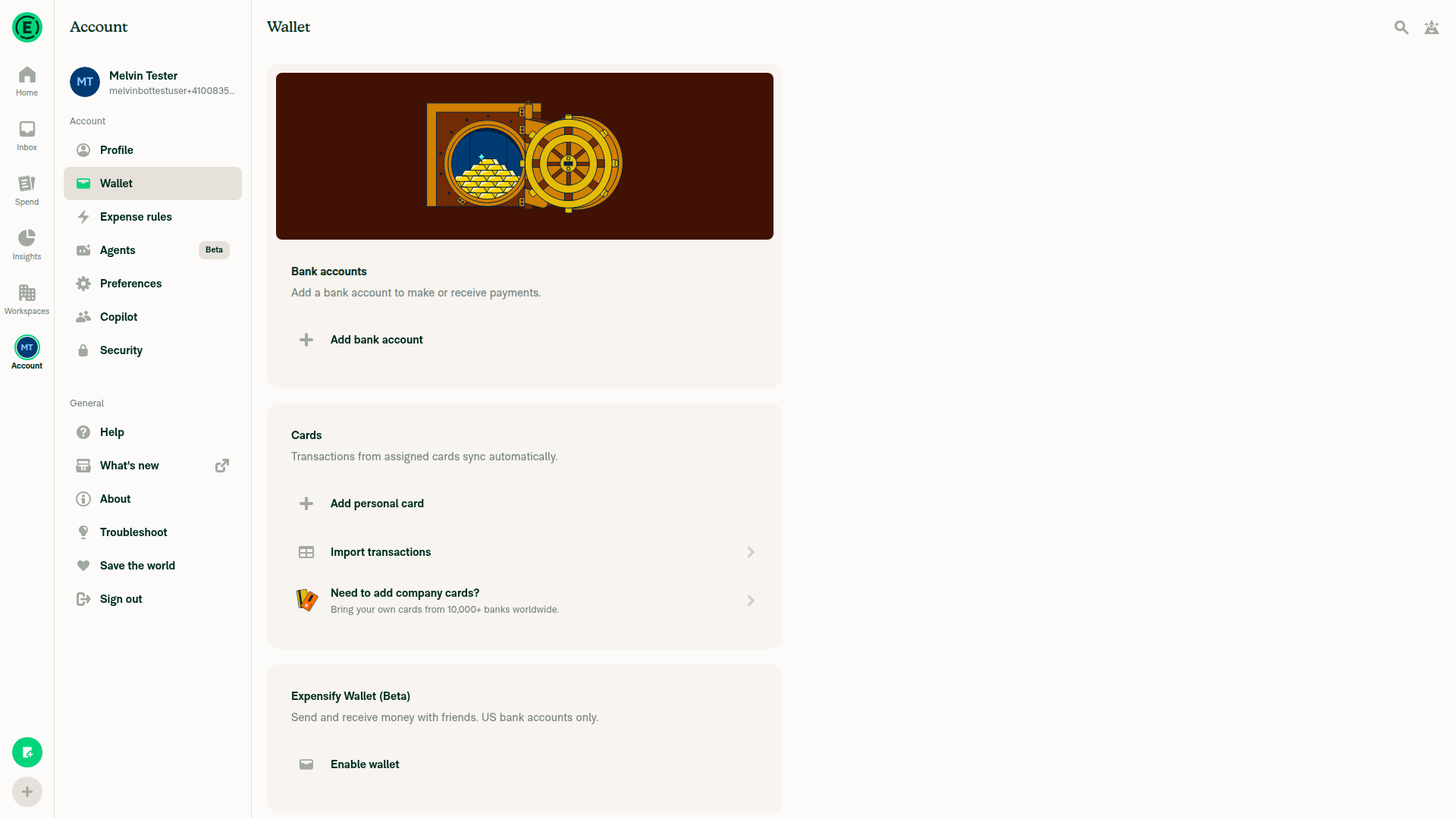
This PR only changes a help article, so it has no App UI change to capture. The tester could not open the help preview from the App session, and the test account's Wallet has no bank accounts, so the new Connect/Fix state can't appear there.
Account > Wallet page showing Bank accounts section with only Add bank account, no connected accounts

Step Status
Help preview article shows the new Active bullet mentioning "Connect to Plaid for a more accurate Expensify Card limit" / "Fix your Plaid connection for a more accurate Expensify Card limit"Not performed. The web tester's session is limited to the dev App build and can't open the external help preview. You can view the article at the help preview.
❌
Account > Wallet bank accounts section shows (or doesn't show) a bank account with the Connect/Fix Plaid message and actionIn Account > Wallet, the Bank accounts card shows only Add bank account and lists no accounts. No Active account with the Plaid message appears. This is expected because the test account has no Expensify Card settlement account.
Account > Wallet page showing Bank accounts section with only Add bank account, no connected accounts
✅

view run · view recording

@stephanieelliott
stephanieelliott merged commit 3e1a3fd into main Oct 30, 2026
24 of 26 checks passed
@stephanieelliott
stephanieelliott deleted the claude-docsPlaidConnectFixWalletStatus branch October 30, 2026 05:35
@OSBotify

Copy link
Copy Markdown
Contributor

🚀 Deployed to staging by https://github.com/stephanieelliott in version: 9.5.27-0 🚀

platform result
🕸 web 🕸 success ✅
🤖 android 🤖 success ✅
🍎 iOS 🍎 success ✅

Sign up for free to join this conversation on GitHub. Already have an account? Sign in to comment

Labels

HelpDot Apply this label if the issue relates to ExpensifyHelp

Projects

None yet

Development

Successfully merging this pull request may close these issues.

4 participants