Skip to content

Show the full report field name in a tooltip when it is cut off - #105279

Merged
puneetlath merged 8 commits into
mainfrom
claude-reportFieldLabelTooltip
Nov 3, 2026
Merged

puneetlath merged 8 commits into
mainfrom
claude-reportFieldLabelTooltip

Conversation

@MelvinBot

@MelvinBot MelvinBot commented Oct 28, 2026 •

Copy link
Copy Markdown
Contributor

Explanation of Change

A long report field name is cut off on the report, and you couldn't read the full name anywhere. On web, hovering over a report field whose name is cut off now shows the full name in a tooltip.

  • TextInputLabel (web): a new optional onTruncationChange callback reports whether the label is cut off (scrollWidth > offsetWidth, the same check TextWithTooltip uses). It checks on layout and again once the label's font-size animation settles. The label keeps its width while its font size changes, so onLayout alone would miss a label that only fits when shrunk (focused or filled).
  • BaseTextInput: a new opt-in shouldShowLabelTooltipWhenTruncated prop wraps the input container in Tooltip and sets text to the label only while it is cut off. The tooltip wraps the container, not the label, because the label has pointerEventsNone so clicks reach the input.
  • GenericTooltip: it used to return its children bare when text was empty and wrapped them in a fragment otherwise. Toggling text therefore remounted the wrapped element, which would drop the input's focus and draft value as the label shrinks to fit. It now renders the same tree either way and only skips the tooltip bubble. The new GenericTooltipTest fails without this change (the child mounts twice).
  • DatePicker forwards the new prop. ReportFieldInlineInput turns it on for date, list, and text/formula/read-only fields.

Native has no hover, so it is unchanged.

Fixed Issues

$ #105158
PROPOSAL: #105158 (comment)

Tests

  1. Create a workspace report field with a very long name.
  2. Open a report on that workspace.
  3. Hover over the cut-off field name.
  4. Verify a tooltip shows the full name.
  • Verify that no errors appear in the JS console

Offline tests

QA Steps

  1. Create a workspace report field with a very long name.
  2. Open a report on that workspace.
  3. Hover over the cut-off field name.
  4. Verify a tooltip shows the full name.
  • Verify that no errors appear in the JS console

PR Author Checklist

  • I linked the correct issue in the ### Fixed Issues section above
  • I wrote clear testing steps that cover the changes made in this PR
    • I added steps for local testing in the Tests section
    • I added steps for the expected offline behavior in the Offline steps section
    • I added steps for Staging and/or Production testing in the QA steps section
    • I added steps to cover failure scenarios (i.e. verify an input displays the correct error message if the entered data is not correct)
    • I turned off my network connection and tested it while offline to ensure it matches the expected behavior (i.e. verify the default avatar icon is displayed if app is offline)
    • I tested this PR with a High Traffic account against the staging or production API to ensure there are no regressions (e.g. long loading states that impact usability).
  • I included screenshots or videos for tests on all platforms
  • I ran the tests on all platforms & verified they passed on:
    • Android: Native
    • Android: mWeb Chrome
    • iOS: Native
    • iOS: mWeb Safari
    • MacOS: Chrome / Safari
  • I verified there are no console errors (if there's a console error not related to the PR, report it or open an issue for it to be fixed)
  • I verified any copy / text that was added to the app is either coming verbatim from figma or has been approved by marketing (in order to get marketing approval, ask the Bug Zero team member to add the Waiting for copy label to the issue)
  • If a new code pattern is added I verified it was agreed to be used by multiple Expensify engineers
  • I tested other components that can be impacted by my changes (i.e. if the PR modifies a shared library or component like Avatar, I verified the components using Avatar are working as expected)
  • If new assets were added or existing ones were modified, I verified that:
    • The assets are optimized and compressed (for SVG files, run npm run compress-svg)
    • The assets load correctly across all supported platforms.
  • If the PR modifies code that runs when editing or sending messages, I tested and verified there is no unexpected behavior for all supported markdown - URLs, single line code, code blocks, quotes, headings, bold, strikethrough, and italic.
  • If the PR modifies a generic component, I tested and verified that those changes do not break usages of that component in the rest of the App (i.e. if a shared library or component like Avatar is modified, I verified that Avatar is working as expected in all cases)
  • If the PR modifies a component related to any of the existing Storybook stories, I tested and verified all stories for that component are still working as expected.
  • If the PR modifies a component or page that can be accessed by a direct deeplink, I verified that the code functions as expected when the deeplink is used - from a logged in and logged out account.
  • If the PR modifies the UI (e.g. new buttons, new UI components, changing the padding/spacing/sizing, moving components, etc) or modifies the form input styles:
    • I verified that all the inputs inside a form are aligned with each other.
    • I added Design label and/or tagged @Expensify/design so the design team can review the changes.
  • If the PR adds or modifies the UI:
    • I asked an AI agent to review the changes for accessibility issues and addressed its findings.
    • I tested with a screen reader (VoiceOver on macOS) and verified all new/changed elements are reachable with a logical focus order.
    • I verified all new/changed elements have meaningful accessible names and roles.
    • I verified state changes are announced (e.g. checked/unchecked, expanded/collapsed, selected).
  • I added unit tests for any new feature or bug fix in this PR to help automatically prevent regressions in this user flow.
  • If the main branch was merged into this PR after a review, I tested again and verified the outcome was still expected according to the Test steps.

AI Tests

  • npm run typecheck: passed.
  • ESLint on changed files: no new errors. The same errors are reported on main.
  • npm run react-compiler-compliance-check check on changed files: TextInputLabel and GenericTooltip compile. DatePicker and BaseTextInput already fail on main for existing ref reads during render.
  • cspell on changed files: 0 issues.
  • Jest: GenericTooltipTest (new), TextInputLabel, BaseTextInputTest, BaseTextInputImplementationTest, TextInputWebRefAndFocusTest, DatePickerTest, and AvatarTooltipsTest pass (7 suites, 40 tests).
  • Browser check: not run. The automated web session went blank after a hot reload during editing and can't be reloaded, so the tooltip still needs a manual check on web.

Screenshots/Videos

Android: Native
Android: mWeb Chrome
iOS: Native
iOS: mWeb Safari
MacOS: Chrome / Safari

Adds an opt-in shouldShowLabelTooltipWhenTruncated prop to the text input. On web, the label reports whether it is cut off (on layout and after its font-size animation settles), and the input container shows the full label in a tooltip on hover. Report fields turn this on for date, list, and text fields.

GenericTooltip now keeps its children in the same place in the tree whether or not it has text, so toggling text no longer remounts the wrapped input and drops its focus.

Co-authored-by: huult <huult@users.noreply.github.com>
@MelvinBot
MelvinBot requested a review from a team October 28, 2026 17:43
@melvin-bot melvin-bot Bot added Melvin-Test-Android Melvin-Test-Web Triggers Melvin to run the testing steps of the PR on web labels Oct 28, 2026
@melvin-bot

melvin-bot Bot commented Oct 28, 2026

Copy link
Copy Markdown

Hey! I see that you made changes to our Form component. Make sure to update the docs in FORMS.md accordingly. Cheers!

@MelvinBot

Copy link
Copy Markdown
Contributor Author

I created this PR from an upstream branch since I don't have push access to your fork.

To take ownership of this branch and be able to push updates, run:

git remote add upstream https://github.com/Expensify/App.git
git fetch upstream claude-reportFieldLabelTooltip
git checkout -b claude-reportFieldLabelTooltip upstream/claude-reportFieldLabelTooltip
git push -u origin claude-reportFieldLabelTooltip

Then you can close this PR and open a new one from your fork.

@codecov

codecov Bot commented Oct 28, 2026 •

Copy link
Copy Markdown

Codecov Report

✅ Changes either increased or maintained existing code coverage, great job!

Files with missing lines Coverage Δ
src/components/DatePicker/index.tsx 63.88% <ø> (ø)
.../MoneyRequestReportView/ReportFieldInlineInput.tsx 94.11% <ø> (ø)
src/components/TextInput/TextInputLabel/index.tsx 96.66% <100.00%> (+96.66%) ⬆️
src/components/Tooltip/GenericTooltip.tsx 93.69% <100.00%> (+0.83%) ⬆️
...tInput/TextInputLabel/LabelScaleSettleListener.tsx 77.77% <77.77%> (ø)
...s/TextInput/BaseTextInput/implementation/index.tsx 0.00% <0.00%> (ø)
... and 8 files with indirect coverage changes

@MelvinBot

MelvinBot commented Oct 28, 2026 •

Copy link
Copy Markdown
Contributor Author

🤖 Web test steps verification results: ⚠️ partial

The PR's Tests section is still empty, so I ran the linked issue's expected-result steps: long report field names are cut off, short ones are not, and editing a long-named field still saves normally. I couldn't confirm the hover tooltip, because this test browser shows no hover tooltips anywhere, including the existing avatar tooltip, so the tooltip still needs a manual check on web.
Long field edited and saved with value Yes, confirmed

Step Status
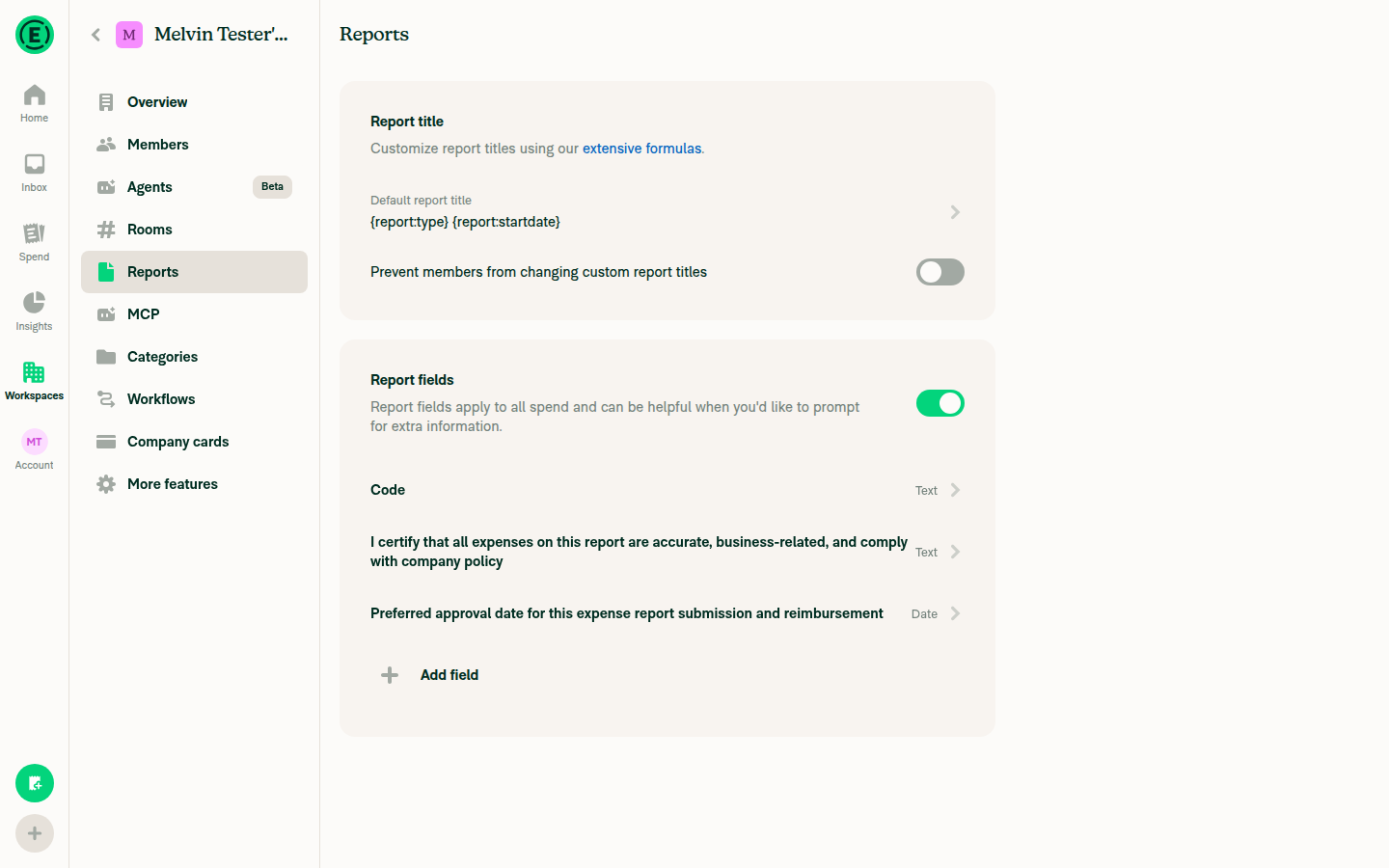
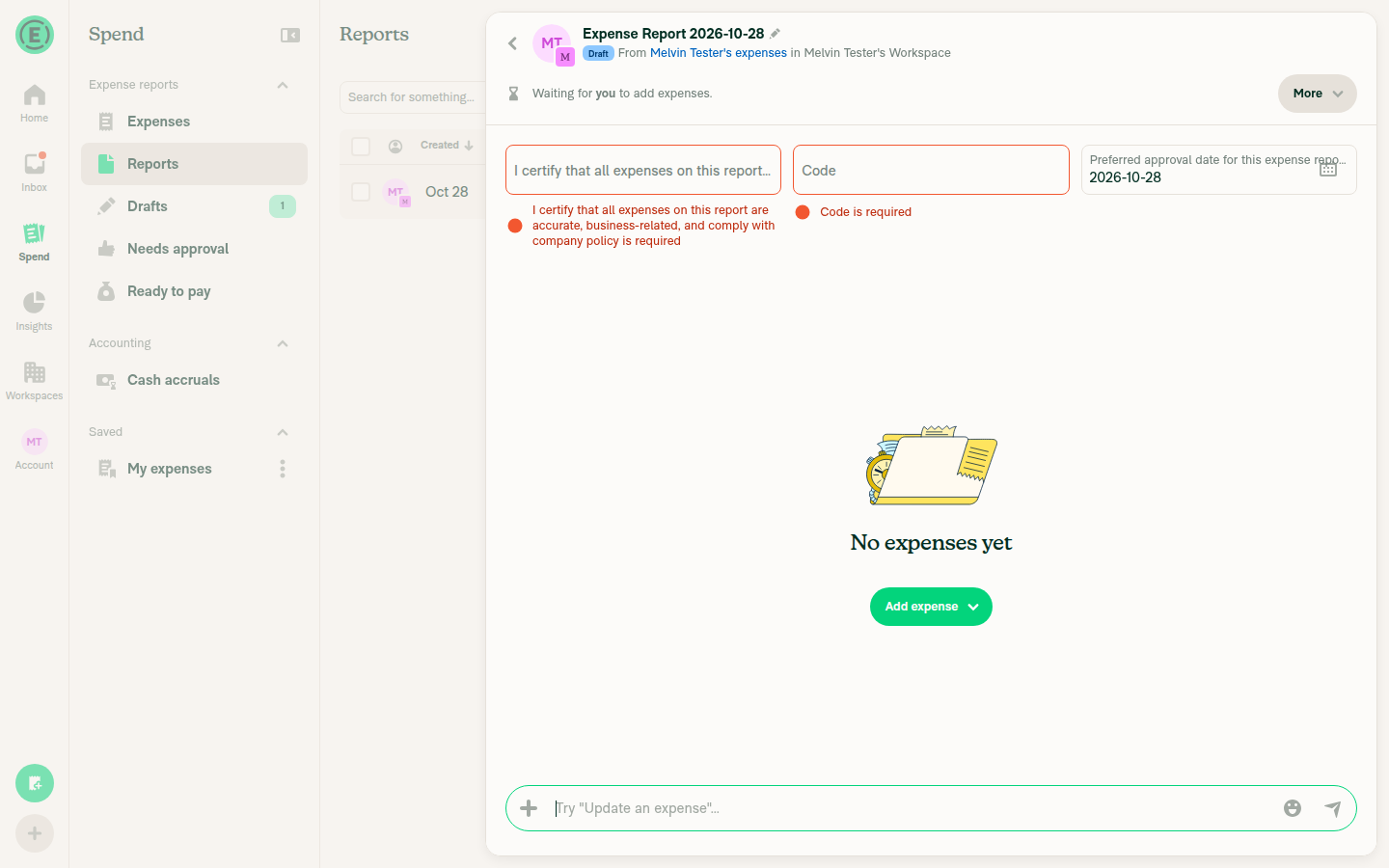
A workspace report field with a very long name existsCreated a Control workspace, turned on Report fields, and added a long Text field ("I certify that all expenses on this report are accurate, business-related, and comply with company policy"), a long Date field ("Preferred approval date for this expense report submission and reimbursement"), and a short "Code" field.
Workspace Reports settings showing the three report fields
✅
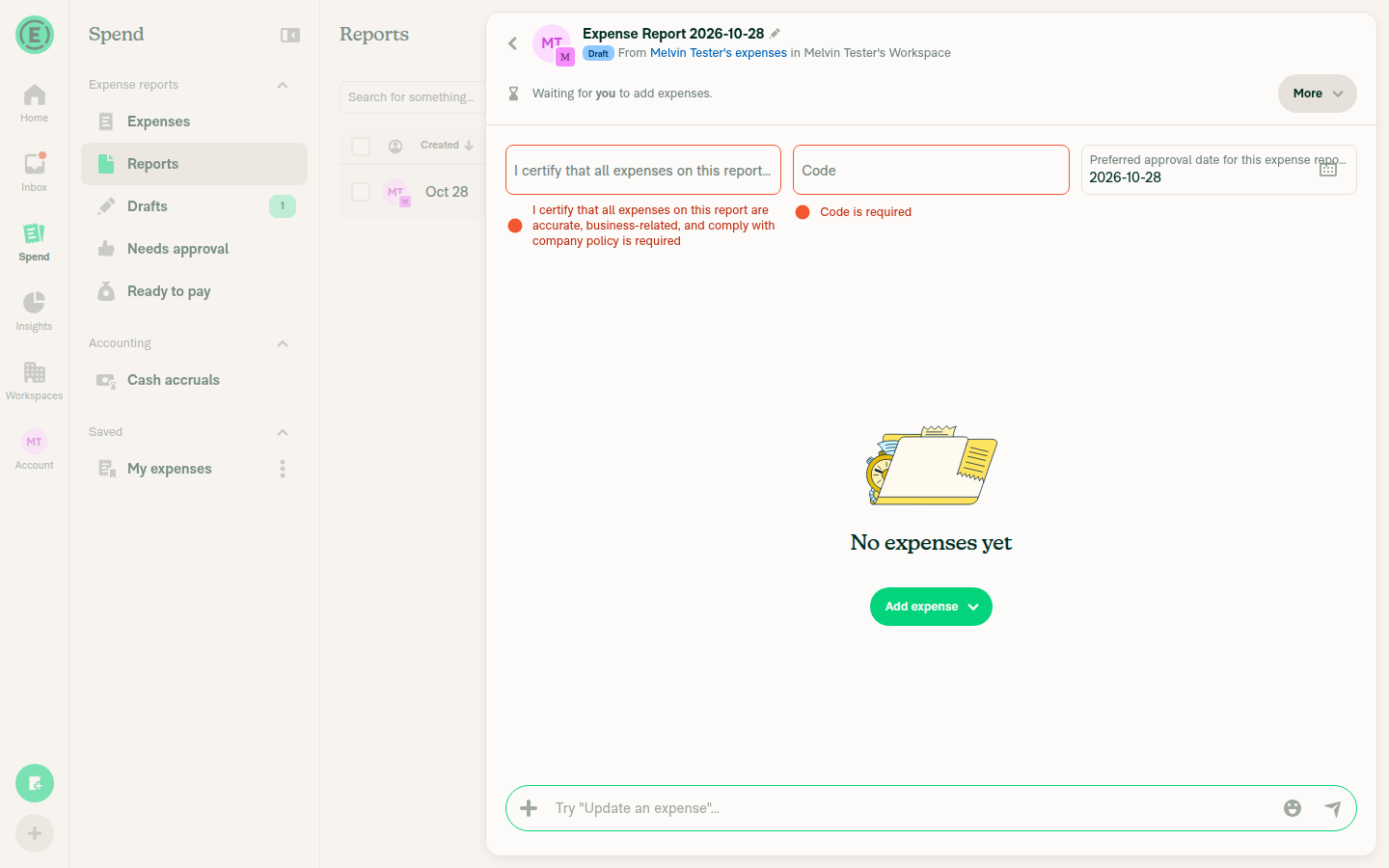
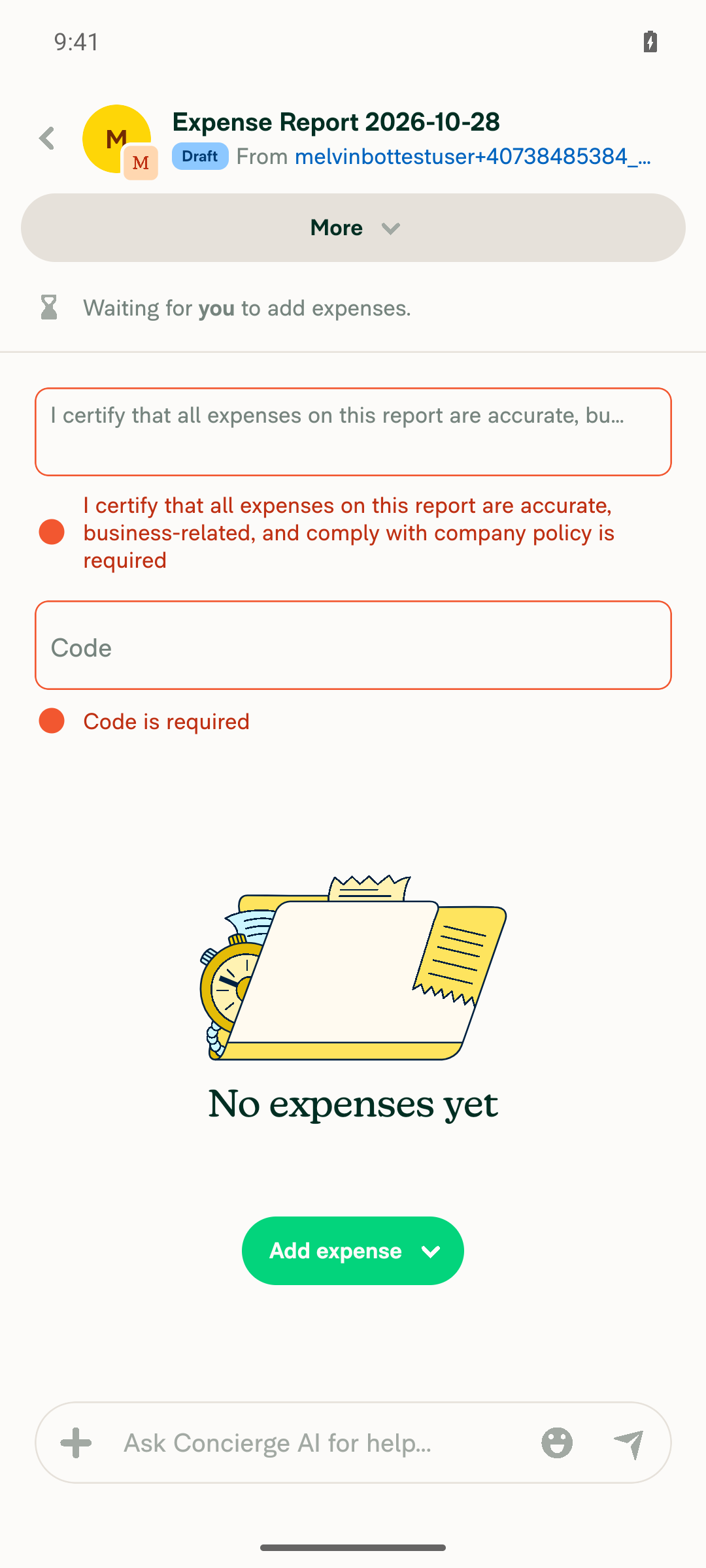
Opening a report on that workspace shows the long field name cut offThe long Text field shows "I certify that all expenses on this report are a..." and the long Date field shows "Preferred approval date for this expense repo...". The accessibility tree marks the long field as truncated and the short "Code" field as not truncated.
Report view with long field names truncated and short Code field shown in full
✅
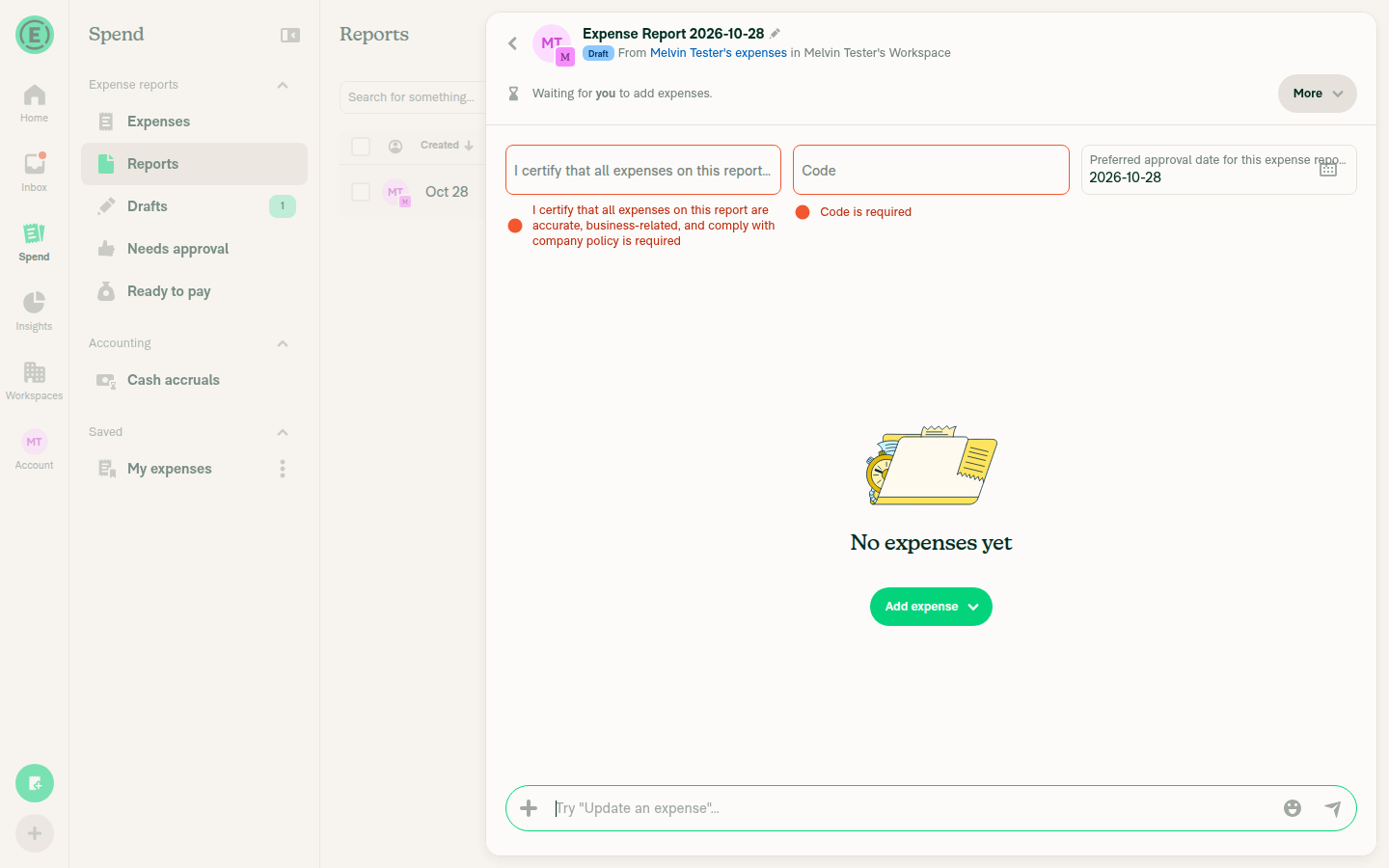
Hovering the cut-off field name shows a tooltip with the full nameNo tooltip appeared after hovering the truncated Text and Date fields, even after waiting 2 seconds. This result is inconclusive, not proof of a bug: hovering a user avatar, which has an existing tooltip, also showed nothing in this browser session.
No tooltip visible after hovering the truncated text field
No tooltip visible after hovering the truncated date field
❌
Hovering a short, non-truncated field name shows no tooltipHovering "Code" showed no tooltip. This is a weak signal, because no tooltips appeared anywhere in this session.
✅
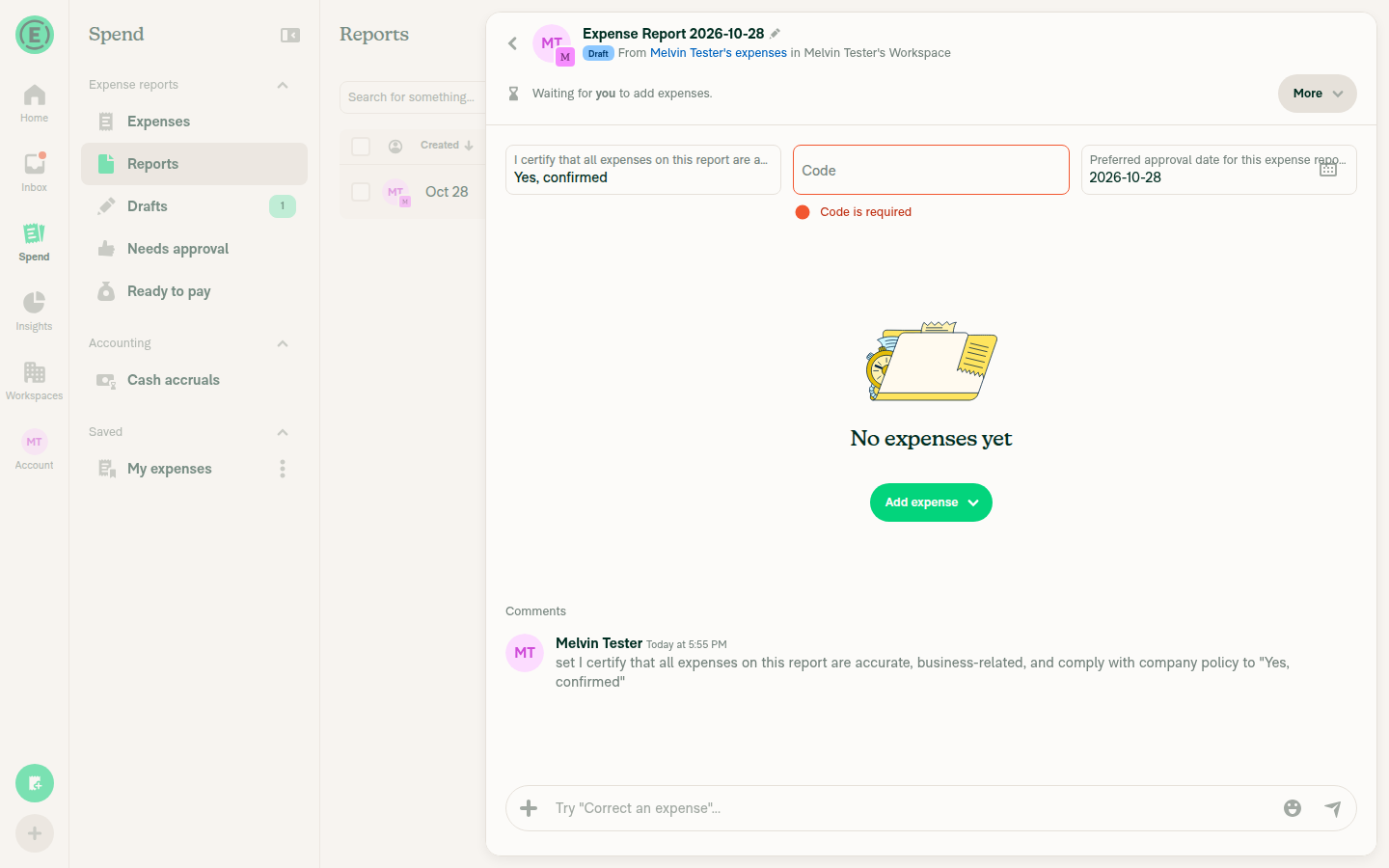
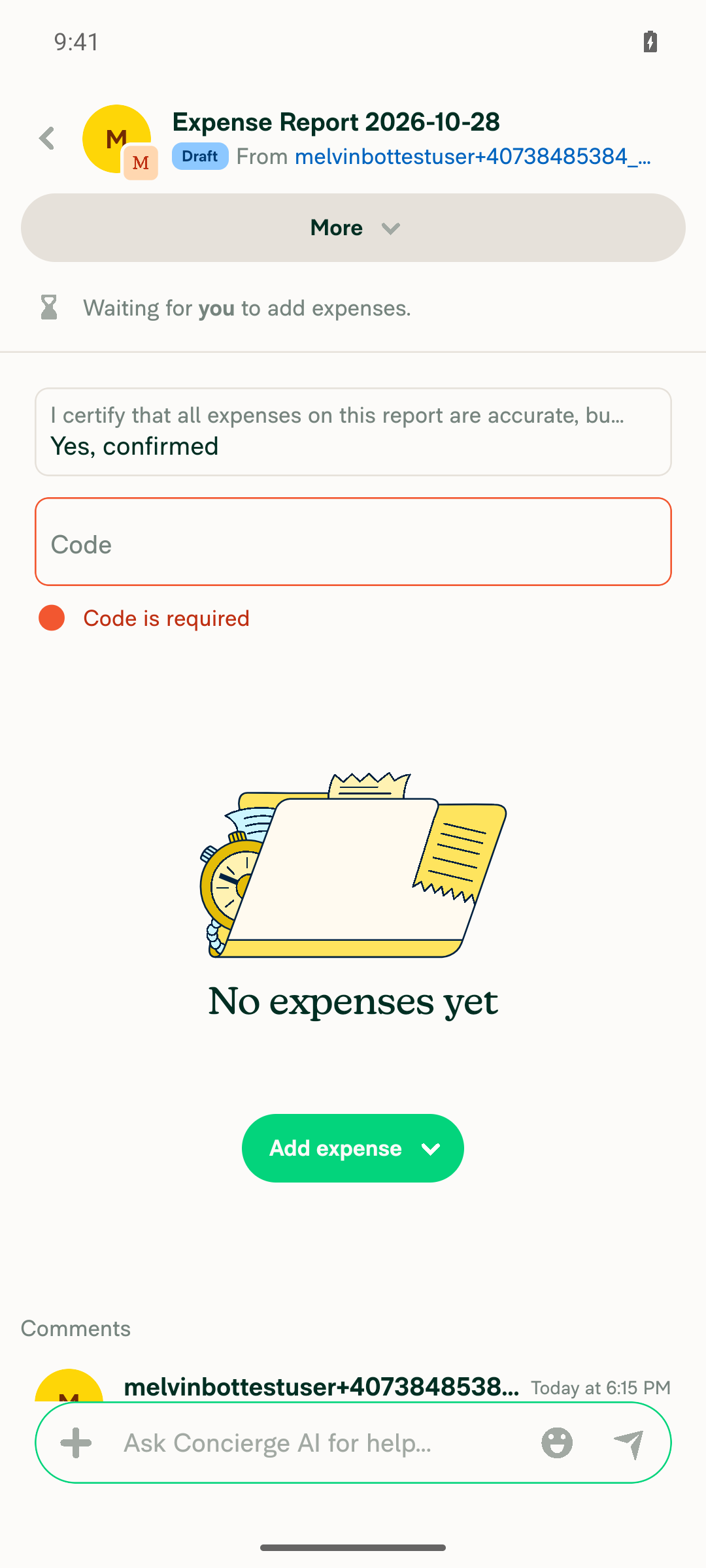
Editing the long-named field keeps focus and the typed valueI typed "Yes, confirmed" into the long Text field and clicked away. The value saved, and the report history shows the update.
Long field edited and saved with value Yes, confirmed
✅
No new errors appear in the JS consoleAll of about 30 API calls made during the test returned 200. The test tool can't capture console output directly, so this check covers network traffic only.
✅

view run · view recording

@MelvinBot

MelvinBot commented Oct 28, 2026 •

Copy link
Copy Markdown
Contributor Author

🤖 Android test steps verification results: ✅ pass

The PR's Tests section is still empty, so I ran the linked issue's steps as a regression check: the tooltip is web-only, and on Android long report field names still cut off cleanly with no tooltip or broken UI. The long-named field stays fully editable and saves normally.
Both report fields saved with no error state

Step Status
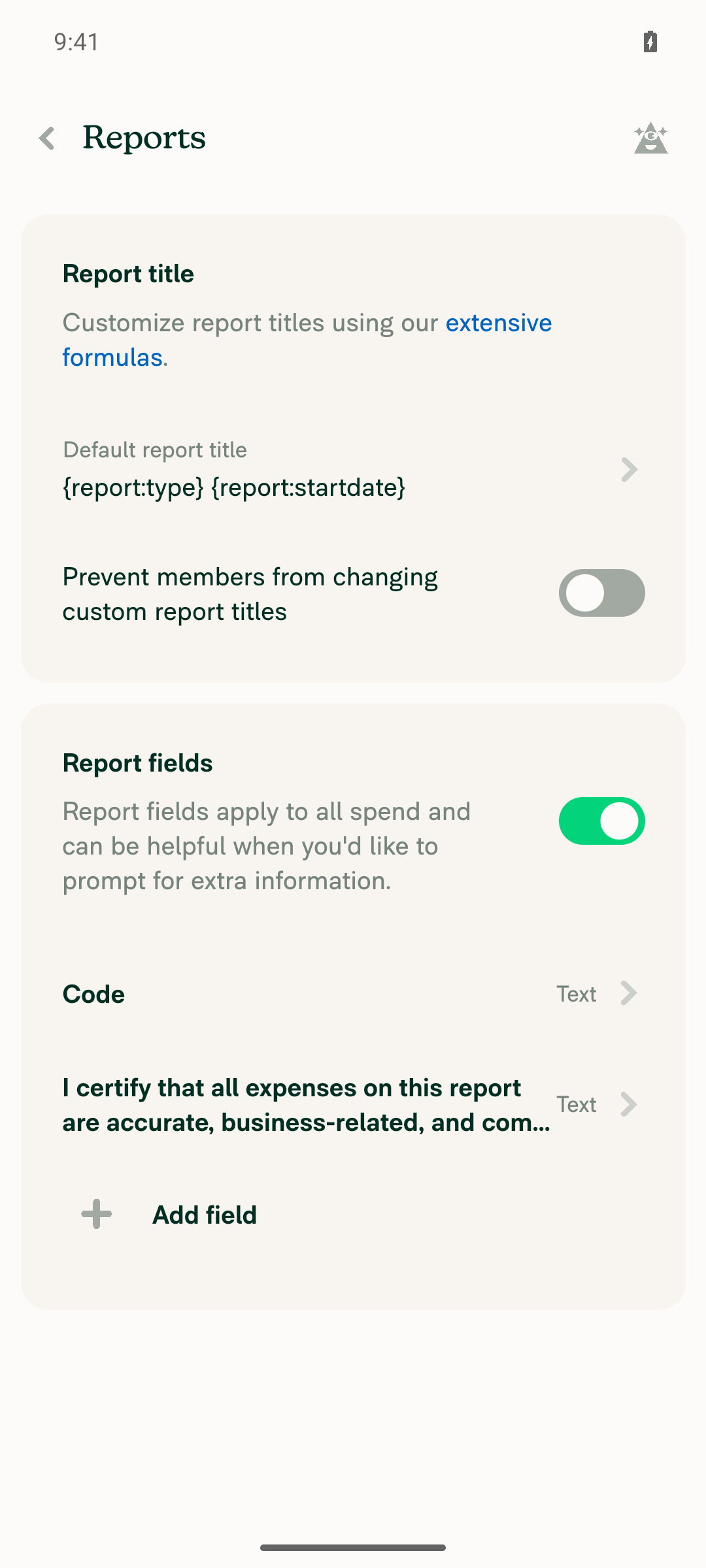
A workspace report field with a very long name existsTurned on Report fields in a Control workspace and added a Text field named "I certify that all expenses on this report are accurate, business-related, and comply with company policy", plus a short "Code" field. Both appear under Workspace settings > Reports > Report fields.
Both report fields listed in workspace Report fields settings
✅
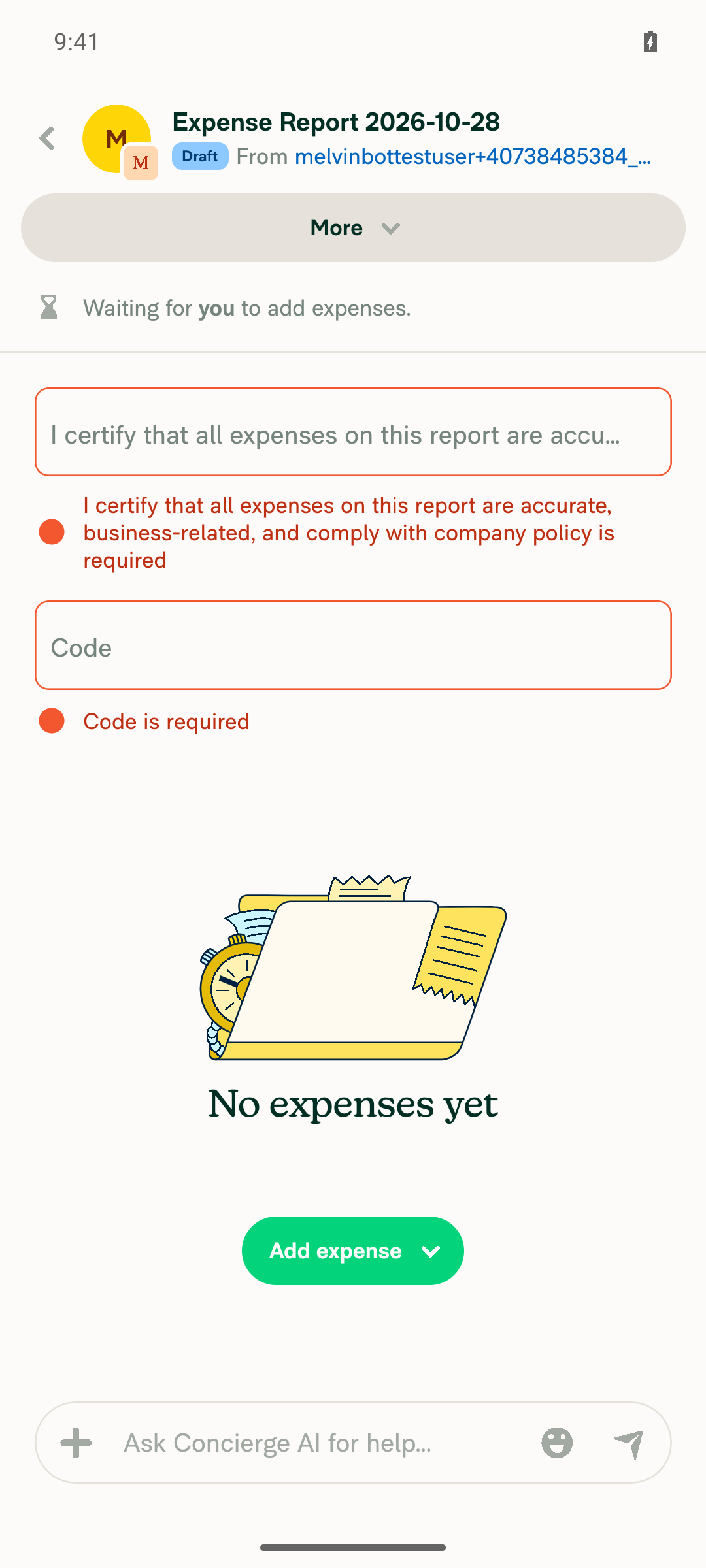
The report view cuts off the long field name and shows the short name in fullOn a new expense report, the long field label shows "I certify that all expenses on this report are accu…", while "Code" shows in full.
Report view showing truncated long field label and full Code label
✅
Long-pressing the cut-off field name shows no tooltip or broken UILong-pressing the truncated field only focused it. No tooltip, popup, or layout break appeared, as expected for a web-only feature.
Screen after long-press on the truncated field, no tooltip present
✅
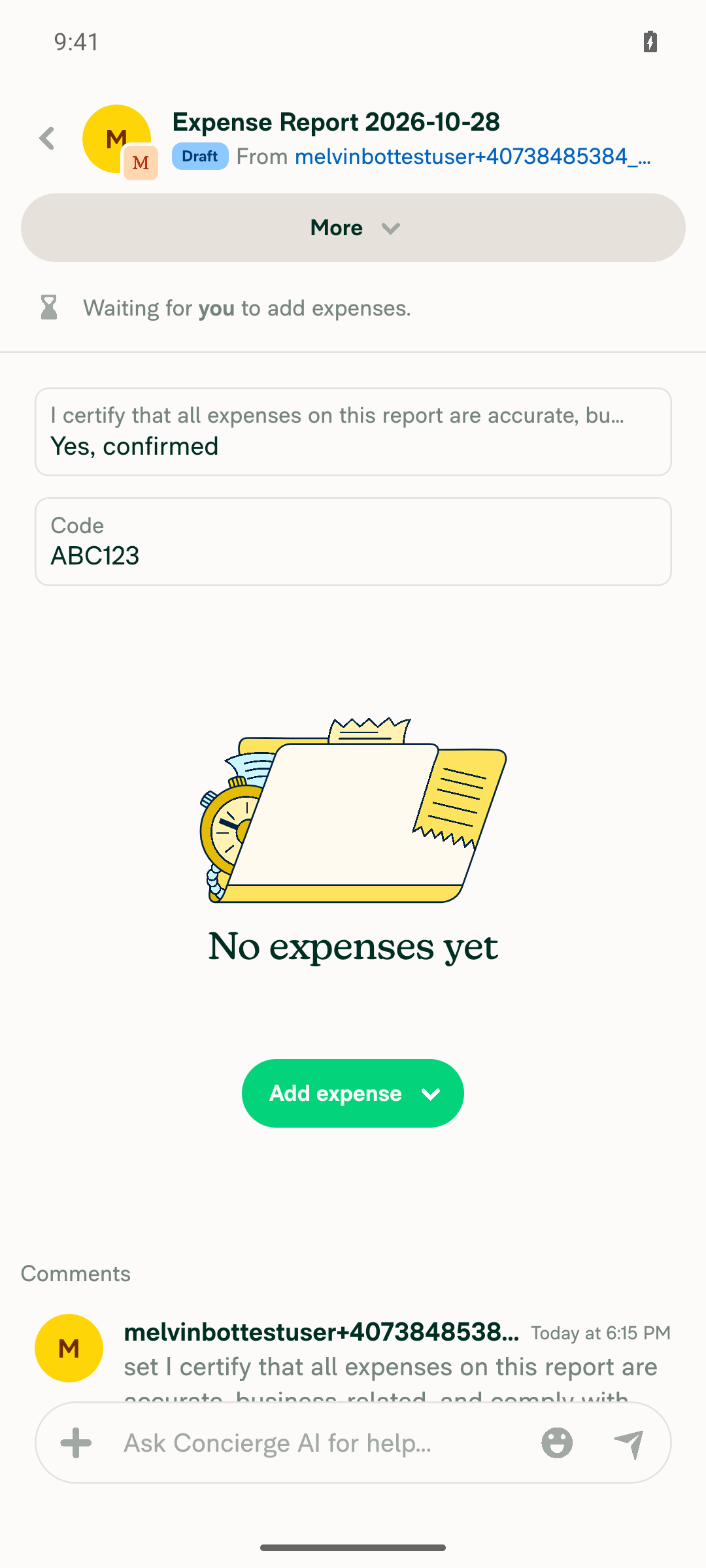
Editing the long-named field keeps focus and the typed valueI typed "Yes, confirmed" into the long field. Focus and text stayed while editing, and the value saved when focus moved away. The report history shows the full field name: "changed 'I certify that all expenses on this report are accurate, business-related, and comply with company policy' to 'Yes, confirmed'".
Long field showing saved value Yes, confirmed under truncated label
✅
No crash, red box, or error appearsThe app stayed in the foreground the whole time. Both fields saved with no error state, red box, or crash.
Both report fields saved with no error state
✅

view run · view recording

@huult

huult commented Oct 29, 2026

Copy link
Copy Markdown
Contributor

@MelvinBot Please update the test steps and QA steps to match those in ticket #105158.

@MelvinBot

Copy link
Copy Markdown
Contributor Author

I updated the Tests and QA Steps sections to match the expected result in [$175] [CFI] Report fields - Show the full field name on hover when the name is cut off. Both sections now read:

  1. Create a workspace report field with a very long name.
  2. Open a report on that workspace.
  3. Hover over the cut-off field name.
  4. Verify a tooltip shows the full name.

I kept the "no errors in the JS console" check and removed the TODO placeholders. I didn't change the rest of the PR body.


view run

@huult

huult commented Oct 29, 2026

Copy link
Copy Markdown
Contributor

@MelvinBot useAnimatedReaction is registered in every TextInputLabel, including the vast majority that don't pass onTruncationChange. Each time a label scale settles it also calls scheduleOnRN(checkTruncation), which returns immediately when the callback is missing. TextInputLabel is rendered by every text input, so this adds a worklet and a JS-thread hop per input for a feature only report fields use.

Could we skip it when there's no callback? Hooks can't be conditional, so the simplest options are either to guard inside the reaction (if (!onTruncationChange) return; before scheduleOnRN, which at least removes the bridge call), or to move the measurement into a small child component that's only rendered when onTruncationChange is set.

@huult

huult commented Oct 29, 2026

Copy link
Copy Markdown
Contributor

@MelvinBot This changes the tree shape for every Tooltip caller whose text is empty: children used to be returned bare and now sit at index 1 of a fragment. For a caller whose text is stable that's invisible, and for one whose text toggles it fixes the remount, which is what this PR needs. Two things worth confirming:

Is there any caller that relies on Tooltip with empty text rendering exactly its children, for example in a snapshot or a ref/layout assumption? A quick grep or a run of the Tooltip-related tests would settle it.
Could you add a test for the empty-text case (no bubble rendered, children not remounted when text goes from empty to set)? GenericTooltipTest only covers the no-remount path today.

Move the label scale reaction into a child component that renders only when onTruncationChange is set, and skip the onLayout handler otherwise, so other text inputs don't register a worklet or measure their label.

Co-authored-by: huult <huult@users.noreply.github.com>
@MelvinBot

Copy link
Copy Markdown
Contributor Author

Done. I went with the child component, so text inputs without onTruncationChange no longer register the reaction at all.

  • The scale reaction now lives in LabelScaleSettleListener.tsx. TextInputLabel renders it only when the callback is set (TextInputLabel/index.tsx:45-50).
  • I also gated onLayout the same way (index.tsx:54). On web, onLayout attaches a resize observer per element, so other inputs skipped that cost too.
  • A new test renders the web label and checks that neither the listener nor onLayout is present without the callback, and both are present with it.
Checks
  • Jest: TextInputLabel, BaseTextInputTest, BaseTextInputImplementationTest, TextInputWebRefAndFocusTest, DatePickerTest, RangeDatePickerTest, and GenericTooltipTest pass.
  • npm run typecheck, ESLint, the React Compiler check, and cspell pass on the changed files.

view run

…ren mounted

Co-authored-by: huult <huult@users.noreply.github.com>
@MelvinBot

Copy link
Copy Markdown
Contributor Author

1. No caller relies on an empty-text Tooltip rendering its bare children. A fragment adds no DOM or native node, so layout is the same. Refs aren't affected either.

  • Only two components render GenericTooltip: BaseTooltip/index.tsx:101 and BaseEducationalTooltip. Both pass a render function, and the caller's ref goes on the BoundsObserver inside it (BaseTooltip/index.tsx:106-111). Nothing reads GenericTooltip's own output.
  • No snapshot test renders a tooltip. The only render snapshot in the repo is an avatar Icon.
  • All 37 Jest suites that reference tooltips pass (245 tests), including AvatarTooltipsTest, EducationalTooltipRemeasureTest, ReactionTooltipContentTest, FloatingActionButtonTest, AccountSwitcherTest, TextInputLabel, and BaseTextInputTest.

2. I added the empty-text test in GenericTooltipTest.tsx:45-77. It hovers a tooltip with empty text and checks that the child renders and no bubble does. Then it sets the text and checks that the bubble appears and the child mounted only once. Both tests fail when I restore the old early return.

Typecheck and ESLint pass. I couldn't run the oxfmt format check in this environment.


view run

@huult

huult commented Oct 29, 2026

Copy link
Copy Markdown
Contributor

@MelvinBot checkTruncation currently runs from onLayout and when the scale animation settles, but not when label changes. If the text changes while the label box keeps its size, neither trigger fires, so the truncation flag goes stale:

A label that is now too long gets no tooltip.
A label that now fits keeps a tooltip for text that isn't cut off.
This can happen when the user switches language, or when a workspace admin renames a report field while the report is open. The box width is set by the input, so a different string does not change it, and onLayout stays silent.

Could we also measure after label changes? For example:

useEffect(() => {
checkTruncation();
}, [label, checkTruncation]);
It would also be good to cover this in the test: render with a short label, rerender with a long one in the same box, and assert that onTruncationChange is called with true.

The input sets the label's width, so new text keeps the same box and onLayout doesn't fire. Check again on label change, so a language switch or a renamed report field updates the tooltip.

Co-authored-by: huult <huult@users.noreply.github.com>
@MelvinBot

Copy link
Copy Markdown
Contributor Author

Done. TextInputLabel now checks truncation again whenever label changes, using the useEffect you suggested: TextInputLabel/index.tsx:38-42.

I added a test for it: tests/ui/components/TextInputLabel.tsx:90. It keeps the box at a fixed width and rerenders the label:

  1. Short label to long label: onTruncationChange is called with true.
  2. Long label back to short label: it's called with false, which covers the case where a tooltip stays on text that fits.

The test fails without the new effect.

Checks
  • Jest: TextInputLabel, GenericTooltipTest, BaseTextInputImplementationTest, TextInputWebRefAndFocusTest, and DatePickerTest pass (5 suites, 21 tests).
  • npm run typecheck: passed.
  • npm run lint on the changed files: no errors.
  • React Compiler compliance check on TextInputLabel: passed.
  • oxfmt: not run locally. CI will check formatting.
  • Browser check: not run.

view run

@huult

huult commented Oct 29, 2026

Copy link
Copy Markdown
Contributor

@MelvinBot ready for review

@MelvinBot
MelvinBot marked this pull request as ready for review October 29, 2026 03:24
@MelvinBot
MelvinBot requested a review from a team as a code owner October 29, 2026 03:24
@MelvinBot

Copy link
Copy Markdown
Contributor Author

I marked this PR as ready for review.


view run

@melvin-bot
melvin-bot Bot requested review from huult and removed request for a team October 29, 2026 03:24
@melvin-bot

melvin-bot Bot commented Oct 29, 2026

Copy link
Copy Markdown

@huult Please copy/paste the Reviewer Checklist from here into a new comment on this PR and complete it. If you have the K2 extension, you can simply click: [this button]

@chatgpt-codex-connector

chatgpt-codex-connector Bot commented Oct 29, 2026 •

Copy link
Copy Markdown

Codex Review Summary

This comment shows the latest Codex review activity on this pull request.

Review Status Commit Review trigger
📝 Code Review ✅ Completed 2026-10-29T03:47:31.193836Z ecefa87 Manual request
ℹ️ About Codex in GitHub

Your team has set up Codex to review pull requests in this repo. Reviews are triggered when you

  • Open a pull request for review
  • Mark a draft as ready
  • Comment "@codex review" or "@codex security review".

Codex reacts with 👀 while any review is running, comments if it has suggestions, and reacts with 👍 once all reviews finish with no findings.

@huult

huult commented Oct 29, 2026 •

Copy link
Copy Markdown
Contributor

@huult is this ready for review?

Yes, this PR is ready for review.

@huult

huult commented Oct 30, 2026

Copy link
Copy Markdown
Contributor

@MelvinBot could you sync with main?

…elTooltip

Co-authored-by: huult <huult@users.noreply.github.com>
@MelvinBot

Copy link
Copy Markdown
Contributor Author

I merged the latest main into this branch. There were no conflicts. The branch now includes merge commit 28d985a.


view run

@trjExpensify

Copy link
Copy Markdown
Contributor

@huult I think you need to approve and then @puneetlath will be prompted for review :)

@huult

huult commented Nov 2, 2026

Copy link
Copy Markdown
Contributor

@trjExpensify I’ve already approved this PR. Cc @puneetlath

puneetlath
puneetlath previously approved these changes Nov 2, 2026

@puneetlath puneetlath left a comment

Copy link
Copy Markdown
Contributor

Choose a reason for hiding this comment

The reason will be displayed to describe this comment to others. Learn more.

Looks good to me, but has conflicts now.

@huult

huult commented Nov 2, 2026

Copy link
Copy Markdown
Contributor

@MelvinBot could you sync with main?

…elTooltip

Co-authored-by: huult <huult@users.noreply.github.com>

# Conflicts:
#	tests/unit/GenericTooltipTest.tsx
@MelvinBot
MelvinBot dismissed stale reviews from puneetlath and trjExpensify via ed9a03f November 2, 2026 22:49
@MelvinBot

Copy link
Copy Markdown
Contributor Author

Synced with main in ed9a03f.

There was one conflict in tests/unit/GenericTooltipTest.tsx, because main added the same test file. I kept all three tests in one file:

  • From this PR: the two tests showing the tooltip's children don't remount.
  • From main: the TooltipSense test.

The mocks are combined so they work for all three. The bubble mock now renders a tooltip-bubble view and also captures animation. GenericTooltip.tsx merged with no conflicts.

I couldn't run Jest, ESLint, or Prettier locally in this run, so CI will be the first check on the merged test file.

@huult

huult commented Nov 2, 2026

Copy link
Copy Markdown
Contributor

@MelvinBot Could you take a look at the failing CI checks?

@MelvinBot

Copy link
Copy Markdown
Contributor Author

The failing Oxlint check is unrelated to this PR, so I didn't push a fix.

Analysis: Both errors are @typescript-eslint/no-unnecessary-type-assertion in test files this PR doesn't touch:

Evidence: Other unrelated branches fail Oxlint check with the same two errors, for example rory/migrate-pr-testing-worker and carlos-billpay-existing-bills. So the errors are already on main, and this PR picked them up in the last sync. The check should pass after a fix lands on main and you sync again.

Check independent approval also fails, but that only needs a reviewer's approval. validate-perf-tests was still running when I checked.

@huult

huult commented Nov 2, 2026

Copy link
Copy Markdown
Contributor

@puneetlath all yours

@huult

huult commented Nov 3, 2026

Copy link
Copy Markdown
Contributor

@MelvinBot could you sync with main?

…elTooltip

Co-authored-by: huult <huult@users.noreply.github.com>
@MelvinBot

Copy link
Copy Markdown
Contributor Author

Synced with main in 05d334a. The merge had no conflicts, and none of the new main commits touch this PR's files.

This sync also brings in the main fix for the two unnecessary type assertions that were failing Oxlint check (8246307). That check should pass on this run.

@huult

huult commented Nov 3, 2026

Copy link
Copy Markdown
Contributor

@puneetlath Everything looks good now.

@puneetlath
puneetlath merged commit 2f7cbba into main Nov 3, 2026
44 of 45 checks passed
@puneetlath
puneetlath deleted the claude-reportFieldLabelTooltip branch November 3, 2026 16:54
@OSBotify

OSBotify commented Nov 3, 2026

Copy link
Copy Markdown
Contributor

✋ This PR was not deployed to staging yet because QA is ongoing. It will be automatically deployed to staging after the next production release.

@github-actions

github-actions Bot commented Nov 3, 2026

Copy link
Copy Markdown
Contributor

🚧 puneetlath has triggered a test Expensify/App build. You can view the workflow run here.

@github-actions

github-actions Bot commented Nov 3, 2026

Copy link
Copy Markdown
Contributor

@OSBotify OSBotify mentioned this pull request Nov 3, 2026
99 tasks done
@OSBotify

OSBotify commented Nov 3, 2026

Copy link
Copy Markdown
Contributor

🚀 Deployed to staging by https://github.com/puneetlath in version: 9.5.31-0 🚀

platform result
🕸 web 🕸 success ✅
🤖 android 🤖 failure ❌
🍎 iOS 🍎 success ✅

@MelvinBot

Copy link
Copy Markdown
Contributor Author

No help site update needed — this usability fix shows full truncated report field names on hover without changing the documented workflow.

@OSBotify

OSBotify commented Nov 3, 2026

Copy link
Copy Markdown
Contributor

🚀 Deployed to staging by https://github.com/puneetlath in version: 9.5.31-0 🚀

platform result
🕸 web 🕸 success ✅
🤖 android 🤖 success ✅
🍎 iOS 🍎 success ✅

@OSBotify

OSBotify commented Nov 4, 2026

Copy link
Copy Markdown
Contributor

🚀 Deployed to production by https://github.com/blimpich in version: 9.5.31-4 🚀

platform result
🕸 web 🕸 success ✅
🤖 android 🤖 success ✅
🍎 iOS 🍎 success ✅

Bundle Size Analysis (Sentry):

Sign up for free to join this conversation on GitHub. Already have an account? Sign in to comment

Labels

Melvin-Test-Android Melvin-Test-Web Triggers Melvin to run the testing steps of the PR on web

Projects

None yet

Development

Successfully merging this pull request may close these issues.

6 participants