Skip to content

Remove the describeRule beta - #104861

Merged
yuwenmemon merged 4 commits into
mainfrom
claude-removeDescribeRuleBeta
Oct 26, 2026
Merged

yuwenmemon merged 4 commits into
mainfrom
claude-removeDescribeRuleBeta

Conversation

@MelvinBot

@MelvinBot MelvinBot commented Oct 23, 2026 •

Copy link
Copy Markdown
Contributor

Explanation of Change

Removes the describeRule beta so every workspace admin can describe a rule in plain English and have Concierge build it. The feature and its regression fixes are already in production, and the team agreed on the issue that the beta can go.

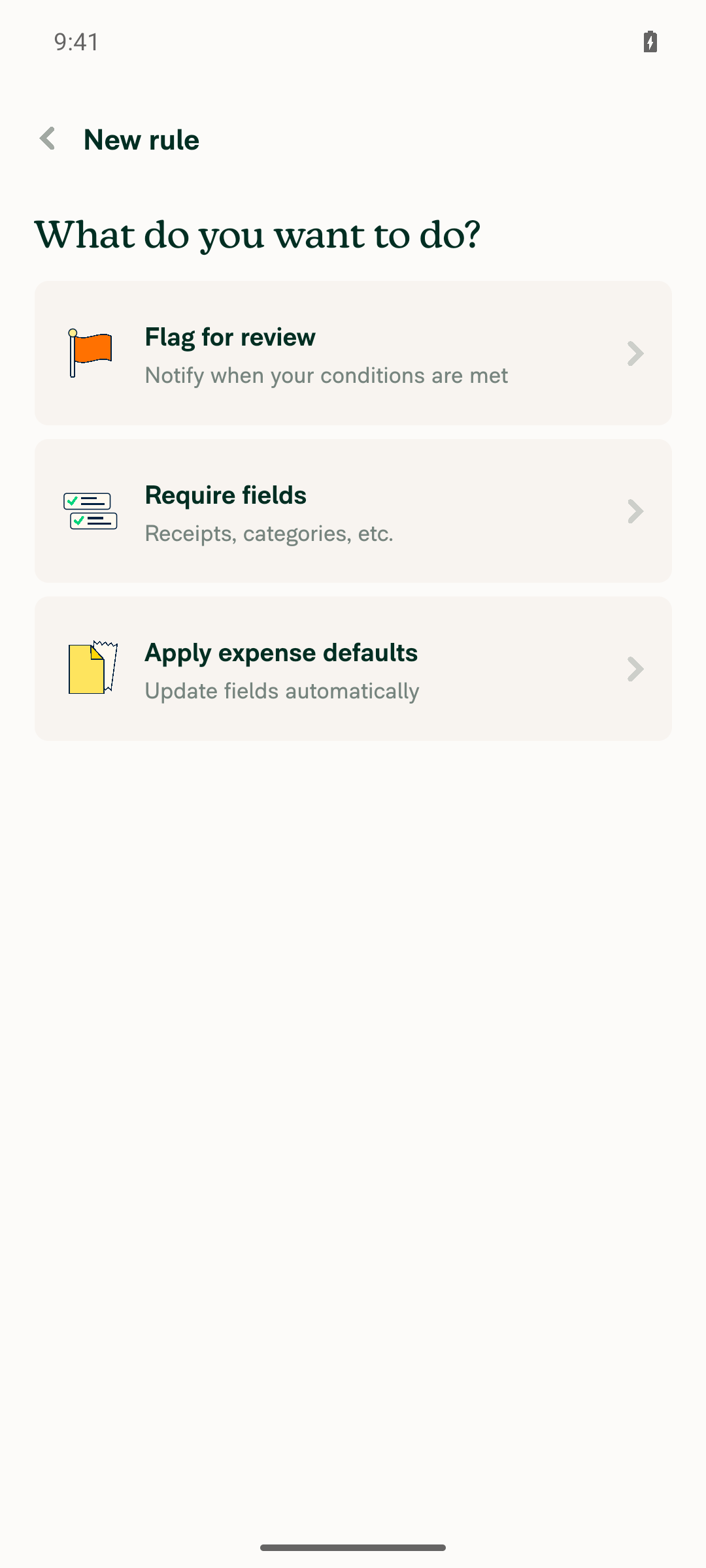
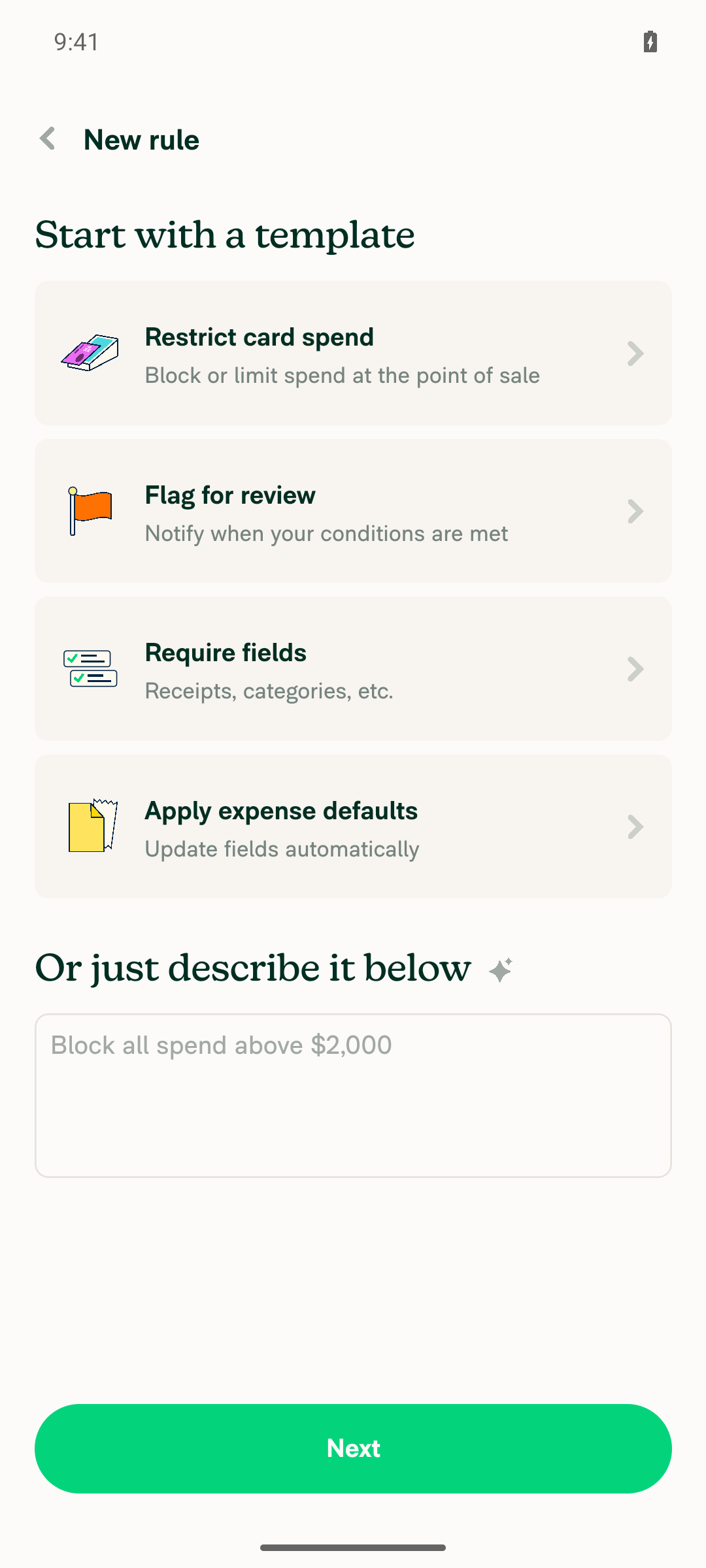
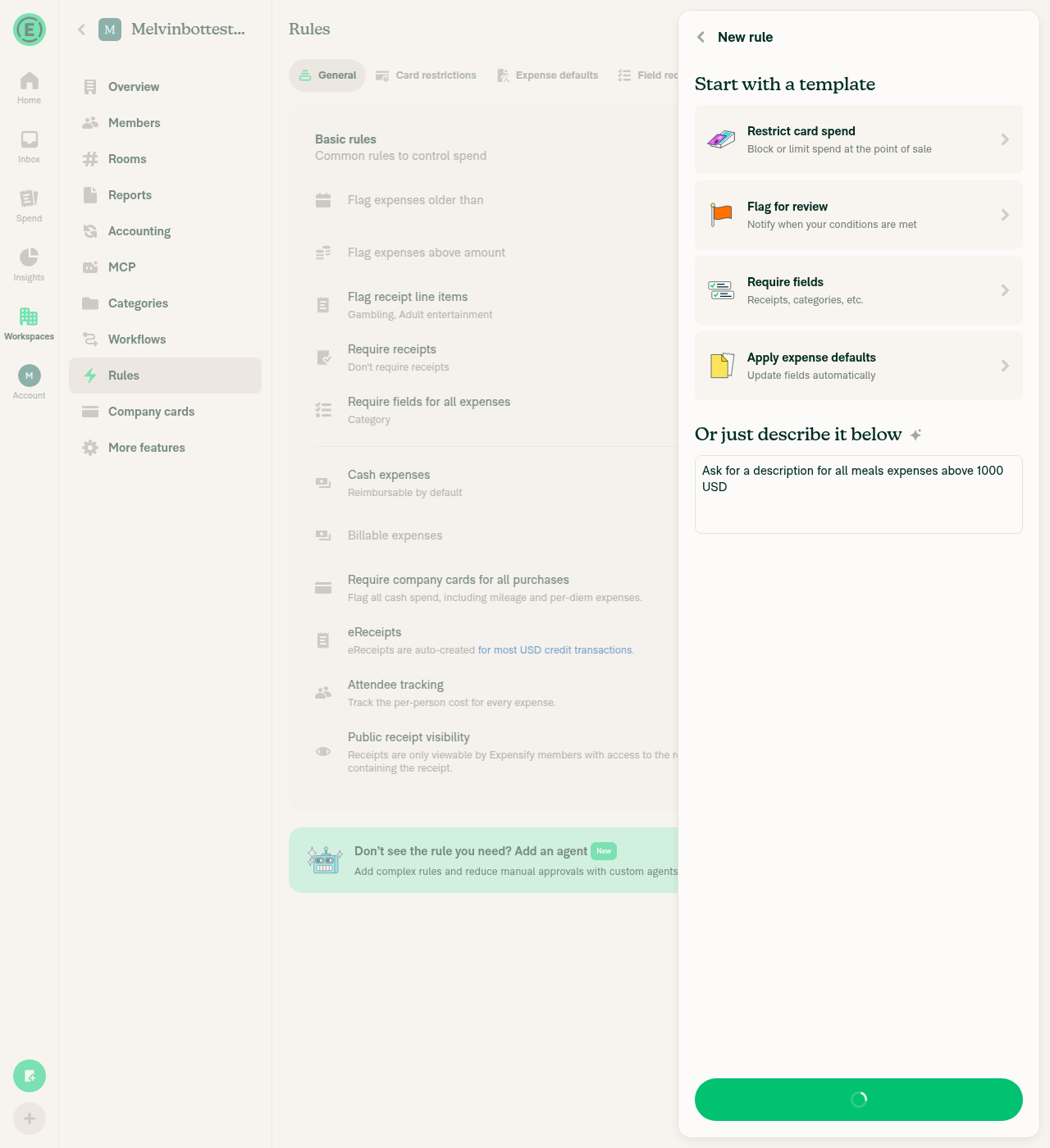
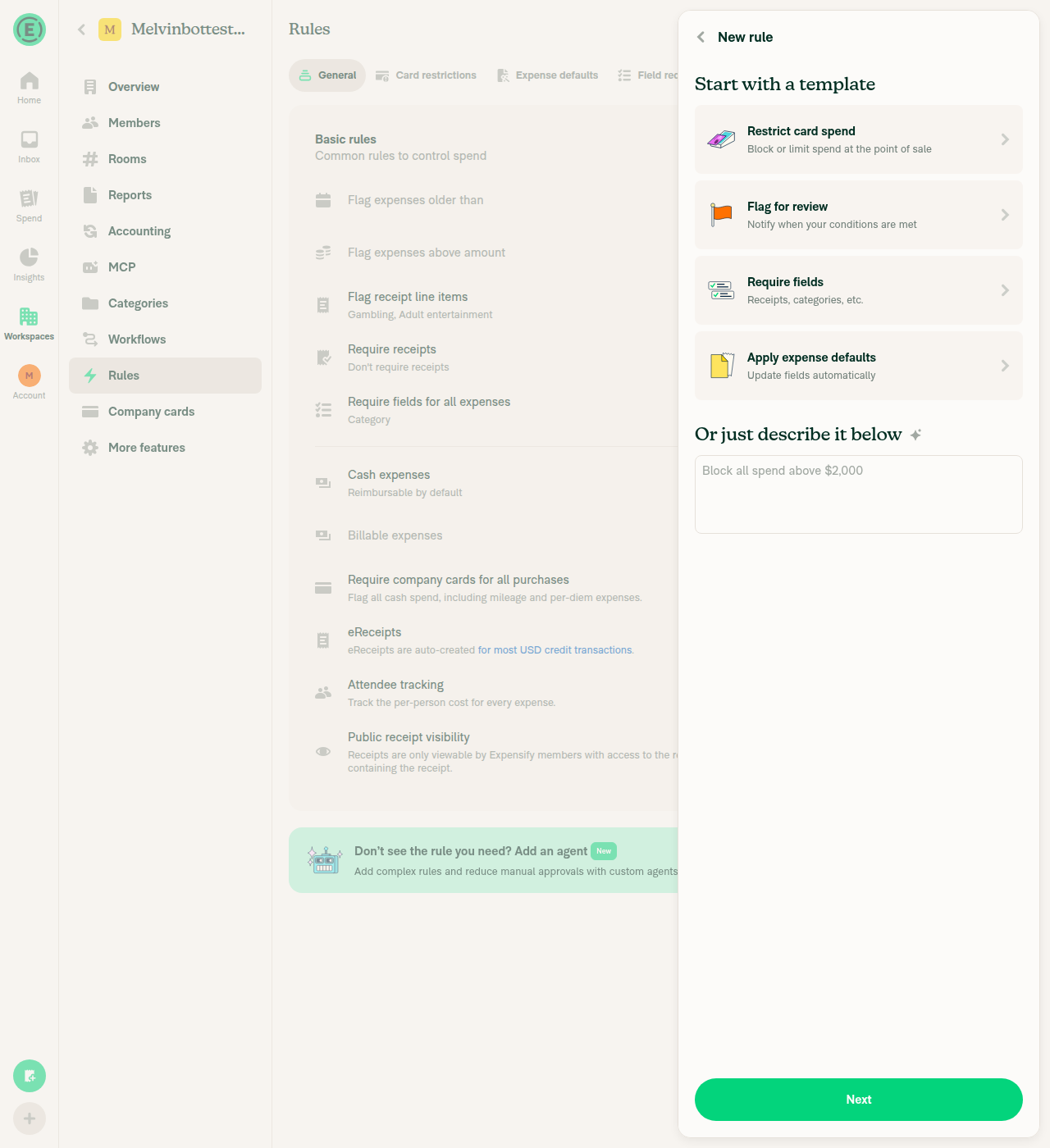
  • RulesNewPage: always shows the describe section when New rule opens from the workspace Rules page and always uses the short "Require fields" title. The "Describe agent rule" option is removed, because the describe section drafts an agent rule when Concierge can't build a standard rule, and the Agents tab still has Add agent rule. Before this PR, only accounts without the beta saw that option.
  • DescribeRuleButton: always renders the Describe button in the rule editors.
  • Removes the DESCRIBE_RULE beta constant, the "Describe agent rule" option and its translations, and the old long newRule.requireFields translation in every locale. Renames newRule.requireFieldsShort to newRule.requireFields.
  • Updates RulesNewPageDescribeRuleTest: drops the beta mock and expects the four rule types followed by the describe section.

Fixed Issues

$ #92743
PROPOSAL:

Tests

  1. As a workspace admin, go to Workspace > Rules and click Add rule.
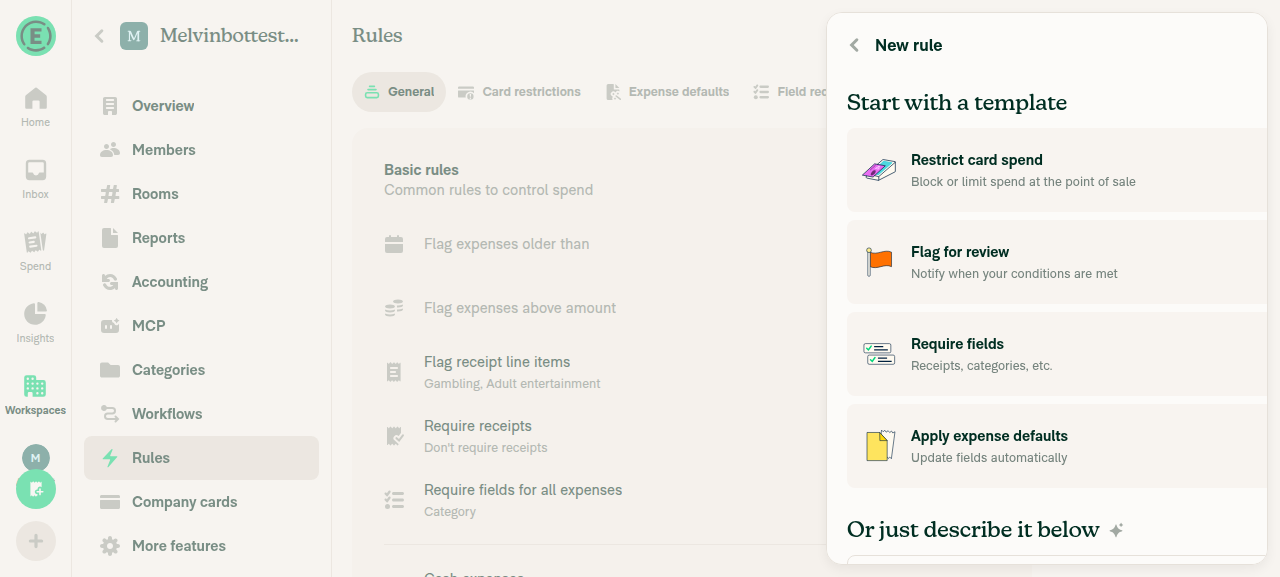
  2. Verify New rule lists Restrict card spend, Flag for review, Require fields, and Apply expense defaults, in that order. Verify the third option is titled "Require fields" and there is no "Describe agent rule" option.
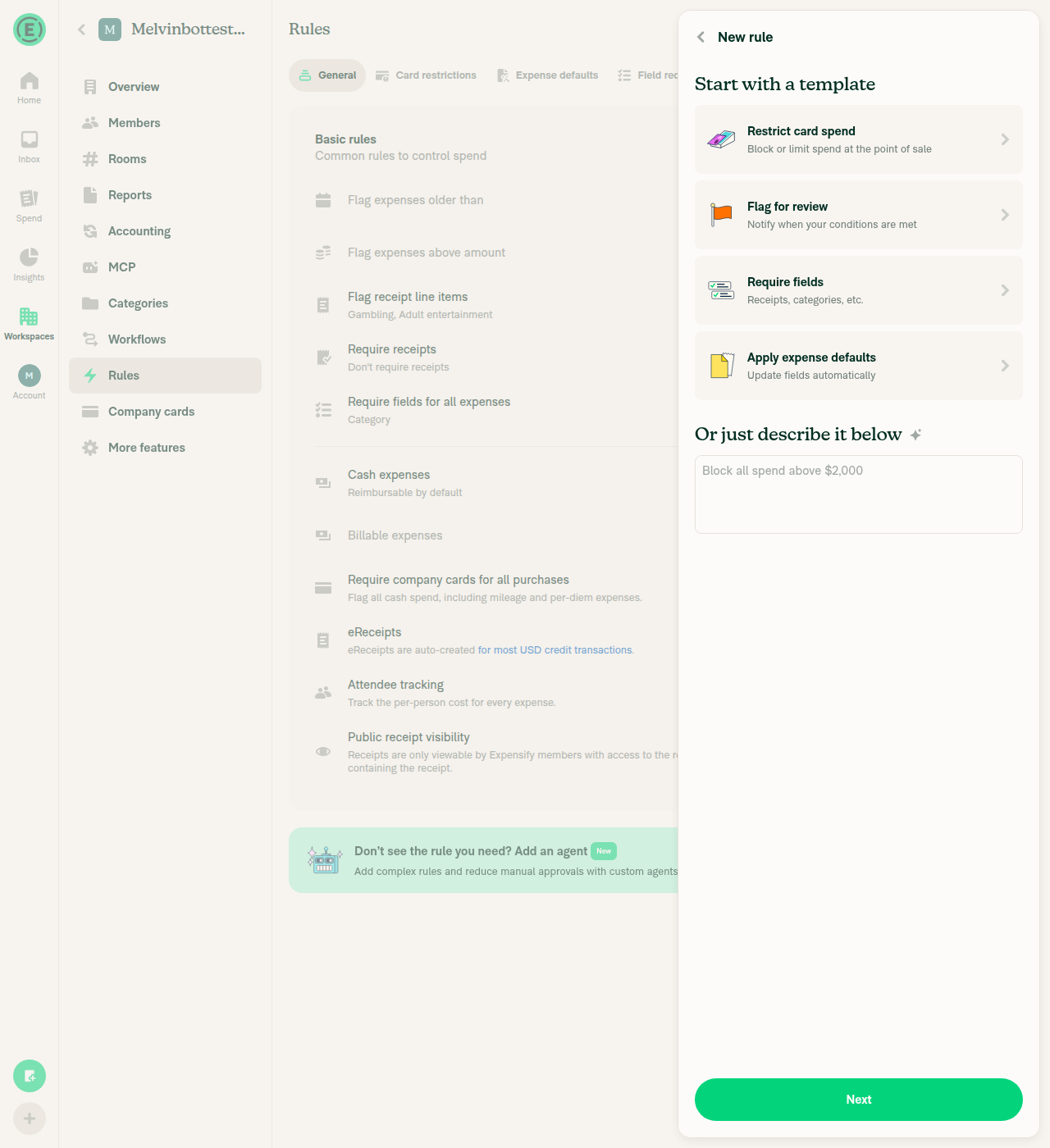
  3. Verify the section below the templates shows "Or just describe it below", a text field with the placeholder "Block all spend above $2,000", and a Next button.
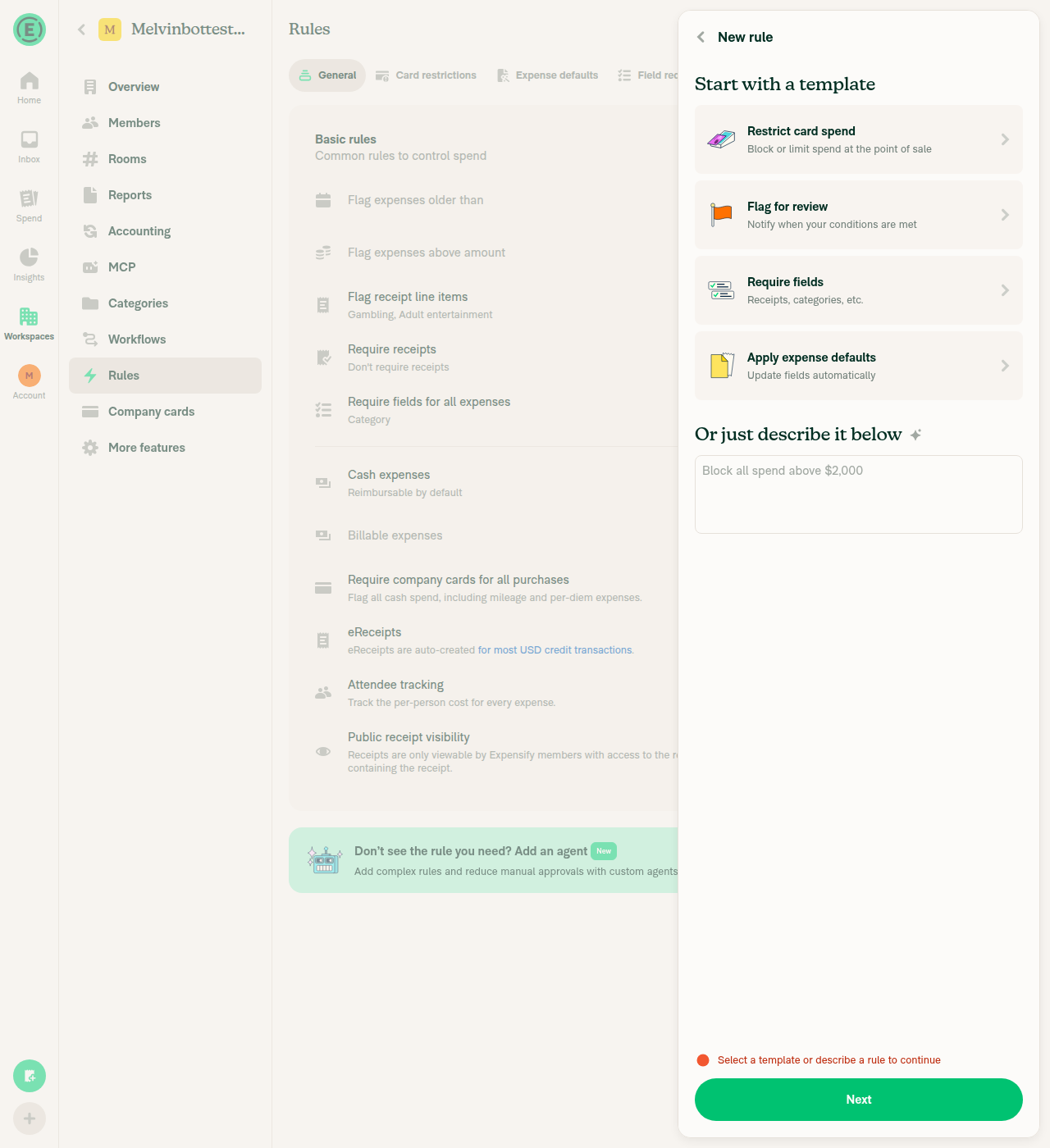
  4. Click Next with the text field empty. Verify the error "Select a template or describe a rule to continue" appears.
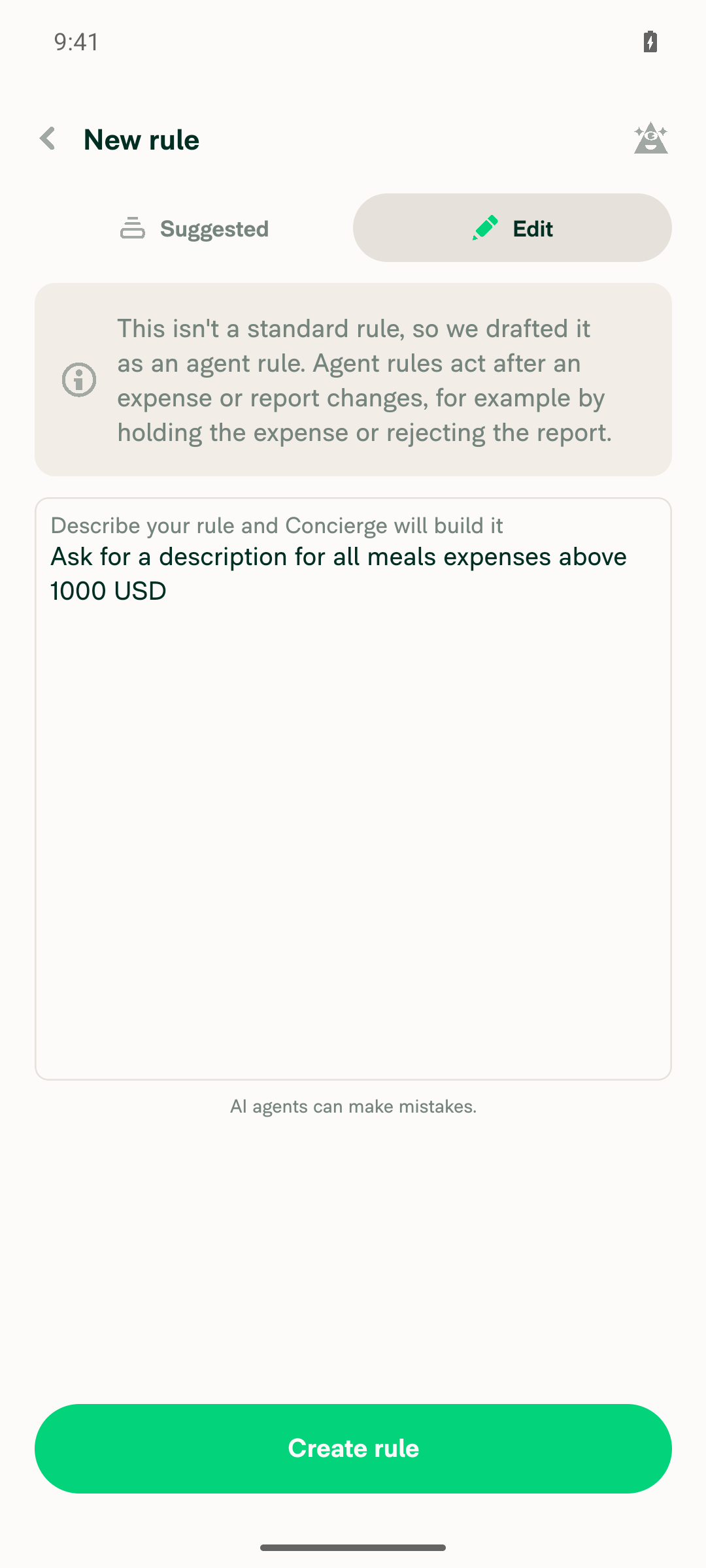
  5. Type "Ask for a description for all meals expenses above 1000 USD" and click Next. Verify a pre-filled rule editor opens, or an inline error explains why the rule can't be built.
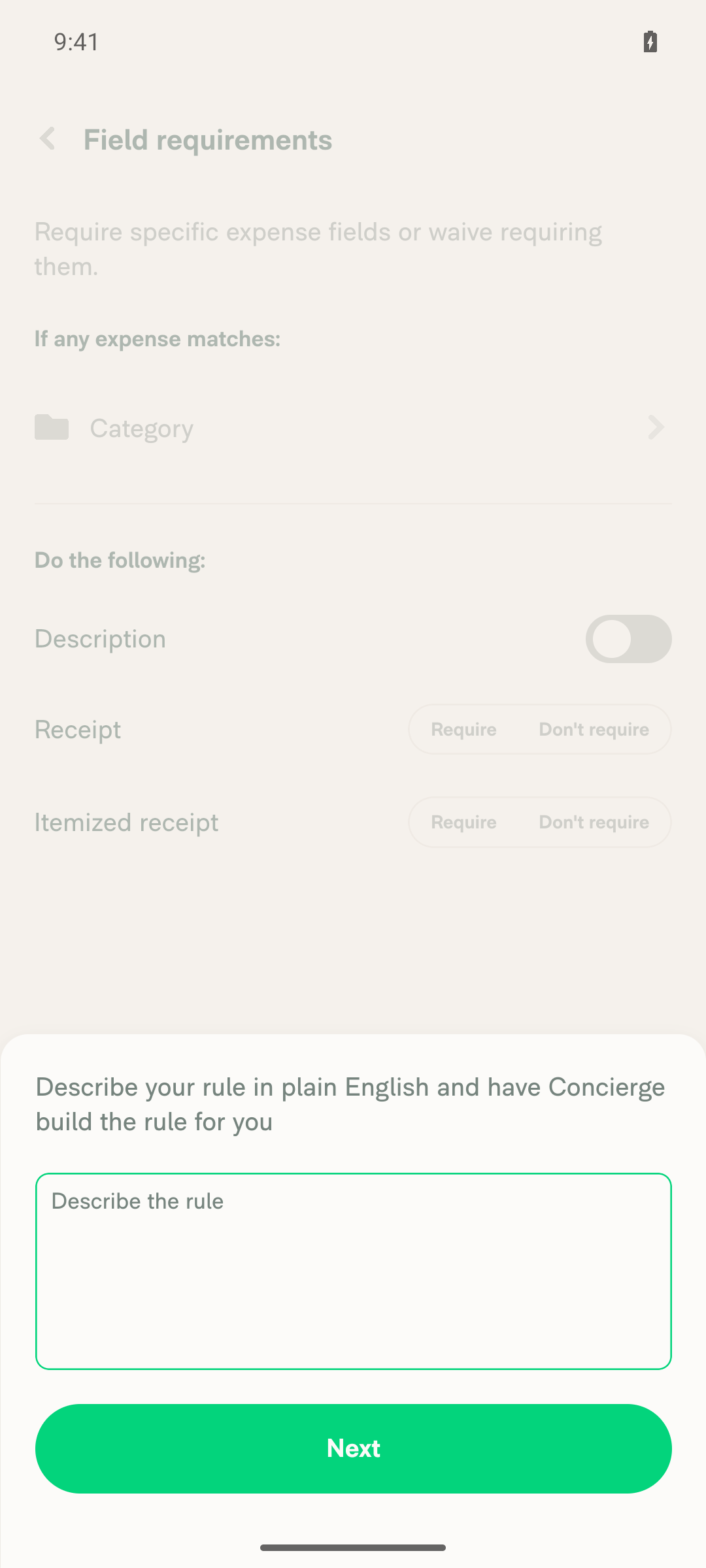
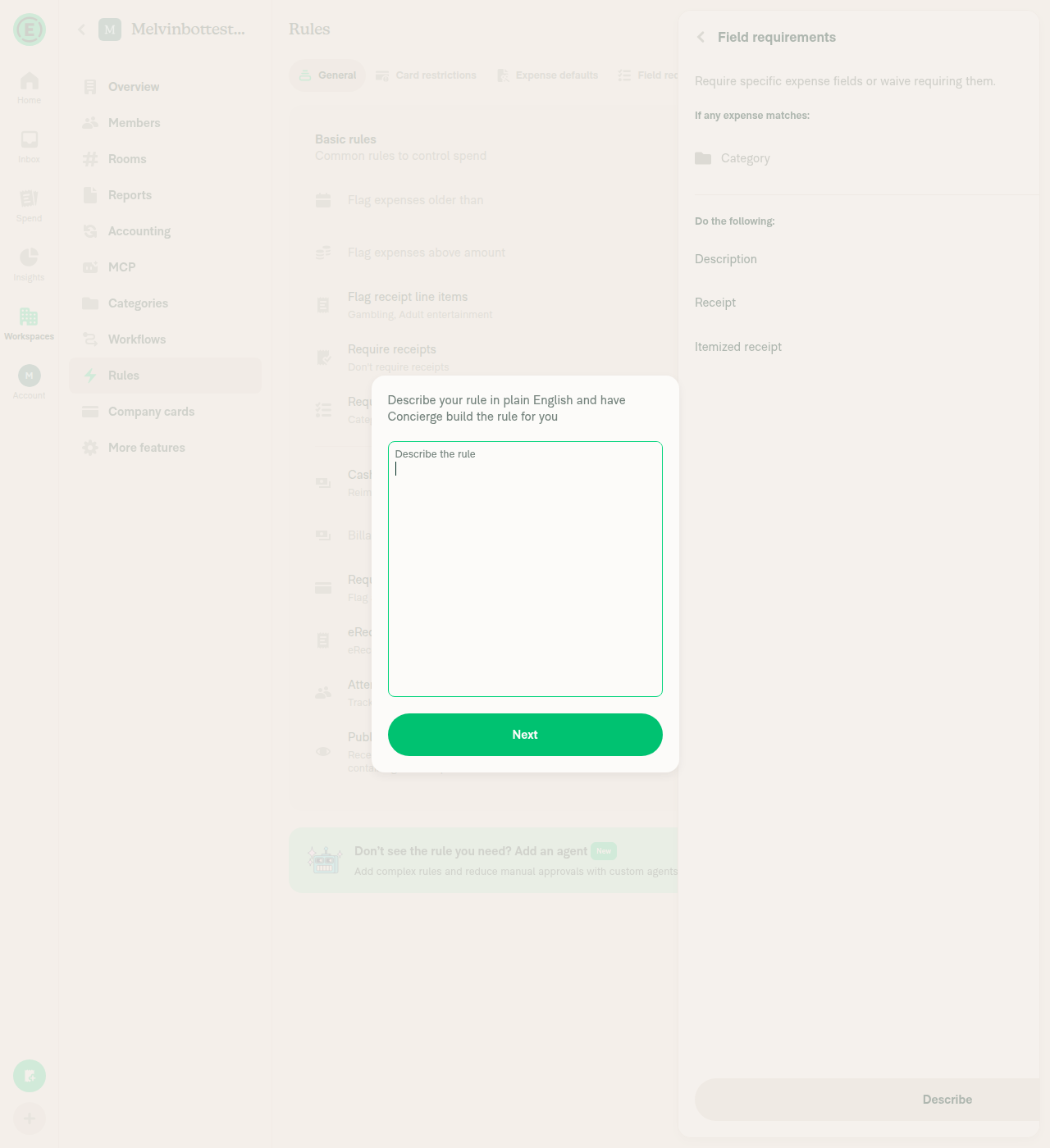
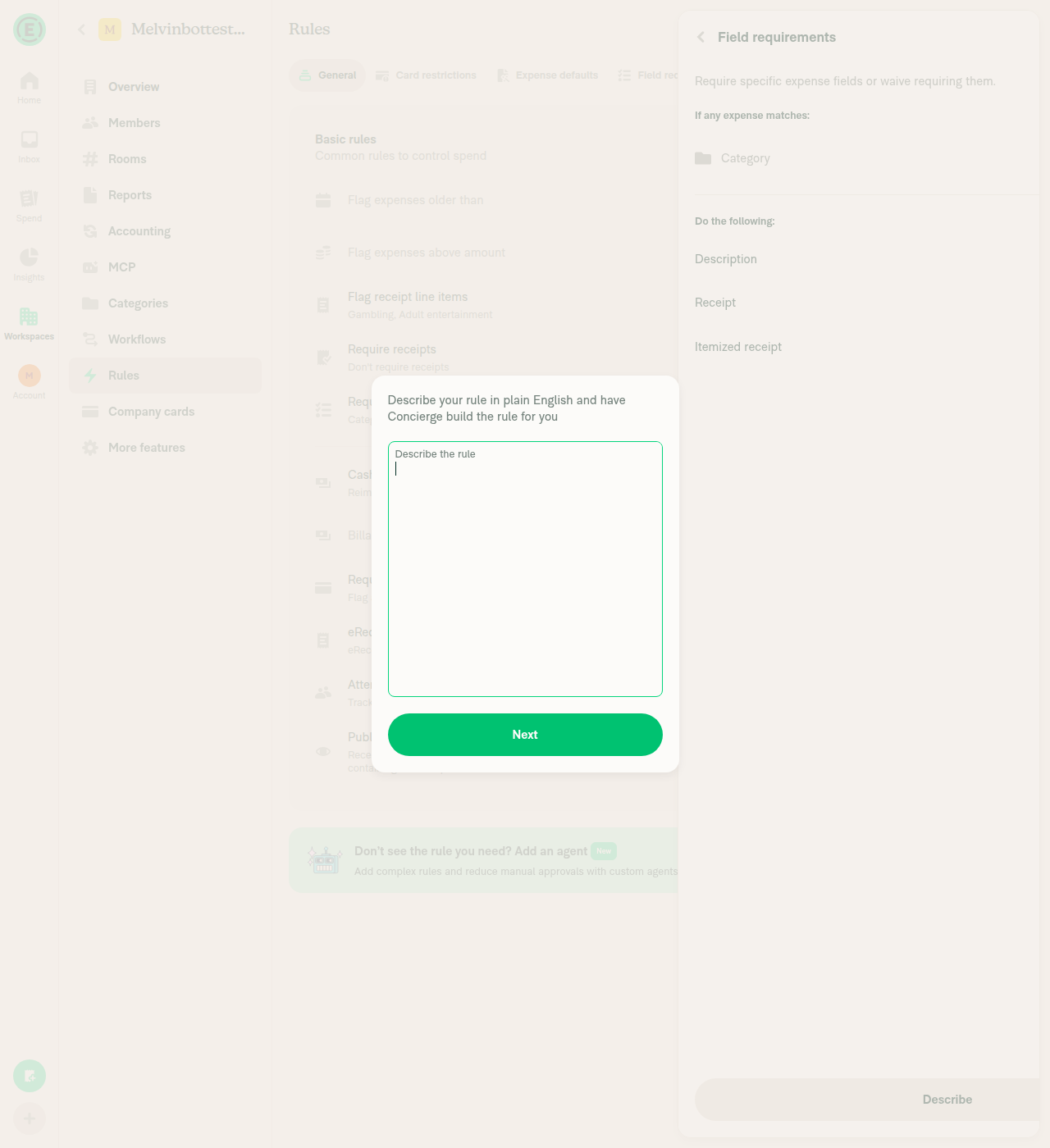
  6. Go back to New rule and click Require fields. Verify the footer shows a Describe button next to Save rule. Click Describe and verify the "Describe your rule in plain English…" modal opens.
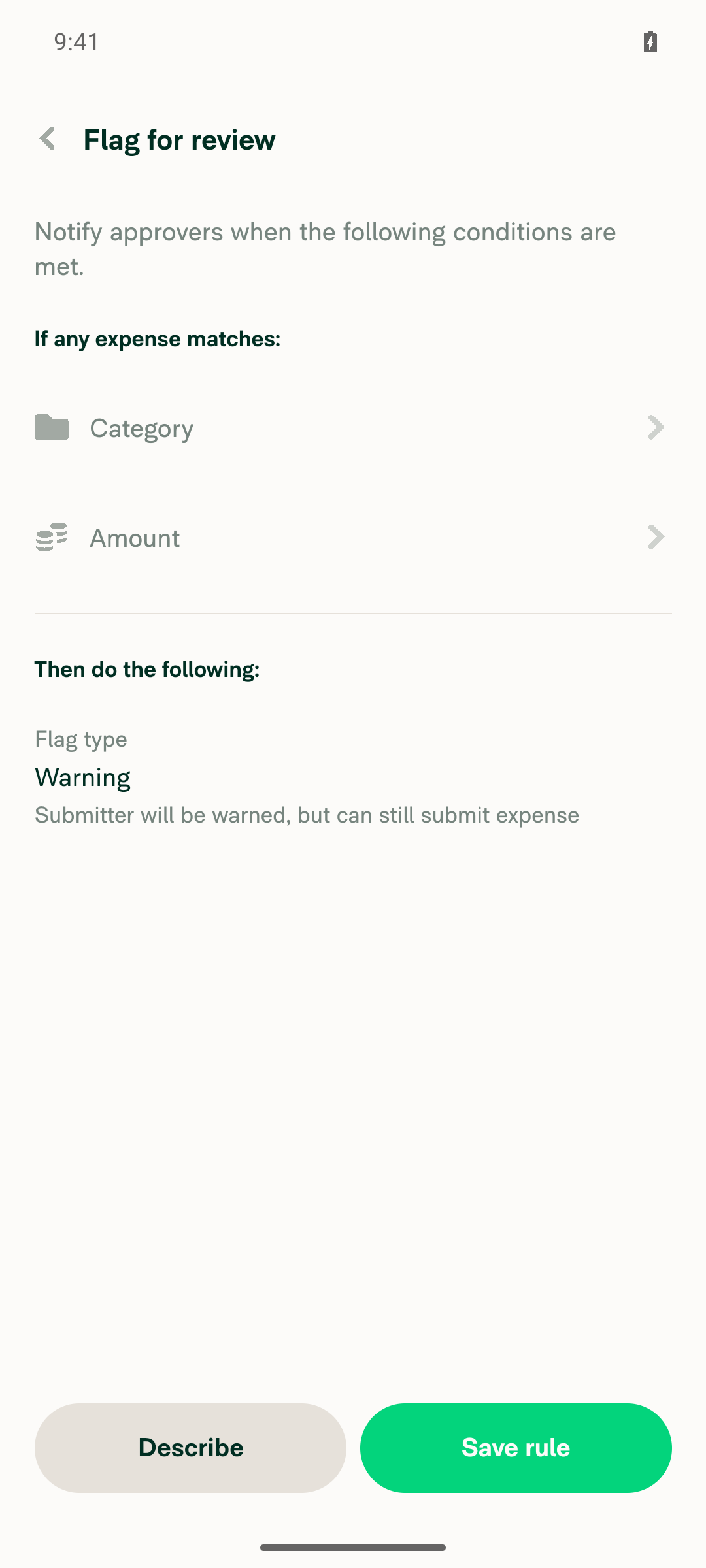
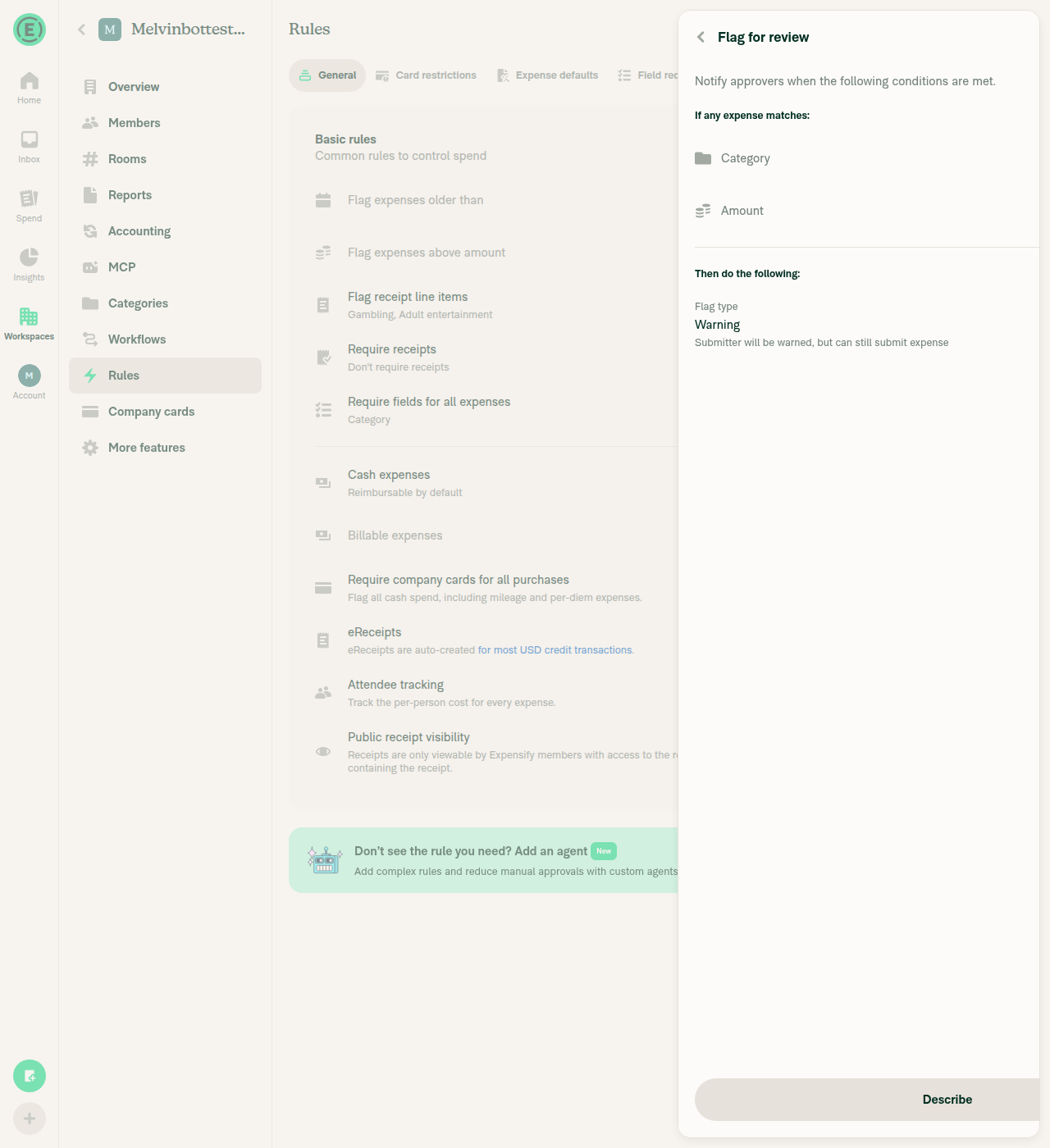
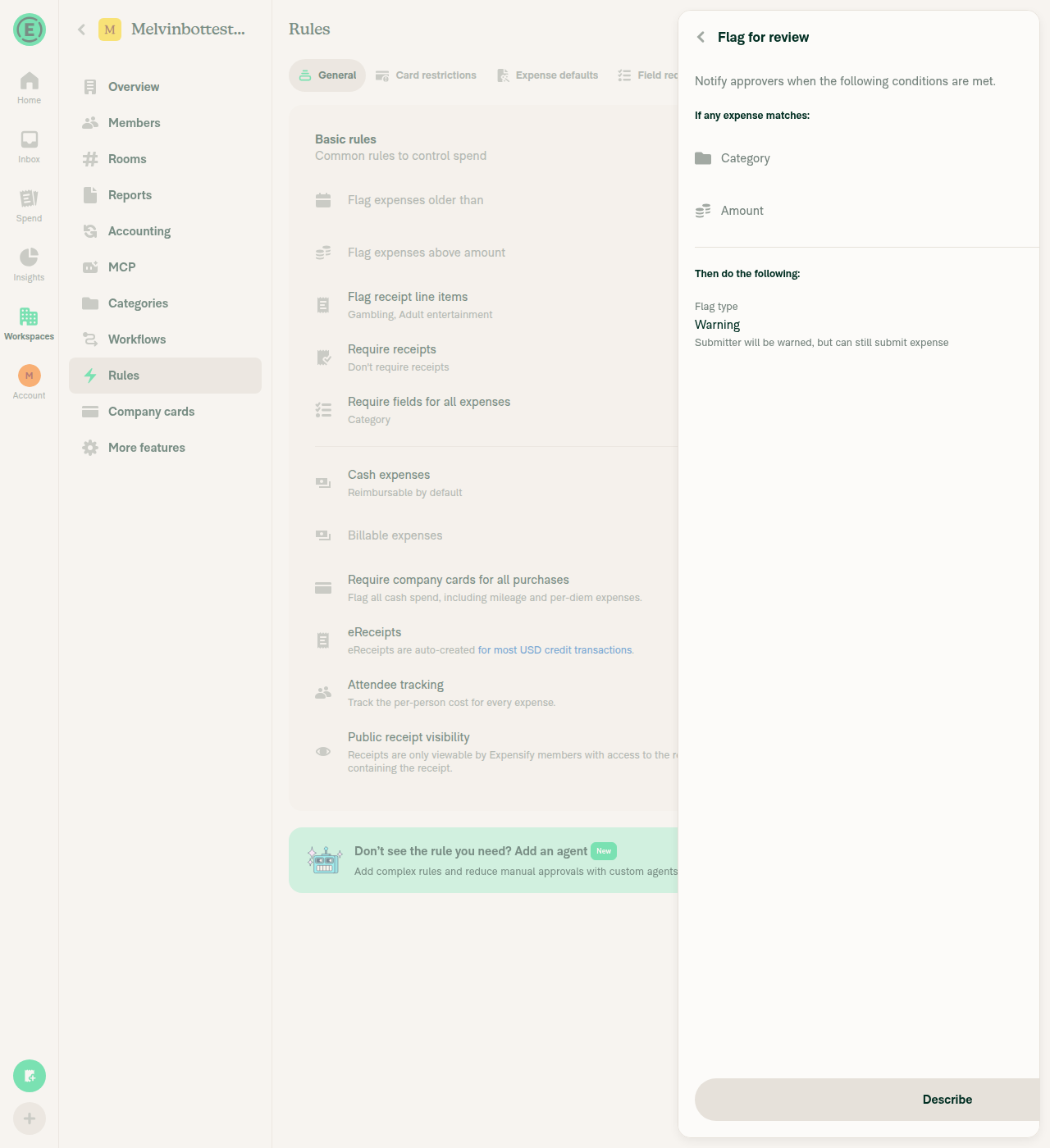
  7. Go back to New rule and click Flag for review. Verify the footer shows a Describe button next to Save rule.
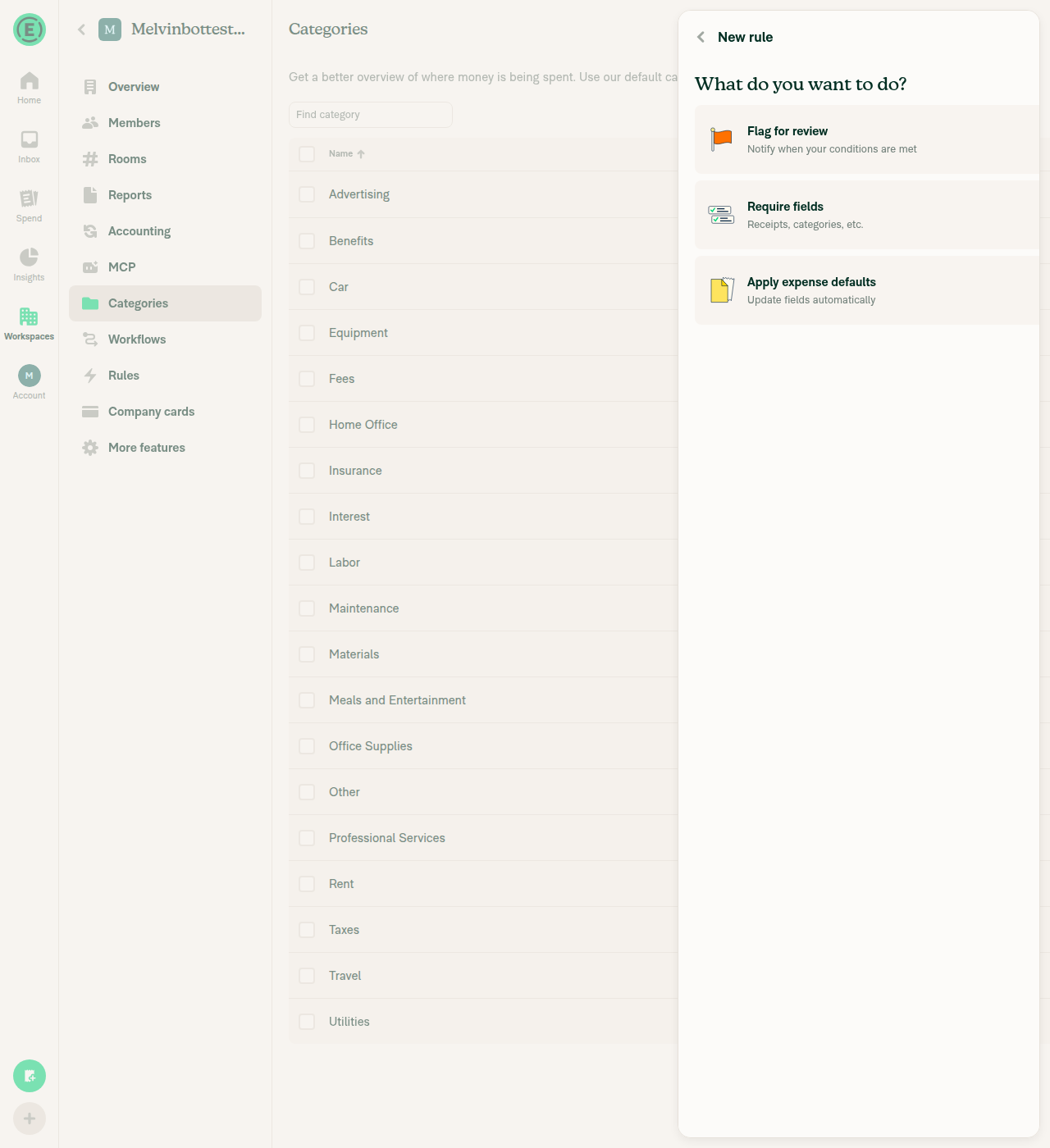
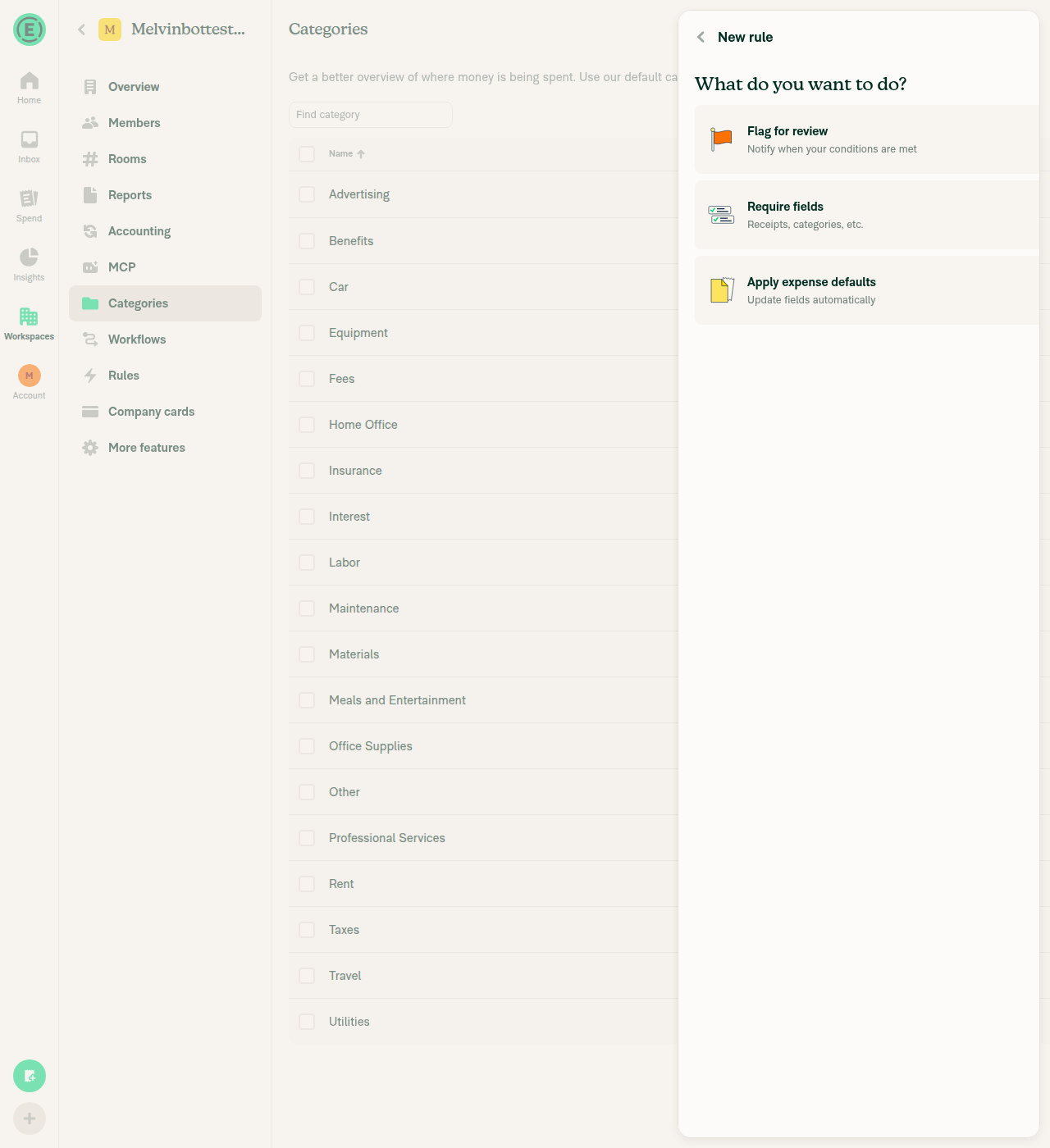
  8. Go to Workspace > Categories, open any category, and click Create new rule. Verify only Flag for review, Require fields, and Apply expense defaults appear, with no describe section.

Offline tests

N/A. Describing a rule needs Concierge, so offline behavior is unchanged.

QA Steps

Same as tests.

PR Author Checklist

  • I linked the correct issue in the ### Fixed Issues section above
  • I wrote clear testing steps that cover the changes made in this PR
    • I added steps for local testing in the Tests section
    • I added steps for the expected offline behavior in the Offline steps section
    • I added steps for Staging and/or Production testing in the QA steps section
    • I added steps to cover failure scenarios (i.e. verify an input displays the correct error message if the entered data is not correct)
    • I turned off my network connection and tested it while offline to ensure it matches the expected behavior (i.e. verify the default avatar icon is displayed if app is offline)
    • I tested this PR with a High Traffic account against the staging or production API to ensure there are no regressions (e.g. long loading states that impact usability).
  • I included screenshots or videos for tests on all platforms
  • I ran the tests on all platforms & verified they passed on:
    • Android: Native
    • Android: mWeb Chrome
    • iOS: Native
    • iOS: mWeb Safari
    • MacOS: Chrome / Safari
  • I verified there are no console errors (if there's a console error not related to the PR, report it or open an issue for it to be fixed)
  • I verified any copy / text that was added to the app is either coming verbatim from figma or has been approved by marketing (in order to get marketing approval, ask the Bug Zero team member to add the Waiting for copy label to the issue)
  • If a new code pattern is added I verified it was agreed to be used by multiple Expensify engineers
  • I tested other components that can be impacted by my changes (i.e. if the PR modifies a shared library or component like Avatar, I verified the components using Avatar are working as expected)
  • If new assets were added or existing ones were modified, I verified that:
    • The assets are optimized and compressed (for SVG files, run npm run compress-svg)
    • The assets load correctly across all supported platforms.
  • If the PR modifies code that runs when editing or sending messages, I tested and verified there is no unexpected behavior for all supported markdown - URLs, single line code, code blocks, quotes, headings, bold, strikethrough, and italic.
  • If the PR modifies a generic component, I tested and verified that those changes do not break usages of that component in the rest of the App (i.e. if a shared library or component like Avatar is modified, I verified that Avatar is working as expected)
  • If the PR modifies a component related to any of the existing Storybook stories, I tested and verified all stories for that component are still working as expected.
  • If the PR modifies a component or page that can be accessed by a direct deeplink, I verified that the code functions as expected when the deeplink is used - from a logged in and logged out account.
  • If the PR modifies the UI (e.g. new buttons, new UI components, changing the padding/spacing/sizing, moving components, etc) or modifies the form input styles:
    • I verified that all the inputs inside a form are aligned with each other.
    • I added Design label and/or tagged @Expensify/design so the design team can review the changes.
  • If the PR adds or modifies the UI:
    • I asked an AI agent to review the changes for accessibility issues and addressed its findings.
    • I tested with a screen reader (VoiceOver on macOS) and verified all new/changed elements are reachable with a logical focus order.
    • I verified all new/changed elements have meaningful accessible names and roles.
    • I verified state changes are announced (e.g. checked/unchecked, expanded/collapsed, selected).
  • I added unit tests for any new feature or bug fix in this PR to help automatically prevent regressions in this user flow.
  • If the main branch was merged into this PR after a review, I tested again and verified the outcome was still expected according to the Test steps.

Screenshots/Videos

Android: Native
Android: mWeb Chrome
iOS: Native
iOS: mWeb Safari
MacOS: Chrome / Safari

New rule: four templates and the describe section
New rule page with four templates and describe section

New rule: error after clicking Next with nothing selected
Inline error after clicking Next with nothing selected

Require fields editor: Describe modal
Require fields editor with Describe modal open

Flag for review editor: Describe button
Flag for review editor with Describe button

Category New rule: no describe section
Category-scoped New rule page without describe section

AI Tests

  • npm run typecheck: passed
  • npm run lint-changed: passed
  • npm test -- tests/ui/RulesNewPageDescribeRuleTest.tsx: 16/16 passed

Co-authored-by: Rushat Gabhane <rushatgabhane@users.noreply.github.com>
@MelvinBot

MelvinBot commented Oct 23, 2026 •

Copy link
Copy Markdown
Contributor Author

🤖 Android test steps verification results: ✅ pass

All 7 checks passed on Android, using a test account that does not have the describeRule beta. This PR has no written Tests section, so I based the steps on its description. The describe section, its draft flow, and the editor Describe buttons all work. The category-scoped New rule page still hides the describe section.
Category-scoped New rule page without describe section

Step Status
1. New rule lists Restrict card spend, Flag for review, Require fields, Apply expense defaults. It uses the "Require fields" title and has no "Describe agent rule" option.Workspace > Rules > Add rule showed exactly these 4 templates with these labels. There was no "Describe agent rule" entry.
New rule page with four templates and describe section
✅
2. Describe section shows "Or just describe it below", the "Block all spend above $2,000" placeholder, and a Next buttonThe heading, the text field with that placeholder, and the Next button appear below the templates.
New rule page with four templates and describe section
✅
3. Describing a rule and tapping Next builds a Concierge draftI entered "Ask for a description for all meals expenses above 1000 USD" and tapped Next. A pre-filled New rule editor opened with Edit and Suggested tabs, plus this banner: "This isn't a standard rule, so we drafted it as an agent rule…" No inline error appeared. Note: Concierge drafted an agent rule, not the pre-filled Require fields rule that the issue example describes. Concierge chooses the rule type on the backend, and this PR does not change that.
Pre-filled agent-rule draft after describing the rule
✅
4. The Require fields editor footer has a Describe button that opens the describe modalThe footer shows Describe next to Save rule. Tapping Describe opened the "Describe your rule in plain English…" modal, and dismissing it returned to the editor.
Describe modal over the Require fields editor
✅
5. The Flag for review editor footer has a Describe buttonThe footer shows the Describe and Save rule buttons side by side.
Flag for review editor footer with Describe button
✅
6. The category-scoped New rule page does not show the describe sectionCategories > Advertising > Create new rule listed only Flag for review, Require fields, and Apply expense defaults. It had no describe section.
Category-scoped New rule page without describe section
✅
7. No red-box errors or crashesThe app stayed in the foreground for the whole run. No error banners appeared, and no console errors were captured.
✅

view run · view recording

@MelvinBot

MelvinBot commented Oct 23, 2026 •

Copy link
Copy Markdown
Contributor Author

🤖 Web test steps verification results: ⚠️ partial

On Web, the test account has no describeRule beta. It still sees the describe section on New rule and the Describe button in the Require fields and Flag for review editors. The category-scoped New rule page correctly hides the describe section. One step failed: after I submitted a description from New rule, the Next button kept loading and never opened an editor or showed an error. The same step passed on Android.
Category-scoped New rule page without describe section

Step Status
1. New rule lists Restrict card spend, Flag for review, Require fields, Apply expense defaults. It uses the "Require fields" title and has no "Describe agent rule" option.The page showed exactly these 4 templates. The Require fields subtitle reads "Receipts, categories, etc." There was no "Describe agent rule" or "Set field requirements" option.
New rule page listing the four templates
✅
2. Describe section shows "Or just describe it below", the "Block all spend above $2,000" placeholder, and a Next buttonAll three appear below the templates.
Describe section with placeholder and Next button
✅
3. Describing a rule and clicking Next builds a draft or shows an inline errorI entered "Ask for a description for all meals expenses above 1000 USD" and clicked Next. GenerateRule returned HTTP 200. The Next button then showed a loading spinner for over 50 seconds. No editor opened and no inline error appeared, so I clicked Back to exit. On Android, the same input opened a pre-filled agent-rule draft. This run doesn't show whether the PR causes the Web hang.
Next button stuck loading after describing a rule
❌
4. The Require fields editor footer has a Describe button that opens the describe modalThe footer shows Describe. Clicking it opened the "Describe your rule in plain English…" dialog, which closed normally.
Require fields editor with Describe modal open
✅
5. The Flag for review editor footer has a Describe buttonThe footer shows Describe.
Flag for review editor with Describe button
✅
6. The category-scoped New rule page does not show the describe sectionCategories > Meals and Entertainment > Create new rule listed only Flag for review, Require fields, and Apply expense defaults. It had no describe section.
Category-scoped New rule page without describe section
✅
7. No errors in the JS consoleThe tester couldn't read the browser console directly. As a proxy, every network request during the run returned HTTP 200, with no failed requests. So this run doesn't prove the console had no warnings or errors.
✅

view run · view recording

Co-authored-by: Rushat Gabhane <rushatgabhane@users.noreply.github.com>
@MelvinBot

Copy link
Copy Markdown
Contributor Author

No code fix is needed. Every code check on the latest commit (5b01c88b) passes, including Jest, TypeScript, ESLint, and the perf tests.

The only failing check is Check independent approval. It fails until a reviewer other than the PR author approves the PR. An approval clears it, and no code change can.


view run

},
]),
{
key: 'createAgentRule',

Copy link
Copy Markdown
Contributor

Choose a reason for hiding this comment

The reason will be displayed to describe this comment to others. Learn more.

Can we drop this option? New rule is meant to be one flow with no up-front choice between an agent rule and a standard rule. The describe box below already drafts an agent rule when it can’t build a standard one.

Admins who know they want an agent rule still have Add AI rule / Add agent rule on the Agents tab, along with the Suggested list. It also renders under “Start with a template”, where it reads as a fifth template. Before the beta removal, this file only showed it to accounts without the beta, as a stand-in for the describe box.

Copy link
Copy Markdown
Contributor Author

Choose a reason for hiding this comment

The reason will be displayed to describe this comment to others. Learn more.

Done in 17c98ba. New rule now shows only the four rule types and then the describe section.

Copy link
Copy Markdown
Contributor

Choose a reason for hiding this comment

The reason will be displayed to describe this comment to others. Learn more.

@yuwenmemon One thing to flag: dropping this row removes the only direct entry to the agent rule page from New rule. The remaining paths are both on the Agents tab - the empty state CTA, or the Add agent rule row once rules exist.

That also buries the Suggested list, since it's the default tab on that page. An admin who wanted to browse suggestions now has to know to go to Rules > Agents first. The describe box can't get them there either, it only lands on Edit with a prefilled draft after Concierge decides it isn't a standard rule.

Not blocking, and the Suggested tab is still one tap away once they're on the page. Just want to confirm the extra hop is intended rather than a side effect.

Comment thread src/languages/de.ts Outdated
flagForReview: 'Zur Überprüfung markieren',
flagForReviewDescription: 'Benachrichtigen, wenn Ihre Bedingungen erfüllt sind',
requireFields: 'Feldanforderungen festlegen',
requireFieldsShort: 'Felder vorschreiben',

Copy link
Copy Markdown
Contributor

Choose a reason for hiding this comment

The reason will be displayed to describe this comment to others. Learn more.

NAB now that requireFields is gone, we can rename the requireFieldsShort short to just be requireFields.

Copy link
Copy Markdown
Contributor Author

Choose a reason for hiding this comment

The reason will be displayed to describe this comment to others. Learn more.

Done in 8c3494b. newRule.requireFieldsShort is now newRule.requireFields in every locale.

@rushatgabhane

Copy link
Copy Markdown
Member

@MelvinBot please get it done

MelvinBot and others added 2 commits October 26, 2026 09:33
…title is gone

Co-authored-by: Rushat Gabhane <rushatgabhane@users.noreply.github.com>
@MelvinBot

Copy link
Copy Markdown
Contributor Author

I addressed both of yuwenmemon's review comments and pushed to Remove the describeRule beta.

  • Dropped "Describe agent rule" from New rule (17c98ba). New rule now shows the four rule types and then the describe section. This undoes the option you asked me to keep on Oct 25. Admins can still get an agent rule from the describe section or from the Agents tab. If you still want the option, tell me and I'll restore it.
  • Renamed newRule.requireFieldsShort to newRule.requireFields in all 11 locales, RulesNewPage, and the test (8c3494b).

Typecheck and lint pass, and RulesNewPageDescribeRuleTest passes 16/16. I updated the PR description to match.

The PR is still a draft. Before you mark it ready for review, fill in the Tests and QA sections and add screenshots.

@OSBotify

Copy link
Copy Markdown
Contributor

🦜 Polyglot Parrot! 🦜

Squawk! Looks like you added some shiny new English strings. Allow me to parrot them back to you in other tongues:

View the translation diff
diff --git a/src/languages/de.ts b/src/languages/de.ts
index 4dbbdfa7..ff399ec5 100644
--- a/src/languages/de.ts
+++ b/src/languages/de.ts
@@ -8897,7 +8897,7 @@ Fügen Sie weitere Ausgabelimits hinzu, um den Cashflow Ihres Unternehmens zu sc
                 applyExpenseDefaultsDescription: 'Felder automatisch aktualisieren',
                 flagForReview: 'Zur Überprüfung markieren',
                 flagForReviewDescription: 'Benachrichtigen, wenn Ihre Bedingungen erfüllt sind',
-                requireFields: 'Felder vorschreiben',
+                requireFields: 'Felder erforderlich',
                 requireFieldsDescription: 'Belege, Kategorien usw.',
                 describeItBelow: 'Oder beschreiben Sie sie einfach unten',
                 describeRulePlaceholder: 'Alle Ausgaben über 2.000 $ blockieren',
diff --git a/src/languages/es.ts b/src/languages/es.ts
index 7bbc9a7a..ce48afe9 100644
--- a/src/languages/es.ts
+++ b/src/languages/es.ts
@@ -8905,7 +8905,7 @@ ${reportName}`,
                 applyExpenseDefaultsDescription: 'Actualizar campos automáticamente',
                 flagForReview: 'Marcar para revisión',
                 flagForReviewDescription: 'Notificar cuando se cumplan tus condiciones',
-                requireFields: 'Exigir campos',
+                requireFields: 'Campos obligatorios',
                 requireFieldsDescription: 'Recibos, categorías, etc.',
                 describeItBelow: 'O simplemente descríbela abajo',
                 describeRulePlaceholder: 'Bloquear todos los gastos superiores a $2,000',
diff --git a/src/languages/fr.ts b/src/languages/fr.ts
index e96fc2ac..aa08f7e1 100644
--- a/src/languages/fr.ts
+++ b/src/languages/fr.ts
@@ -8920,7 +8920,7 @@ Ajoutez davantage de règles de dépenses pour protéger la trésorerie de l’e
                 applyExpenseDefaultsDescription: 'Mettre à jour les champs automatiquement',
                 flagForReview: 'Marquer pour examen',
                 flagForReviewDescription: 'Avertir lorsque vos conditions sont remplies',
-                requireFields: 'Exiger des champs',
+                requireFields: 'Champs obligatoires',
                 requireFieldsDescription: 'Reçus, catégories, etc.',
                 describeItBelow: 'Ou décrivez-la simplement ci-dessous',
                 describeRulePlaceholder: 'Bloquer toutes les dépenses supérieures à 2 000 $',
diff --git a/src/languages/it.ts b/src/languages/it.ts
index 20ca21d5..538e904e 100644
--- a/src/languages/it.ts
+++ b/src/languages/it.ts
@@ -8851,7 +8851,7 @@ Aggiungi altre regole di spesa per proteggere il flusso di cassa aziendale.`,
                 applyExpenseDefaultsDescription: 'Aggiorna i campi automaticamente',
                 flagForReview: 'Contrassegna per revisione',
                 flagForReviewDescription: 'Avvisa quando le tue condizioni sono soddisfatte',
-                requireFields: 'Richiedi campi',
+                requireFields: 'Rendi obbligatori i campi',
                 requireFieldsDescription: 'Ricevute, categorie, ecc.',
                 describeItBelow: 'Oppure descrivila qui sotto',
                 describeRulePlaceholder: 'Blocca tutte le spese superiori a 2.000 $',
diff --git a/src/languages/ja.ts b/src/languages/ja.ts
index 5eb27fc9..40a64964 100644
--- a/src/languages/ja.ts
+++ b/src/languages/ja.ts
@@ -8736,7 +8736,7 @@ ${reportName}`,
                 applyExpenseDefaultsDescription: 'フィールドを自動で更新する',
                 flagForReview: '確認のためにフラグを付ける',
                 flagForReviewDescription: '条件が満たされたときに通知する',
-                requireFields: '必須フィールド',
+                requireFields: '必須項目',
                 requireFieldsDescription: '領収書、カテゴリなど',
                 describeItBelow: 'または、下で説明してください',
                 describeRulePlaceholder: '2,000ドルを超えるすべての支出をブロック',
diff --git a/src/languages/nl.ts b/src/languages/nl.ts
index 1010e0f1..4828f5a7 100644
--- a/src/languages/nl.ts
+++ b/src/languages/nl.ts
@@ -8825,7 +8825,7 @@ er bestedingsregels toe om de kasstroom van het bedrijf te beschermen.`,
                 applyExpenseDefaultsDescription: 'Velden automatisch bijwerken',
                 flagForReview: 'Markeren voor controle',
                 flagForReviewDescription: 'Melding wanneer aan je voorwaarden is voldaan',
-                requireFields: 'Velden verplichten',
+                requireFields: 'Velden verplicht stellen',
                 requireFieldsDescription: 'Bonnen, categorieën, enz.',
                 describeItBelow: 'Of beschrijf hem hieronder',
                 describeRulePlaceholder: 'Blokkeer alle uitgaven boven $2.000',
diff --git a/src/languages/pt-BR.ts b/src/languages/pt-BR.ts
index f07ace52..e159ff44 100644
--- a/src/languages/pt-BR.ts
+++ b/src/languages/pt-BR.ts
@@ -8829,7 +8829,7 @@ Adicione mais regras de gasto para proteger o fluxo de caixa da empresa.`,
                 applyExpenseDefaultsDescription: 'Atualizar campos automaticamente',
                 flagForReview: 'Marcar para revisão',
                 flagForReviewDescription: 'Notificar quando suas condições forem atendidas',
-                requireFields: 'Exigir campos',
+                requireFields: 'Tornar campos obrigatórios',
                 requireFieldsDescription: 'Recibos, categorias etc.',
                 describeItBelow: 'Ou simplesmente descreva abaixo',
                 describeRulePlaceholder: 'Bloquear todos os gastos acima de $2.000',

Note

You can apply these changes to your branch by copying the patch to your clipboard, then running pbpaste | git apply 😉

View workflow run

@rushatgabhane

Copy link
Copy Markdown
Member

@MelvinBot mark ready for review and add screenshots

@MelvinBot

Copy link
Copy Markdown
Contributor Author

No code fix is needed. Every code check on the latest commit (8c3494b4) passes, including the perf tests.

Two review checks still fail, and code changes can't fix either one:

  • PR Reviewer Checklist / checklist passes after the reviewer posts the completed reviewer checklist.
  • Check independent approval passes after someone other than the PR author approves the PR.

view run

@MelvinBot
MelvinBot marked this pull request as ready for review October 26, 2026 09:50
@MelvinBot
MelvinBot requested a review from a team as a code owner October 26, 2026 09:50
@melvin-bot
melvin-bot Bot requested review from Krishna2323 and situchan and removed request for a team October 26, 2026 09:50
@melvin-bot

melvin-bot Bot commented Oct 26, 2026

Copy link
Copy Markdown

@Krishna2323 @situchan One of you needs to copy/paste the Reviewer Checklist from here into a new comment on this PR and complete it. If you have the K2 extension, you can simply click: [this button]

@melvin-bot
melvin-bot Bot requested review from JmillsExpensify and removed request for a team October 26, 2026 09:50
@chatgpt-codex-connector

chatgpt-codex-connector Bot commented Oct 26, 2026 •

Copy link
Copy Markdown

Codex Review Summary

This comment shows the latest Codex review activity on this pull request.

Review Status Commit Review trigger
📝 Code Review ✅ Completed 2026-10-26T09:53:04.302706Z 8c3494b Draft marked ready
ℹ️ About Codex in GitHub

Your team has set up Codex to review pull requests in this repo. Reviews are triggered when you

  • Open a pull request for review
  • Mark a draft as ready
  • Comment "@codex review" or "@codex security review".

Codex reacts with 👀 while any review is running, comments if it has suggestions, and reacts with 👍 once all reviews finish with no findings.

@MelvinBot

Copy link
Copy Markdown
Contributor Author

🤖 Web test steps verification results: ✅ pass

All 6 checks passed on Web with an account that does not have the describeRule beta. I marked the PR ready for review and added these screenshots to the description under MacOS: Chrome / Safari.
Category-scoped New rule page without describe section

Step Status
1. New rule lists Restrict card spend, Flag for review, Require fields, Apply expense defaults, with no "Describe agent rule" optionThe page showed exactly these 4 templates in this order. There was no fifth option.
New rule page with four templates and describe section
✅
2. Describe section shows "Or just describe it below", the "Block all spend above $2,000" placeholder, and a Next buttonAll three appear below the templates.
New rule page with four templates and describe section
✅
3. Clicking Next with nothing selected shows an inline errorThe error "Select a template or describe a rule to continue" appeared next to the text field.
Inline error after clicking Next with nothing selected
✅
4. The Require fields editor has a Describe button that opens the describe modalThe footer shows Describe and Save rule. Clicking Describe opened the "Describe your rule in plain English…" dialog.
Require fields editor with Describe modal open
✅
5. The Flag for review editor has a Describe buttonThe footer shows Describe and Save rule.
Flag for review editor with Describe button
✅
6. The category New rule page has no describe sectionCategories > Advertising > Create new rule listed only Flag for review, Require fields, and Apply expense defaults, with no describe section.
Category-scoped New rule page without describe section
✅

@Krishna2323

Copy link
Copy Markdown
Contributor

Reviewing...

@Krishna2323

Copy link
Copy Markdown
Contributor

I didn't edit the PR description. Here's why, plus steps you can paste in.

  • The failing checklist is the PR Reviewer Checklist. The run says "No PR Reviewer Checklist was found" after it searched the PR comments. It passes once you, as reviewer, post the reviewer checklist as a comment. Ticking author boxes won't change it.
  • I won't tick the PR Author Checklist. Those boxes say the author did things nobody has done on this PR. Examples: testing on iOS, testing offline, testing with VoiceOver, and testing with a High Traffic account. rushatgabhane, as co-author and assignee, should tick only what they actually did.
  • The author fills in Tests and QA Steps. The template asks the human co-author to list the tests they ran. These steps match what my web run verified, so rushatgabhane can paste them after running them:
### Tests
1. As a workspace admin, go to Workspace > Rules and click Add rule.
2. Verify New rule lists Restrict card spend, Flag for review, Require fields, and Apply expense defaults, in that order. Verify the third option is titled "Require fields" and there is no "Describe agent rule" option.
3. Verify the section below the templates shows "Or just describe it below", a text field with the placeholder "Block all spend above $2,000", and a Next button.
4. Click Next with the text field empty. Verify the error "Select a template or describe a rule to continue" appears.
5. Type "Ask for a description for all meals expenses above 1000 USD" and click Next. Verify a pre-filled rule editor opens, or an inline error explains why the rule can't be built.
6. Go back to New rule and click Require fields. Verify the footer shows a Describe button next to Save rule. Click Describe and verify the "Describe your rule in plain English…" modal opens.
7. Go back to New rule and click Flag for review. Verify the footer shows a Describe button next to Save rule.
8. Go to Workspace > Categories, open any category, and click Create new rule. Verify only Flag for review, Require fields, and Apply expense defaults appear, with no describe section.

### Offline tests
N/A. Describing a rule needs Concierge, so offline behavior is unchanged.

### QA Steps
Same as tests.

Step 5 is the one to watch on web. In an earlier web run, Next kept loading after a description was submitted. My latest web run didn't repeat that step.

@MelvinBot make the changes, I'll post reviewer checklist shortly

@MelvinBot

Copy link
Copy Markdown
Contributor Author

I still can't make these edits.

  • Tests and QA Steps: My instructions don't let me fill in these sections for the human co-author. The steps in my last comment are ready to paste. rushatgabhane can add them after running them.
  • PR Author Checklist: Ticking the boxes would say someone tested on iOS, Android, offline, and with VoiceOver. Nobody has done that on this PR.

Your reviewer checklist comment will fix the failing checklist check. The author sections don't affect it.


view run

@Krishna2323

Copy link
Copy Markdown
Contributor

Reviewer Checklist

  • I have verified the author checklist is complete (all boxes are checked off).
  • I verified the correct issue is linked in the ### Fixed Issues section above
  • I verified testing steps are clear and they cover the changes made in this PR
    • I verified the steps for local testing are in the Tests section
    • I verified the steps for Staging and/or Production testing are in the QA steps section
    • I verified the steps cover any possible failure scenarios (i.e. verify an input displays the correct error message if the entered data is not correct)
    • I turned off my network connection and tested it while offline to ensure it matches the expected behavior (i.e. verify the default avatar icon is displayed if app is offline)
  • I checked that screenshots or videos are included for tests on all platforms
  • I included screenshots or videos for tests on all platforms
  • I verified that the composer does not automatically focus or open the keyboard on mobile unless explicitly intended. This includes checking that returning the app from the background does not unexpectedly open the keyboard.
  • I verified tests pass on all platforms & I tested again on:
    • Android: HybridApp
    • Android: mWeb Chrome
    • iOS: HybridApp
    • iOS: mWeb Safari
    • MacOS: Chrome / Safari
  • If there are any errors in the console that are unrelated to this PR, I either fixed them (preferred) or linked to where I reported them in Slack
  • I verified proper code patterns were followed (see Reviewing the code)
    • I verified that any callback methods that were added or modified are named for what the method does and never what callback they handle (i.e. toggleReport and not onIconClick).
    • I verified that comments were added to code that is not self explanatory
    • I verified that any new or modified comments were clear, correct English, and explained "why" the code was doing something instead of only explaining "what" the code was doing.
    • I verified any copy / text that was added to the app is grammatically correct in English. It adheres to proper capitalization guidelines (note: only the first word of header/labels should be capitalized), and is either coming verbatim from figma or has been approved by marketing (in order to get marketing approval, ask the Bug Zero team member to add the Waiting for copy label to the issue)
  • If a new code pattern is added I verified it was agreed to be used by multiple Expensify engineers
  • I verified that this PR follows the guidelines as stated in the Review Guidelines
  • I verified other components that can be impacted by these changes have been tested, and I retested again (i.e. if the PR modifies a shared library or component like Avatar, I verified the components using Avatar have been tested & I retested again)
  • If a new component is created I verified that:
    • A similar component doesn't exist in the codebase
    • All props are defined accurately and each prop has a /** comment above it */
    • The file is named correctly
    • The component has a clear name that is non-ambiguous and the purpose of the component can be inferred from the name alone
    • The only data being stored in the state is data necessary for rendering and nothing else
    • For Class Components, any internal methods passed to components event handlers are bound to this properly so there are no scoping issues (i.e. for onClick={this.submit} the method this.submit should be bound to this in the constructor)
    • Any internal methods bound to this are necessary to be bound (i.e. avoid this.submit = this.submit.bind(this); if this.submit is never passed to a component event handler like onClick)
    • All JSX used for rendering exists in the render method
    • The component has the minimum amount of code necessary for its purpose, and it is broken down into smaller components in order to separate concerns and functions
  • If any new file was added I verified that:
    • The file has a description of what it does and/or why is needed at the top of the file if the code is not self explanatory
  • If a new CSS style is added I verified that:
    • A similar style doesn't already exist
    • The style can't be created with an existing StyleUtils function (i.e. StyleUtils.getBackgroundAndBorderStyle(theme.componentBG)
  • If the PR modifies code that runs when editing or sending messages, I tested and verified there is no unexpected behavior for all supported markdown - URLs, single line code, code blocks, quotes, headings, bold, strikethrough, and italic.
  • If the PR modifies a generic component, I tested and verified that those changes do not break usages of that component in the rest of the App (i.e. if a shared library or component like Avatar is modified, I verified that Avatar is working as expected in all cases)
  • If the PR modifies a component related to any of the existing Storybook stories, I tested and verified all stories for that component are still working as expected.
  • If the PR modifies a component or page that can be accessed by a direct deeplink, I verified that the code functions as expected when the deeplink is used - from a logged in and logged out account.
  • If the PR modifies the UI (e.g. new buttons, new UI components, changing the padding/spacing/sizing, moving components, etc) or modifies the form input styles:
    • I verified that all the inputs inside a form are aligned with each other.
    • I added Design label and/or tagged @Expensify/design so the design team can review the changes.
  • For any bug fix or new feature in this PR, I verified that sufficient unit tests are included to prevent regressions in this flow.
  • If the main branch was merged into this PR after a review, I tested again and verified the outcome was still expected according to the Test steps.
  • I have checked off every checkbox in the PR reviewer checklist, including those that don't apply to this PR.

Screenshots/Videos

Android: HybridApp
Android: mWeb Chrome
iOS: HybridApp
ios_hybrid.mp4
iOS: mWeb Safari
MacOS: Chrome / Safari
web_chrome.mp4

@Krishna2323 Krishna2323 left a comment

Copy link
Copy Markdown
Contributor

Choose a reason for hiding this comment

The reason will be displayed to describe this comment to others. Learn more.

LGTM!

@rushatgabhane

Copy link
Copy Markdown
Member

@MelvinBot make the edits please

Tests

  1. As a workspace admin, go to Workspace > Rules and click Add rule.
  2. Verify New rule lists Restrict card spend, Flag for review, Require fields, and Apply expense defaults, in that order. Verify the third option is titled "Require fields" and there is no "Describe agent rule" option.
  3. Verify the section below the templates shows "Or just describe it below", a text field with the placeholder "Block all spend above $2,000", and a Next button.
  4. Click Next with the text field empty. Verify the error "Select a template or describe a rule to continue" appears.
  5. Type "Ask for a description for all meals expenses above 1000 USD" and click Next. Verify a pre-filled rule editor opens, or an inline error explains why the rule can't be built.
  6. Go back to New rule and click Require fields. Verify the footer shows a Describe button next to Save rule. Click Describe and verify the "Describe your rule in plain English…" modal opens.
  7. Go back to New rule and click Flag for review. Verify the footer shows a Describe button next to Save rule.
  8. Go to Workspace > Categories, open any category, and click Create new rule. Verify only Flag for review, Require fields, and Apply expense defaults appear, with no describe section.

Offline tests

N/A. Describing a rule needs Concierge, so offline behavior is unchanged.

QA Steps

Same as tests.

@MelvinBot

Copy link
Copy Markdown
Contributor Author

I updated the PR description with your steps:

  • Tests: your 8 numbered steps
  • Offline tests: "N/A. Describing a rule needs Concierge, so offline behavior is unchanged."
  • QA Steps: "Same as tests."

The TODO placeholders are gone. Nothing else in the description changed. The PR Author Checklist boxes are still unticked, so please tick the ones you've done.


view run

@luacmartins luacmartins left a comment

Copy link
Copy Markdown
Contributor

Choose a reason for hiding this comment

The reason will be displayed to describe this comment to others. Learn more.

LGTM

@luacmartins

Copy link
Copy Markdown
Contributor

@JS00001 are we ready to merge this one?

@yuwenmemon
yuwenmemon merged commit e712889 into main Oct 26, 2026
55 of 61 checks passed
@yuwenmemon
yuwenmemon deleted the claude-removeDescribeRuleBeta branch October 26, 2026 17:00
@OSBotify

Copy link
Copy Markdown
Contributor

✋ This PR was not deployed to staging yet because QA is ongoing. It will be automatically deployed to staging after the next production release.

OSBotify pushed a commit that referenced this pull request Oct 26, 2026
Remove the describeRule beta

(cherry picked from commit e712889)

(cherry-picked to staging by yuwenmemon)
@OSBotify OSBotify added the CP Staging marks PRs that have been CP'd to staging label Oct 26, 2026
@github-actions

Copy link
Copy Markdown
Contributor

🚧 yuwenmemon has triggered a test Expensify/App build. You can view the workflow run here.

@github-actions

Copy link
Copy Markdown
Contributor

@OSBotify

Copy link
Copy Markdown
Contributor

🚀 Cherry-picked to staging by https://github.com/yuwenmemon in version: 9.5.20-5 🚀

platform result
🕸 web 🕸 success ✅
🤖 android 🤖 success ✅
🍎 iOS 🍎 success ✅

@MelvinBot

MelvinBot commented Oct 26, 2026 •

Copy link
Copy Markdown
Contributor Author

Yes, the help site needs an update. This PR removes the describeRule beta, so its changes now reach every workspace admin. I opened a draft docs PR: Docs updates for E/A#104861 Rename Require fields and update agent rule steps

Three articles had sentences that this PR made wrong:

  • Automate Workflows with Agent Rules: the steps said "Select Add rule. Select Describe agent rule." That option is gone. The steps now say to select Agents, then Add AI rule, or Add agent rule if the workspace already has agent rules.
  • Workspace Rules: the New rule option list named Set field requirements and Describe agent rule. It now says Require fields, drops Describe agent rule, and adds one sentence about the new Or just describe it below section.
  • Create expense categories: two references to Set field requirements now say Require fields.

I checked every label against en.ts and the live web UI.

@rushatgabhane, please review the linked help site PR and confirm it reflects the current behavior. Then mark the linked help site PR Ready for review


view run · view recording

@OSBotify

Copy link
Copy Markdown
Contributor

🚀 Deployed to production by https://github.com/jasperhuangg in version: 9.5.20-5 🚀

platform result
🕸 web 🕸 success ✅
🤖 android 🤖 success ✅
🍎 iOS 🍎 failure ❌

Bundle Size Analysis (Sentry):

@OSBotify

Copy link
Copy Markdown
Contributor

🚀 Cherry-picked to staging by https://github.com/yuwenmemon in version: 9.5.21-0 🚀

platform result
🕸 web 🕸 success ✅
🤖 android 🤖 success ✅
🍎 iOS 🍎 success ✅

@OSBotify

Copy link
Copy Markdown
Contributor

🚀 Cherry-picked to staging by https://github.com/yuwenmemon in version: 9.5.23-0 🚀

platform result
🕸 web 🕸 success ✅
🤖 android 🤖 success ✅
🍎 iOS 🍎 success ✅

Sign up for free to join this conversation on GitHub. Already have an account? Sign in to comment

Labels

CP Staging marks PRs that have been CP'd to staging Melvin-Test-Android Melvin-Test-Web Triggers Melvin to run the testing steps of the PR on web

Projects

None yet

Development

Successfully merging this pull request may close these issues.

7 participants