Skip to content

Skip the optimistic Search row when a new expense doesn't match the active filters - #104832

Merged
neil-marcellini merged 3 commits into
mainfrom
claude-hideNonMatchingOptimisticSearchRow
Nov 5, 2026
Merged

neil-marcellini merged 3 commits into
mainfrom
claude-hideNonMatchingOptimisticSearchRow

Conversation

@MelvinBot

@MelvinBot MelvinBot commented Oct 23, 2026 •

Copy link
Copy Markdown
Contributor

Explanation of Change

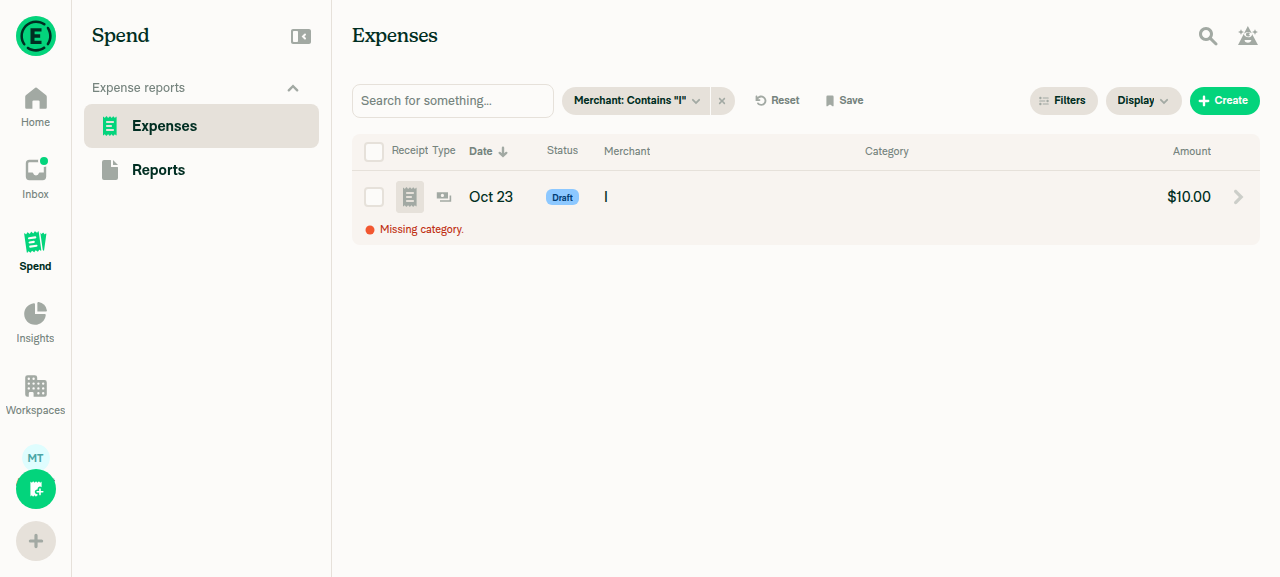
When you create an expense from Spend, useOptimisticSearchTracking adds the new transaction to the list before the server responds. It did this without checking the active query. With a restrictive filter such as merchant:I, the server correctly leaves the expense out, so tracking never resolved and the row stayed on screen.

This PR reuses shouldOptimisticallyUpdateSearch, the check that already gates the optimistic Onyx snapshot update, in the tracking hook:

  • Render: searchDataWithOptimisticTransaction stays a pure calculation. It skips the transaction when it doesn't match the query.
  • Effect: the existing watch-key effect calls clearOptimisticTracking() in that case. This drops the pending-expense placeholder and stops tracking, without calling setState during render.
  • Report lookup: the hook reads only the transaction's own report (one key, not the REPORT collection), so the policy and status checks work the same as in SearchUpdate.ts. currentUserAccountID comes from useSearchSnapshot, which already has it.

Queries with no restrictive filters behave as before: the new row still appears right away.

Updated 2026-11-04: Corrected based on feedback from truph01. The shared eligibility check previously rejected every merchant-filtered search, including matching expenses. It now evaluates the effective merchant using the parsed contains, equality, and inequality operators, preserves clause/list semantics, and retains existing restrictions for other filters. Both optimistic snapshot updates and tracking use this check, so matching merchant expenses no longer depend on a server response.

AI tests run locally before the main merge:

  • npm test -- tests/unit/Search/ tests/actions/IOU/SearchUpdateTest.ts: 61 suites, 1834 tests passed. The new test fails without the fix.
  • npm run typecheck, npm run lint on changed files, npm run spell-changed, npm run fmt (oxfmt), and react-compiler-compliance-check check on the changed hooks: all passed.
  • Not run: the full npm test suite and the Storybook smoke test (no UI or story changes). A web UI check was attempted, but the test browser session rendered a blank page, so it couldn't run.

AI Tests

After correcting matching merchant filters on 2026-11-04:

  • Search tests and SearchUpdate tests: 70 suites, 2052 tests, and 2 snapshots passed. The new matching/no-server-response tests failed before the fix.
  • Coverage includes immediate insertion, keeping the row without a server response, rearming tracking, nonmatching exclusion, edited merchants, merchant operators/lists/repeated clauses, other restrictive filters, and optimistic snapshot writes.
  • Full lint, lint-changed, typecheck, spell-changed, explicit React Compiler checks on the PR hooks, and Storybook smoke test: passed.
  • Full Jest suite: exceeded the 10-minute execution limit; no failing suites appeared before timeout.
  • The matrix's prettier script does not exist; direct formatter invocation was denied by this environment. No formatting pass is claimed.
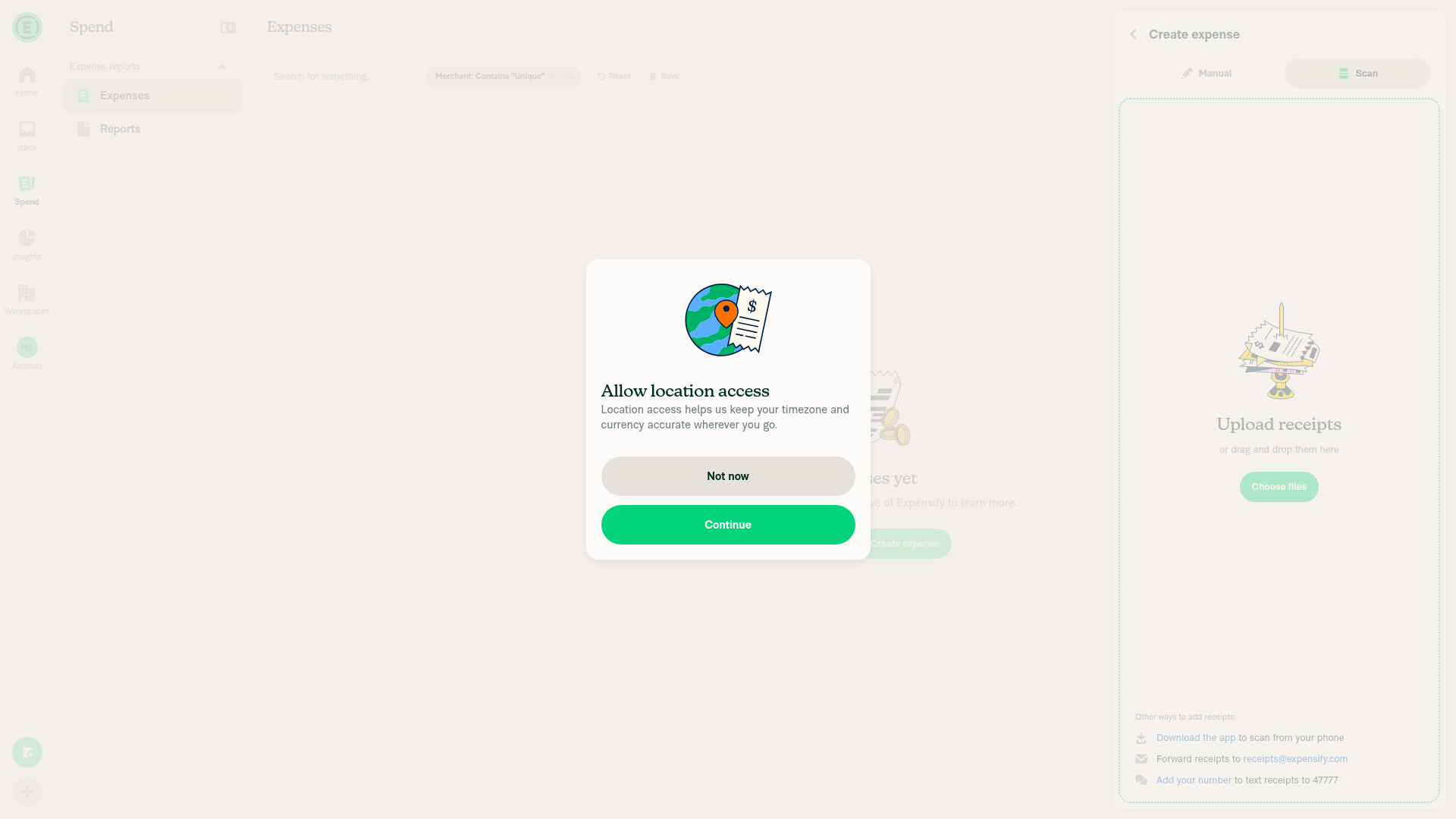
  • Web verification: blocked by a location-access modal before expense creation. Offline network control and console inspection were unavailable in the permitted test interface. No browser confirmation is claimed.
  • Staged code review: no violations found. Human Tests and QA sections remain unchanged.

Expense creation blocked at location-access modal

After merging main on 2026-11-04:

  • Targeted optimistic tracking and SearchUpdate tests: 2 suites, 41 tests passed.
  • Storybook smoke test and React Compiler check on both changed hooks: passed.
  • Full Jest suite: attempted; exceeded the 10-minute limit, with failures including missing installed Onyx get/multiGet APIs outside this PR's changes.
  • Typecheck: failed on missing dependencies/types, including Onyx get/multiGet, modern-screenshot, and oxlint; no errors reported in the three PR-specific files.
  • Lint and lint-changed: blocked because Oxlint matched no files. Compiler check-changed could not resolve origin/; the explicit hook check passed.
  • Formatting: the requested prettier npm script no longer exists on main.
  • Spell-changed: failed on eight Polish words in an upstream test, outside this PR's changes.
  • Web verification: blocked by a blank handed browser session. The expense-filter flow and JS console check were not verified.
  • Staged code review: no violations found. Human Tests and QA sections remain unchanged.
Blocked web verification screenshot Blank dev NewDot page in the handed session

Fixed Issues

$ #104147
PROPOSAL: #104147 (comment)

Tests

  1. Launch app
  2. Go to spend
  3. Create expense with merchant I
  4. Tap filter - merchant - Enter I and apply filter
  5. Create expense with merchant Gj
  6. Verify: Only expenses matching the applied Merchant filter (I) should appear in the filtered results.
  • Verify that no errors appear in the JS console

Offline tests

Covered by automated tests.

QA Steps

Same as tests

  • Verify that no errors appear in the JS console

PR Author Checklist

  • I linked the correct issue in the ### Fixed Issues section above
  • I wrote clear testing steps that cover the changes made in this PR
    • I added steps for local testing in the Tests section
    • I added steps for the expected offline behavior in the Offline steps section
    • I added steps for Staging and/or Production testing in the QA steps section
    • I added steps to cover failure scenarios (i.e. verify an input displays the correct error message if the entered data is not correct)
    • I turned off my network connection and tested it while offline to ensure it matches the expected behavior (i.e. verify the default avatar icon is displayed if app is offline)
    • I tested this PR with a High Traffic account against the staging or production API to ensure there are no regressions (e.g. long loading states that impact usability).
  • I included screenshots or videos for tests on all platforms
  • I ran the tests on all platforms & verified they passed on:
    • Android: Native
    • Android: mWeb Chrome
    • iOS: Native
    • iOS: mWeb Safari
    • MacOS: Chrome / Safari
  • I verified there are no console errors (if there's a console error not related to the PR, report it or open an issue for it to be fixed)
  • I verified any copy / text that was added to the app is either coming verbatim from figma or has been approved by marketing (in order to get marketing approval, ask the Bug Zero team member to add the Waiting for copy label to the issue)
  • If a new code pattern is added I verified it was agreed to be used by multiple Expensify engineers
  • I tested other components that can be impacted by my changes (i.e. if the PR modifies a shared library or component like Avatar, I verified the components using Avatar are working as expected)
  • If new assets were added or existing ones were modified, I verified that:
    • The assets are optimized and compressed (for SVG files, run npm run compress-svg)
    • The assets load correctly across all supported platforms.
  • If the PR modifies code that runs when editing or sending messages, I tested and verified there is no unexpected behavior for all supported markdown - URLs, single line code, code blocks, quotes, headings, bold, strikethrough, and italic.
  • If the PR modifies a generic component, I tested and verified that those changes do not break usages of that component in the rest of the App (i.e. if a shared library or component like Avatar is modified, I verified that Avatar is working as expected in all cases)
  • If the PR modifies a component related to any of the existing Storybook stories, I tested and verified all stories for that component are still working as expected.
  • If the PR modifies a component or page that can be accessed by a direct deeplink, I verified that the code functions as expected when the deeplink is used - from a logged in and logged out account.
  • If the PR modifies the UI (e.g. new buttons, new UI components, changing the padding/spacing/sizing, moving components, etc) or modifies the form input styles:
    • I verified that all the inputs inside a form are aligned with each other.
    • I added Design label and/or tagged @Expensify/design so the design team can review the changes.
  • If the PR adds or modifies the UI:
    • I asked an AI agent to review the changes for accessibility issues and addressed its findings.
    • I tested with a screen reader (VoiceOver on macOS) and verified all new/changed elements are reachable with a logical focus order.
    • I verified all new/changed elements have meaningful accessible names and roles.
    • I verified state changes are announced (e.g. checked/unchecked, expanded/collapsed, selected).
  • I added unit tests for any new feature or bug fix in this PR to help automatically prevent regressions in this user flow.
  • If the main branch was merged into this PR after a review, I tested again and verified the outcome was still expected according to the Test steps.

Screenshots/Videos

Android: Native
Android: mWeb Chrome
iOS: Native
iOS: mWeb Safari
MacOS: Chrome / Safari

… query filters

Co-authored-by: truph01 <truph01@users.noreply.github.com>
@MelvinBot
MelvinBot requested a review from a team October 23, 2026 10:23
@melvin-bot melvin-bot Bot added Melvin-Test-Android Melvin-Test-Web Triggers Melvin to run the testing steps of the PR on web labels Oct 23, 2026
@MelvinBot

Copy link
Copy Markdown
Contributor Author

I created this PR from an upstream branch since I don't have push access to your fork.

To take ownership of this branch and be able to push updates, run:

git remote add upstream https://github.com/Expensify/App.git
git fetch upstream claude-hideNonMatchingOptimisticSearchRow
git checkout -b claude-hideNonMatchingOptimisticSearchRow upstream/claude-hideNonMatchingOptimisticSearchRow
git push -u origin claude-hideNonMatchingOptimisticSearchRow

Then you can close this PR and open a new one from your fork.

@MelvinBot

MelvinBot commented Oct 23, 2026 •

Copy link
Copy Markdown
Contributor Author

🤖 Android test steps verification results: ✅ pass

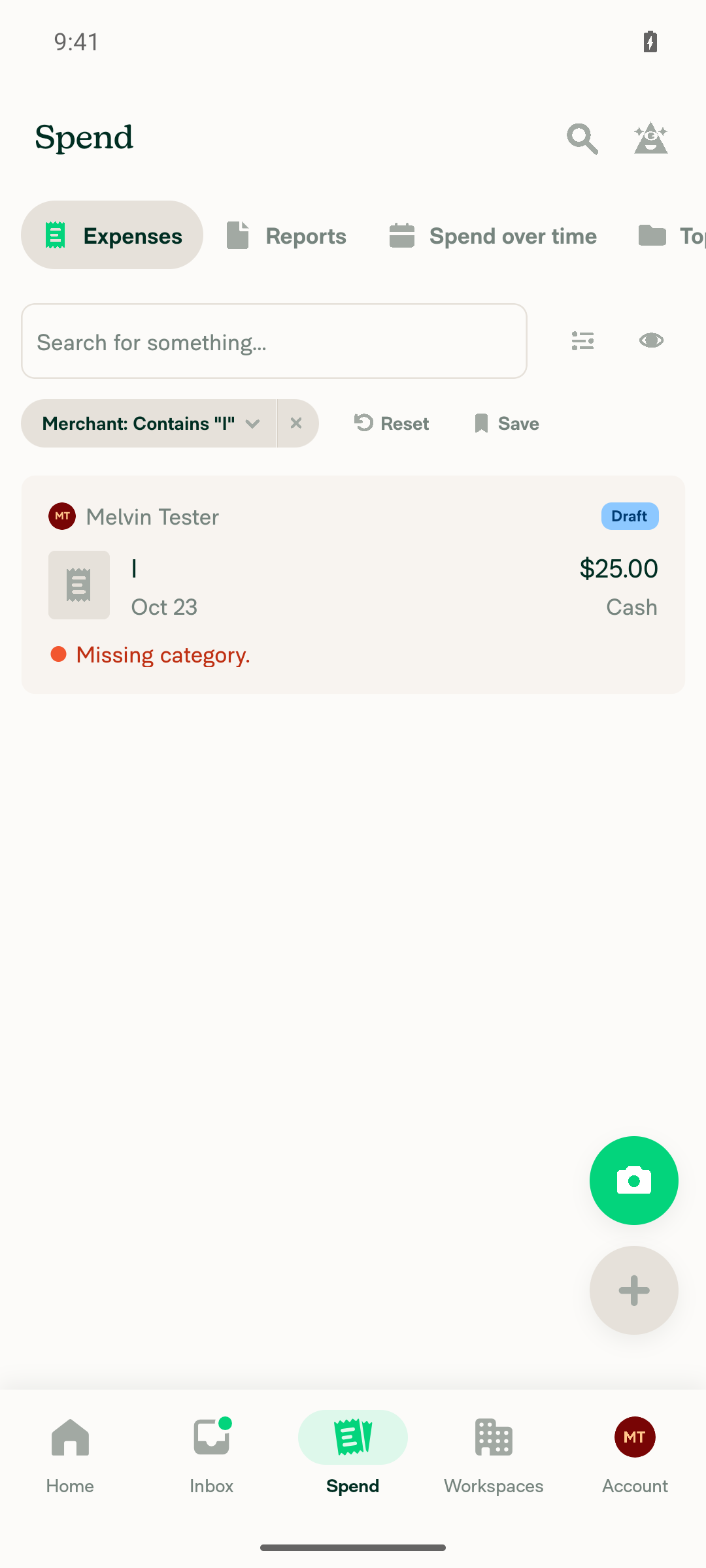
With an active Merchant contains "I" filter on Spend, a new expense with merchant "Gj" does not appear in the filtered results, and it does appear once the filter is cleared. The PR's Tests section is still empty, so I used the reproduction steps from the linked issue.
Both Gj and I expenses visible after clearing filter

Step Status
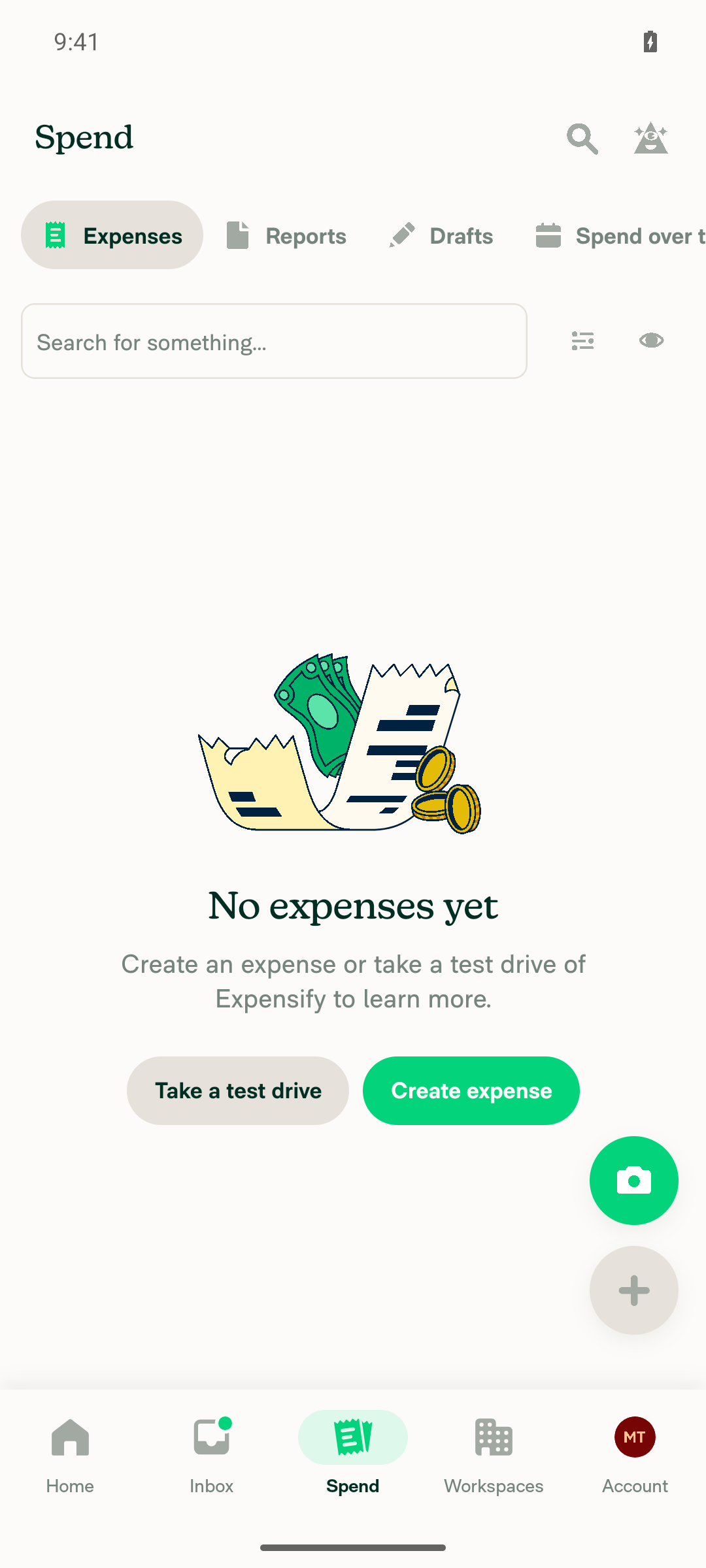
Spend (Reports > Expenses) loadsSpend > Expenses rendered with Filters/Display controls and an empty-state list.
Spend Expenses tab loaded
✅
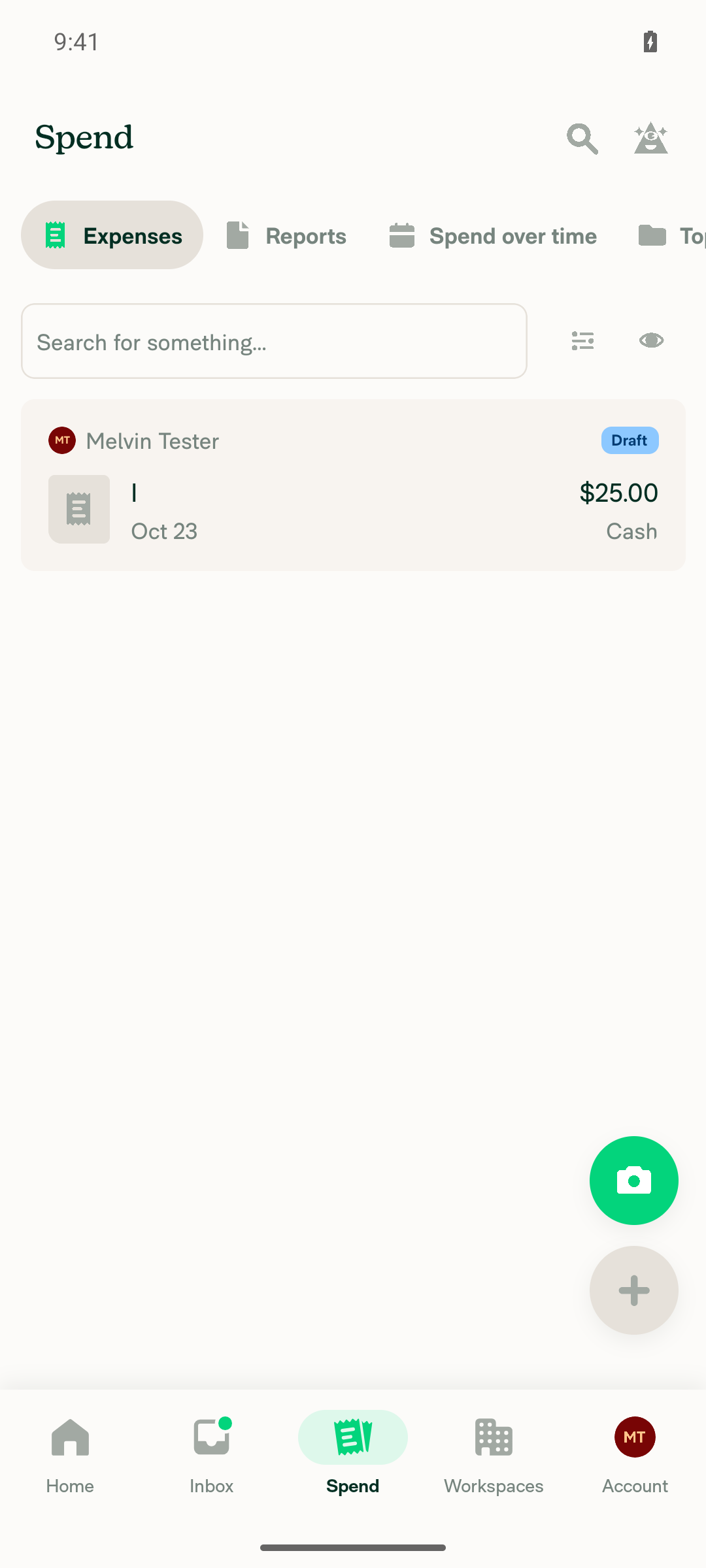
Manual expense created with merchant "I" appears in SpendCreated a $25.00 manual expense with merchant "I"; it appeared as a Draft row in the Spend list.
Merchant I expense visible in Spend
✅
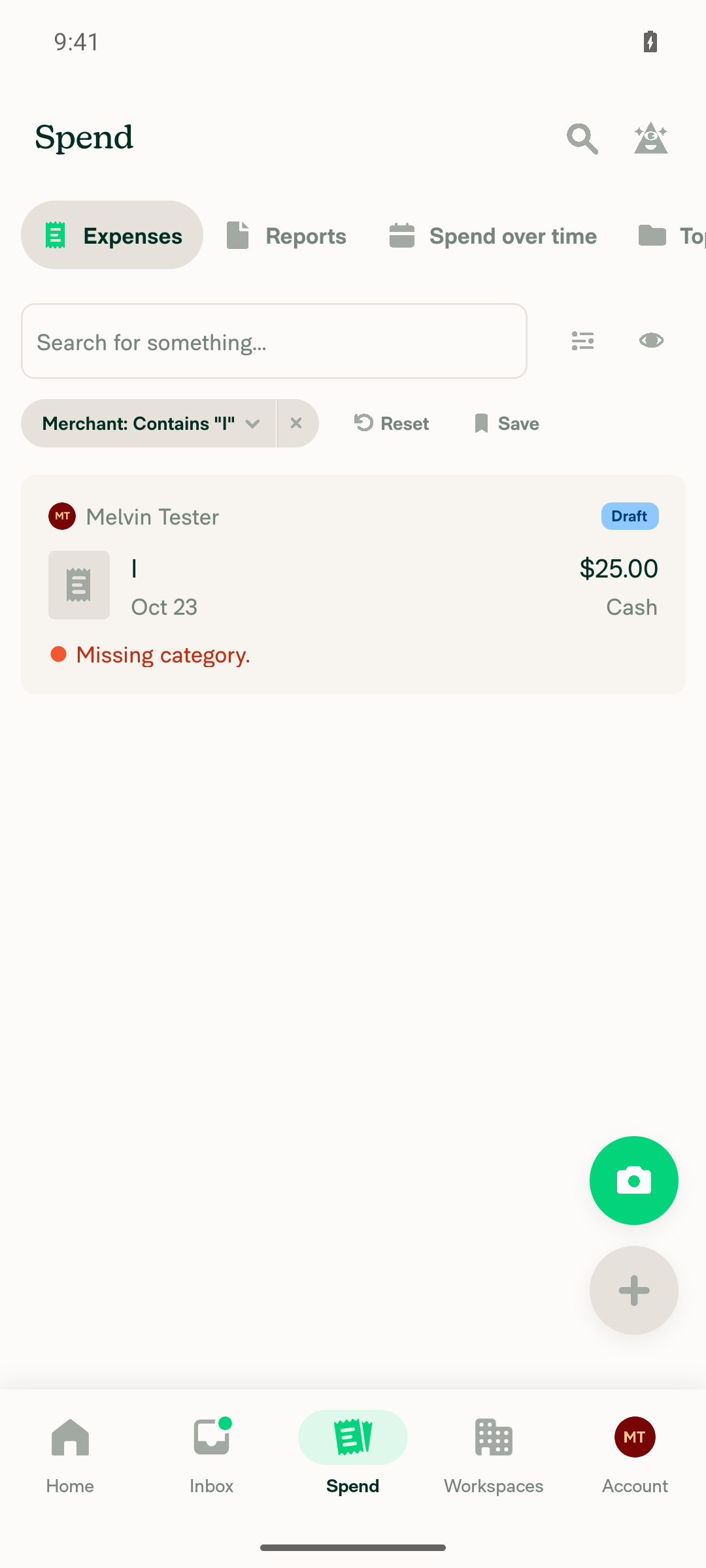
Filters > Merchant "I" shows only matching expensesApplied the Merchant contains "I" filter; the list showed only the "I" / $25.00 expense.
Merchant I filter applied showing only matching expense
✅
New expense "Gj" created from the global + button while the merchant:I filter is activeUsed the global "Create expense" action to add a $40.00 manual expense with merchant "Gj" while the filter stayed applied; the app returned to the filtered Spend view.
✅
"Gj" expense does not appear in the merchant:I filtered resultsAfter waiting about 6 seconds, the filtered list still showed only the "I" expense; a search for "Gj" on screen found no element.
Gj expense absent from merchant:I filtered results
✅
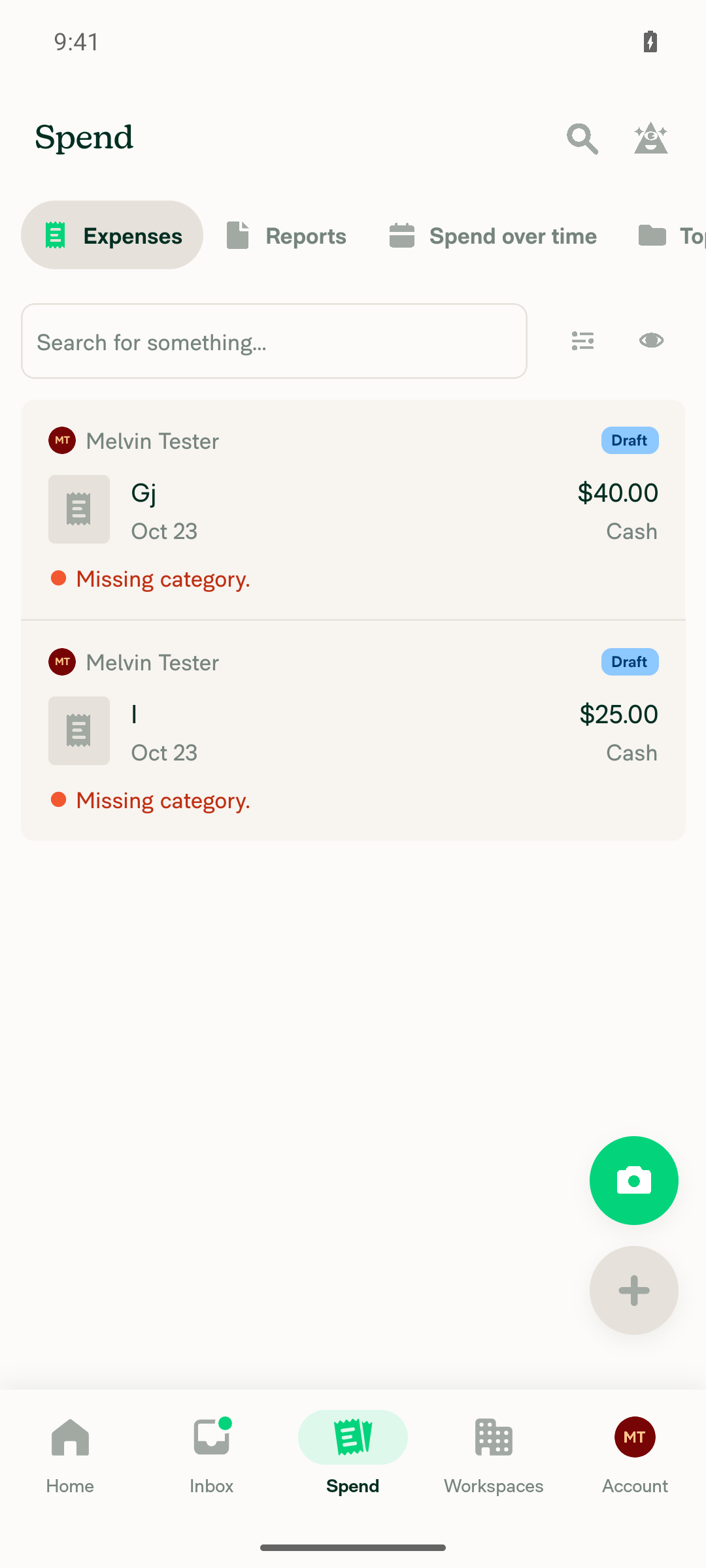
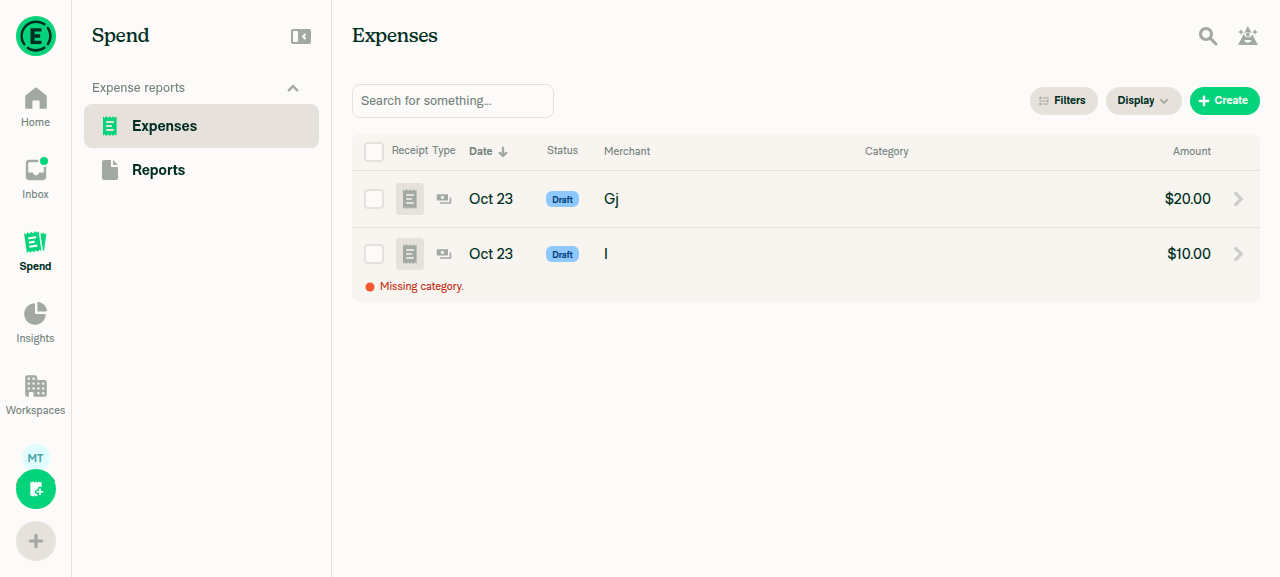
Regression: clearing the merchant filter shows the "Gj" expenseTapped Reset on the filter; both "Gj" ($40.00) and "I" ($25.00) appeared in the unfiltered Spend list.
Both Gj and I expenses visible after clearing filter
✅

view run · view recording

@MelvinBot

MelvinBot commented Oct 23, 2026 •

Copy link
Copy Markdown
Contributor Author

🤖 Web test steps verification results: ⚠️ partial

With the merchant:I filter on, a new expense with merchant "Gj" did not appear in the filtered Spend results, even after a wait, and it appeared once the filter was cleared. The fix works on web; only the JS console check couldn't run, because the test browser has no console access.
Unfiltered Spend list showing both Gj and I expenses

Step Status
Go to Spend (Reports > Expenses) and it loadsClicked the Spend tab; the "Expenses" heading rendered with Filters/Display/Create controls and a "No expenses yet" empty state.
✅
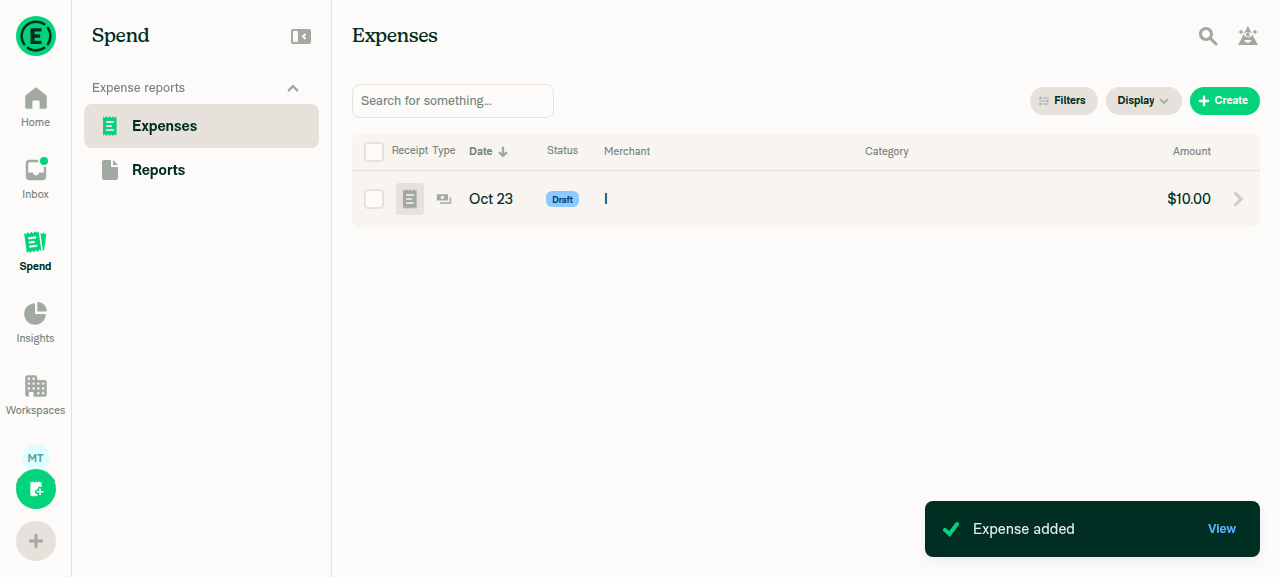
Create a manual expense with merchant "I"; it appears in SpendCreated a $10.00 expense with merchant "I"; the row appeared in the Expenses list with an "Expense added" toast.
Expense with merchant I created and visible in Spend list
✅
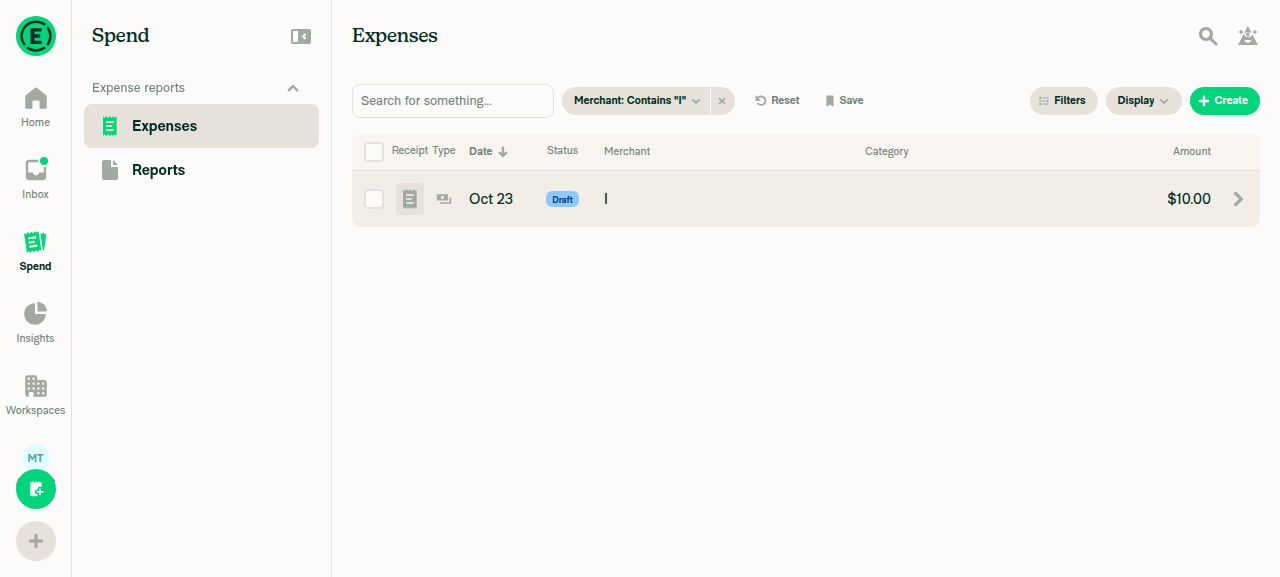
Filters > Merchant "I" shows only matching expensesApplied Merchant contains "I"; the filter chip appeared and the list showed only the "I" / $10.00 expense.
Merchant:Contains I filter chip applied with matching expense visible
✅
Create a "Gj" expense from the global Create button while the merchant:I filter is activeUsed Create > Create expense on Spend with the filter still applied; added a $20.00 expense with merchant "Gj" and saw the "Expense added" toast.
✅
"Gj" expense does not appear in the merchant:I filtered resultsRight after returning, and again after a 3-second wait, only the "I" row showed under the active filter; a visibility check for "Gj" found no match.
Filtered Spend results after creating the Gj expense, showing only the merchant-I row
✅
Regression: clearing the merchant filter shows the "Gj" expenseClicked Reset; both "Gj" ($20.00) and "I" ($10.00) appeared in the unfiltered list.
Unfiltered Spend list showing both Gj and I expenses
✅
No errors appear in the JS consoleNot verified: the web test tool has no browser console access. No error banners, toasts, or broken UI appeared during the flow.
⚠️

view run · view recording

@truph01

truph01 commented Nov 4, 2026

Copy link
Copy Markdown
Contributor

@MelvinBot Merge main and mark this PR as ready

Co-authored-by: truph01 <truph01@users.noreply.github.com>
@MelvinBot
MelvinBot marked this pull request as ready for review November 4, 2026 04:25
@MelvinBot
MelvinBot requested a review from a team as a code owner November 4, 2026 04:25
@melvin-bot
melvin-bot Bot requested review from truph01 and removed request for a team November 4, 2026 04:25
@melvin-bot

melvin-bot Bot commented Nov 4, 2026

Copy link
Copy Markdown

@truph01 Please copy/paste the Reviewer Checklist from here into a new comment on this PR and complete it. If you have the K2 extension, you can simply click: [this button]

@melvin-bot
melvin-bot Bot requested review from twisterdotcom and removed request for a team November 4, 2026 04:25
@chatgpt-codex-connector

chatgpt-codex-connector Bot commented Nov 4, 2026 •

Copy link
Copy Markdown

Codex Review Summary

This comment shows the latest Codex review activity on this pull request.

Review Status Commit Review trigger
📝 Code Review ✅ Completed 2026-11-04T04:29:17.970506Z 5ccefb3 Draft marked ready
ℹ️ About Codex in GitHub

Your team has set up Codex to review pull requests in this repo. Reviews are triggered when you

  • Open a pull request for review
  • Mark a draft as ready
  • Comment "@codex review" or "@codex security review".

Codex reacts with 👀 while any review is running, comments if it has suggestions, and reacts with 👍 once all reviews finish with no findings.

@MelvinBot

MelvinBot commented Nov 4, 2026 •

Copy link
Copy Markdown
Contributor Author

🤖 Web test steps verification results: ❌ fail

Web verification was blocked: the browser session rendered a blank page with zero nodes, including after five seconds. Human Tests/QA sections remain unchanged.
Blank dev NewDot page in the handed session

Step Status
Spend loadsBlocked: the blank page prevented navigation.
Blank dev NewDot page in the handed session
⚠️
Manual merchant I appearsNot executed: expense creation was blocked.
⚠️
merchant:I filter shows INot executed: filtering was blocked.
⚠️
Creating Gj via global Create excludes Gj immediately and after waitingNot executed: filtering and expense creation were blocked.
⚠️
Clearing filter shows bothNot executed: expenses and filter state could not be established.
⚠️
No JS console errorsNot verified: the test interface does not support console inspection.
⚠️

Merged main into your branch, resolved conflicts, and marked the PR ready for review. All 41 targeted tests, Storybook smoke testing, and explicit React Compiler checks passed. Other checks encountered dependency/tooling failures; full Jest testing timed out. Details are recorded in the PR’s AI Tests section.


view run · no recording available

@MelvinBot

Copy link
Copy Markdown
Contributor Author

⚠️ Something went wrong. This may be a transient issue. Try again. If it persists, check status.openai.com.

Run details

@truph01

truph01 commented Nov 4, 2026

Copy link
Copy Markdown
Contributor

@MelvinBot

With a filter the new expense matches (e.g. merchant:Unique and an expense from "Unique"), the row no longer shows up right away. It only appears once the server responds, and offline it doesn't show at all until reconnecting. Before this change it appeared immediately.

Co-authored-by: truph01 <truph01@users.noreply.github.com>
@MelvinBot
MelvinBot requested a review from a team as a code owner November 4, 2026 07:41
@melvin-bot
melvin-bot Bot requested review from neil-marcellini and removed request for a team November 4, 2026 07:41
@melvin-bot

melvin-bot Bot commented Nov 4, 2026

Copy link
Copy Markdown

@neil-marcellini Please copy/paste the Reviewer Checklist from here into a new comment on this PR and complete it. If you have the K2 extension, you can simply click: [this button]

@MelvinBot

MelvinBot commented Nov 4, 2026 •

Copy link
Copy Markdown
Contributor Author

🤖 Web test steps verification results: ⚠️ partial

Web verification stopped before expense setup: the location-access modal could not be dismissed. No browser confirmation was possible.
Expense creation blocked at location-access modal

Step Status
Matching Unique expense appears immediatelyNot verified: location-access modal blocked creation.
Expense creation blocked at location-access modal
❌
Matching expense appears offlineNot verified: setup blocked; test interface also lacks offline network control.
❌
Nonmatching Other expense stays excludedNot verified: expense creation blocked.
❌
Reconnecting preserves matching rowsNot verified: offline setup blocked.
❌
merchant:unique finds Unique after server responseNot verified: expense creation blocked.
❌
No JavaScript console errorsNot verified: test interface lacks console access.
❌

Fixed and pushed in f7ed13a. You were right: the eligibility check rejected every merchant filter. SearchUpdate.ts:87–111 now evaluates merchant matches, keeping matching rows optimistic while excluding nonmatches.

All 2,052 targeted tests passed, including no-server-response coverage. Lint, typecheck, spelling, compiler checks, and Storybook passed. Full Jest testing timed out; formatting verification was unavailable. Details are in AI Tests; human Tests/QA remain unchanged.


view run · no recording available

@truph01

truph01 commented Nov 4, 2026

Copy link
Copy Markdown
Contributor

Reviewer Checklist

  • I have verified the author checklist is complete (all boxes are checked off).
  • I verified the correct issue is linked in the ### Fixed Issues section above
  • I verified testing steps are clear and they cover the changes made in this PR
    • I verified the steps for local testing are in the Tests section
    • I verified the steps for Staging and/or Production testing are in the QA steps section
    • I verified the steps cover any possible failure scenarios (i.e. verify an input displays the correct error message if the entered data is not correct)
    • I turned off my network connection and tested it while offline to ensure it matches the expected behavior (i.e. verify the default avatar icon is displayed if app is offline)
  • I checked that screenshots or videos are included for tests on all platforms
  • I included screenshots or videos for tests on all platforms
  • I verified that the composer does not automatically focus or open the keyboard on mobile unless explicitly intended. This includes checking that returning the app from the background does not unexpectedly open the keyboard.
  • I verified tests pass on all platforms & I tested again on:
    • Android: HybridApp
    • Android: mWeb Chrome
    • iOS: HybridApp
    • iOS: mWeb Safari
    • MacOS: Chrome / Safari
  • If there are any errors in the console that are unrelated to this PR, I either fixed them (preferred) or linked to where I reported them in Slack
  • I verified proper code patterns were followed (see Reviewing the code)
    • I verified that any callback methods that were added or modified are named for what the method does and never what callback they handle (i.e. toggleReport and not onIconClick).
    • I verified that comments were added to code that is not self explanatory
    • I verified that any new or modified comments were clear, correct English, and explained """"why"""" the code was doing something instead of only explaining """"what"""" the code was doing.
    • I verified any copy / text that was added to the app is grammatically correct in English. It adheres to proper capitalization guidelines (note: only the first word of header/labels should be capitalized), and is either coming verbatim from figma or has been approved by marketing (in order to get marketing approval, ask the Bug Zero team member to add the Waiting for copy label to the issue)
  • If a new code pattern is added I verified it was agreed to be used by multiple Expensify engineers
  • I verified that this PR follows the guidelines as stated in the Review Guidelines
  • I verified other components that can be impacted by these changes have been tested, and I retested again (i.e. if the PR modifies a shared library or component like Avatar, I verified the components using Avatar have been tested & I retested again)
  • If a new component is created I verified that:
    • A similar component doesn't exist in the codebase
    • All props are defined accurately and each prop has a /** comment above it */
    • The file is named correctly
    • The component has a clear name that is non-ambiguous and the purpose of the component can be inferred from the name alone
    • The only data being stored in the state is data necessary for rendering and nothing else
    • For Class Components, any internal methods passed to components event handlers are bound to this properly so there are no scoping issues (i.e. for onClick={this.submit} the method this.submit should be bound to this in the constructor)
    • Any internal methods bound to this are necessary to be bound (i.e. avoid this.submit = this.submit.bind(this); if this.submit is never passed to a component event handler like onClick)
    • All JSX used for rendering exists in the render method
    • The component has the minimum amount of code necessary for its purpose, and it is broken down into smaller components in order to separate concerns and functions
  • If any new file was added I verified that:
    • The file has a description of what it does and/or why is needed at the top of the file if the code is not self explanatory
  • If a new CSS style is added I verified that:
    • A similar style doesn't already exist
    • The style can't be created with an existing StyleUtils function (i.e. StyleUtils.getBackgroundAndBorderStyle(theme.componentBG)
  • If the PR modifies code that runs when editing or sending messages, I tested and verified there is no unexpected behavior for all supported markdown - URLs, single line code, code blocks, quotes, headings, bold, strikethrough, and italic.
  • If the PR modifies a generic component, I tested and verified that those changes do not break usages of that component in the rest of the App (i.e. if a shared library or component like Avatar is modified, I verified that Avatar is working as expected in all cases)
  • If the PR modifies a component related to any of the existing Storybook stories, I tested and verified all stories for that component are still working as expected.
  • If the PR modifies a component or page that can be accessed by a direct deeplink, I verified that the code functions as expected when the deeplink is used - from a logged in and logged out account.
  • If the PR modifies the UI (e.g. new buttons, new UI components, changing the padding/spacing/sizing, moving components, etc) or modifies the form input styles:
    • I verified that all the inputs inside a form are aligned with each other.
    • I added Design label and/or tagged @Expensify/design so the design team can review the changes.
  • For any bug fix or new feature in this PR, I verified that sufficient unit tests are included to prevent regressions in this flow.
  • If the main branch was merged into this PR after a review, I tested again and verified the outcome was still expected according to the Test steps.
  • I have checked off every checkbox in the PR reviewer checklist, including those that don't apply to this PR.

Screenshots/Videos

Android: HybridApp
Screen.Recording.2026-11-04.at.17.31.39.mov
Android: mWeb Chrome
iOS: HybridApp
Screen.Recording.2026-11-04.at.17.29.26.mov
iOS: mWeb Safari
Screen.Recording.2026-11-04.at.17.24.13.mov
MacOS: Chrome / Safari
Screen.Recording.2026-11-04.at.17.21.39.mov

@truph01

truph01 commented Nov 4, 2026

Copy link
Copy Markdown
Contributor

@MelvinBot Update test section in checklist to:

1. Launch app
2. Go to spend
3. Create expense with merchant I
3. Tap filter - merchant - Enter I and apply filter
4. Create expense with merchant Gj
5. Verify:  Only expenses matching the applied Merchant filter (I) should appear in the filtered results.

@melvin-bot

melvin-bot Bot commented Nov 4, 2026

Copy link
Copy Markdown

⚠️ Something went wrong. This may be a transient issue. Try again. If it persists, check status.openai.com.

@neil-marcellini neil-marcellini left a comment

Copy link
Copy Markdown
Contributor

Choose a reason for hiding this comment

The reason will be displayed to describe this comment to others. Learn more.

Good to go. @truph01 I did notice there's a weird flash in your testing video when the new expense is added. Can we please figure out what's causing that and get rid of it in a follow up? Is it new in this PR or did it already exist on main?

@neil-marcellini
neil-marcellini merged commit d6bf6c3 into main Nov 5, 2026
47 of 48 checks passed
@neil-marcellini
neil-marcellini deleted the claude-hideNonMatchingOptimisticSearchRow branch November 5, 2026 03:04
@github-actions

github-actions Bot commented Nov 5, 2026

Copy link
Copy Markdown
Contributor

🚧 neil-marcellini has triggered a test Expensify/App build. You can view the workflow run here.

@OSBotify

OSBotify commented Nov 5, 2026

Copy link
Copy Markdown
Contributor

✋ This PR was not deployed to staging yet because QA is ongoing. It will be automatically deployed to staging after the next production release.

@github-actions

github-actions Bot commented Nov 5, 2026

Copy link
Copy Markdown
Contributor

@twisterdotcom

Copy link
Copy Markdown
Contributor

Looks good from Product: #104832 (comment)

@OSBotify

OSBotify commented Nov 6, 2026

Copy link
Copy Markdown
Contributor

🚀 Deployed to staging by https://github.com/neil-marcellini in version: 9.5.33-0 🚀

platform result
🕸 web 🕸 success ✅
🤖 android 🤖 success ✅
🍎 iOS 🍎 success ✅

Sign up for free to join this conversation on GitHub. Already have an account? Sign in to comment

Labels

Melvin-Test-Android Melvin-Test-Web Triggers Melvin to run the testing steps of the PR on web

Projects

None yet

Development

Successfully merging this pull request may close these issues.

5 participants