Skip to content

Fix action pill flashing when sending messages - #104825

Merged
carlosmiceli merged 7 commits into
Expensify:mainfrom
aimane-chnaif:fix-92663
Oct 27, 2026
Merged

carlosmiceli merged 7 commits into
Expensify:mainfrom
aimane-chnaif:fix-92663

Conversation

@aimane-chnaif

@aimane-chnaif aimane-chnaif commented Oct 23, 2026 •

Copy link
Copy Markdown
Contributor

Explanation of Change

Sending a message adds a row at index 0, which shifts the action badge target's index by one.
We then recomputed the pill from FlashList's cached viewable items, whose indexes were now stale, so a visible expense was briefly treated as above the viewport and the pill flashed.
Now the check reads FlashList's live visible range via computeVisibleIndices() and only falls back to the reported items before the list has a layout.

The shared list ref is retyped from FlatList to FlashListRef (both lists using it are FlashLists) so computeVisibleIndices() and getLayout() are reachable without a cast.

Fixed Issues

$ #92663

Tests

  1. Create new account and new workspace
  2. Open workspace chat.
  3. Create a manual expense.
  4. Send a message below the just created expense.
  5. Keep sending messages.
  6. Verify that "Submit" pill doesn't briefly appear until expense preview is no longer visible.
  7. Verify that pill shows and remains displayed after preview is no longer visible.
  • Verify that no errors appear in the JS console

Offline tests

Same as Tests

QA Steps

Same as Tests

  • Verify that no errors appear in the JS console

PR Author Checklist

  • I linked the correct issue in the ### Fixed Issues section above
  • I wrote clear testing steps that cover the changes made in this PR
    • I added steps for local testing in the Tests section
    • I added steps for the expected offline behavior in the Offline steps section
    • I added steps for Staging and/or Production testing in the QA steps section
    • I added steps to cover failure scenarios (i.e. verify an input displays the correct error message if the entered data is not correct)
    • I turned off my network connection and tested it while offline to ensure it matches the expected behavior (i.e. verify the default avatar icon is displayed if app is offline)
    • I tested this PR with a High Traffic account against the staging or production API to ensure there are no regressions (e.g. long loading states that impact usability).
  • I included screenshots or videos for tests on all platforms
  • I ran the tests on all platforms & verified they passed on:
    • Android: Native
    • Android: mWeb Chrome
    • iOS: Native
    • iOS: mWeb Safari
    • MacOS: Chrome / Safari
  • I verified there are no console errors (if there's a console error not related to the PR, report it or open an issue for it to be fixed)
  • I verified any copy / text that was added to the app is either coming verbatim from figma or has been approved by marketing (in order to get marketing approval, ask the Bug Zero team member to add the Waiting for copy label to the issue)
  • If a new code pattern is added I verified it was agreed to be used by multiple Expensify engineers
  • I tested other components that can be impacted by my changes (i.e. if the PR modifies a shared library or component like Avatar, I verified the components using Avatar are working as expected)
  • If new assets were added or existing ones were modified, I verified that:
    • The assets are optimized and compressed (for SVG files, run npm run compress-svg)
    • The assets load correctly across all supported platforms.
  • If the PR modifies code that runs when editing or sending messages, I tested and verified there is no unexpected behavior for all supported markdown - URLs, single line code, code blocks, quotes, headings, bold, strikethrough, and italic.
  • If the PR modifies a generic component, I tested and verified that those changes do not break usages of that component in the rest of the App (i.e. if a shared library or component like Avatar is modified, I verified that Avatar is working as expected in all cases)
  • If the PR modifies a component related to any of the existing Storybook stories, I tested and verified all stories for that component are still working as expected.
  • If the PR modifies a component or page that can be accessed by a direct deeplink, I verified that the code functions as expected when the deeplink is used - from a logged in and logged out account.
  • If the PR modifies the UI (e.g. new buttons, new UI components, changing the padding/spacing/sizing, moving components, etc) or modifies the form input styles:
    • I verified that all the inputs inside a form are aligned with each other.
    • I added Design label and/or tagged @Expensify/design so the design team can review the changes.
  • If the PR adds or modifies the UI:
    • I asked an AI agent to review the changes for accessibility issues and addressed its findings.
    • I tested with a screen reader (VoiceOver on macOS) and verified all new/changed elements are reachable with a logical focus order.
    • I verified all new/changed elements have meaningful accessible names and roles.
    • I verified state changes are announced (e.g. checked/unchecked, expanded/collapsed, selected).
  • I added unit tests for any new feature or bug fix in this PR to help automatically prevent regressions in this user flow.
  • If the main branch was merged into this PR after a review, I tested again and verified the outcome was still expected according to the Test steps.

Screenshots/Videos

Android: Native
Android: mWeb Chrome
iOS: Native
iOS: mWeb Safari
MacOS: Chrome / Safari
before.fix.mov
after.fix.mov

@aimane-chnaif
aimane-chnaif marked this pull request as ready for review October 23, 2026 09:13
@aimane-chnaif
aimane-chnaif requested review from a team as code owners October 23, 2026 09:13
@melvin-bot
melvin-bot Bot requested review from mkhutornyi and removed request for a team October 23, 2026 09:13
@melvin-bot

melvin-bot Bot commented Oct 23, 2026

Copy link
Copy Markdown

@mkhutornyi Please copy/paste the Reviewer Checklist from here into a new comment on this PR and complete it. If you have the K2 extension, you can simply click: [this button]

@melvin-bot
melvin-bot Bot requested review from dylanexpensify and removed request for a team October 23, 2026 09:13
@chatgpt-codex-connector

chatgpt-codex-connector Bot commented Oct 23, 2026 •

Copy link
Copy Markdown

Codex Review Summary

This comment shows the latest Codex review activity on this pull request.

Review Status Commit Review trigger
📝 Code Review ✅ Completed 2026-10-25T17:28:22.345376Z 19e38e6 Manual request
ℹ️ About Codex in GitHub

Your team has set up Codex to review pull requests in this repo. Reviews are triggered when you

  • Open a pull request for review
  • Mark a draft as ready
  • Comment "@codex review" or "@codex security review".

Codex reacts with 👀 while any review is running, comments if it has suggestions, and reacts with 👍 once all reviews finish with no findings.

@codecov

codecov Bot commented Oct 23, 2026 •

Copy link
Copy Markdown

Codecov Report

❌ Looks like you've decreased code coverage for some files. Please write tests to increase, or at least maintain, the existing level of code coverage. See our documentation here for how to interpret this table.

Files with missing lines Coverage Δ
...equestReportView/MoneyRequestReportUnifiedList.tsx 0.71% <ø> (ø)
src/hooks/useReportScrollManager/index.native.ts 88.88% <100.00%> (ø)
src/pages/inbox/ActionListContext.tsx 100.00% <100.00%> (ø)
...box/report/useReportUnreadMessageScrollTracking.ts 100.00% <100.00%> (+1.19%) ⬆️
src/hooks/useReportActionsScroll.ts 96.39% <42.85%> (-1.76%) ⬇️
... and 11 files with indirect coverage changes

dylanexpensify
dylanexpensify previously approved these changes Oct 23, 2026

@dylanexpensify dylanexpensify left a comment

Copy link
Copy Markdown
Contributor

Choose a reason for hiding this comment

The reason will be displayed to describe this comment to others. Learn more.

Looks good from product POV

@mkhutornyi

mkhutornyi commented Oct 25, 2026 •

Copy link
Copy Markdown
Contributor

Reviewer Checklist

  • I have verified the author checklist is complete (all boxes are checked off).
  • I verified the correct issue is linked in the ### Fixed Issues section above
  • I verified testing steps are clear and they cover the changes made in this PR
    • I verified the steps for local testing are in the Tests section
    • I verified the steps for Staging and/or Production testing are in the QA steps section
    • I verified the steps cover any possible failure scenarios (i.e. verify an input displays the correct error message if the entered data is not correct)
    • I turned off my network connection and tested it while offline to ensure it matches the expected behavior (i.e. verify the default avatar icon is displayed if app is offline)
  • I checked that screenshots or videos are included for tests on all platforms
  • I included screenshots or videos for tests on all platforms
  • I verified that the composer does not automatically focus or open the keyboard on mobile unless explicitly intended. This includes checking that returning the app from the background does not unexpectedly open the keyboard.
  • I verified tests pass on all platforms & I tested again on:
    • Android: HybridApp
    • Android: mWeb Chrome
    • iOS: HybridApp
    • iOS: mWeb Safari
    • MacOS: Chrome / Safari
  • If there are any errors in the console that are unrelated to this PR, I either fixed them (preferred) or linked to where I reported them in Slack
  • I verified any copy / text that was added to the app is either coming verbatim from figma or has been approved by marketing (in order to get marketing approval, ask the Bug Zero team member to add the Waiting for copy label to the issue)
  • If a new code pattern is added I verified it was agreed to be used by multiple Expensify engineers
  • I verified other components that can be impacted by these changes have been tested, and I retested again (i.e. if the PR modifies a shared library or component like Avatar, I verified the components using Avatar have been tested & I retested again)
  • If a new component is created I verified that:
    • A similar component doesn't exist in the codebase
    • All props are defined accurately
    • The component has a clear name that is non-ambiguous and the purpose of the component can be inferred from the name alone
    • The only data being stored in the state is data necessary for rendering and nothing else
    • The component has the minimum amount of code necessary for its purpose, and it is broken down into smaller components in order to separate concerns and functions
  • If the PR modifies code that runs when editing or sending messages, I tested and verified there is no unexpected behavior for all supported markdown - URLs, single line code, code blocks, quotes, headings, bold, strikethrough, and italic.
  • If the PR modifies a generic component, I tested and verified that those changes do not break usages of that component in the rest of the App (i.e. if a shared library or component like Avatar is modified, I verified that Avatar is working as expected in all cases)
  • If the PR modifies a component related to any of the existing Storybook stories, I tested and verified all stories for that component are still working as expected.
  • If the PR modifies a component or page that can be accessed by a direct deeplink, I verified that the code functions as expected when the deeplink is used - from a logged in and logged out account.
  • If the PR modifies the UI (e.g. new buttons, new UI components, changing the padding/spacing/sizing, moving components, etc) or modifies the form input styles:
    • I verified that all the inputs inside a form are aligned with each other.
    • I added Design label and/or tagged @Expensify/design so the design team can review the changes.
  • If the PR adds or modifies the UI:
    • I asked an AI agent to review the changes for accessibility issues and addressed its findings.
    • I tested with a screen reader (VoiceOver on macOS) and verified all new/changed elements are reachable with a logical focus order.
    • I verified all new/changed elements have meaningful accessible names and roles.
    • I verified state changes are announced (e.g. checked/unchecked, expanded/collapsed, selected).
  • For any bug fix or new feature in this PR, I verified that sufficient unit tests are included to prevent regressions in this flow.
  • If the main branch was merged into this PR after a review, I tested again and verified the outcome was still expected according to the Test steps.
  • I have checked off every checkbox in the PR reviewer checklist, including those that don't apply to this PR.

Screenshots/Videos

Android: HybridApp
android.mov
Android: mWeb Chrome
iOS: HybridApp
ios.mp4
iOS: mWeb Safari
MacOS: Chrome / Safari
web.mov

@mkhutornyi

Copy link
Copy Markdown
Contributor

@MelvinBot review

@mkhutornyi

Copy link
Copy Markdown
Contributor

@codex review

@MelvinBot

Copy link
Copy Markdown
Contributor

Code review

The fix looks correct to me, and I found no blocking issues. CI is green apart from the reviewer checklist. I have one request and one nit.

  1. Add a unit test for the new branch. No test file changed, and Codecov shows the patch at 57% for this hook. The existing test useReportUnreadMessageScrollTrackingTest.ts:463 doesn't pass recomputeViewableItems, so it only covers the old fallback. Add a test that passes a mock, changes actionBadgeTargetIndex, and checks two things: the mock was called, and isActionBadgeAboveViewport did not change based on the stale previousViewableItems.
  2. Nit: FlatListRefType in FlashList/types.ts:7 now wraps a FlashListRef, so the name is misleading. A rename (7 files) could be a follow-up.
Why the fix works (checked against FlashList 2.3.2)
  • recomputeViewableItems() clears lastReportedViewableIndices, then recomputes from current layouts. The callback fires whenever any item is visible, even if the visible indexes match what was reported before. That covers the "positions unchanged, FlashList stays silent" case in useReportUnreadMessageScrollTracking.ts:199-209.
  • The report list passes no viewabilityConfig, so FlashList's default minimumViewTime of 250 ms applies. The pill keeps its previous state until fresh items arrive, instead of flashing from stale indexes. That is the intended behavior.
  • Edge cases behave as before:
    • If the list has no layout yet, the recompute does nothing. The old fallback returned early on empty items anyway.
    • When the target becomes -1, the code still uses the fallback, which hides the pill.
    • useMoneyRequestReportScroll doesn't pass recomputeViewableItems, so its behavior doesn't change.
  • Dropping the optional call on getNativeScrollRef in index.native.ts is safe. FlashListRef declares the method as required.

view run

@chatgpt-codex-connector

Copy link
Copy Markdown

Codex Review: Didn't find any major issues. 🎉

Reviewed commit: e42c4c282b

ℹ️ About Codex in GitHub

Codex has been enabled to automatically review pull requests in this repo. Reviews are triggered when you

  • Open a pull request for review
  • Mark a draft as ready
  • Comment "@codex review".

If Codex has suggestions, it will comment; otherwise it will react with 👍.

When you sign up for Codex through ChatGPT, Codex can also answer questions or update the PR, like "@codex address that feedback".

@MelvinBot

Copy link
Copy Markdown
Contributor

⏱️ Ran out of time before I could finish. This usually means the task was too complex or I got stuck exploring. Please try again with a more specific request or post in #melvinbot-ai.

Run details

@mkhutornyi

Copy link
Copy Markdown
Contributor

@aimane-chnaif should the title be "Submit" pill, not "Latest messages"?

@aimane-chnaif aimane-chnaif changed the title Fix the "Latest messages" pill flashing when new actions arrive Fix action pill flashing when sending messages Oct 25, 2026
@aimane-chnaif

Copy link
Copy Markdown
Contributor Author

@aimane-chnaif should the title be "Submit" pill, not "Latest messages"?

Good catch. Fixed

@mkhutornyi

Copy link
Copy Markdown
Contributor

The bug is still reproducible on iOS

bug.mp4

@MelvinBot

Copy link
Copy Markdown
Contributor

Regression check

I found no crash or correctness regressions in the code. I found two small behavior changes. I checked the code only and did not run the app.

  1. Pill updates now lag by about 250 ms on every badge target change, not just after new rows. The report list passes no viewabilityConfig, so FlashList uses its default minimumViewTime of 250 ms before it reports the recomputed items. Before this PR, a target change that didn't insert rows updated the pill at once from correct cached items. Now it waits. One possible visible case: the target moves from an off-screen action to an on-screen one, and the pill stays visible for about 250 ms. I haven't reproduced this.
  2. The fallback can't run on the report screen. The wrapper in useReportActionsScroll.ts:241 is always defined. Because of that, useReportUnreadMessageScrollTracking.ts:205 always skips the fallback, even when getListRef() returns null, for example while the list remounts on a listID change. In that case, nothing recalculates the pill until the next scroll or viewability event. To fix this, have the wrapper report whether the list ref existed, and run the fallback when it didn't.

The iOS repro that mkhutornyi reported isn't a regression, but it shows the fix doesn't fully work on iOS. I didn't investigate it here.

What I ruled out
  • Calling a missing method: The shared ref always points to a Shopify FlashList, so recomputeViewableItems exists. ReportActionsList passes it through InvertedFlashList and @components/FlashList. The money request report lists use FlashList too.
  • Extra side effects: onUnreadActionVisible already ran on every badge target change before this PR. Consumers ignore the larger changed array that the recompute produces.
  • Ordering: FlashList measures layout during the layout phase, and its commit effect runs before the parent effect. So the recompute reads updated layouts, and its cleared cache produces one fresh callback.
  • Retyping and getNativeScrollRef(): These are type-only changes for a list that was already a FlashList at runtime, and getNativeScrollRef is required on FlashListRef. Typecheck and Jest pass.
  • Money request report view: useMoneyRequestReportScroll doesn't pass recomputeViewableItems, so its behavior doesn't change.

view run

Comment thread src/pages/inbox/report/useReportUnreadMessageScrollTracking.ts
@MelvinBot

Copy link
Copy Markdown
Contributor

Code review (19e38e6)

The live-range approach looks correct, and it resolves both concerns from my last check: there is no 250 ms lag and no skipped fallback. CI is green apart from Check independent approval. I reviewed the code only. I did not run the app or check the iOS repro.

  1. Treat an empty live range as "unknown." When nothing intersects the viewport, computeVisibleIndices() returns FlashList's ConsecutiveNumbers.EMPTY, which is {startIndex: -1, endIndex: -2}. That isn't undefined, so the ?? maxIndex fallback in useReportUnreadMessageScrollTracking.ts:178 never runs. badgeTargetIndex > -2 is then always true, and the pill shows. This can happen if the cached items are non-empty but the live window has zero height or the offset is past the content. To fix this, return undefined from the wrapper in useReportActionsScroll.ts:246-253 when startIndex < 0.
  2. Add a unit test for the new path. No test file changed. Add a test to useReportUnreadMessageScrollTrackingTest.ts that passes a getVisibleIndexRange mock. It should check that a live range containing the target keeps the pill hidden, even when the stale previousViewableItems say otherwise.
What I checked (FlashList 2.3.2)
  • Guard: getLayout(0) on the ref calls tryGetLayout, which returns undefined when there is no layout manager or no data. So the guard prevents the throw in computeVisibleIndices().
  • Header offset: computeVisibleIndices() uses the scroll offset minus firstItemOffset. That matches how viewability is computed, so the list header doesn't shift the range.
  • Effect order: The effect that syncs getVisibleIndexRange into the ref runs before the actionBadgeTargetIndex effect. So the badge recalculation always reads the current accessor.
  • Unchanged paths: The unread-marker pill still uses the cached items. useMoneyRequestReportScroll doesn't pass the accessor, so its behavior doesn't change.

view run

@aimane-chnaif

Copy link
Copy Markdown
Contributor Author

https://github.com/Expensify/App/actions/runs/40216008477/job/121237162789?pr=104825

job 3 failure is unrelated. @MelvinBot fix this in a separate PR

@chatgpt-codex-connector

Copy link
Copy Markdown

Codex Review: Didn't find any major issues. Already looking forward to the next diff.

Reviewed commit: 19e38e6b74

ℹ️ About Codex in GitHub

Codex has been enabled to automatically review pull requests in this repo. Reviews are triggered when you

  • Open a pull request for review
  • Mark a draft as ready
  • Comment "@codex review".

If Codex has suggestions, it will comment; otherwise it will react with 👍.

When you sign up for Codex through ChatGPT, Codex can also answer questions or update the PR, like "@codex address that feedback".

@melvin-bot
melvin-bot Bot requested a review from carlosmiceli October 25, 2026 17:32
@MelvinBot

Copy link
Copy Markdown
Contributor

Regression check (19e38e6)

I found one possible regression on web and one code risk. Neither one causes a crash. The full web test results are in the next comment.

  1. Possible regression: the pill can show one message late. In the web run, the expense preview had already scrolled fully out of view after the 10th message, but the "Submit" pill didn't appear. It appeared only after the 11th message. I haven't confirmed this against main or reproduced it a second time.
    • Likely cause: The live range is read only when onViewableItemsChanged runs. When you send a message, the badge-index effect at line 202 reads the range at commit, which can be before the scroll to the bottom finishes. After the list settles at the bottom, the visible index set is often the same as before (for example, [0..N]), so FlashList doesn't call back. Nothing then corrects the result.
    • Why it matters: main shows the pill too early (the original flicker). This PR can show it too late. The recomputeViewableItems() call in your first commit covered this case, and 19e38e6 dropped it.
    • To check: Send messages until the preview just leaves the viewport, then see whether the pill appears on that send or on the next one.
  2. Code risk: an empty live range always shows the pill. I raised this in my last review, and it is still open. When nothing intersects the viewport, computeVisibleIndices() returns {startIndex: -1, endIndex: -2}. That value isn't undefined, so the ?? maxIndex fallback never runs, and badgeTargetIndex > -2 is always true. To fix this, return undefined from useReportActionsScroll.ts:246 when startIndex < 0.
What I ruled out
  • Different visibility rules: The live range and FlashList's viewability both count an item as visible if any pixel shows, and both use the same scroll offset. So they agree once the list settles.
  • Calling a method too early: The getLayout(0) guard returns undefined before layout, so computeVisibleIndices() can't throw.
  • Other screens: useMoneyRequestReportScroll doesn't pass getVisibleIndexRange, so the money request report view doesn't change. The unread-marker ("Latest messages") pill still uses the cached items, so it doesn't change either.
  • Retyping the ref and getNativeScrollRef(): These are type-only changes. The list was already a FlashList at runtime.
  • Web flows: Clicking the pill, returning to the bottom, and leaving and reopening the chat all worked on web.

view run

@MelvinBot

MelvinBot commented Oct 25, 2026 •

Copy link
Copy Markdown
Contributor

🤖 Web test steps verification results: ✅ pass

The "Submit" pill stays hidden while the expense preview is visible and appears after the preview scrolls out of view. It also hides and shows correctly after you click it, return to the newest message, or leave and reopen the chat.
Pill shows Submit after scrolling to bottom

Step Status
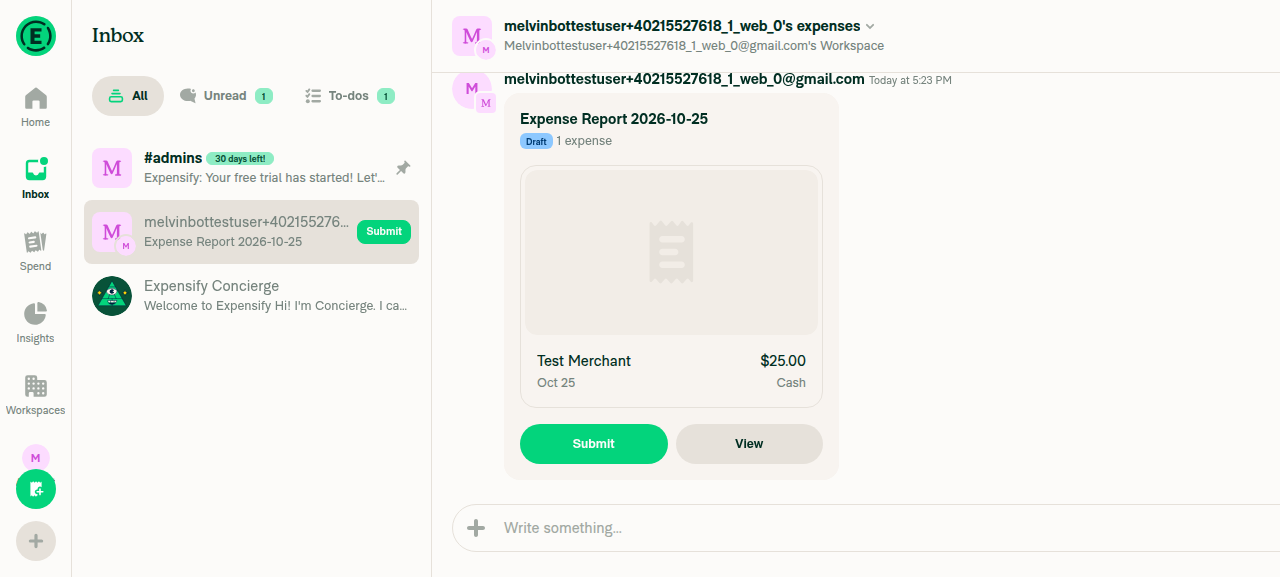
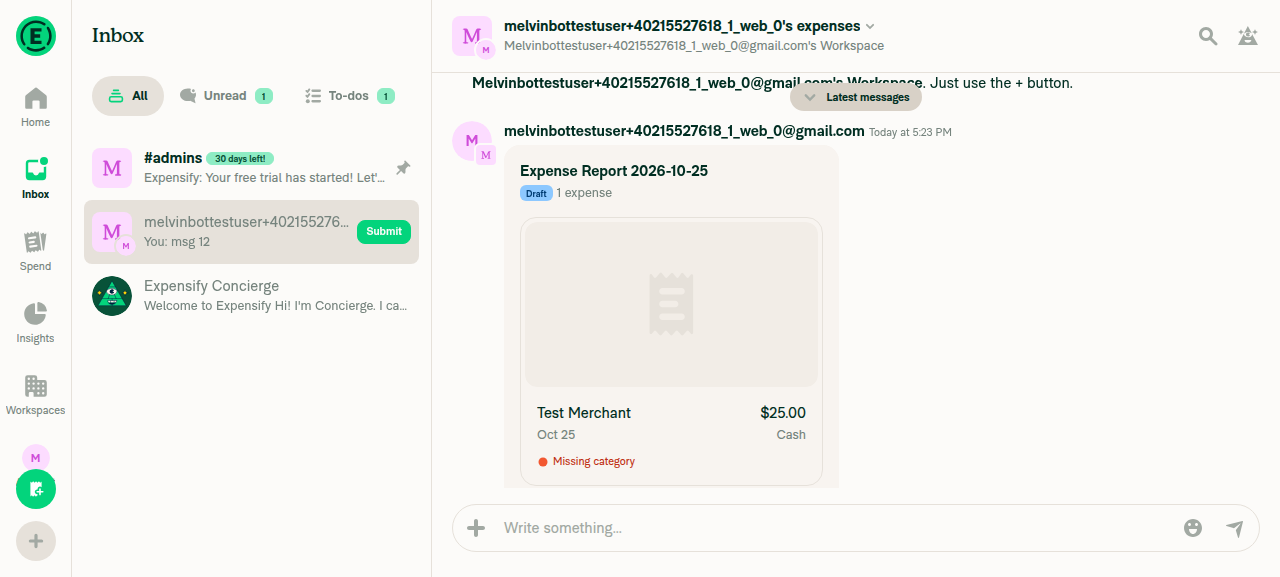
1. Right after the expense preview appears (still visible), the pill is not shownAfter the manual expense was created, the preview showed its own Submit and View buttons, and no pill appeared above the composer.
Expense preview visible, no pill
✅
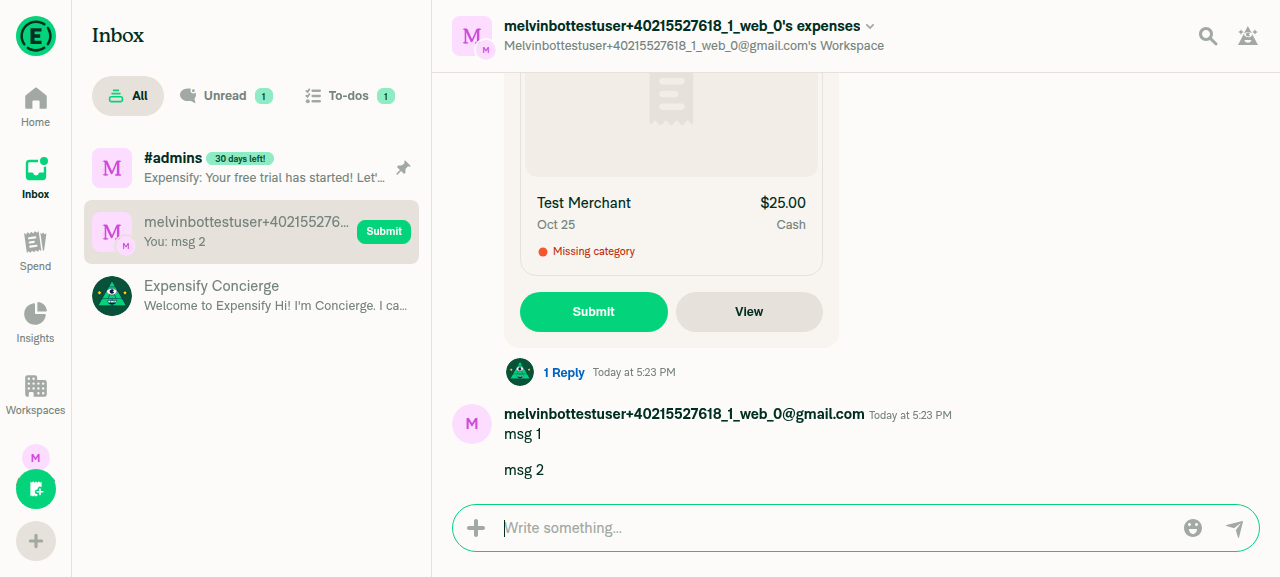
2. Send a short message; with the preview still visible, the pill does not appearAfter "msg 1" and "msg 2" were sent, the preview stayed mostly on screen and no pill appeared.
Two messages sent, preview visible, no pill
✅
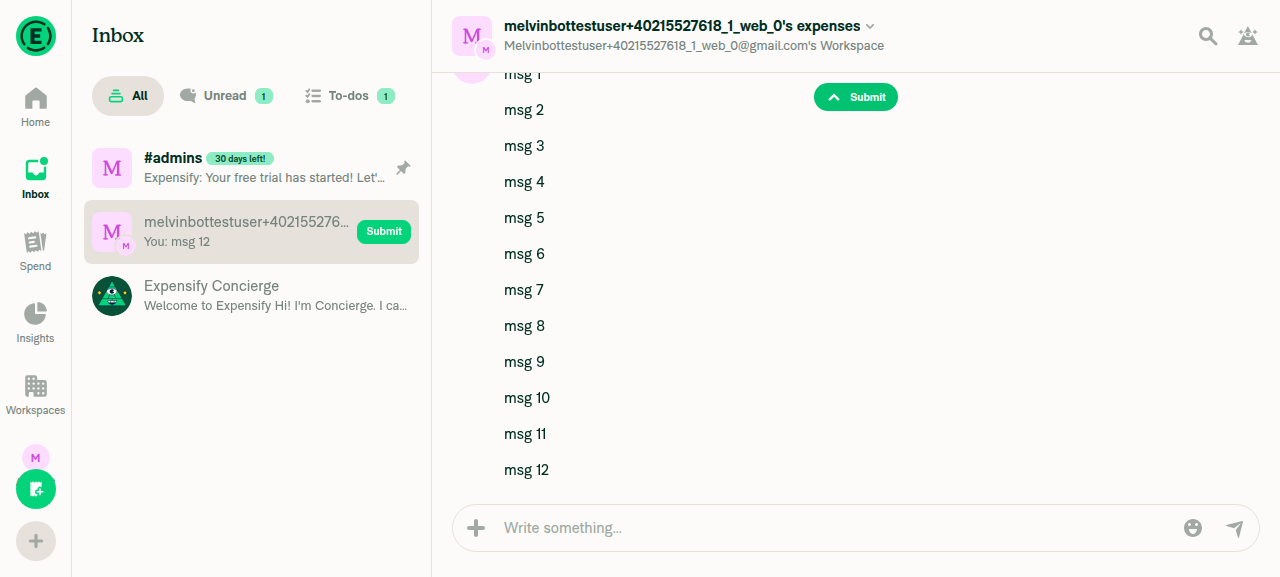
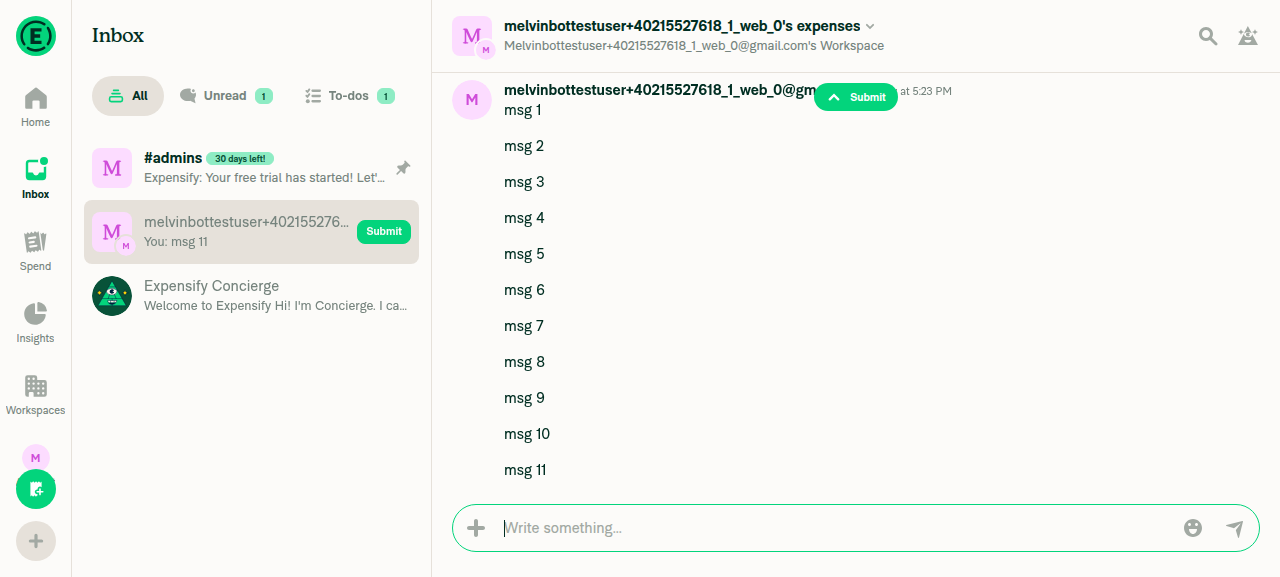
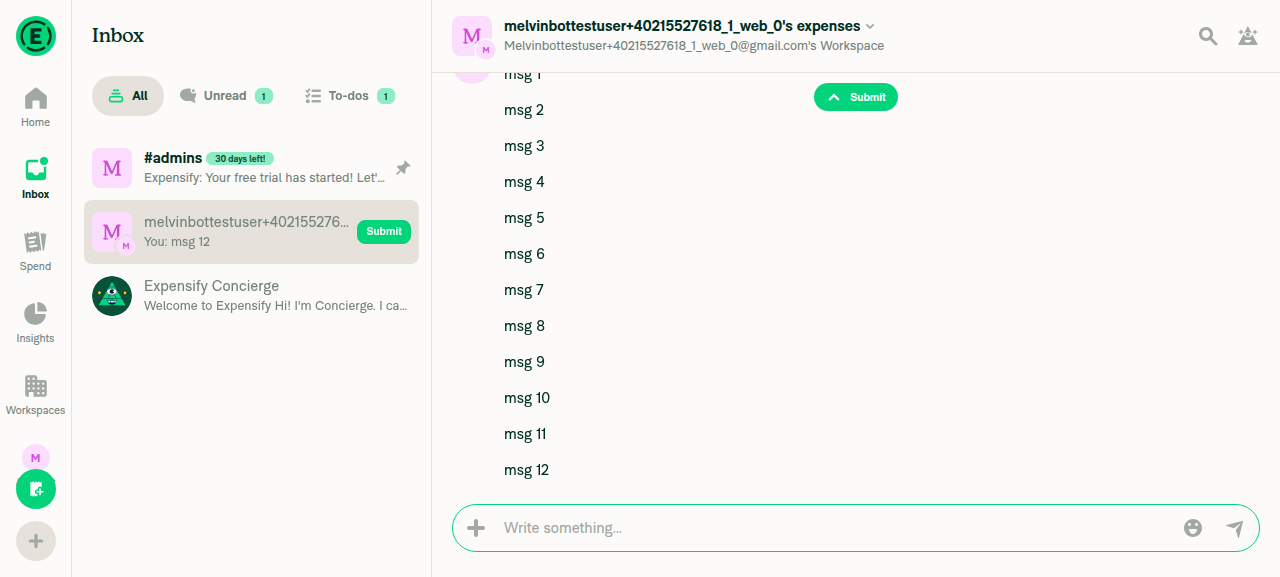
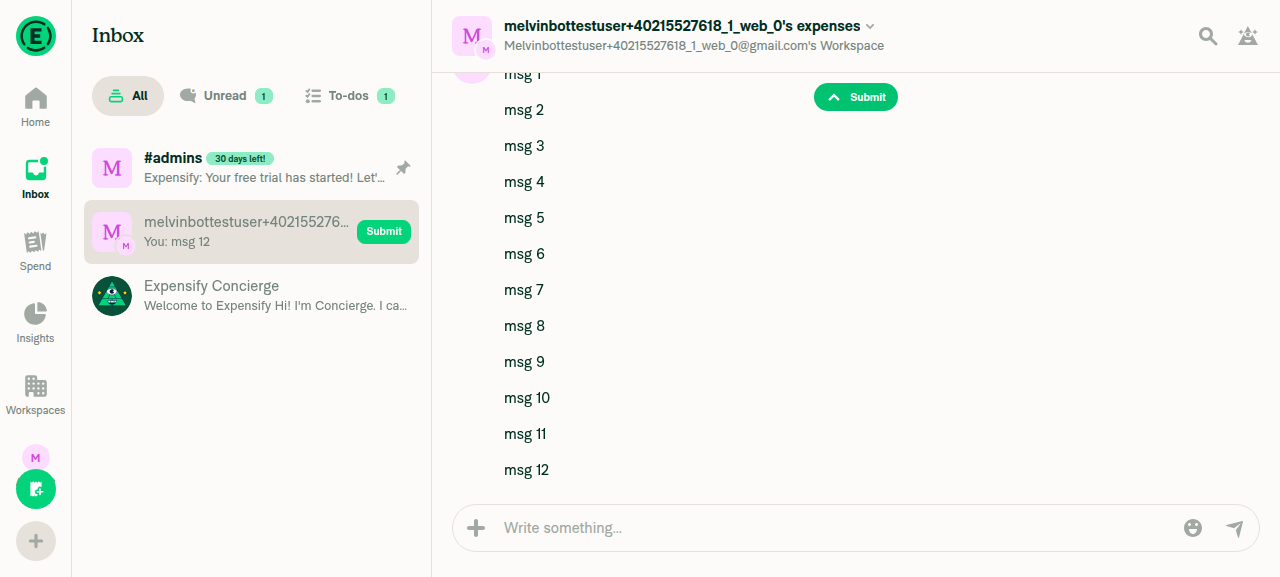
3. Keep sending messages until the preview scrolls out of view; the pill shows and staysAfter 10 messages, the preview was fully off-screen, but the pill didn't appear yet. It appeared after the 11th message and stayed after the 12th.
Submit pill appears after preview scrolls out
Submit pill stays after another message
✅
4. Click the pill: the list scrolls to the preview, and the pill hides once the preview is visibleClicking "Submit" scrolled to the preview, and the pill changed to "Latest messages."
Pill click scrolled to preview
✅
5. Scroll back down to the newest message (preview out of view): the pill reappearsClicking "Latest messages" returned to the bottom, and the pill changed back to "Submit."
Pill reappears at bottom
✅
6. Manually scroll up until the preview is just visible: the pill hidesWheel scrolling didn't reliably move the list in the test browser. The tester checked this through the pill's own scroll-to-preview action instead, and the pill hid once the preview became visible.
Pill hides once expense preview is visible
✅
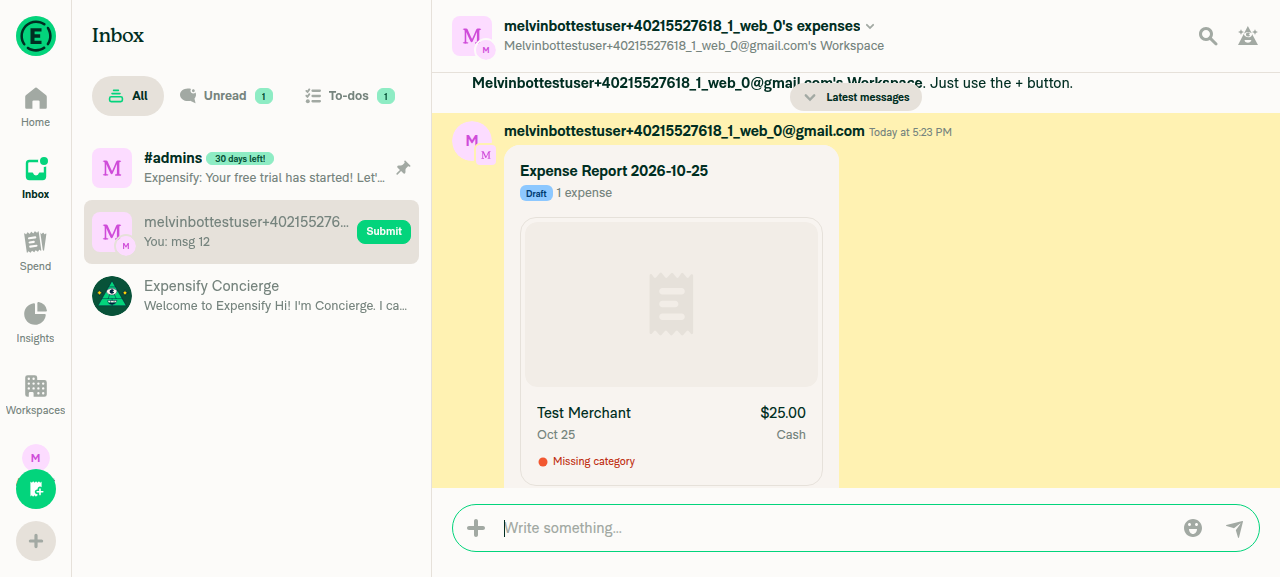
7. Navigate to another chat (Concierge) and back: the pill state is correctConcierge showed no pill. Back in the workspace chat, the highlighted preview was visible with the pill hidden. After scrolling to the bottom, "Submit" showed again.
Back in workspace chat, preview visible
Pill shows Submit after scrolling to bottom
✅
8. No new errors related to FlashList, computeVisibleIndices, or getLayoutThe web test tool can't read the JS console, so I couldn't check console errors directly. No error screens or broken UI appeared during the run.
✅

view run · view recording

@mkhutornyi

mkhutornyi commented Oct 25, 2026 •

Copy link
Copy Markdown
Contributor

Possible regression: the pill can show one message late. In the web run, the expense preview had already scrolled fully out of view after the 10th message, but the "Submit" pill didn't appear. It appeared only after the 11th message. I haven't confirmed this against main or reproduced it a second time.

I am not able to reproduce

not.repro.mov

And I don't think this is a regression.
The live range is read after FlashList measures the new row, so it isn't stale at commit.
FlashList counts a row as visible while any pixel of its layout box (including padding) is in the viewport, so the preview can look gone a send before it counts as gone.
main reaches the same end state on the same send, just with the flicker first.
Happy to look again if it reproduces with the preview's box fully out of view.

@MelvinBot

Copy link
Copy Markdown
Contributor

I opened [No QA] Fix flaky Select all query in WorkspaceCategoriesTest as a draft to fix the job 3 failure. You're right that it's unrelated to this PR. The test passes locally on both main and this PR's head.

Cause: The categories table's column header is a sticky FlashList row. Once the list loads, FlashList renders the header twice: once as a cell and once as the sticky overlay. Each copy has a "Select all" checkbox. When getByLabelText runs after the sticky copy mounts, it finds both checkboxes and throws. I confirmed locally that two matches appear after the list settles.

Fix: Both tests now use getAllByLabelText(...).at(0), which matches the existing pattern in WorkspaceTagsTest.tsx. Both checkboxes call the same handleSelectAll. WorkspaceCategoriesTest passes locally, and ESLint is clean.

Re-run job 3 here to get this PR green in the meantime.


view run

@aimane-chnaif

Copy link
Copy Markdown
Contributor Author

@carlosmiceli job 3 failure is unrelated and being fixed separately in #104939.

@carlosmiceli
carlosmiceli merged commit a842c3d into Expensify:main Oct 27, 2026
35 of 36 checks passed
@OSBotify

Copy link
Copy Markdown
Contributor

✋ This PR was not deployed to staging yet because QA is ongoing. It will be automatically deployed to staging after the next production release.

@github-actions

Copy link
Copy Markdown
Contributor

🚧 carlosmiceli has triggered a test Expensify/App build. You can view the workflow run here.

@github-actions

Copy link
Copy Markdown
Contributor

@OSBotify

Copy link
Copy Markdown
Contributor

🚀 Deployed to staging by https://github.com/carlosmiceli in version: 9.5.24-1 🚀

platform result
🕸 web 🕸 success ✅
🤖 android 🤖 cancelled 🔪
🍎 iOS 🍎 cancelled 🔪

@MelvinBot

Copy link
Copy Markdown
Contributor

No help site update needed. This PR fixes a brief flash of the action pill (for example, Submit) when you send a message below a visible expense, and no help article describes that behavior.


view run

@OSBotify

Copy link
Copy Markdown
Contributor

🚀 Deployed to production by https://github.com/jasperhuangg in version: 9.5.24-8 🚀

platform result
🕸 web 🕸 success ✅
🤖 android 🤖 success ✅
🍎 iOS 🍎 success ✅

Bundle Size Analysis (Sentry):

Sign up for free to join this conversation on GitHub. Already have an account? Sign in to comment

Labels

None yet

Projects

None yet

Development

Successfully merging this pull request may close these issues.

6 participants