Skip to content

[Payment due @situchan] Open a support ticket straight from the Talk to a human link - #104572

Merged
jasperhuangg merged 43 commits into
Expensify:mainfrom
ishpaul777:ishpaul/684546-talk-to-human-ticket
Oct 28, 2026
Merged

jasperhuangg merged 43 commits into
Expensify:mainfrom
ishpaul777:ishpaul/684546-talk-to-human-ticket

Conversation

@ishpaul777

@ishpaul777 ishpaul777 commented Oct 21, 2026 •

Copy link
Copy Markdown
Contributor

Explanation of Change

Concierge now ends most replies with a Talk to a human link instead of escalating (Web-Expensify #56788). That link currently lands on Account > Help, where the customer still has to find and press the Talk to a human row. This adds a settings/help/talk-to-human route that performs that step for them, so the link opens a support ticket directly.

The ticket logic already existed in openSupportTicket(); the only new behaviour is an entry point for it. Ticket creation and the no-rep-available fallback to Concierge are extracted into useOpenSupportTicket, so the Help page row and this route stay identical. A route is used rather than intercepting link presses, so email links, refreshes and mobile deep links all work.

The route leaves itself before creating the ticket, so the ticket's Back returns to the chat the link was pressed in instead of this loader. With nothing behind it (a direct link) it falls back to the Help page and opens the ticket from there. Offline returns to the Help page, since ticket creation needs the network, and a ref keeps a remount from opening a second ticket.

Deploy order: this ships before Auth and Web-Expensify, which point the link here.

Fixed Issues

$ https://github.com/Expensify/Expensify/issues/684546

Tests

  1. Sign in and open any chat, for example your self DM.
  2. Send this message, replacing the domain with the one for your environment: https://new.expensify.com/settings/help/talk-to-human.
  3. Press the link in the message you just sent.
  4. Verify a support ticket is created and opened directly, with no stop on the Help page.
  5. Press Back in the ticket. Verify you return to the chat where you pressed the link, not a spinner.
  6. Go to Account > Help and press the Talk to a human row. Verify it behaves exactly as before.
  7. Open settings/help/talk-to-human directly in the URL bar. Verify it opens a ticket. Pressing Back there should land on the Help page.

Test when no rep available:

  1. Press Talk to a human in the Concierge DM. You should stay in the DM with no side panel.
  2. Press it from another chat. The side panel should open with Concierge and the centre pane should stay on that chat.
  3. Press the Help page row. The side panel should open, as before.
  • Verify that no errors appear in the JS console

Offline tests

  1. Go offline and press the link. Verify you land on Account > Help and no ticket is created.
  2. Come back online and press the Talk to a human row. Verify a ticket opens.

QA Steps

  1. Open the Concierge chat and send "I want to talk to a real person please."
  2. Press Talk to a human in the reply and verify a support ticket opens directly and Back returns to the chat.
  3. Verify the Talk to a human row under Account > Help still opens a ticket.
  • Verify that no errors appear in the JS console

PR Author Checklist

  • I linked the correct issue in the ### Fixed Issues section above
  • I wrote clear testing steps that cover the changes made in this PR
    • I added steps for local testing in the Tests section
    • I added steps for the expected offline behavior in the Offline steps section
    • I added steps for Staging and/or Production testing in the QA steps section
    • I added steps to cover failure scenarios (i.e. verify an input displays the correct error message if the entered data is not correct)
    • I turned off my network connection and tested it while offline to ensure it matches the expected behavior (i.e. verify the default avatar icon is displayed if app is offline)
    • I tested this PR with a High Traffic account against the staging or production API to ensure there are no regressions (e.g. long loading states that impact usability).
  • I included screenshots or videos for tests on all platforms
  • I ran the tests on all platforms & verified they passed on:
    • Android: Native
    • Android: mWeb Chrome
    • iOS: Native
    • iOS: mWeb Safari
    • MacOS: Chrome / Safari
  • I verified there are no console errors (if there's a console error not related to the PR, report it or open an issue for it to be fixed)
  • I verified any copy / text that was added to the app is either coming verbatim from figma or has been approved by marketing (in order to get marketing approval, ask the Bug Zero team member to add the Waiting for copy label to the issue)
  • If a new code pattern is added I verified it was agreed to be used by multiple Expensify engineers
  • I tested other components that can be impacted by my changes (i.e. if the PR modifies a shared library or component like Avatar, I verified the components using Avatar are working as expected)
  • If new assets were added or existing ones were modified, I verified that:
    • The assets are optimized and compressed (for SVG files, run npm run compress-svg)
    • The assets load correctly across all supported platforms.
  • If the PR modifies code that runs when editing or sending messages, I tested and verified there is no unexpected behavior for all supported markdown - URLs, single line code, code blocks, quotes, headings, bold, strikethrough, and italic.
  • If the PR modifies a generic component, I tested and verified that those changes do not break usages of that component in the rest of the App (i.e. if a shared library or component like Avatar is modified, I verified that Avatar is working as expected in all cases)
  • If the PR modifies a component related to any of the existing Storybook stories, I tested and verified all stories for that component are still working as expected.
  • If the PR modifies a component or page that can be accessed by a direct deeplink, I verified that the code functions as expected when the deeplink is used - from a logged in and logged out account.
  • If the PR modifies the UI (e.g. new buttons, new UI components, changing the padding/spacing/sizing, moving components, etc) or modifies the form input styles:
    • I verified that all the inputs inside a form are aligned with each other.
    • I added Design label and/or tagged @Expensify/design so the design team can review the changes.
  • If the PR adds or modifies the UI:
    • I asked an AI agent to review the changes for accessibility issues and addressed its findings.
    • I tested with a screen reader (VoiceOver on macOS) and verified all new/changed elements are reachable with a logical focus order.
    • I verified all new/changed elements have meaningful accessible names and roles.
    • I verified state changes are announced (e.g. checked/unchecked, expanded/collapsed, selected).
  • I added unit tests for any new feature or bug fix in this PR to help automatically prevent regressions in this user flow.
  • If the main branch was merged into this PR after a review, I tested again and verified the outcome was still expected according to the Test steps.

Screenshots/Videos

Android: Native
Android: mWeb Chrome
iOS: Native
iOS: mWeb Safari
MacOS: Chrome / Safari
Screen.Recording.2026-10-21.at.8.27.20.PM.mov

@ishpaul777
ishpaul777 requested review from a team as code owners October 21, 2026 13:09
@melvin-bot
melvin-bot Bot requested a review from situchan October 21, 2026 13:09
@chatgpt-codex-connector

chatgpt-codex-connector Bot commented Oct 21, 2026 •

Copy link
Copy Markdown

Codex Review Summary

This comment shows the latest Codex review activity on this pull request.

Review Status Commit Review trigger
📝 Code Review ✅ Completed 2026-10-28T17:54:00.258021Z b9957e3 Manual request
ℹ️ About Codex in GitHub

Your team has set up Codex to review pull requests in this repo. Reviews are triggered when you

  • Open a pull request for review
  • Mark a draft as ready
  • Comment "@codex review" or "@codex security review".

Codex reacts with 👀 while any review is running, comments if it has suggestions, and reacts with 👍 once all reviews finish with no findings.

@melvin-bot
melvin-bot Bot removed the request for review from a team October 21, 2026 13:09
@melvin-bot

melvin-bot Bot commented Oct 21, 2026

Copy link
Copy Markdown

@situchan Please copy/paste the Reviewer Checklist from here into a new comment on this PR and complete it. If you have the K2 extension, you can simply click: [this button]

@melvin-bot
melvin-bot Bot requested review from dylanexpensify and removed request for a team October 21, 2026 13:09
@situchan

situchan commented Oct 21, 2026 •

Copy link
Copy Markdown
Contributor

Reviewer Checklist

  • I have verified the author checklist is complete (all boxes are checked off).
  • I verified the correct issue is linked in the ### Fixed Issues section above
  • I verified testing steps are clear and they cover the changes made in this PR
    • I verified the steps for local testing are in the Tests section
    • I verified the steps for Staging and/or Production testing are in the QA steps section
    • I verified the steps cover any possible failure scenarios (i.e. verify an input displays the correct error message if the entered data is not correct)
    • I turned off my network connection and tested it while offline to ensure it matches the expected behavior (i.e. verify the default avatar icon is displayed if app is offline)
  • I checked that screenshots or videos are included for tests on all platforms
  • I included screenshots or videos for tests on all platforms
  • I verified that the composer does not automatically focus or open the keyboard on mobile unless explicitly intended. This includes checking that returning the app from the background does not unexpectedly open the keyboard.
  • I verified tests pass on all platforms & I tested again on:
    • Android: HybridApp
    • Android: mWeb Chrome
    • iOS: HybridApp
    • iOS: mWeb Safari
    • MacOS: Chrome / Safari
  • If there are any errors in the console that are unrelated to this PR, I either fixed them (preferred) or linked to where I reported them in Slack
  • I verified any copy / text that was added to the app is either coming verbatim from figma or has been approved by marketing (in order to get marketing approval, ask the Bug Zero team member to add the Waiting for copy label to the issue)
  • If a new code pattern is added I verified it was agreed to be used by multiple Expensify engineers
  • I verified other components that can be impacted by these changes have been tested, and I retested again (i.e. if the PR modifies a shared library or component like Avatar, I verified the components using Avatar have been tested & I retested again)
  • If a new component is created I verified that:
    • A similar component doesn't exist in the codebase
    • All props are defined accurately
    • The component has a clear name that is non-ambiguous and the purpose of the component can be inferred from the name alone
    • The only data being stored in the state is data necessary for rendering and nothing else
    • The component has the minimum amount of code necessary for its purpose, and it is broken down into smaller components in order to separate concerns and functions
  • If the PR modifies code that runs when editing or sending messages, I tested and verified there is no unexpected behavior for all supported markdown - URLs, single line code, code blocks, quotes, headings, bold, strikethrough, and italic.
  • If the PR modifies a generic component, I tested and verified that those changes do not break usages of that component in the rest of the App (i.e. if a shared library or component like Avatar is modified, I verified that Avatar is working as expected in all cases)
  • If the PR modifies a component related to any of the existing Storybook stories, I tested and verified all stories for that component are still working as expected.
  • If the PR modifies a component or page that can be accessed by a direct deeplink, I verified that the code functions as expected when the deeplink is used - from a logged in and logged out account.
  • If the PR modifies the UI (e.g. new buttons, new UI components, changing the padding/spacing/sizing, moving components, etc) or modifies the form input styles:
    • I verified that all the inputs inside a form are aligned with each other.
    • I added Design label and/or tagged @Expensify/design so the design team can review the changes.
  • If the PR adds or modifies the UI:
    • I asked an AI agent to review the changes for accessibility issues and addressed its findings.
    • I tested with a screen reader (VoiceOver on macOS) and verified all new/changed elements are reachable with a logical focus order.
    • I verified all new/changed elements have meaningful accessible names and roles.
    • I verified state changes are announced (e.g. checked/unchecked, expanded/collapsed, selected).
  • For any bug fix or new feature in this PR, I verified that sufficient unit tests are included to prevent regressions in this flow.
  • If the main branch was merged into this PR after a review, I tested again and verified the outcome was still expected according to the Test steps.
  • I have checked off every checkbox in the PR reviewer checklist, including those that don't apply to this PR.

Screenshots/Videos

Android: HybridApp
Android: mWeb Chrome
iOS: HybridApp
ios.mp4
iOS: mWeb Safari
MacOS: Chrome / Safari
web.mov

@ishpaul777
ishpaul777 marked this pull request as draft October 21, 2026 13:16
@situchan

Copy link
Copy Markdown
Contributor

Please ping me when ready for review. Thanks

@chatgpt-codex-connector chatgpt-codex-connector Bot left a comment

Copy link
Copy Markdown

Choose a reason for hiding this comment

The reason will be displayed to describe this comment to others. Learn more.

💡 Codex Review

Here are some automated review suggestions for this pull request.

Reviewed commit: 8b33174b58

ℹ️ About Codex in GitHub

Your team has set up Codex to review pull requests in this repo. Reviews are triggered when you

  • Open a pull request for review
  • Mark a draft as ready
  • Comment "@codex review".

If Codex has suggestions, it will comment; otherwise it will react with 👍.

Codex can also answer questions or update the PR. Try commenting "@codex address that feedback".

@codecov

codecov Bot commented Oct 21, 2026 •

Copy link
Copy Markdown

Codecov Report

❌ Looks like you've decreased code coverage for some files. Please write tests to increase, or at least maintain, the existing level of code coverage. See our documentation here for how to interpret this table.

Files with missing lines Coverage Δ
src/SCREENS.ts 100.00% <ø> (ø)
src/hooks/useOpenSupportTicket.ts 100.00% <100.00%> (ø)
src/libs/Navigation/AppNavigator/AuthScreens.tsx 81.39% <100.00%> (+0.21%) ⬆️
src/libs/Navigation/linkingConfig/config.ts 68.75% <ø> (ø)
src/pages/TalkToHumanPage.tsx 100.00% <100.00%> (ø)
src/pages/settings/HelpPage/HelpPage.tsx 90.07% <100.00%> (+3.11%) ⬆️
src/pages/inbox/ReportNavigateAwayHandler.tsx 78.35% <75.00%> (-0.11%) ⬇️
... and 65 files with indirect coverage changes

@ishpaul777
ishpaul777 marked this pull request as ready for review October 21, 2026 22:09
@ishpaul777

Copy link
Copy Markdown
Contributor Author

@situchan its ready for review

// eslint-disable-next-line react-hooks/exhaustive-deps
}, [isOffline]);

return <FullScreenLoadingIndicator />;

Copy link
Copy Markdown
Contributor

Choose a reason for hiding this comment

The reason will be displayed to describe this comment to others. Learn more.

❌ UI-1 (docs)

This screen renders FullScreenLoadingIndicator as its sole content with no navigation component (no HeaderWithBackButton or close button) and does not set shouldUseGoBackButton explicitly. If opening the support ticket hangs, the user has no visible escape route. Per UI-1, this prop is being migrated to become the default, so it should be set explicitly for now on pages where no navigation is rendered.

return <FullScreenLoadingIndicator shouldUseGoBackButton />;

Reviewed at: 37a9c92 | Please rate this suggestion with 👍 or 👎 to help us improve! Reactions are used to monitor reviewer efficiency.

Copy link
Copy Markdown
Contributor

Choose a reason for hiding this comment

The reason will be displayed to describe this comment to others. Learn more.

@MelvinBot as we discussed here, create separate PR to fix this. shouldUseGoBackButton no longer needs to be set explicitly.

Copy link
Copy Markdown
Contributor

Choose a reason for hiding this comment

The reason will be displayed to describe this comment to others. Learn more.

🤖 I couldn't open the PR. My environment still blocks edits to files under .claude/. The only copy of this rule is .claude/skills/app-coding-standards/rules/ui-1-correct-loading-indicator.md, and it is unchanged on main.

An engineer needs to replace that file with the version you approved in this comment. That version makes these changes:

  • It stops flagging a missing shouldUseGoBackButton, because the prop defaults to true (FullscreenLoadingIndicator.tsx:38).
  • It flags a missing shouldUseGoBackButton={false} only when going back doesn't make sense. Examples include global overlays, sign-in or sign-out transitions, and auth handoff pages.
  • It still suggests ActivityIndicator when a header with a back button renders in the same tree.

The file still applies to the current main without edits. Once it merges, the reviewer will stop flagging TalkToHumanPage for this.


view run

@chatgpt-codex-connector chatgpt-codex-connector Bot left a comment

Copy link
Copy Markdown

Choose a reason for hiding this comment

The reason will be displayed to describe this comment to others. Learn more.

💡 Codex Review

Here are some automated review suggestions for this pull request.

Reviewed commit: 723f39a201

ℹ️ About Codex in GitHub

Your team has set up Codex to review pull requests in this repo. Reviews are triggered when you

  • Open a pull request for review
  • Mark a draft as ready
  • Comment "@codex review".

If Codex has suggestions, it will comment; otherwise it will react with 👍.

Codex can also answer questions or update the PR. Try commenting "@codex address that feedback".

// so opening it from here would make Back return to this loader instead of the chat the link was pressed in.
// A direct link has nothing behind it to return to and goBack would then skip afterTransition, so it falls back
// to the Help page and opens the ticket from there.
const fallbackRoute = navigationRef.current?.canGoBack() ? undefined : ROUTES.SETTINGS_HELP;

Copy link
Copy Markdown

Choose a reason for hiding this comment

The reason will be displayed to describe this comment to others. Learn more.

P2 Badge Ignore the injected sidebar when detecting direct links

On a narrow-layout cold load of settings/help/talk-to-human, SplitRouter.adaptStateIfNecessary() prepends SCREENS.SETTINGS.ROOT (the cold-root behavior is also encoded in tests/navigation/GoBackTests.tsx), so this broad canGoBack() check returns true even though there is no originating page. The fallback is therefore omitted, the first Back pops only to Settings root, and openSupportTicket() records settings rather than the intended Help page as the ticket's Back target; determine whether there is outer/in-app history without counting the split navigator's injected sidebar.

Useful? React with 👍 / 👎.

Copy link
Copy Markdown
Contributor Author

Choose a reason for hiding this comment

The reason will be displayed to describe this comment to others. Learn more.

Valid but cosmetic: on a cold narrow-layout direct link, Back from the ticket lands on Settings instead of Help. The ticket still opens, and telling the injected sidebar from a real page means reading split-navigator state that differs by layout, so I'm leaving it as is.

dylanexpensify
dylanexpensify previously approved these changes Oct 22, 2026

@dylanexpensify dylanexpensify left a comment

Copy link
Copy Markdown
Contributor

Choose a reason for hiding this comment

The reason will be displayed to describe this comment to others. Learn more.

Looks good from a product perspective

@ishpaul777

Copy link
Copy Markdown
Contributor Author

@situchan gentle bump!

@situchan

Copy link
Copy Markdown
Contributor

I'll review shortly. Please fix conflict

@chatgpt-codex-connector chatgpt-codex-connector Bot left a comment

Copy link
Copy Markdown

Choose a reason for hiding this comment

The reason will be displayed to describe this comment to others. Learn more.

💡 Codex Review

Here are some automated review suggestions for this pull request.

Reviewed commit: a6ae82e93b

ℹ️ About Codex in GitHub

Your team has set up Codex to review pull requests in this repo. Reviews are triggered when you

  • Open a pull request for review
  • Mark a draft as ready
  • Comment "@codex review".

If Codex has suggestions, it will comment; otherwise it will react with 👍.

Codex can also answer questions or update the PR. Try commenting "@codex address that feedback".

Comment thread src/pages/TalkToHumanPage.tsx Resolved

@chatgpt-codex-connector chatgpt-codex-connector Bot left a comment

Copy link
Copy Markdown

Choose a reason for hiding this comment

The reason will be displayed to describe this comment to others. Learn more.

💡 Codex Review

Here are some automated review suggestions for this pull request.

Reviewed commit: 1cb5ed9f42

ℹ️ About Codex in GitHub

Your team has set up Codex to review pull requests in this repo. Reviews are triggered when you

  • Open a pull request for review
  • Mark a draft as ready
  • Comment "@codex review".

If Codex has suggestions, it will comment; otherwise it will react with 👍.

Codex can also answer questions or update the PR. Try commenting "@codex address that feedback".

@ishpaul777

Copy link
Copy Markdown
Contributor Author

@situchan can you please take another look. i added more testing steps in pr desc

Test when no rep available:

  1. Press Talk to a human in the Concierge DM. You should stay in the DM with no side panel.
  2. Press it from another chat. The side panel should open with Concierge and the centre pane should stay on that chat.
  3. Press the Help page row. The side panel should open, as before.

@ishpaul777

Copy link
Copy Markdown
Contributor Author

@MelvinBot review

@MelvinBot

Copy link
Copy Markdown
Contributor

Review (b9957e3)

I found no new issues, and both findings from my last review are fixed. A web retest passed all five steps.

  1. The Help row is disabled offline. The row now sets disabled (HelpPage.tsx:208). On web, the row was greyed out offline, pressing it did nothing, and no extra ticket appeared after reconnecting.
  2. A stale offline value can no longer win. The focus effect's cleanup cancels the earlier run (TalkToHumanPage.tsx:28-56). This also removed the isUnmounted ref and its useEffect.

The new failure handling also looks right. Every failed request now closes the pending ticket screen, and the screen closes only while it is still in front (useOpenSupportTicket.ts:37-57). ReportNavigateAwayHandler now skips reports that are still pending creation, so it doesn't race the hook (ReportNavigateAwayHandler.tsx:234-237). Only openSupportTicket sets isPendingCreation, so no other flow changes. The Concierge check stops Concierge from opening a second time when you're already in that chat.

Web test results (wide layout)
Step Status
Link pressed online from a non-Concierge chat opens a ticket directlyA ticket opened with no stop on Help.
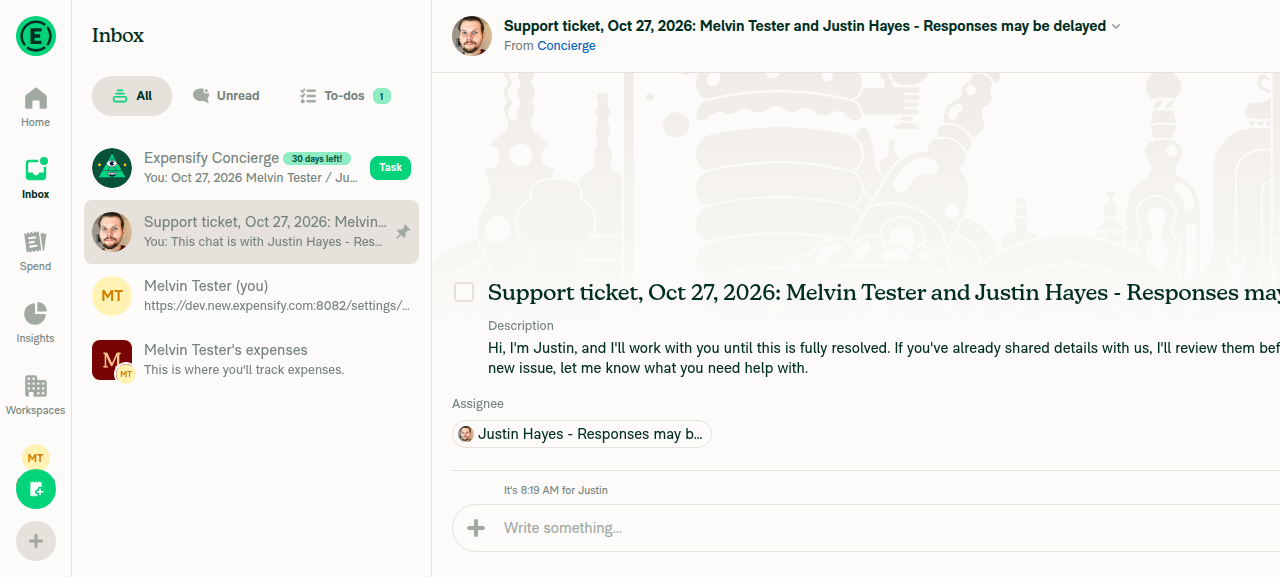
Ticket opened from link online
✅
Link pressed offline lands on Help with Help highlightedNo ticket opened.
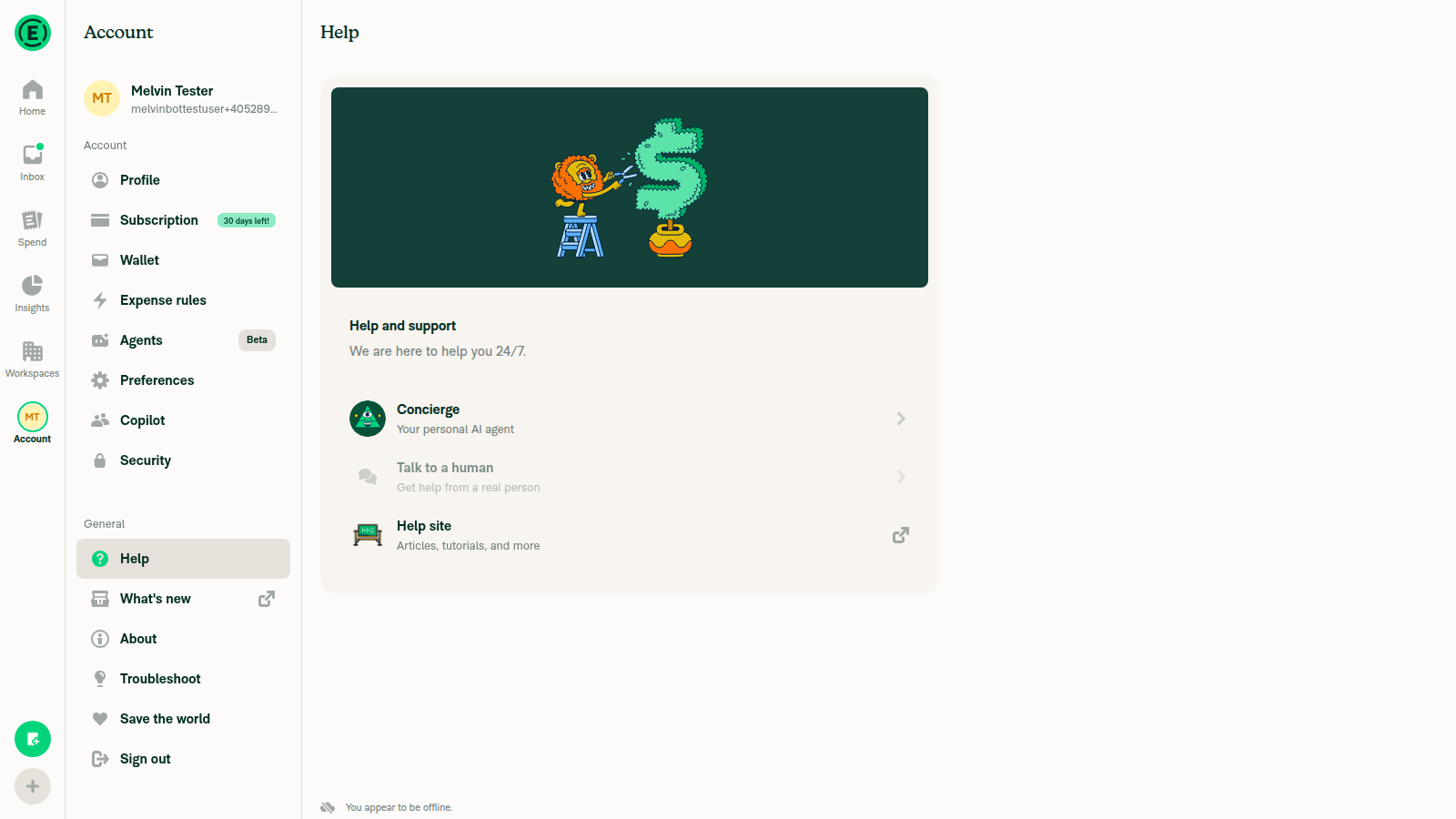
Help page offline with row disabled
✅
Offline, the Talk to a human row is disabledThe row is marked disabled, and pressing it did nothing.
✅
After reconnecting, no extra ticket appearsThe Inbox still had only one ticket.
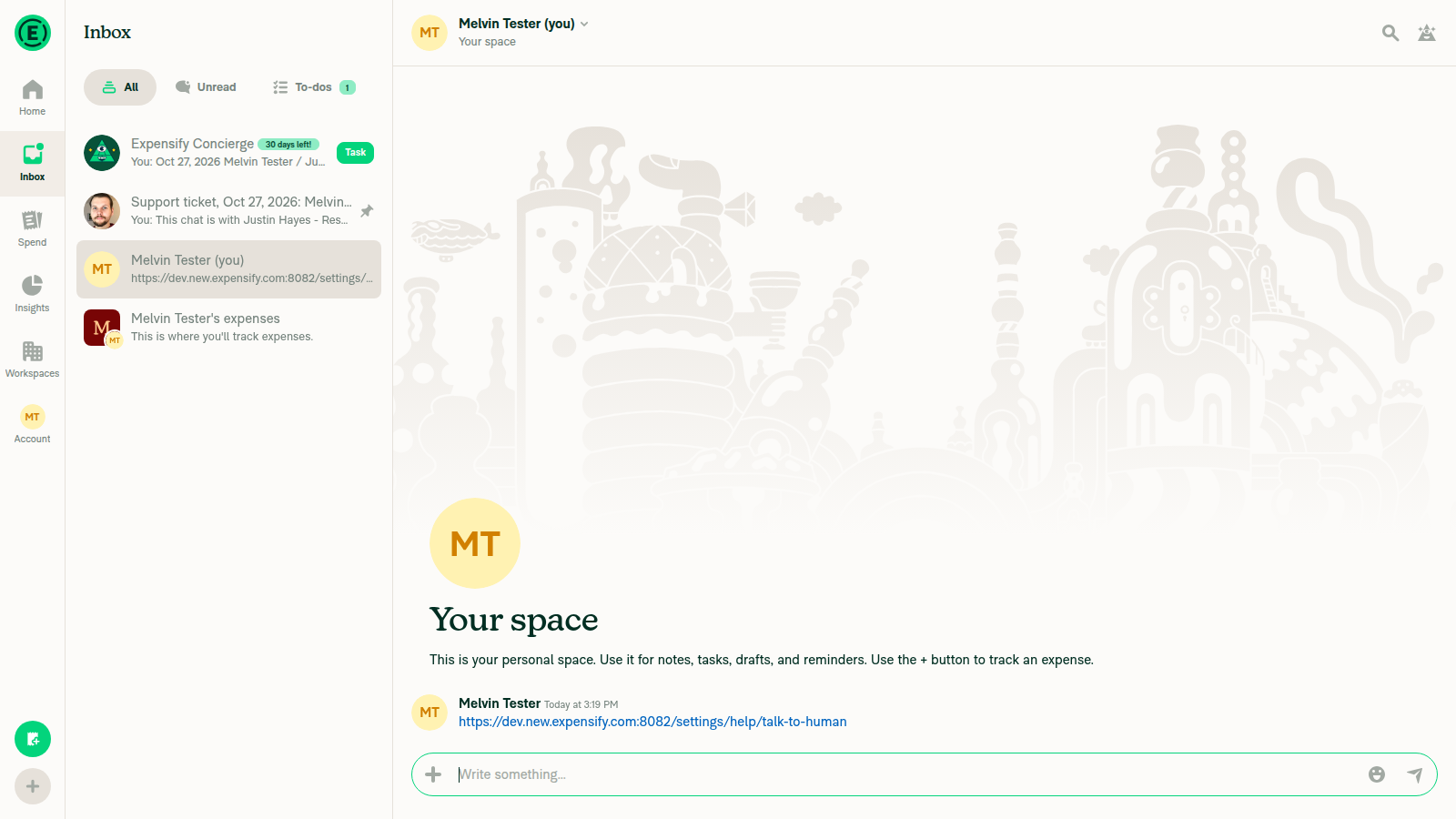
Inbox after reconnect
✅
Online, the Help row opens a ticketA new ticket opened.
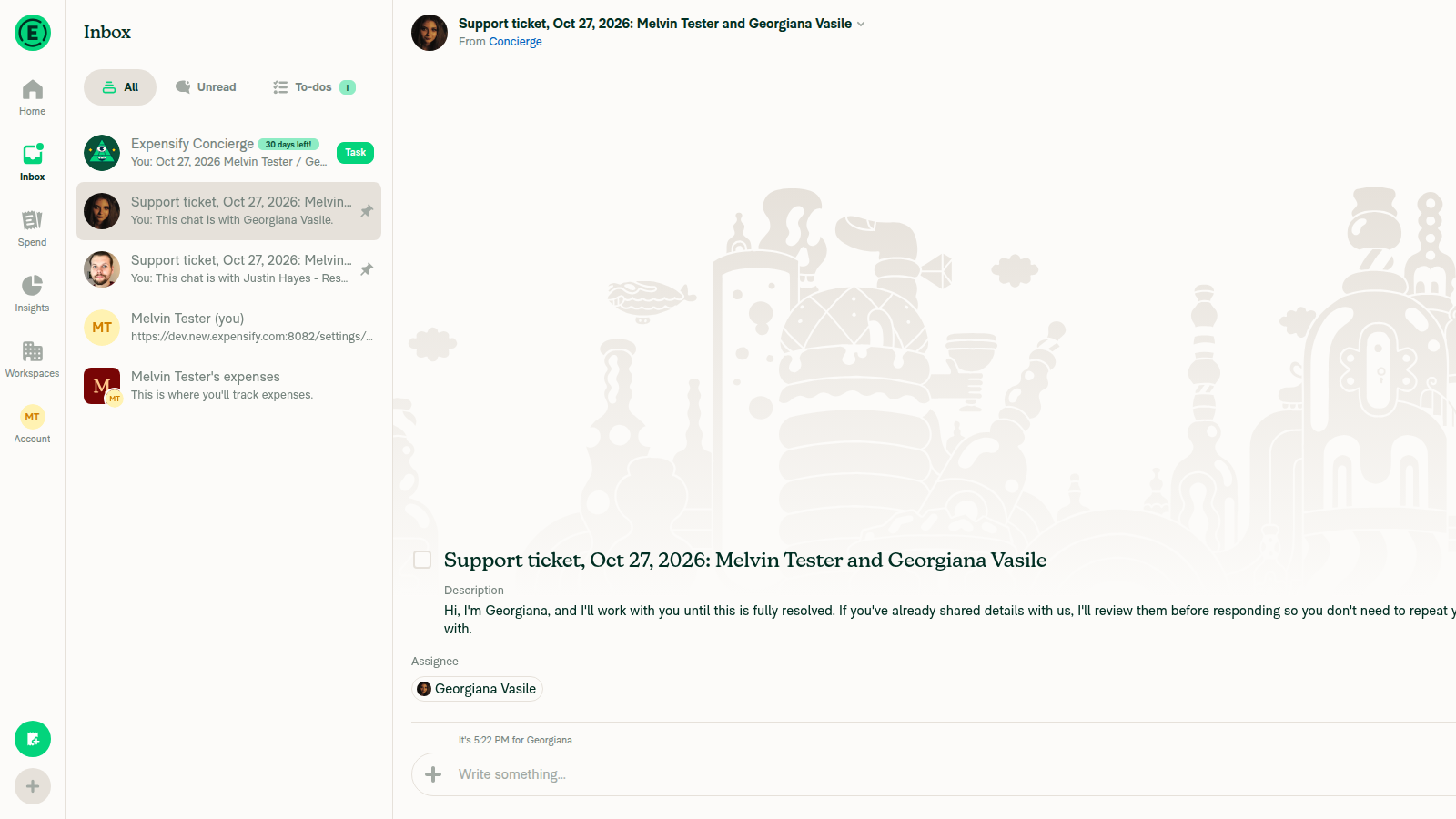
Ticket opened from Help row
✅

I couldn't test the new no-rep-available steps, because a rep was always free. I also didn't test native or press Back on the wide web layout.

@situchan situchan left a comment

Copy link
Copy Markdown
Contributor

Choose a reason for hiding this comment

The reason will be displayed to describe this comment to others. Learn more.

Looks good.
Thanks for fixing too many edge cases

@melvin-bot
melvin-bot Bot requested a review from mollfpr October 28, 2026 17:19
@melvin-bot

melvin-bot Bot commented Oct 28, 2026

Copy link
Copy Markdown

@mollfpr Please copy/paste the Reviewer Checklist from here into a new comment on this PR and complete it. If you have the K2 extension, you can simply click: [this button]

@melvin-bot melvin-bot Bot changed the title Open a support ticket straight from the Talk to a human link [Payment due @situchan] Open a support ticket straight from the Talk to a human link Oct 28, 2026
@melvin-bot

melvin-bot Bot commented Oct 28, 2026

Copy link
Copy Markdown

🎯 @situchan, thanks for reviewing and testing this PR! 🎉

A payment issue will be created for your review once this PR is deployed to production.
E/E issue linked to the PR - https://www.github.com/Expensify/Expensify/issues/684546.

If payment is not needed (e.g., regression PR review fix etc), react with 👎 to this comment to prevent the payment issue from being created.

@ishpaul777
ishpaul777 requested review from jasperhuangg and removed request for mollfpr October 28, 2026 17:21
@MelvinBot

Copy link
Copy Markdown
Contributor

Code review

The logic looks right, and I found no blocking bugs. One behavior doesn't match the PR description: after you open the link directly, Back lands on Home, not the Help page.

1. Opening the link directly puts Home behind the ticket, not Help

The description and Tests step 7 say Back should land on the Help page. TALK_TO_HUMAN has no relation in getMatchingFullScreenRoute, so the direct-link state uses the default full-screen route, which is Home (getAdaptedStateFromPath.ts:177-180 → L64). TalkToHumanPage.tsx:43 pops to Home, and the ticket opens on top of Home. The test only checks for TAB_NAVIGATOR (TalkToHumanNavigationTests.tsx:119), so it passes either way.

Choose one fix:

  • If Help should be behind the ticket, map TALK_TO_HUMAN to Settings › Help for direct links. Then make the test check that the focused route is SCREENS.SETTINGS.HELP.
  • If Home is fine, update the description and Tests step 7.

2. Description wording (minor)

"A ref keeps a remount from opening a second ticket" isn't accurate. A ref resets on remount. It stops a second ticket when the effect re-runs on the same page instance. The code comment already says this correctly.

Checked and looks good
  • isDisabled → disabled on the Help row fixes an existing bug. MenuItem reads disabled (MenuItem.tsx:216), so before this change the row stayed enabled offline. The new HelpPage tests cover it.
  • pendingTicketRoute reads the ticket route correctly. Navigation.navigate and goBack run synchronously when waitForTransition isn't set (TransitionTracker.ts:165-167). The same applies to clearing and restoring shouldPopToSidebar around goBack.
  • The isPendingCreation skip in ReportNavigateAwayHandler only affects support tickets. openSupportTicket is the only caller that sets the flag (Report/index.ts:5149).
  • On a failed create, failureData clears the report and the loading flag together. So ReportFetchHandler doesn't strip isPendingCreation before the hook compares routes.

I didn't run the UI test steps, because each run would create a real support ticket.


view run

@MelvinBot

Copy link
Copy Markdown
Contributor

Regression check (b9957e3)

I found one minor regression, in the Help page Talk to a human row. The other existing flows behave as before.

A failed ticket now leaves the customer on the Help page with no message.

This applies when ticket creation fails for any reason other than "no rep available", such as a network or server error.

Suggested fix: handle every failure the way you handle "no rep available". Call dismissPendingTicket(openConcierge) in the generic-error and .catch branches too, and show a Growl if you want one.

Checked and unchanged
  • Other report screens: openSupportTicket is the only code that sets isPendingCreation (Report/index.ts:5149). The new skip affects nothing else.
  • "No rep available" from the Help row: it still shows a Growl, pops the ticket and opens Concierge. It also no longer pops the wrong page when the customer has already left the ticket.
  • Reopening a resolved ticket: openSupportTicket(resolvedSupportTicketReportID) doesn't set isPendingCreation, so it doesn't use this path.
  • Offline Help row: the row is now actually disabled (disabled replaces isDisabled, which MenuItem ignored). This change is intended and covered by tests.
  • /settings/help: it still resolves to the Help page. No other code used the removed alias.
  • Already raised in my last review: after you open the link directly, Back goes to Home, not Help.

I found these by reading the code. I didn't run them in the app, because each ticket attempt creates a real support ticket.


view run

@chatgpt-codex-connector

Copy link
Copy Markdown

Codex Review: Didn't find any major issues. Can't wait for the next one!

Reviewed commit: b9957e30f5

ℹ️ About Codex in GitHub

Codex has been enabled to automatically review pull requests in this repo. Reviews are triggered when you

  • Open a pull request for review
  • Mark a draft as ready
  • Comment "@codex review".

If Codex has suggestions, it will comment; otherwise it will react with 👍.

When you sign up for Codex through ChatGPT, Codex can also answer questions or update the PR, like "@codex address that feedback".

@jasperhuangg
jasperhuangg merged commit 784162c into Expensify:main Oct 28, 2026
38 of 40 checks passed
@OSBotify

Copy link
Copy Markdown
Contributor

✋ This PR was not deployed to staging yet because QA is ongoing. It will be automatically deployed to staging after the next production release.

@github-actions

Copy link
Copy Markdown
Contributor

🚧 jasperhuangg has triggered a test Expensify/App build. You can view the workflow run here.

@github-actions

Copy link
Copy Markdown
Contributor

@OSBotify

Copy link
Copy Markdown
Contributor

🚀 Deployed to staging by https://github.com/jasperhuangg in version: 9.5.25-0 🚀

platform result
🕸 web 🕸 success ✅
🤖 android 🤖 success ✅
🍎 iOS 🍎 success ✅

@MelvinBot

Copy link
Copy Markdown
Contributor

No help site update needed: this PR only adds a route that opens the existing Talk to a human support ticket directly, and the Account > Help > Talk to a human path that Concierge-Basics.md describes works the same as before.


view run

@OSBotify

Copy link
Copy Markdown
Contributor

🚀 Deployed to production by https://github.com/jasperhuangg in version: 9.5.25-2 🚀

platform result
🕸 web 🕸 success ✅
🤖 android 🤖 success ✅
🍎 iOS 🍎 success ✅

Bundle Size Analysis (Sentry):

@melvin-bot

melvin-bot Bot commented Oct 29, 2026

Copy link
Copy Markdown

🤖 Payment issue created: #105417

Sign up for free to join this conversation on GitHub. Already have an account? Sign in to comment

Labels

None yet

Projects

None yet

Development

Successfully merging this pull request may close these issues.

6 participants