Skip to content

Show the cardholder in From for deleted card expenses - #103903

Merged
arosiclair merged 5 commits into
mainfrom
claude-deletedCardExpenseFromColumn
Oct 26, 2026
Merged

arosiclair merged 5 commits into
mainfrom
claude-deletedCardExpenseFromColumn

Conversation

@MelvinBot

@MelvinBot MelvinBot commented Oct 13, 2026 •

Copy link
Copy Markdown
Contributor

Explanation of Change

When a card expense is deleted, it's report is set to -1 and it is no longer linked to an IOU action. The spend page determines the transaction owner using these properties, so it displays with no owner in this state. This PR updates the spend page to use the owner of the linked card instead (this is actually the canonical way to determine the owner of a transaction).

AI Tests (run by MelvinBot)

  • npm test -- tests/unit/Search tests/ui/Search: 77 suites, 2,181 tests passed, including 4 new tests in SearchUIUtilsTest.ts.
  • npm run typecheck: passed.
  • npm run lint on the changed files: passed.
  • npm run fmt: no extra changes.
  • react-compiler-compliance-check: useSearchSnapshot.ts and useLoadSearchCardData.ts pass. Search/index.tsx reports the same 9 (Babel) / 10 (OXC) errors on main, so they're pre-existing and not from this change.
  • Web test: not run. The test browser session never rendered the App, so this still needs manual testing with a company card feed.

Fixed Issues

$ #103480
PROPOSAL: #103480 (comment)

Tests

  1. Sign in as a workspace admin who has a company card assigned to a member, with at least one card expense.
  2. Open Spend > Expenses
  3. Delete one of that member's card expenses.
  4. Set the filter to Status: Deleted.
  5. Click Display and turn on the From column.
  6. Verify the deleted card expense shows the cardholder in From.
  7. Undelete that expense and clear the Deleted filter.
  8. Verify From still shows the same cardholder.
  9. Open a card expense that was never deleted.
  10. Verify From still shows that expense's owner.
  11. Verify that no errors appear in the JS console.

Offline tests

  1. With the card list already loaded, go offline.
  2. Open Spend > Expenses, filter to Status: Deleted, and turn on From.
  3. Verify the deleted card expense still shows the cardholder in From.

QA Steps

Same as tests

PR Author Checklist

  • I linked the correct issue in the ### Fixed Issues section above
  • I wrote clear testing steps that cover the changes made in this PR
    • I added steps for local testing in the Tests section
    • I added steps for the expected offline behavior in the Offline steps section
    • I added steps for Staging and/or Production testing in the QA steps section
    • I added steps to cover failure scenarios (i.e. verify an input displays the correct error message if the entered data is not correct)
    • I turned off my network connection and tested it while offline to ensure it matches the expected behavior (i.e. verify the default avatar icon is displayed if app is offline)
    • I tested this PR with a High Traffic account against the staging or production API to ensure there are no regressions (e.g. long loading states that impact usability).
  • I included screenshots or videos for tests on all platforms
  • I ran the tests on all platforms & verified they passed on:
    • Android: Native
    • Android: mWeb Chrome
    • iOS: Native
    • iOS: mWeb Safari
    • MacOS: Chrome / Safari
  • I verified there are no console errors (if there's a console error not related to the PR, report it or open an issue for it to be fixed)
  • I verified any copy / text that was added to the app is either coming verbatim from figma or has been approved by marketing (in order to get marketing approval, ask the Bug Zero team member to add the Waiting for copy label to the issue)
  • If a new code pattern is added I verified it was agreed to be used by multiple Expensify engineers
  • I tested other components that can be impacted by my changes (i.e. if the PR modifies a shared library or component like Avatar, I verified the components using Avatar are working as expected)
  • If new assets were added or existing ones were modified, I verified that:
    • The assets are optimized and compressed (for SVG files, run npm run compress-svg)
    • The assets load correctly across all supported platforms.
  • If the PR modifies code that runs when editing or sending messages, I tested and verified there is no unexpected behavior for all supported markdown - URLs, single line code, code blocks, quotes, headings, bold, strikethrough, and italic.
  • If the PR modifies a generic component, I tested and verified that those changes do not break usages of that component in the rest of the App (i.e. if a shared library or component like Avatar is modified, I verified that Avatar is working as expected in all cases)
  • If the PR modifies a component related to any of the existing Storybook stories, I tested and verified all stories for that component are still working as expected.
  • If the PR modifies a component or page that can be accessed by a direct deeplink, I verified that the code functions as expected when the deeplink is used - from a logged in and logged out account.
  • If the PR modifies the UI (e.g. new buttons, new UI components, changing the padding/spacing/sizing, moving components, etc) or modifies the form input styles:
    • I verified that all the inputs inside a form are aligned with each other.
    • I added Design label and/or tagged @Expensify/design so the design team can review the changes.
  • If the PR adds or modifies the UI:
    • I asked an AI agent to review the changes for accessibility issues and addressed its findings.
    • I tested with a screen reader (VoiceOver on macOS) and verified all new/changed elements are reachable with a logical focus order.
    • I verified all new/changed elements have meaningful accessible names and roles.
    • I verified state changes are announced (e.g. checked/unchecked, expanded/collapsed, selected).
  • I added unit tests for any new feature or bug fix in this PR to help automatically prevent regressions in this user flow.
  • If the main branch was merged into this PR after a review, I tested again and verified the outcome was still expected according to the Test steps.

Screenshots/Videos

Android: Native
Android: mWeb Chrome
iOS: Native
iOS: mWeb Safari
MacOS: Chrome / Safari

Co-authored-by: Manan <mananjadhav@users.noreply.github.com>
@MelvinBot
MelvinBot requested a review from a team October 13, 2026 14:18
@melvin-bot melvin-bot Bot added Melvin-Test-Android Melvin-Test-Web Triggers Melvin to run the testing steps of the PR on web labels Oct 13, 2026
@MelvinBot

Copy link
Copy Markdown
Contributor Author

I created this PR from an upstream branch since I don't have push access to your fork.

To take ownership of this branch and be able to push updates, run:

git remote add upstream https://github.com/Expensify/App.git
git fetch upstream claude-deletedCardExpenseFromColumn
git checkout -b claude-deletedCardExpenseFromColumn upstream/claude-deletedCardExpenseFromColumn
git push -u origin claude-deletedCardExpenseFromColumn

Then you can close this PR and open a new one from your fork.

@mananjadhav

Copy link
Copy Markdown
Collaborator

Reviewing the PR.

@MelvinBot

MelvinBot commented Oct 13, 2026 •

Copy link
Copy Markdown
Contributor Author

🤖 Android test steps verification results: ⚠️ partial

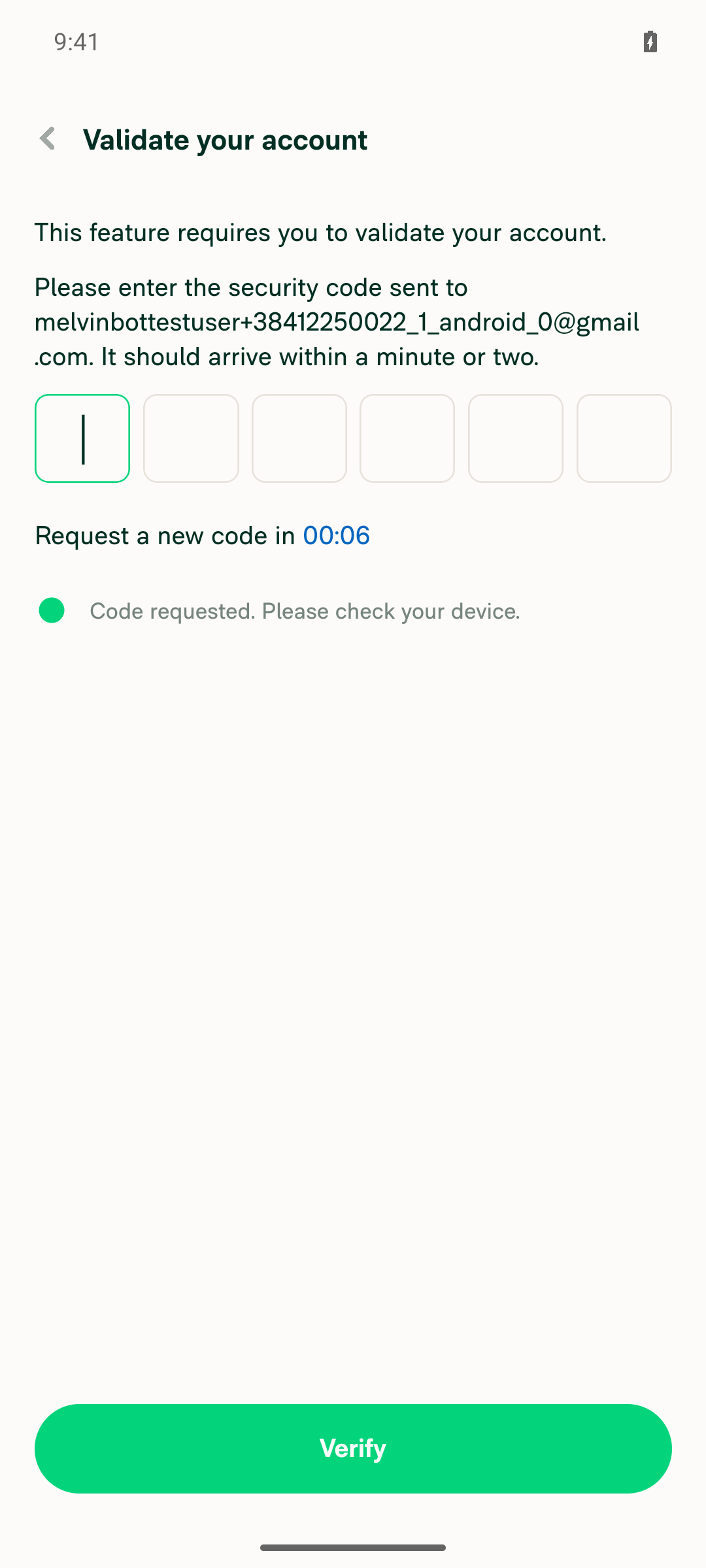
The PR's Tests section is still a TODO, so I ran the repro steps from the linked issue. Workspace setup and the member invite worked. Adding a company card stopped at an account validation screen that needs a magic code from email, so steps 4–11 were blocked and the From column fix was not exercised.

Account security-code validation screen blocking Add cards flow

Step Status
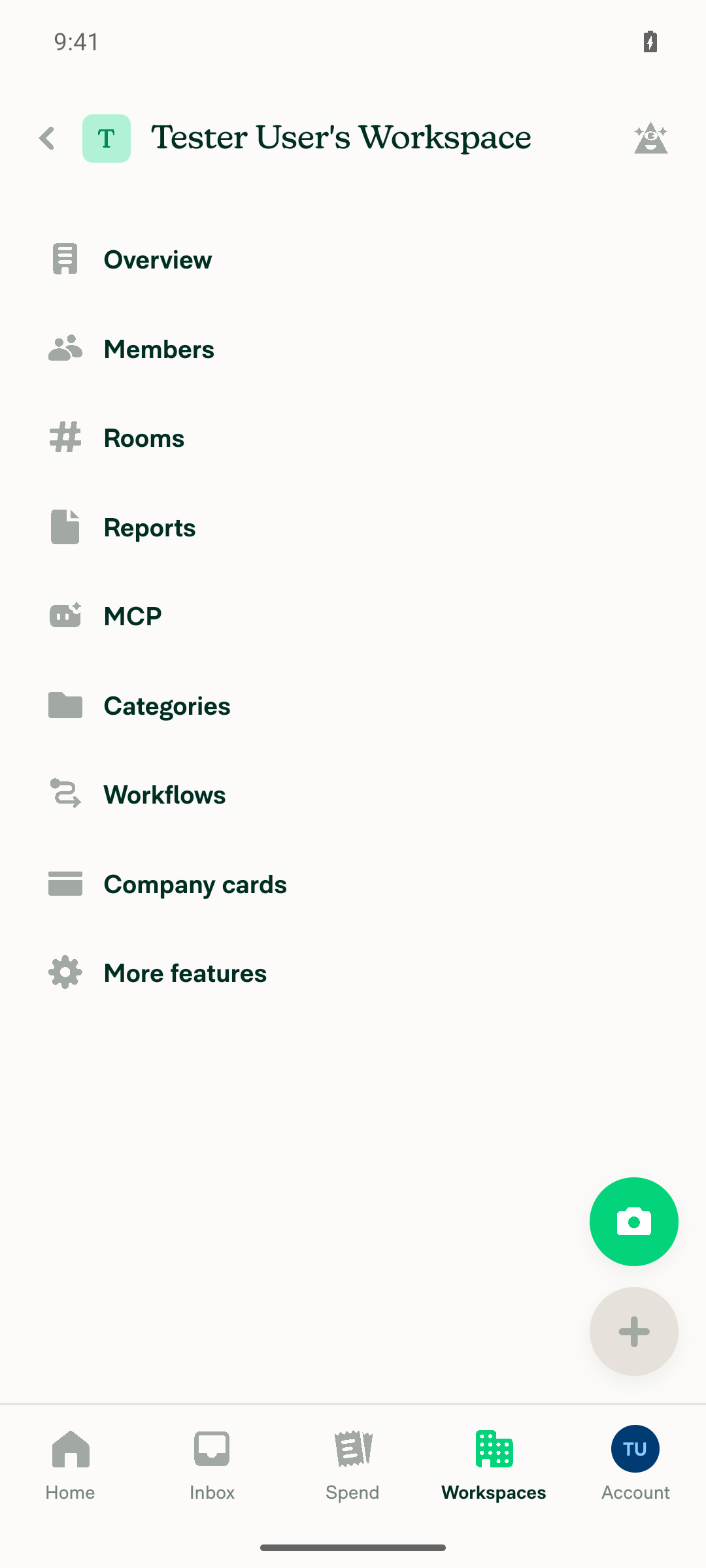
1. Signed in as a policy admin of a workspaceFinished the pending onboarding name form, then created a new workspace from Workspaces > New workspace. The workspace settings page loaded with admin sections (Members, Workflows, Company cards, More features).
Workspace settings page after creating a new workspace
✅
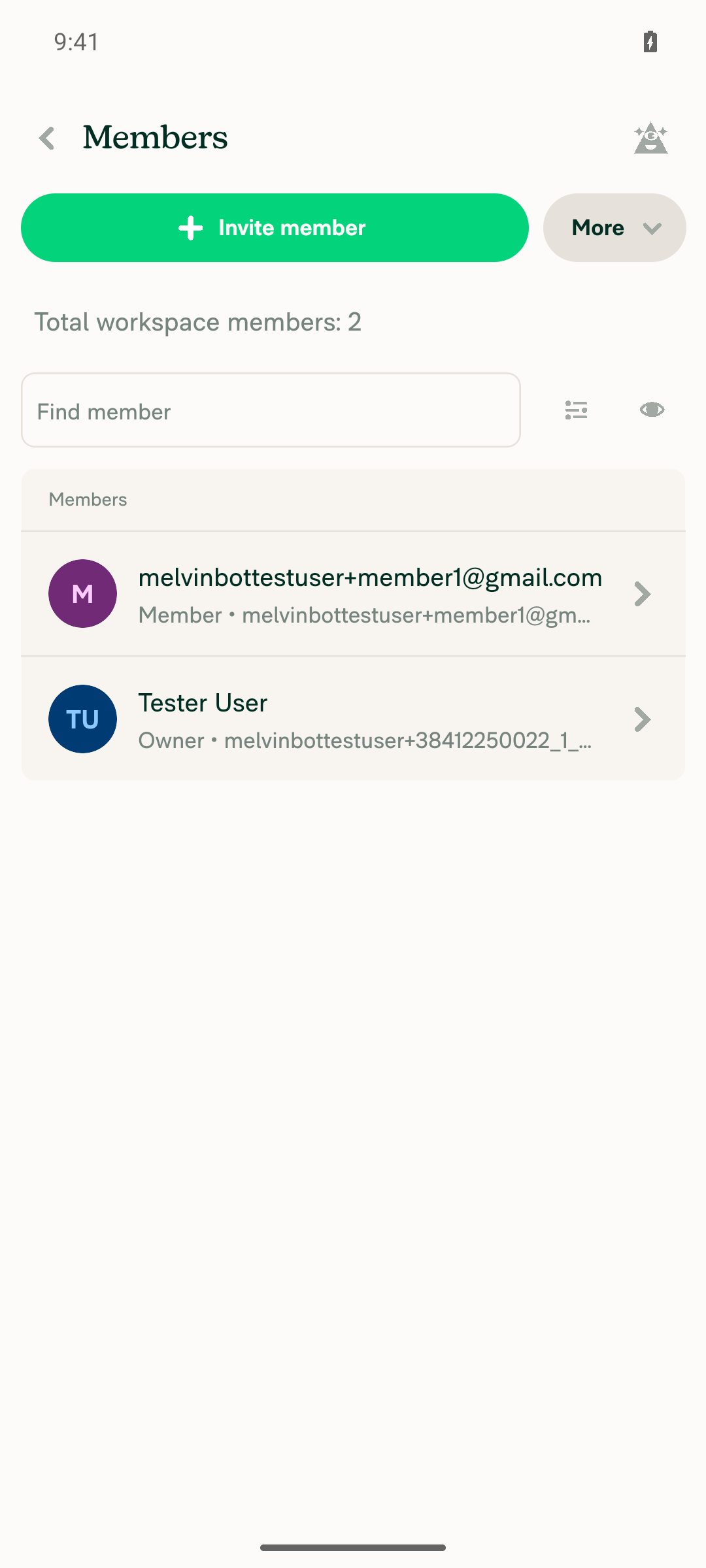
2. A member is invited to the workspaceInvited melvinbottestuser+member1@gmail.com through Members > Invite member. The Members list then showed 2 members, with the new address as Member.
Workspace Members list showing 2 members after invite
✅
3. Company cards > Add cards > United States > Direct feed > Other opens PlaidTapping Add cards opened "This feature requires you to validate your account. Please enter the security code sent to…" instead of the country picker. CI can't read that inbox, so the flow stopped here.
Account security-code validation screen blocking Add cards flow
❌
4. Complete Plaid (guest, user_good / pass_good, card ending x3333)Blocked: the Plaid UI was never reached because of step 3.
❌
5. Set "Allow deleting transactions" to disabledBlocked: no card feed was created.
❌
6. Assign the card to the member "From the beginning"Blocked: no card feed was created.
❌
7. Admin sees Delete on a card expense in SpendBlocked: no card transactions exist.
❌
8. Delete the card expenseBlocked: no card expense to delete.
❌
9. Filters > Status > Deleted shows the deleted expenseBlocked: no deleted expense exists.
❌
10. From column is present for the deleted expenseBlocked: no deleted expense row to inspect.
❌
11. From shows the cardholder (not blank) for the deleted card expenseBlocked: this is the PR's main change, but it couldn't be reached without a connected card feed.
❌

Steps 4–11 are marked ❌ because they couldn't run. They don't show that the PR fails. To test the fix, use an account that is already validated and has a company card feed assigned to a member.


view run · view recording

@MelvinBot

MelvinBot commented Oct 13, 2026 •

Copy link
Copy Markdown
Contributor Author

🤖 Web test steps verification results: ⚠️ partial

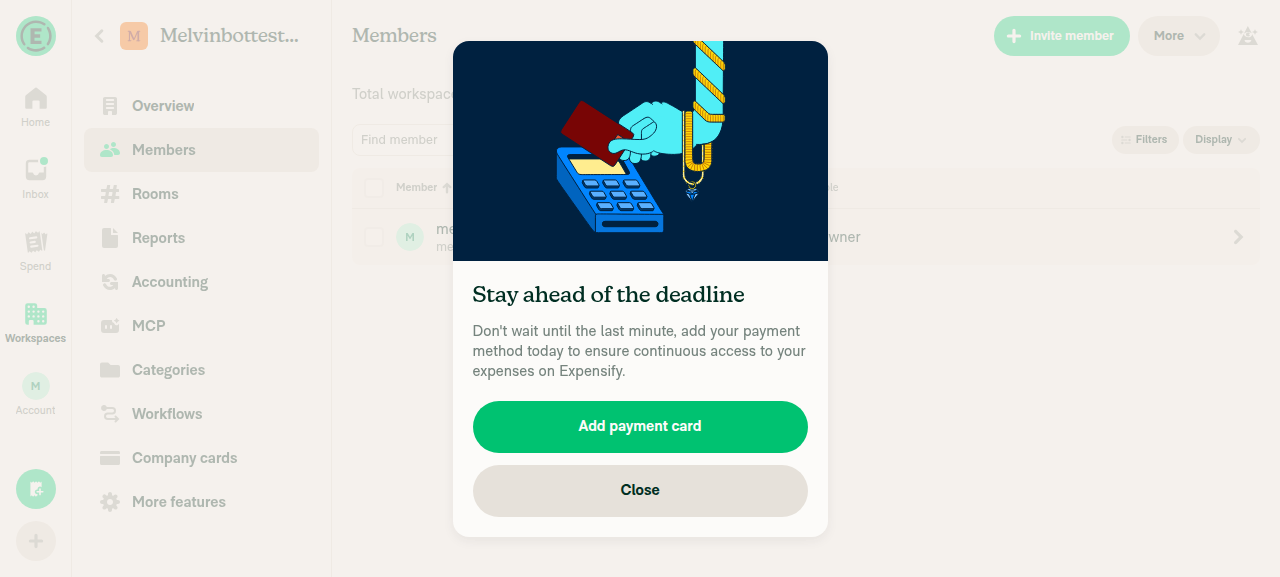
I signed in as the workspace owner. Inviting a member opened an "Add payment card" modal that ignored every click, so steps 2–11 were blocked and the From column fix was not exercised.

Add payment card modal blocking the Members page

Step Status
1. Signed in as a policy admin of a workspaceSign-in stalled on the login form, so I finished it by hand. After onboarding, a workspace was created with the test account as Owner.
Home screen signed in, workspace createdWorkspaces list showing test account as Owner
✅
2. A member is invited to the workspaceMembers > Invite member opened a "Stay ahead of the deadline / Add payment card" modal. Its Close and Add payment card buttons ignored every click and tap. The modal covered the rest of the App, and the Members list still showed only the Owner.
Add payment card modal blocking the Members page
❌
3. Company cards > Add cards > United States > Direct feed > Other opens PlaidBlocked: the modal from step 2 prevented navigation.
❌
4. Complete Plaid (guest, user_good / pass_good, card ending x3333)Blocked by step 2.
❌
5. Set "Allow deleting transactions" to disabledBlocked by step 2.
❌
6. Assign the card to the member "From the beginning"Blocked: no member and no card feed.
❌
7. Admin sees Delete on a card expense in SpendBlocked by step 2.
❌
8. Delete the card expenseBlocked by step 2.
❌
9. Filters > Status > Deleted shows the deleted expenseBlocked by step 2.
❌
10. From column is present for the deleted expenseBlocked by step 2.
❌
11. From shows the cardholder (not blank) for the deleted card expenseBlocked: this is the PR's main change, but no deleted card expense could be created.
❌

Steps 2–11 are marked ❌ because they couldn't run. They don't show that the PR fails. The stuck modal looks like a problem with the test browser, not this PR. To test the fix, use an account with a payment card on file and a company card feed already assigned to a member.


view run · view recording

Comment thread src/libs/SearchUIUtils.ts Outdated
const from = fromAccountID ? (personalDetailsMap.get(fromAccountID.toString()) ?? emptyPersonalDetails) : emptyPersonalDetails;
// Deleted expenses have no report or IOU action, so fall back to the holder of the card they were charged to
const cardHolderAccountID = transactionItem.cardID ? cardList?.[transactionItem.cardID]?.accountID : undefined;
const fromAccountID = reportAction?.actorAccountID ?? report?.ownerAccountID ?? cardHolderAccountID;

Copy link
Copy Markdown
Collaborator

Choose a reason for hiding this comment

The reason will be displayed to describe this comment to others. Learn more.

@MelvinBot The cardholder fallback runs for every row that has no IOU action and no report owner, not only deleted rows. An unreported card expense used to render a blank From and will now show the cardholder. It also reads the card's current assignee, so a reassigned card shows the new holder on an old deleted expense.


// The ref stops a failure from looping, since the loading flag clears on failure too. A later mount retries.
if (isOffline || areCardsLoaded || hasRequestedCardDataRef.current) {
if (!shouldLoad || isOffline || areCardsLoaded || hasRequestedCardDataRef.current) {

@mananjadhav mananjadhav Oct 14, 2026 •

Copy link
Copy Markdown
Collaborator

Choose a reason for hiding this comment

The reason will be displayed to describe this comment to others. Learn more.

@MelvinBot isLoadingCards sets hasRequestedCardDataRef before shouldLoad is checked. On a normal Spend view this hook is mounted with shouldLoad false. Opening the card filter or selecting a row sets isLoadingCards, and this effect treats that as its own request. If that request fails, filtering to Deleted later does not call openSearchCardFiltersPage again, so the cardholder never loads and From stays blank. Return when shouldLoad is false before writing the ref.

Unreported card expenses also have no report or IOU action, so the fallback was changing their From too.

Co-authored-by: Manan <mananjadhav@users.noreply.github.com>
@MelvinBot

Copy link
Copy Markdown
Contributor Author

Thanks, mananjadhav. I fixed the first point. For the second point, I don't think the wrong-holder case happens, based on App code.

1. Fallback now applies only to deleted rows (fixed in dac05bc). The cardholder is now used only when isDeletedTransaction(transactionItem) is true, so unreported card expenses keep a blank From as before. See src/libs/SearchUIUtils.ts:1905-1907. I added a test for an unreported card expense at SearchUIUtilsTest.ts:7264.

2. Reassigned cards. App has no action that changes the holder on an existing card. Unassigning a company card removes that cardID from cardList (CompanyCards.ts:581-586). Assigning the card to someone else then creates a new card record. So an old deleted expense points at a cardID that no longer resolves, and From stays blank instead of showing the new holder. Transactions also don't store the holder at charge time, so App can't do better without Search returning the owner. I can't confirm from App code that the backend never reuses a cardID.

Checks: Search unit and UI tests (77 suites, 2,182 tests), npm run typecheck, lint on the changed files, and npm run fmt all passed. spell-changed couldn't run because this checkout has no merge base with main.


view run

@mananjadhav

Copy link
Copy Markdown
Collaborator

The code changes are fine. Working on the checklist now. Also adding the test steps and testing it out.

@mananjadhav

mananjadhav commented Oct 14, 2026 •

Copy link
Copy Markdown
Collaborator

Reviewer Checklist

  • I have verified the author checklist is complete (all boxes are checked off).
  • I verified the correct issue is linked in the ### Fixed Issues section above
  • I verified testing steps are clear and they cover the changes made in this PR
    • I verified the steps for local testing are in the Tests section
    • I verified the steps for Staging and/or Production testing are in the QA steps section
    • I verified the steps cover any possible failure scenarios (i.e. verify an input displays the correct error message if the entered data is not correct)
    • I turned off my network connection and tested it while offline to ensure it matches the expected behavior (i.e. verify the default avatar icon is displayed if app is offline)
  • I checked that screenshots or videos are included for tests on all platforms
  • I included screenshots or videos for tests on all platforms
  • I verified that the composer does not automatically focus or open the keyboard on mobile unless explicitly intended. This includes checking that returning the app from the background does not unexpectedly open the keyboard.
  • I verified tests pass on all platforms & I tested again on:
    • Android: HybridApp
    • Android: mWeb Chrome
    • iOS: HybridApp
    • iOS: mWeb Safari
    • MacOS: Chrome / Safari
  • If there are any errors in the console that are unrelated to this PR, I either fixed them (preferred) or linked to where I reported them in Slack
  • I verified any copy / text that was added to the app is either coming verbatim from figma or has been approved by marketing (in order to get marketing approval, ask the Bug Zero team member to add the Waiting for copy label to the issue)
  • If a new code pattern is added I verified it was agreed to be used by multiple Expensify engineers
  • I verified other components that can be impacted by these changes have been tested, and I retested again (i.e. if the PR modifies a shared library or component like Avatar, I verified the components using Avatar have been tested & I retested again)
  • If a new component is created I verified that:
    • A similar component doesn't exist in the codebase
    • All props are defined accurately
    • The component has a clear name that is non-ambiguous and the purpose of the component can be inferred from the name alone
    • The only data being stored in the state is data necessary for rendering and nothing else
    • The component has the minimum amount of code necessary for its purpose, and it is broken down into smaller components in order to separate concerns and functions
  • If the PR modifies code that runs when editing or sending messages, I tested and verified there is no unexpected behavior for all supported markdown - URLs, single line code, code blocks, quotes, headings, bold, strikethrough, and italic.
  • If the PR modifies a generic component, I tested and verified that those changes do not break usages of that component in the rest of the App (i.e. if a shared library or component like Avatar is modified, I verified that Avatar is working as expected in all cases)
  • If the PR modifies a component related to any of the existing Storybook stories, I tested and verified all stories for that component are still working as expected.
  • If the PR modifies a component or page that can be accessed by a direct deeplink, I verified that the code functions as expected when the deeplink is used - from a logged in and logged out account.
  • If the PR modifies the UI (e.g. new buttons, new UI components, changing the padding/spacing/sizing, moving components, etc) or modifies the form input styles:
    • I verified that all the inputs inside a form are aligned with each other.
    • I added Design label and/or tagged @Expensify/design so the design team can review the changes.
  • If the PR adds or modifies the UI:
    • I asked an AI agent to review the changes for accessibility issues and addressed its findings.
    • I tested with a screen reader (VoiceOver on macOS) and verified all new/changed elements are reachable with a logical focus order.
    • I verified all new/changed elements have meaningful accessible names and roles.
    • I verified state changes are announced (e.g. checked/unchecked, expanded/collapsed, selected).
  • For any bug fix or new feature in this PR, I verified that sufficient unit tests are included to prevent regressions in this flow.
  • If the main branch was merged into this PR after a review, I tested again and verified the outcome was still expected according to the Test steps.
  • I have checked off every checkbox in the PR reviewer checklist, including those that don't apply to this PR.

Screenshots/Videos

Android: HybridApp
Android: mWeb Chrome mweb-chrome-delete-exp-from-user
iOS: HybridApp
ios-delete-exp-from-user.mov
iOS: mWeb Safari mweb-safari-delete-exp-from-user
MacOS: Chrome / Safari
web-from-deleted-card-expense.mov

@mananjadhav mananjadhav left a comment

Copy link
Copy Markdown
Collaborator

Choose a reason for hiding this comment

The reason will be displayed to describe this comment to others. Learn more.

Approving based on the current scope and testing. Asked a question here about the Native/Mobile behavior.

@melvin-bot
melvin-bot Bot requested a review from arosiclair October 14, 2026 18:02
@mananjadhav

mananjadhav commented Oct 14, 2026 •

Copy link
Copy Markdown
Collaborator

Tests

  1. Sign in as a workspace admin who has a company card assigned to a member, with at least one card expense.
  2. Open Spend > Expenses in a wide browser window.
  3. Delete one of that member's card expenses.
  4. Set the filter to Status: Deleted.
  5. Click Display and turn on the From column.
  6. Verify the deleted card expense shows the cardholder in From.
  7. Undelete that expense and clear the Deleted filter.
  8. Verify From still shows the same cardholder.
  9. Open a card expense that was never deleted.
  10. Verify From still shows that expense's owner.
  11. Verify that no errors appear in the JS console.

Offline tests

  1. With the card list already loaded, go offline.
  2. Open Spend > Expenses, filter to Status: Deleted, and turn on From.
  3. Verify the deleted card expense still shows the cardholder in From.

QA Steps

Same as tests. Use a wide browser window. The phone layout does not show a From column for deleted expenses.

@arosiclair Can you add the test steps to the PR body? I don't have the access to update the PR body.

@mananjadhav

Copy link
Copy Markdown
Collaborator

@MelvinBot mark this PR ready for review

@MelvinBot
MelvinBot marked this pull request as ready for review October 15, 2026 06:15
@MelvinBot
MelvinBot requested a review from a team as a code owner October 15, 2026 06:15
@MelvinBot

Copy link
Copy Markdown
Contributor Author

🤖 Done. This PR is now marked ready for review.


view run

@melvin-bot
melvin-bot Bot requested review from flaviadefaria and mananjadhav and removed request for a team October 15, 2026 06:15
@melvin-bot

melvin-bot Bot commented Oct 15, 2026

Copy link
Copy Markdown

@mananjadhav Please copy/paste the Reviewer Checklist from here into a new comment on this PR and complete it. If you have the K2 extension, you can simply click: [this button]

@melvin-bot
melvin-bot Bot removed the request for review from a team October 15, 2026 06:15
@chatgpt-codex-connector

chatgpt-codex-connector Bot commented Oct 15, 2026 •

Copy link
Copy Markdown

Codex Review Summary

This comment shows the latest Codex review activity on this pull request.

Review Status Commit Review trigger
📝 Code Review ✅ Completed 2026-10-15T06:22:41.278773Z dac05bc Draft marked ready
ℹ️ About Codex in GitHub

Your team has set up Codex to review pull requests in this repo. Reviews are triggered when you

  • Open a pull request for review
  • Mark a draft as ready
  • Comment "@codex review" or "@codex security review".

Codex reacts with 👀 while any review is running, comments if it has suggestions, and reacts with 👍 once all reviews finish with no findings.

@chatgpt-codex-connector chatgpt-codex-connector Bot left a comment

Copy link
Copy Markdown

Choose a reason for hiding this comment

The reason will be displayed to describe this comment to others. Learn more.

💡 Codex Review

Here are some automated review suggestions for this pull request.

Reviewed commit: dac05bc659

ℹ️ About Codex in GitHub

Codex has been enabled to automatically review pull requests in this repo. Reviews are triggered when you

  • Open a pull request for review
  • Mark a draft as ready
  • Comment "@codex review".

If Codex has suggestions, it will comment; otherwise it will react with 👍.

When you sign up for Codex through ChatGPT, Codex can also answer questions or update the PR, like "@codex address that feedback".

Comment thread src/components/Search/index.tsx Outdated
Comment on lines +328 to +329
const isDeletedStatusQuery = !statusFilter.isNegated && !!statusFilter.value?.includes(CONST.SEARCH.STATUS.EXPENSE.DELETED);
useLoadSearchCardData(hasDeletedTransaction || isDeletedStatusQuery);

Copy link
Copy Markdown

Choose a reason for hiding this comment

The reason will be displayed to describe this comment to others. Learn more.

P2 Badge Load cards for negated grouped status searches

When a grouped expense query uses a negated status filter that still admits deleted rows, such as status!:drafts, isDeletedStatusQuery is forced to false. Grouped stage-one snapshots contain only group containers, so hasDeletedTransaction also remains false even after a child snapshot supplies a deleted transaction. Consequently useLoadSearchCardData never requests the complete card list and the newly added cardholder fallback still renders From blank for those deleted company-card expenses. Treat any status predicate that can include deleted expenses as requiring card data, or propagate the deleted flag from grouped child snapshots.

Useful? React with 👍 / 👎.

Copy link
Copy Markdown
Collaborator

Choose a reason for hiding this comment

The reason will be displayed to describe this comment to others. Learn more.

@MelvinBot Check this comment.

Copy link
Copy Markdown
Contributor Author

Choose a reason for hiding this comment

The reason will be displayed to describe this comment to others. Learn more.

Good catch, mananjadhav. This one is valid, and I fixed it in c69501a.

A negated status filter now loads the full card list unless it also excludes deleted. So status!:drafts loads cards, and status!:deleted doesn't. See src/components/Search/index.tsx:328-331.

This matches how App already treats negated filters. isEligibleForStatus counts a trashed expense as a match for any negated status that doesn't exclude deleted.

Checks: Search unit and UI tests passed (77 suites, 2,182 tests), and so did npm run typecheck. ESLint and the React Compiler check show only the errors already on that file before this change.

Your earlier comment on useLoadSearchCardData.ts (the ref is set while shouldLoad is false) still has no reply or fix. Tag me there if you want it fixed too.


view run

Co-authored-by: Manan <mananjadhav@users.noreply.github.com>
@MelvinBot
MelvinBot requested a review from a team as a code owner October 15, 2026 10:07
@melvin-bot
melvin-bot Bot requested review from mananjadhav and removed request for a team October 15, 2026 10:07
@melvin-bot

melvin-bot Bot commented Oct 15, 2026

Copy link
Copy Markdown

@mananjadhav Please copy/paste the Reviewer Checklist from here into a new comment on this PR and complete it. If you have the K2 extension, you can simply click: [this button]

@mananjadhav

Copy link
Copy Markdown
Collaborator

@MelvinBot We've fixed the From only for the Wide layout. We now want to show From in the mobile web/native app fo all the deleted expenses. Can you add the fix for the same?

Co-authored-by: Manan <mananjadhav@users.noreply.github.com>
@MelvinBot

Copy link
Copy Markdown
Contributor Author

🤖 Pushed 15267be. Deleted expenses now show From on mobile web and native too.

The narrow row hid the user info for every deleted expense, so I removed that check at TransactionListItemNarrow.tsx:116. It now uses the same From value as the wide layout. If a deleted expense has no owner to show, such as another member's cash expense, the row leaves From blank, the same as wide.

Checks: a new test in tests/ui/TransactionListItemNarrowTest.tsx fails without the fix and passes with it. Search UI tests (65 passed), npm run typecheck, lint, formatting, and the React Compiler check also passed.

I didn't run an Android test. The test account can't add a company card, so it can't create a deleted card expense.

Please update the QA note in your test steps, which says the phone layout has no From for deleted expenses.


view run

@arosiclair

Copy link
Copy Markdown
Contributor

I updated the test steps in the description and removed the part about only checking the wide layout. Let me know when this is ready for review

@mananjadhav

Copy link
Copy Markdown
Collaborator

Testing out the latest changes. Will upload the checklist soon.

@mananjadhav mananjadhav left a comment

Copy link
Copy Markdown
Collaborator

Choose a reason for hiding this comment

The reason will be displayed to describe this comment to others. Learn more.

Getting an error on Android build but tested on other platforms. Posted an explanation about the From field on the mobile view.

@flaviadefaria

flaviadefaria commented Oct 23, 2026 •

Copy link
Copy Markdown
Contributor

@arosiclair friendly bump here.

Comment thread src/libs/SearchUIUtils.ts Outdated
Comment thread tests/unit/Search/SearchUIUtilsTest.ts Outdated
Co-authored-by: Manan <mananjadhav@users.noreply.github.com>
@MelvinBot

Copy link
Copy Markdown
Contributor Author

⚠️ MelvinBot CI Fix Loop Detected

MelvinBot has made 5 consecutive commits trying to fix CI failures. Automatic CI fix dispatches are now paused for this PR.

Next steps: A human should review the recent commits and resolve the conflicting CI errors manually.

@arosiclair
arosiclair merged commit eadd5a6 into main Oct 26, 2026
45 of 46 checks passed
@arosiclair
arosiclair deleted the claude-deletedCardExpenseFromColumn branch October 26, 2026 15:51
@OSBotify

Copy link
Copy Markdown
Contributor

✋ This PR was not deployed to staging yet because QA is ongoing. It will be automatically deployed to staging after the next production release.

@github-actions

Copy link
Copy Markdown
Contributor

🚧 arosiclair has triggered a test Expensify/App build. You can view the workflow run here.

@github-actions

Copy link
Copy Markdown
Contributor

@OSBotify

Copy link
Copy Markdown
Contributor

🚀 Deployed to staging by https://github.com/arosiclair in version: 9.5.21-0 🚀

platform result
🕸 web 🕸 success ✅
🤖 android 🤖 success ✅
🍎 iOS 🍎 success ✅

@MelvinBot

Copy link
Copy Markdown
Contributor Author

No help site update needed. This is a bug fix: deleted card expenses on Spend > Expenses now show the cardholder in From, which is what you'd expect, and no help article says otherwise.


view run

@OSBotify

Copy link
Copy Markdown
Contributor

🚀 Deployed to staging by https://github.com/arosiclair in version: 9.5.23-0 🚀

platform result
🕸 web 🕸 success ✅
🤖 android 🤖 success ✅
🍎 iOS 🍎 success ✅

@MelvinBot

Copy link
Copy Markdown
Contributor Author

No help site update needed. This is a bug fix: deleted card expenses on Spend > Expenses now show the cardholder in From, which is what you'd expect, and no help article says otherwise.


view run

Sign up for free to join this conversation on GitHub. Already have an account? Sign in to comment

Labels

Melvin-Test-Android Melvin-Test-Web Triggers Melvin to run the testing steps of the PR on web

Projects

None yet

Development

Successfully merging this pull request may close these issues.

5 participants