Skip to content

Gate report field list selection behind a Save button (a11y On Input, PR 16) - #101687

Closed
MelvinBot wants to merge 5 commits into
mainfrom
claude-a11y-report-field-dropdown-save
Closed

MelvinBot wants to merge 5 commits into
mainfrom
claude-a11y-report-field-dropdown-save

Conversation

@MelvinBot

Copy link
Copy Markdown
Contributor

Explanation of Change

PR 16 of the continue plan for the WCAG 3.2.2 "On Input" batch (Tier C — the reusable dropdown child).

EditReportFieldDropdown called its onSubmit prop directly from onSelectRow, so tapping a row saved the report field and closed the page on input. The tap now only stages the value in local state, and onSubmit runs from an explicit Save.

Call-site audit (the gate the plan asked for): EditReportFieldDropdown has exactly one consumer — DynamicEditReportFieldPage, for REPORT_FIELD_TYPES.LIST. Its sibling children (EditReportFieldText, EditReportFieldDate) already submit through a form with its own Save button, so this change makes the list variant consistent with them rather than diverging from any other caller.

Notes on the implementation:

  • The "tap the selected row to clear the field" behavior is preserved: it now compares against the staged value rather than the persisted one, so the toggle still works after the user has moved the selection around, and onSubmit receives the same shape it did before.
  • undefined (not '') means "nothing staged yet", because an empty string is itself a meaningful value here — it clears the field.
  • Save is disabled until the staged value actually differs from the persisted one.
  • initiallyFocusedItemKey still uses the frozen useInitialSelection value, so the pinned "Selected" section and the initial focus target don't move while the user browses.

Fixed Issues

$ #74834
PROPOSAL: #74834 (comment)

Tests

// TODO: The human co-author must fill out the tests you ran before marking this PR as "ready for review".
// Please describe what tests you performed that validate your change worked.

Suggested coverage for the flow this PR touches:

  1. On a workspace with a list-type report field, open a report → tap that field → tap an option → verify the page stays open and the checkmark moves.
  2. Press Save → verify the value is applied to the report and the page closes.
  3. Reopen the field and tap the currently selected option → verify it becomes unselected → press Save → verify the field is cleared.
  4. Reopen the field, search for an option, tap a result → verify the page stays open, then press Save and verify the right value is applied.
  5. Reopen the field and press back without tapping a row → verify nothing changed and Save was disabled.
  6. Verify the text-type and date-type report fields are unaffected (they still submit via their own form Save).
  • Verify that no errors appear in the JS console

Offline tests

Same as tests — the write behind onSubmit was already optimistic, and this PR only moves when it fires, not how.

QA Steps

// TODO: The human co-author must fill out the QA tests you ran before marking this PR as "ready for review".
// Please describe what QA needs to do to validate your changes and what areas they need to test for regressions.

  • Verify that no errors appear in the JS console

PR Author Checklist

  • I linked the correct issue in the ### Fixed Issues section above
  • I wrote clear testing steps that cover the changes made in this PR
    • I added steps for local testing in the Tests section
    • I added steps for the expected offline behavior in the Offline steps section
    • I added steps for Staging and/or Production testing in the QA steps section
    • I added steps to cover failure scenarios (i.e. verify an input displays the correct error message if the entered data is not correct)
    • I turned off my network connection and tested it while offline to ensure it matches the expected behavior (i.e. verify the default avatar icon is displayed if app is offline)
    • I tested this PR with a High Traffic account against the staging or production API to ensure there are no regressions (e.g. long loading states that impact usability).
  • I included screenshots or videos for tests on all platforms
  • I ran the tests on all platforms & verified they passed on:
    • Android: Native
    • Android: mWeb Chrome
    • iOS: Native
    • iOS: mWeb Safari
    • MacOS: Chrome / Safari
  • I verified there are no console errors (if there's a console error not related to the PR, report it or open an issue for it to be fixed)
  • I followed proper code patterns (see Reviewing the code)
    • I verified that comments were added to code that is not self explanatory
    • I verified that any new or modified comments were clear, correct English, and explained "why" the code was doing something instead of only explaining "what" the code was doing.
    • I verified any copy / text that was added to the app is grammatically correct in English. It adheres to proper capitalization guidelines (note: only the first word of header/labels should be capitalized), and is either coming verbatim from figma or has been approved by marketing (in order to get marketing approval, ask the Bug Zero team member to add the Waiting for copy label to the issue)
  • If a new code pattern is added I verified it was agreed to be used by multiple Expensify engineers
  • I followed the guidelines as stated in the Review Guidelines
  • I tested other components that can be impacted by my changes (i.e. if the PR modifies a shared library or component like Avatar, I verified the components using Avatar are working as expected)
  • If a new CSS style is added I verified that:
    • A similar style doesn't already exist
    • The style can't be created with an existing StyleUtils function (i.e. StyleUtils.getBackgroundAndBorderStyle(theme.componentBG))
  • If new assets were added or existing ones were modified, I verified that:
    • The assets are optimized and compressed (for SVG files, run npm run compress-svg)
    • The assets load correctly across all supported platforms.
  • If the PR modifies code that runs when editing or sending messages, I tested and verified there is no unexpected behavior for all supported markdown - URLs, single line code, code blocks, quotes, headings, bold, strikethrough, and italic.
  • If the PR modifies a generic component, I tested and verified that those changes do not break usages of that component in the rest of the App (i.e. if a shared library or component like Avatar is modified, I verified that Avatar is working as expected in all cases)
  • If the PR modifies a component related to any of the existing Storybook stories, I tested and verified all stories for that component are still working as expected.
  • If the PR modifies a component or page that can be accessed by a direct deeplink, I verified that the code functions as expected when the deeplink is used - from a logged in and logged out account.
  • If the PR modifies the UI (e.g. new buttons, new UI components, changing the padding/spacing/sizing, moving components, etc) or modifies the form input styles:
    • I verified that all the inputs inside a form are aligned with each other.
    • I added Design label and/or tagged @Expensify/design so the design team can review the changes.
  • I added unit tests for any new feature or bug fix in this PR to help automatically prevent regressions in this user flow.
  • If the main branch was merged into this PR after a review, I tested again and verified the outcome was still expected according to the Test steps.

Screenshots/Videos

Android: Native
Android: mWeb Chrome
iOS: Native
iOS: mWeb Safari
MacOS: Chrome / Safari

Co-authored-by: truph01 <truph01@users.noreply.github.com>
@codecov

codecov Bot commented Sep 21, 2026 •

Copy link
Copy Markdown

Codecov Report

✅ Changes either increased or maintained existing code coverage, great job!

Files with missing lines Coverage Δ
src/pages/EditReportFieldDropdown.tsx 100.00% <100.00%> (ø)
... and 5 files with indirect coverage changes

@MelvinBot

MelvinBot commented Sep 21, 2026 •

Copy link
Copy Markdown
Contributor Author

🤖 Android test steps verification results: ⚠️ partial

Tap-to-stage works — tapping a row moves the checkmark and no longer closes the page, so the autosave-on-input this PR targets is gone. But the Save button never renders, so a staged list-field selection can never be committed. EditReportFieldDropdown passes confirmButtonOptions to SelectionListWithSections, but BaseSelectionListWithSections.tsx:383-388 only renders <Footer> when footerContent is supplied and never forwards confirmButtonOptions — unlike the flat-list sibling BaseSelectionList.tsx:505-507, which does. Text and date report fields are unaffected.

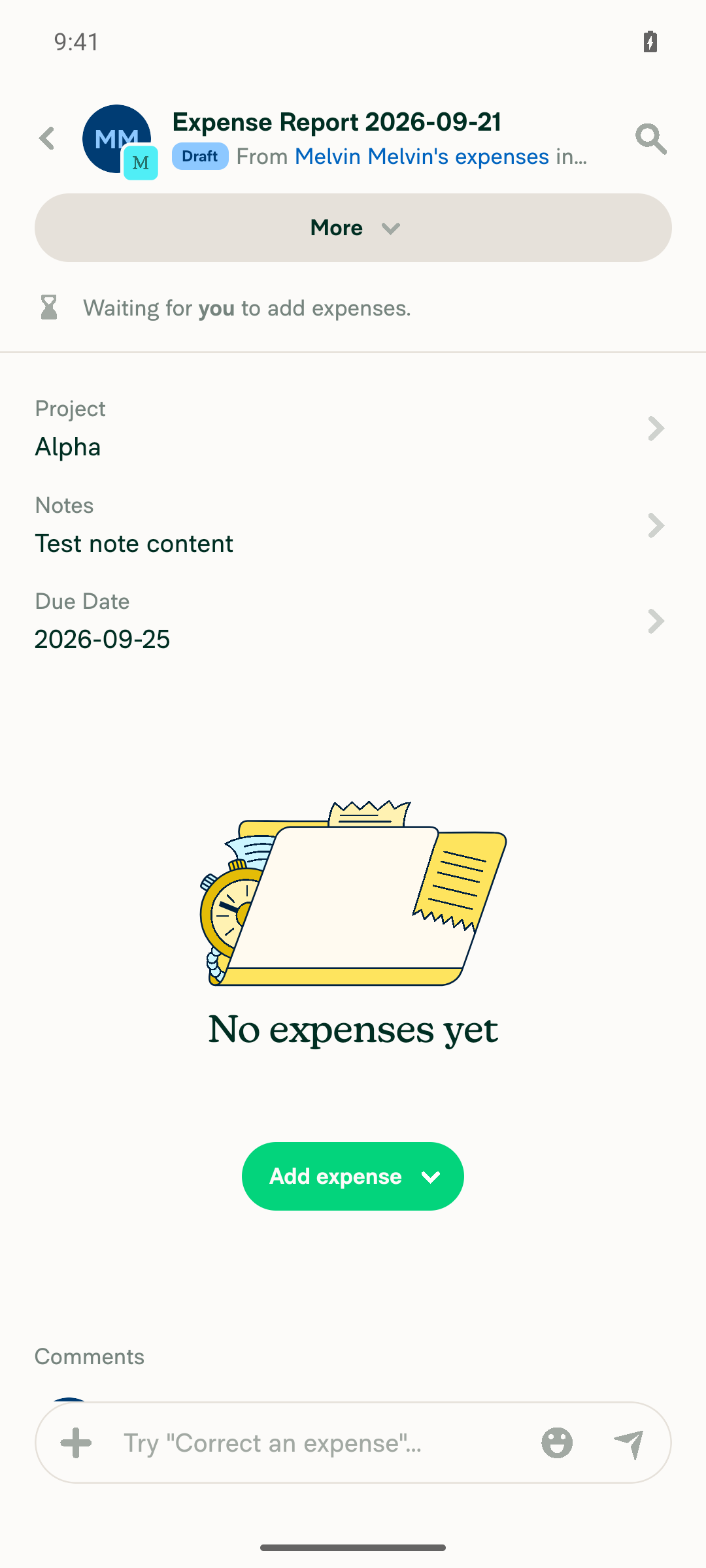
Report showing Notes and Due Date fields successfully updated, Project field still stuck at Alpha

Step Status
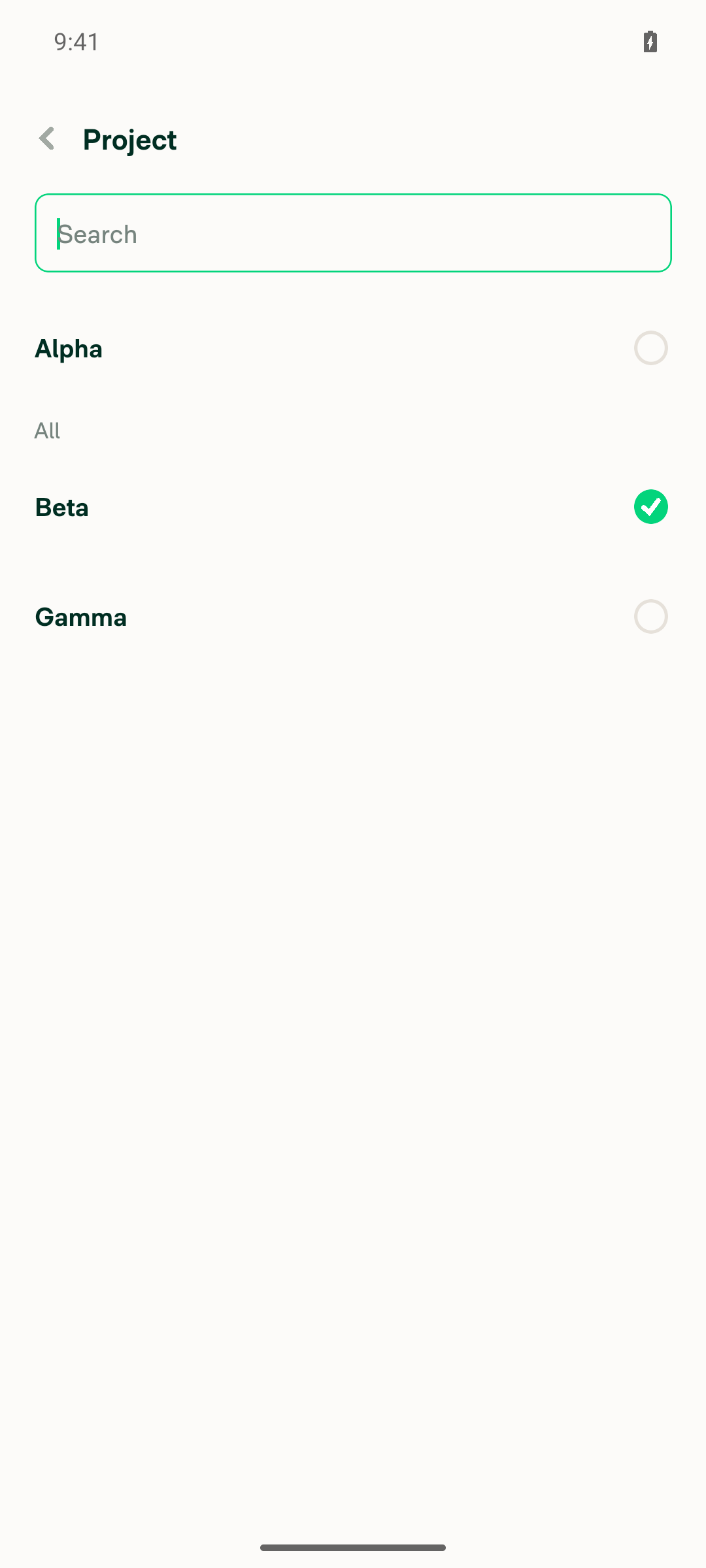
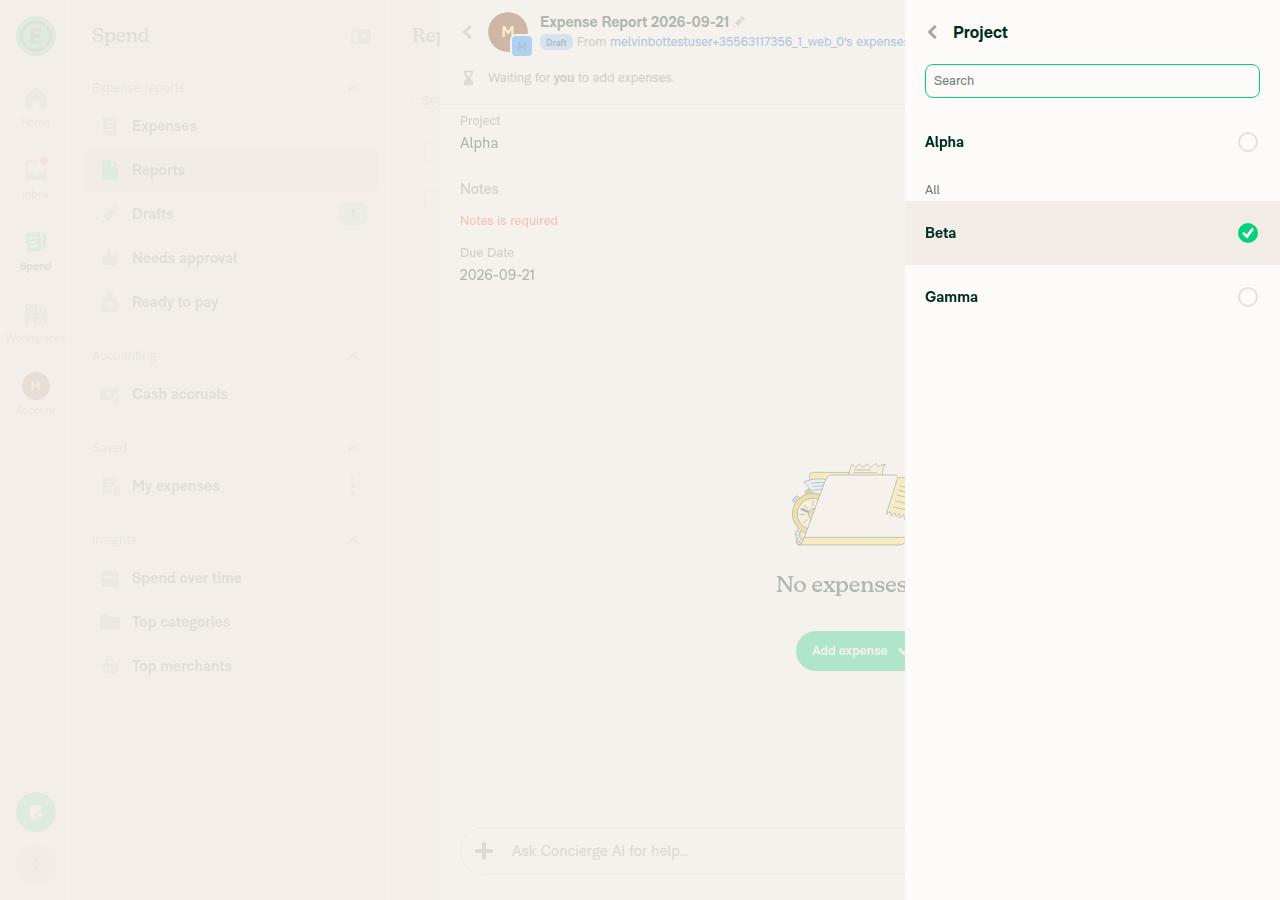
Tap the list-type field (Project), tap an option (Beta) — page stays open and checkmark movesAfter tapping Beta, the picker screen remained open (Back button, search field unchanged) and the checkmark moved from Alpha to Beta.
Project field picker showing Beta checked after tap, page still open
✅
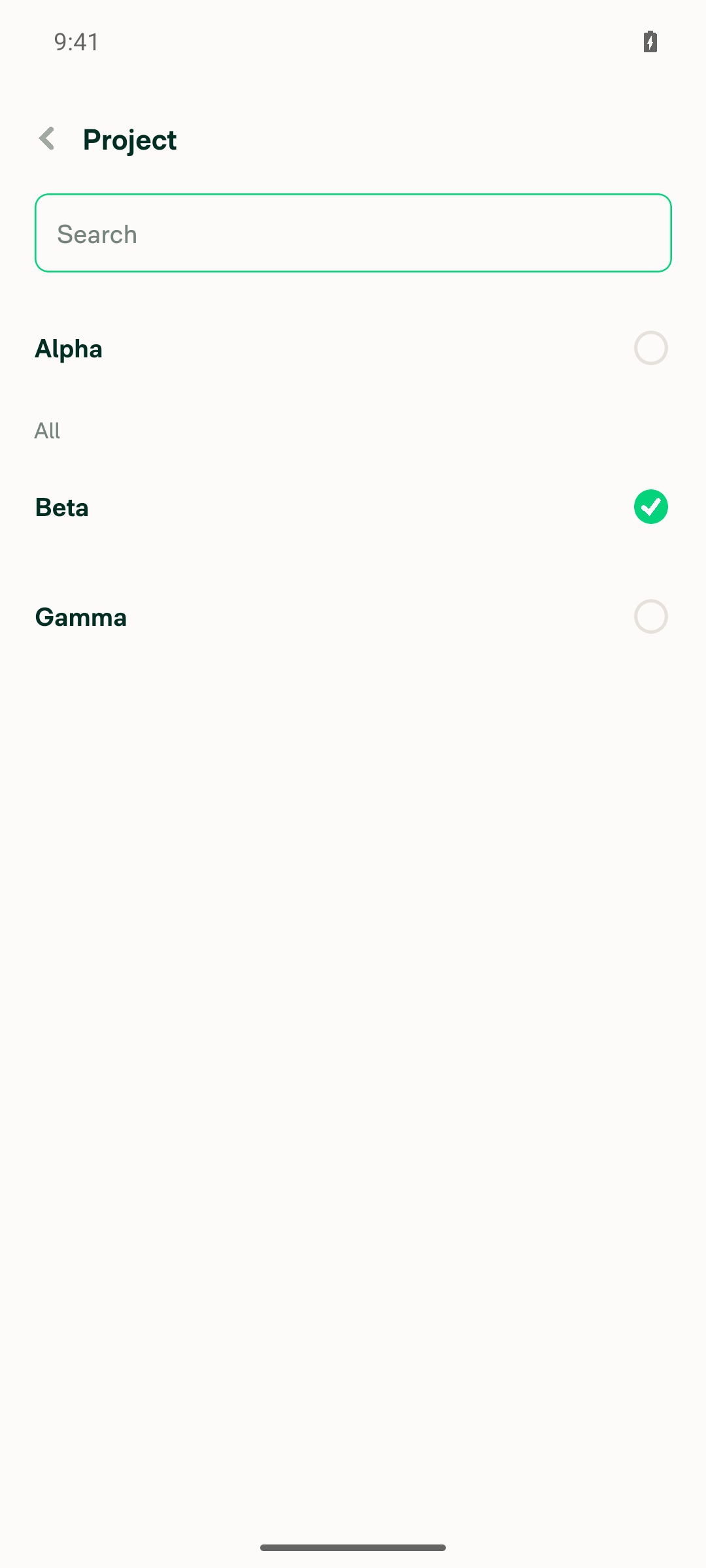
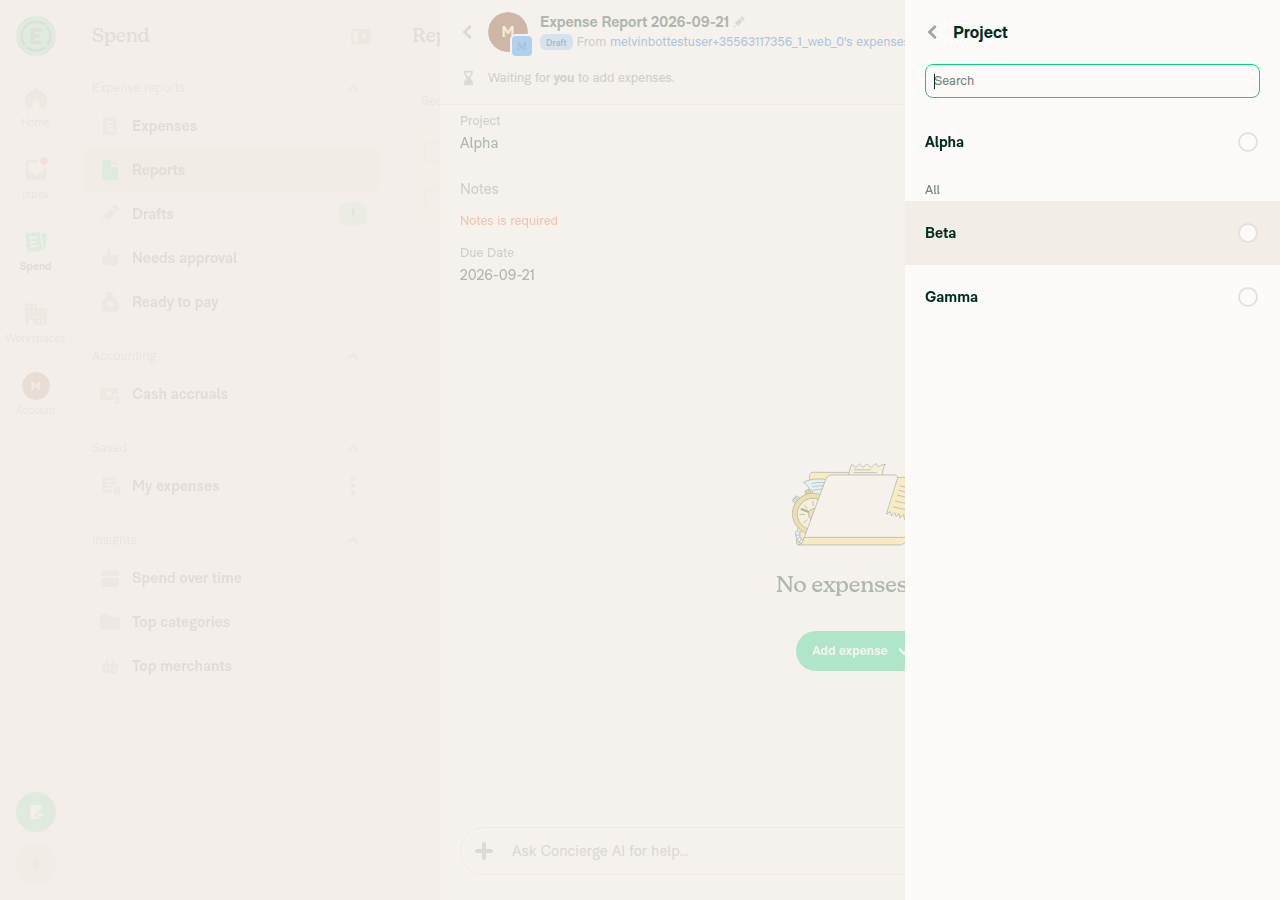
Press Save — value is applied to the report and the page closesNo Save button exists anywhere in the interactive or raw accessibility tree on the Project picker screen (confirmed by a raw-tree grep for "save", zero matches). There is no way to commit the Beta selection; the field stayed at "Alpha" after leaving the screen.
Project field picker with Beta checked and no Save button visible anywhere on screen
❌
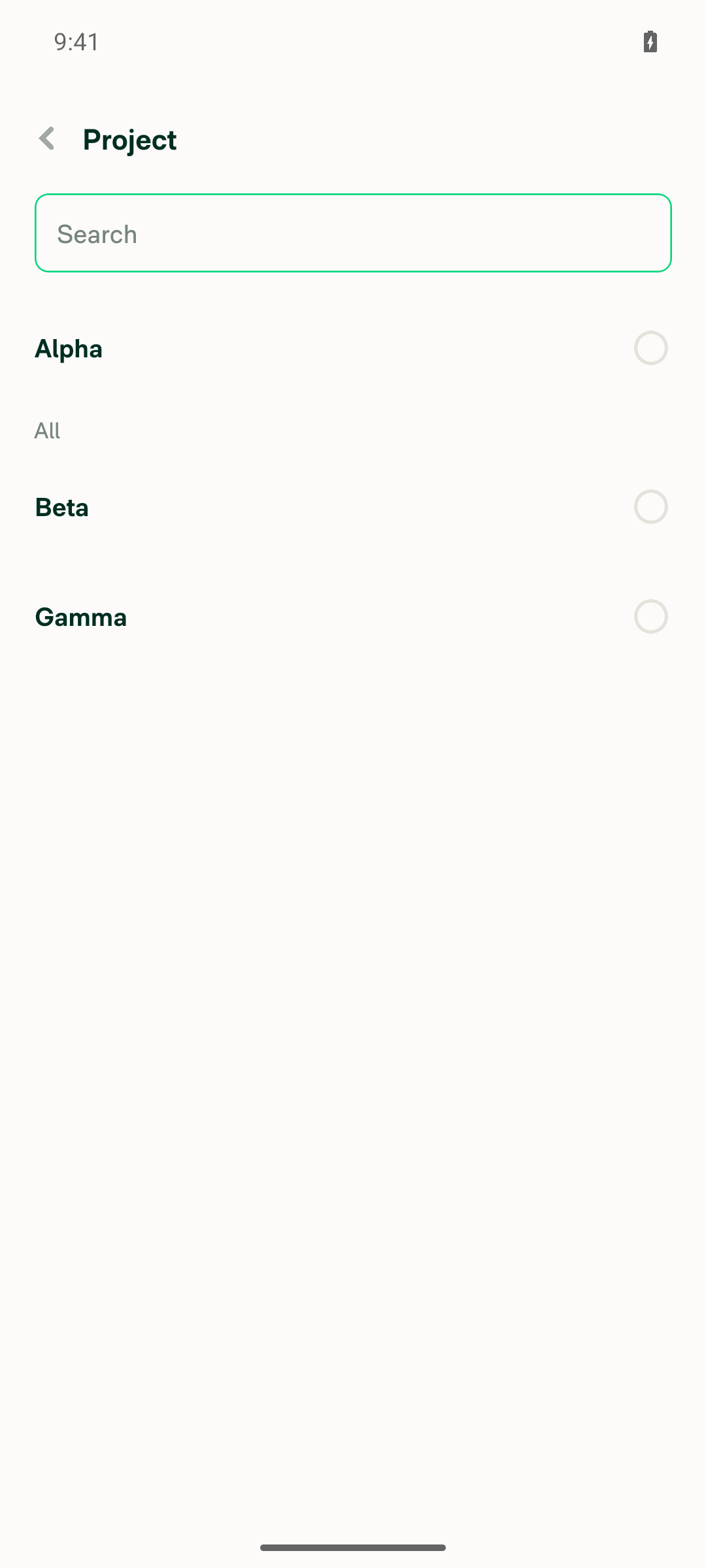
Reopen the field and tap the currently-selected option — it becomes unselected — then press Save and verify the field is clearedReopening showed Alpha selected (unchanged, since the prior Beta tap was never saved). Tapping Alpha again correctly cleared its checkmark with all three options unselected. However, no Save button rendered here either, so the clear-via-Save action could not be performed or verified.
Project field picker with all checkmarks cleared and no Save button present
❌
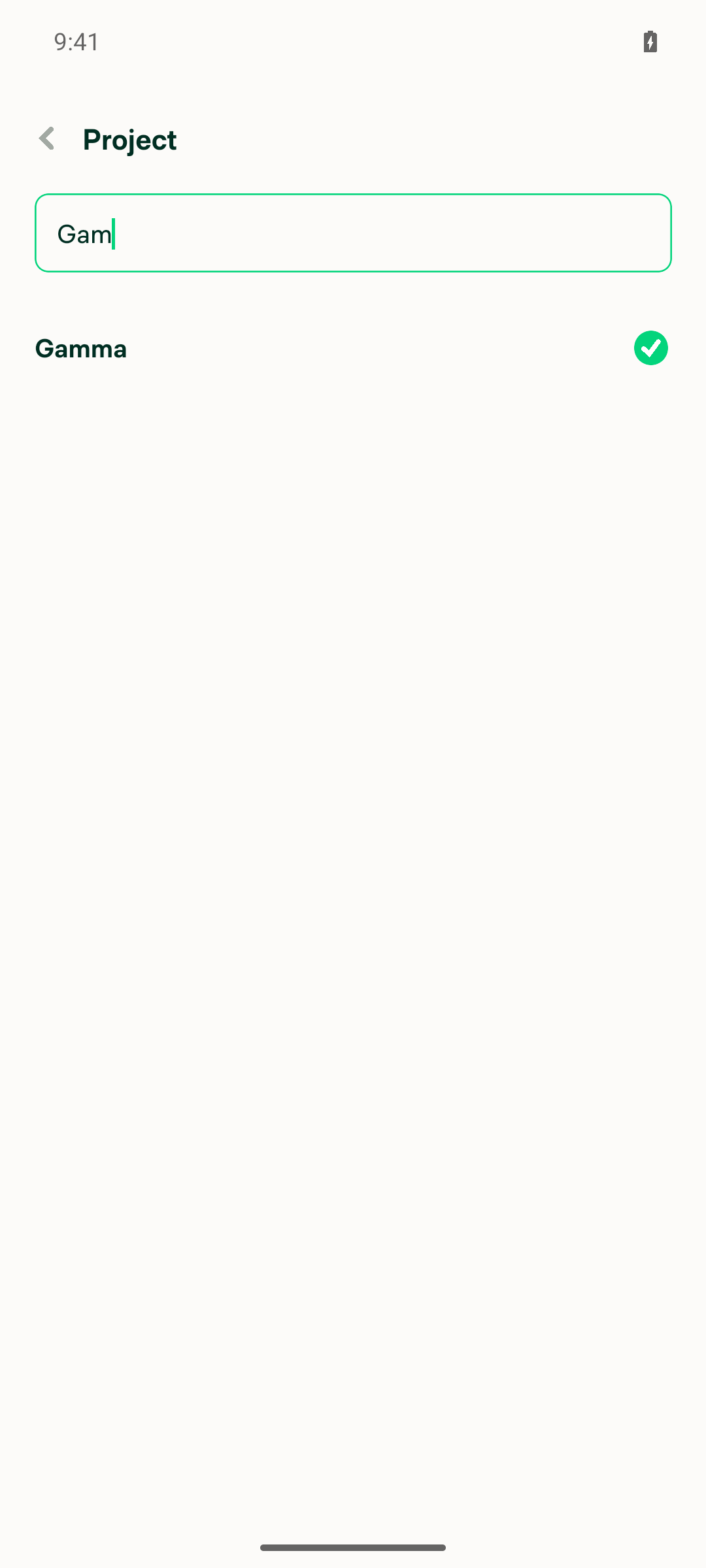
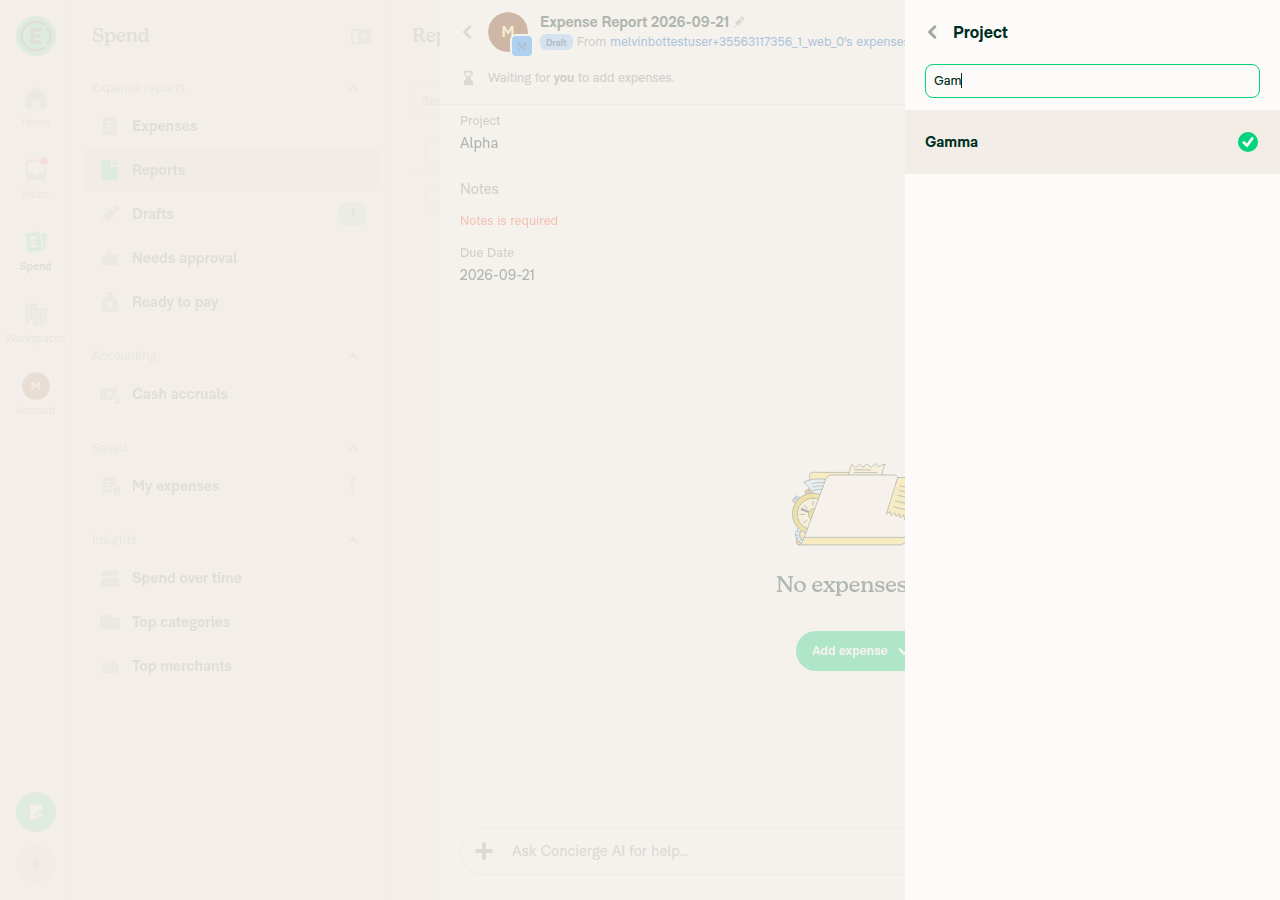
Reopen the field, search for an option, tap a result — page stays open — then press Save and verify the right value is appliedTyping "Gam" filtered to Gamma; tapping it applied the checkmark to Gamma while the picker screen remained open (search box, Back button unchanged). No Save button rendered, so the selection could not be committed; going back discarded it and the report's Project field remained "Alpha".
Search filtered to Gamma with its checkmark applied and no Save button present
❌
Reopen the field and press back without tapping a row — nothing changed and Save was disabledReopening with no draft selection showed no Save button (consistent with the isDisabled logic hiding it, though it hides it entirely rather than showing a disabled state). Pressing back with nothing tapped left the report's Project field unchanged at "Alpha".
✅
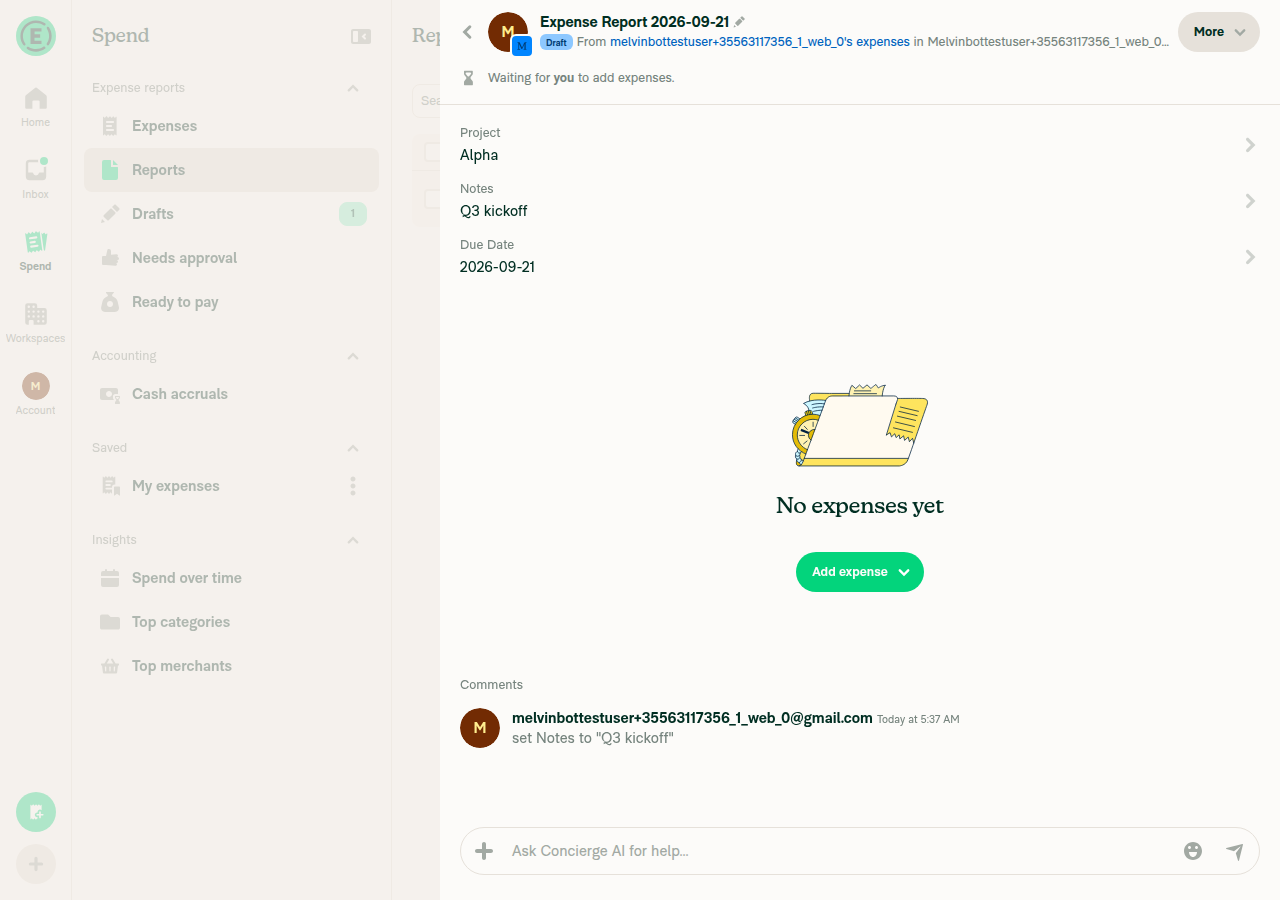
Text-type and date-type report fields are unaffected — they still submit via their own form SaveThe Notes (text) field showed its own Save button, accepted "Test note content", and applied it to the report with a corresponding activity comment. The Due Date (date) field showed its own Save button on a calendar picker, accepted a new date (2026-09-25), and applied it to the report. Both differ from the broken list-field flow because EditReportFieldText/EditReportFieldDate use a Form-based Save, not SelectionListWithSections' confirmButtonOptions.
Report showing Notes and Due Date fields successfully updated, Project field still stuck at Alpha
✅

Setup: created a workspace, upgraded to Control in-app to enable Report Fields, added a list field "Project" (Alpha/Beta/Gamma, initial value Alpha), a text field "Notes", and a date field "Due Date", then created an expense report on that workspace. No JS console errors observed.


view run · view recording

@MelvinBot

MelvinBot commented Sep 21, 2026 •

Copy link
Copy Markdown
Contributor Author

🤖 Web test steps verification results: ❌ fail

Tap-to-stage works — clicking a row moves the checkmark and keeps the page open, so the save-on-input this PR targets is gone. But the Save button never renders for the list-type report field picker in any state, so a staged change can never be committed. This reproduces the same root cause found on Android: EditReportFieldDropdown.tsx:82-87 sets only confirmButtonOptions, but BaseSelectionListWithSections.tsx:383-388 mounts <Footer> only when footerContent is set and never forwards confirmButtonOptions, so the Save <Button> in Footer.tsx:44-52 is never reached. The flat-list sibling BaseSelectionList.tsx:130 gets this right with hasFooter = !!footerContent || confirmButtonOptions?.showButton. Text and date report fields are unaffected.

Report showing Project still Alpha after backing out, Notes saved via its own form

Step Status
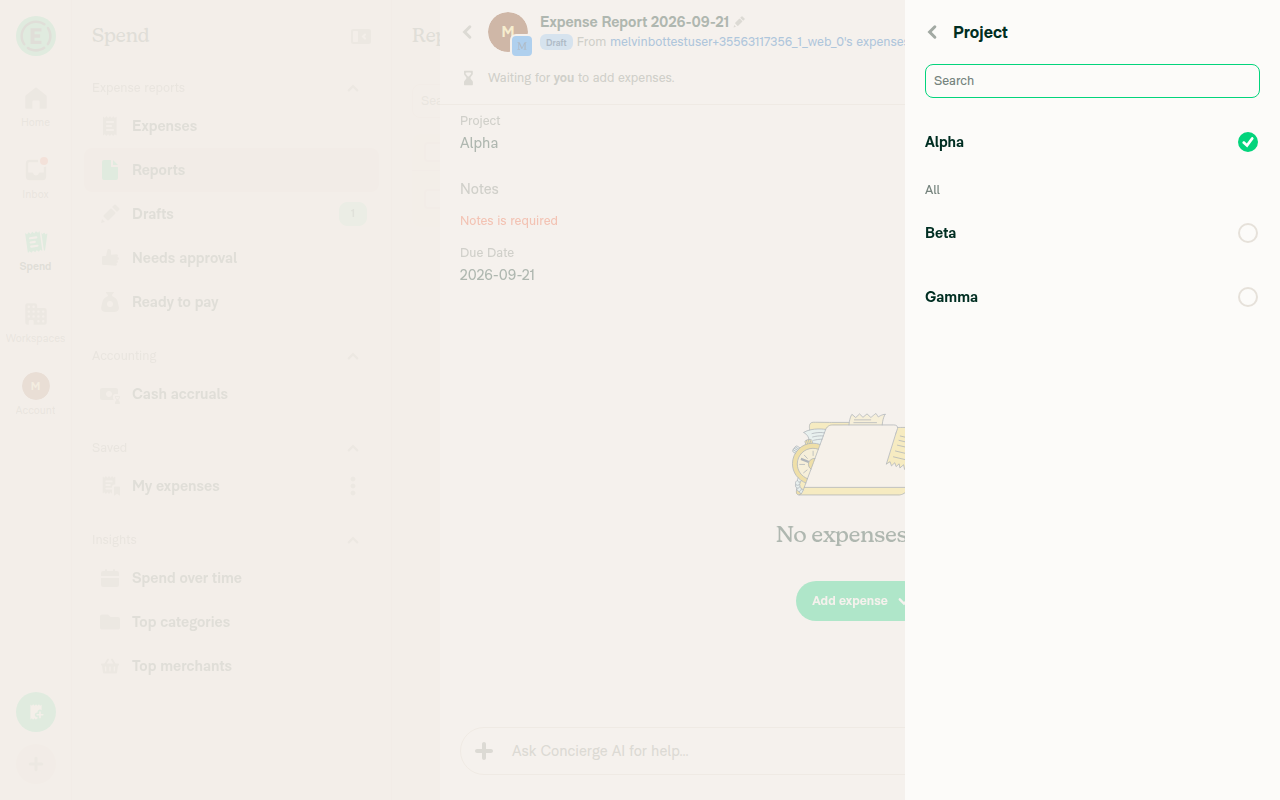
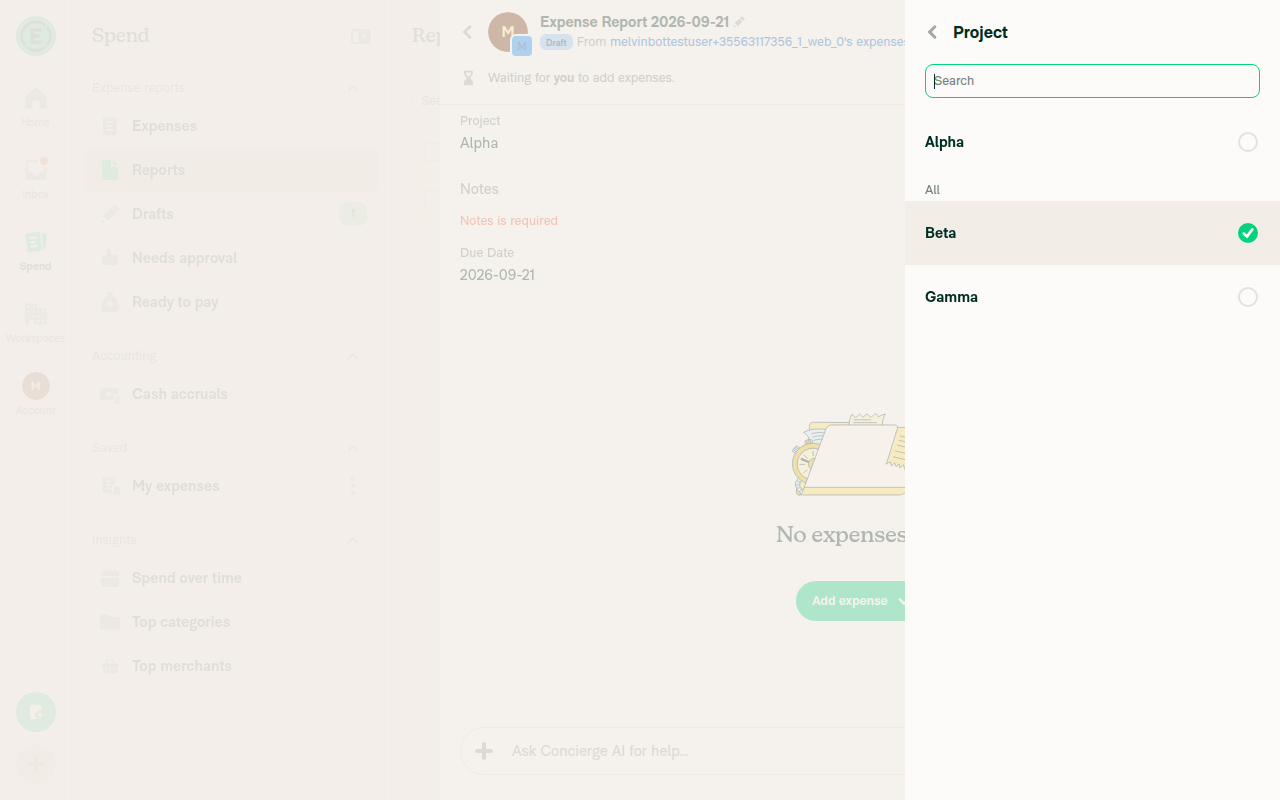
1. Click list-type field option → page stays open, checkmark movesOpening "Project" (list field) showed Alpha checked; clicking "Beta" kept the picker open and moved the checkmark to Beta without navigating away or saving.
Project picker open with Alpha selected
Beta selected, page stays open, no Save button rendered
✅
2. Press Save → value applied to report, page closesNo Save button is ever rendered on the list field's picker screen (confirmed via snapshot and a find for "Save" returning no match, at viewports 500/800/900px tall), so Save could not be pressed and the staged value ("Beta") could never be committed. The background report continued to show "Project: Alpha".
Beta staged with checkmark but no Save button anywhere on screen
❌
3. Reopen field, click selected option to unselect it, press Save, verify field clearedClicking the currently-selected "Beta" row correctly cleared the checkmark (staged value becomes ""), matching the intended clear-on-reselect behavior. But again no Save button rendered, so the clear could never be persisted to the report.
Beta unselected via tap-to-clear staging, no Save button present
❌
4. Reopen field, search for an option, click result → page stays open; press Save, verify right value appliedSearching "Gam" correctly filtered to "Gamma"; clicking it kept the picker open with the checkmark on Gamma (page did not close or navigate). Save button still absent, so the searched selection could never be applied to the report.
Gamma selected via search, page stays open, no Save button
❌
5. Reopen field, press back without selecting a row → nothing changed and Save was disabledNavigating back without clicking any row left the report's Project field unchanged ("Alpha"), confirming no accidental save-on-input. However, "Save was disabled" could not be strictly verified because the button is not merely disabled — it never renders at all, even before any interaction, so there is no visible disabled-button state to confirm.
Report showing Project still Alpha after backing out, Notes saved via its own form
⚠️
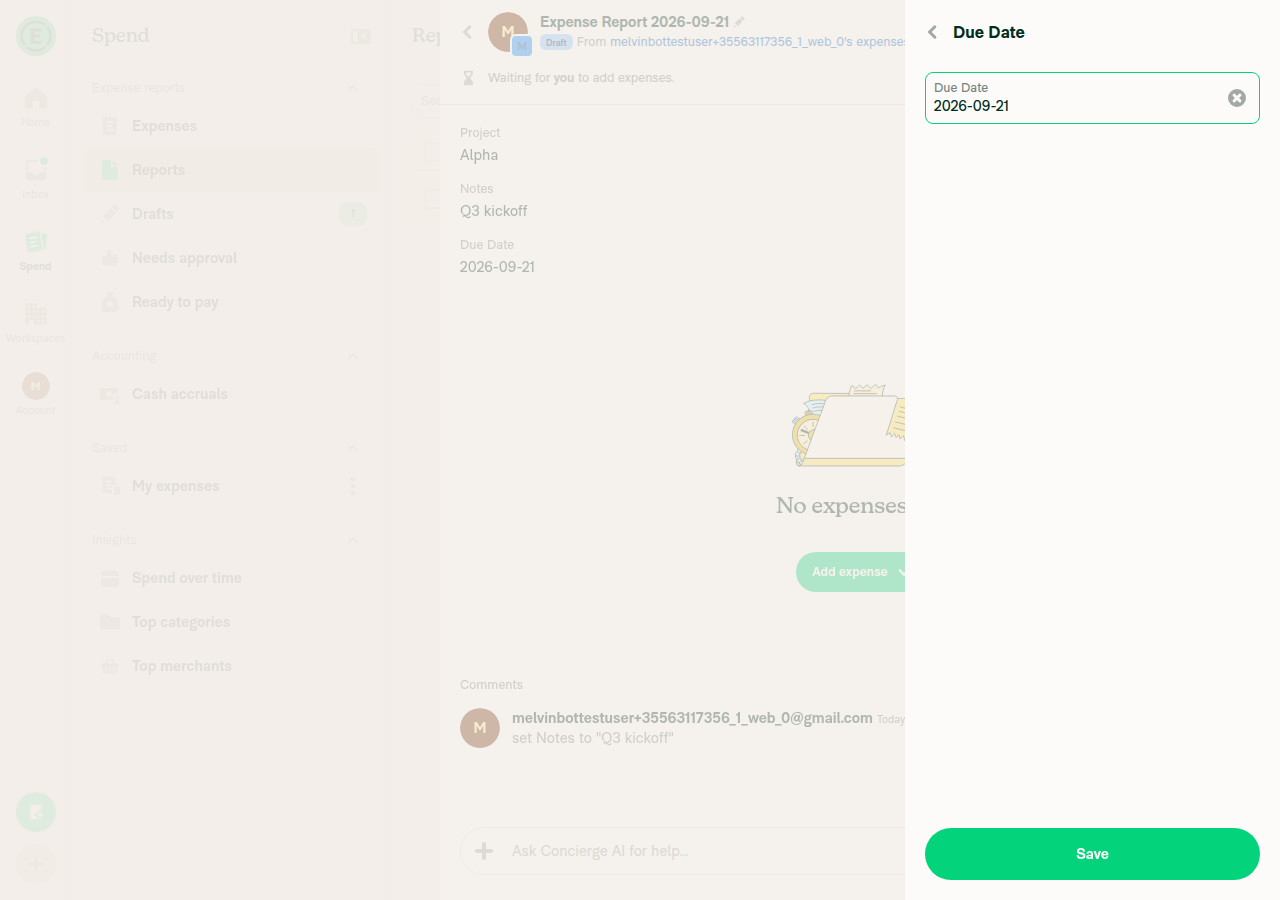
6. Text-type and date-type report fields are unaffected (still submit via their own form Save)The "Notes" (text) field showed its own visible Save button; filling "Q3 kickoff" and pressing Save closed the page and applied the value (confirmed by the report showing Notes: Q3 kickoff and a report-history comment). The "Due Date" (date) field also showed its own visible, enabled Save button on open, unaffected by the list-picker bug.
Due Date field with its own working Save button
Report showing Project still Alpha after backing out, Notes saved via its own form
✅

Setup: workspace on the Control plan with Report Fields enabled and three fields — Project (list: Alpha/Beta/Gamma, initial value Alpha), Notes (text), Due Date (date) — then an expense report on that workspace. Browser console inspection is out of scope for the web harness, so console errors were not captured; no in-app error banners appeared during the session.


view run · view recording

@truph01

truph01 commented Oct 22, 2026

Copy link
Copy Markdown
Contributor

@MelvinBot Merge main and mark this PR as ready

…eld-dropdown-save

Co-authored-by: truph01 <truph01@users.noreply.github.com>

# Conflicts:
#	src/pages/EditReportFieldDropdown.tsx
@MelvinBot
MelvinBot marked this pull request as ready for review October 22, 2026 11:17
@MelvinBot
MelvinBot requested a review from a team as a code owner October 22, 2026 11:17
@melvin-bot
melvin-bot Bot requested review from truph01 and removed request for a team October 22, 2026 11:17
@melvin-bot

melvin-bot Bot commented Oct 22, 2026

Copy link
Copy Markdown

@truph01 Please copy/paste the Reviewer Checklist from here into a new comment on this PR and complete it. If you have the K2 extension, you can simply click: [this button]

@melvin-bot
melvin-bot Bot requested review from trjExpensify and removed request for a team October 22, 2026 11:17
@MelvinBot

Copy link
Copy Markdown
Contributor Author

I merged main into this PR and marked it ready for review.

I resolved one conflict in src/pages/EditReportFieldDropdown.tsx. main changed the picker so that re-selecting the current value no longer clears the field, because '' now means "cleared." I kept this PR's Save button and adopted that behavior. Tapping the already-selected row now stages the same value, so Save stays disabled. It no longer stages a clear.

ESLint and TypeScript pass locally.


view run

@chatgpt-codex-connector

chatgpt-codex-connector Bot commented Oct 22, 2026 •

Copy link
Copy Markdown

Codex Review Summary

This comment shows the latest Codex review activity on this pull request.

Review Status Commit Review trigger
📝 Code Review ✅ Completed 2026-10-22T11:21:45.538728Z ff34cb7 Draft marked ready
ℹ️ About Codex in GitHub

Your team has set up Codex to review pull requests in this repo. Reviews are triggered when you

  • Open a pull request for review
  • Mark a draft as ready
  • Comment "@codex review" or "@codex security review".

Codex reacts with 👀 while any review is running, comments if it has suggestions, and reacts with 👍 once all reviews finish with no findings.

@chatgpt-codex-connector chatgpt-codex-connector Bot left a comment

Copy link
Copy Markdown

Choose a reason for hiding this comment

The reason will be displayed to describe this comment to others. Learn more.

💡 Codex Review

Here are some automated review suggestions for this pull request.

Reviewed commit: ff34cb7259

ℹ️ About Codex in GitHub

Codex has been enabled to automatically review pull requests in this repo. Reviews are triggered when you

  • Open a pull request for review
  • Mark a draft as ready
  • Comment "@codex review".

If Codex has suggestions, it will comment; otherwise it will react with 👍.

When you sign up for Codex through ChatGPT, Codex can also answer questions or update the PR, like "@codex address that feedback".

onSelectRow={(option) => onSubmit({[fieldKey]: option?.text ?? ''})}
// Re-selecting the value the field already holds stages that same value rather than an empty string,
// which leaves '' free to mean "cleared". Staging the stored value keeps Save disabled.
onSelectRow={(option) => setDraftValue(option?.text ?? '')}

Copy link
Copy Markdown

Choose a reason for hiding this comment

The reason will be displayed to describe this comment to others. Learn more.

P1 Badge Toggle a reselected option to the empty draft

When the user taps the currently checked option—or selects a new option and taps it again—this always stages option.text, so the checkmark cannot be removed and onSubmit can never receive ''. This makes clearing an optional list report field impossible through this picker; compare the selected option with currentValue and stage an empty string when they match.

Useful? React with 👍 / 👎.

Copy link
Copy Markdown
Contributor

Choose a reason for hiding this comment

The reason will be displayed to describe this comment to others. Learn more.

@MelvinBot Check this comment

Copy link
Copy Markdown
Contributor Author

Choose a reason for hiding this comment

The reason will be displayed to describe this comment to others. Learn more.

I don't think we should change this. On main, tapping the selected list value no longer clears the field. Restore: Show up to three report fields per row and edit them inline made that change on purpose. It replaced the old fieldValue === option.text ? '' toggle with submitting the tapped value.

This PR only moves the save behind a Save button for WCAG 3.2.2. It shouldn't bring back toggle-to-clear. Tapping the selected row now picks the same value, so Save stays disabled. The test in EditReportFieldDropdownTest.tsx covers this.

If you want toggle-to-clear back, let me know and I'll add it.


view run

onSelectRow={(option) => onSubmit({[fieldKey]: option?.text ?? ''})}
// Re-selecting the value the field already holds stages that same value rather than an empty string,
// which leaves '' free to mean "cleared". Staging the stored value keeps Save disabled.
onSelectRow={(option) => setDraftValue(option?.text ?? '')}

Copy link
Copy Markdown

Choose a reason for hiding this comment

The reason will be displayed to describe this comment to others. Learn more.

P1 Badge Update the existing tests for the staged submission flow

The existing cases in tests/ui/EditReportFieldDropdownTest.tsx (lines 104–129) press a row and immediately assert that onSubmit was called. Since this callback now only updates local state, both tests fail whenever the UI suite runs. Update them to assert that row selection does not submit, press the new Save button, and then verify the submitted value.

Useful? React with 👍 / 👎.

Copy link
Copy Markdown
Contributor

Choose a reason for hiding this comment

The reason will be displayed to describe this comment to others. Learn more.

@MelvinBot Check this comment

Copy link
Copy Markdown
Contributor Author

Choose a reason for hiding this comment

The reason will be displayed to describe this comment to others. Learn more.

Already handled in e5fdb99. The EditReportFieldDropdownTest.tsx tests now check three things:

  • Picking a row doesn't submit.
  • Pressing Save submits the picked value.
  • Picking the stored value again leaves Save disabled.

That commit also fixed SelectionListWithSections so it renders the Save button. No further change needed.


view run

…sts for Save

Co-authored-by: truph01 <truph01@users.noreply.github.com>
@MelvinBot
MelvinBot requested a review from a team as a code owner October 22, 2026 11:28
@melvin-bot
melvin-bot Bot requested review from lakchote and mountiny and removed request for a team October 22, 2026 11:28
@melvin-bot

melvin-bot Bot commented Oct 22, 2026

Copy link
Copy Markdown

@lakchote @mountiny One of you needs to copy/paste the Reviewer Checklist from here into a new comment on this PR and complete it. If you have the K2 extension, you can simply click: [this button]

@MelvinBot

Copy link
Copy Markdown
Contributor Author

Fixed the failing test (job 6) check in e5fdb99. The PR's Save button never rendered: SelectionListWithSections didn't pass confirmButtonOptions to its footer, unlike the flat list.

The dropdown and SelectionList tests, lint, and typecheck pass locally. Check independent approval is expected and unrelated.

@truph01 truph01 left a comment

Copy link
Copy Markdown
Contributor

Choose a reason for hiding this comment

The reason will be displayed to describe this comment to others. Learn more.

@MelvinBot Check this comment

Comment thread src/pages/EditReportFieldDropdown.tsx Outdated
Comment on lines +65 to +67
// Tapping a row used to call `onSubmit` straight away, which closed the page on input (WCAG 3.2.2 On Input).
// The tap now only stages the value, and `onSubmit` runs from an explicit Save.
// An empty string is a meaningful staged value (it clears the field), so `undefined` means "nothing staged yet".

Copy link
Copy Markdown
Contributor

Choose a reason for hiding this comment

The reason will be displayed to describe this comment to others. Learn more.

Remove this comment

This comment was marked as resolved.

Copy link
Copy Markdown
Contributor Author

Choose a reason for hiding this comment

The reason will be displayed to describe this comment to others. Learn more.

Removed in d076696.


view run

Comment thread src/pages/EditReportFieldDropdown.tsx Outdated
Comment on lines +118 to +119
// Re-selecting the value the field already holds stages that same value rather than an empty string,
// which leaves '' free to mean "cleared". Staging the stored value keeps Save disabled.

Copy link
Copy Markdown
Contributor

Choose a reason for hiding this comment

The reason will be displayed to describe this comment to others. Learn more.

Remove this comment

Copy link
Copy Markdown
Contributor

Choose a reason for hiding this comment

The reason will be displayed to describe this comment to others. Learn more.

@MelvinBot Check this comment

Copy link
Copy Markdown
Contributor Author

Choose a reason for hiding this comment

The reason will be displayed to describe this comment to others. Learn more.

Removed in d076696.


view run

onSelectRow={(option) => onSubmit({[fieldKey]: option?.text ?? ''})}
// Re-selecting the value the field already holds stages that same value rather than an empty string,
// which leaves '' free to mean "cleared". Staging the stored value keeps Save disabled.
onSelectRow={(option) => setDraftValue(option?.text ?? '')}

Copy link
Copy Markdown
Contributor

Choose a reason for hiding this comment

The reason will be displayed to describe this comment to others. Learn more.

@MelvinBot Check this comment

onSelectRow={(option) => onSubmit({[fieldKey]: option?.text ?? ''})}
// Re-selecting the value the field already holds stages that same value rather than an empty string,
// which leaves '' free to mean "cleared". Staging the stored value keeps Save disabled.
onSelectRow={(option) => setDraftValue(option?.text ?? '')}

Copy link
Copy Markdown
Contributor

Choose a reason for hiding this comment

The reason will be displayed to describe this comment to others. Learn more.

@MelvinBot Check this comment

Co-authored-by: truph01 <truph01@users.noreply.github.com>
@MelvinBot

Copy link
Copy Markdown
Contributor Author

All four comments you flagged already have replies. No further change is needed. I confirmed this against the PR head, d076696.


view run

@trjExpensify trjExpensify left a comment

Copy link
Copy Markdown
Contributor

Choose a reason for hiding this comment

The reason will be displayed to describe this comment to others. Learn more.

Is this PR necessary anymore due to #104124?

2026-10-22_21-36-41.mp4

@lakchote lakchote left a comment

Copy link
Copy Markdown
Contributor

Choose a reason for hiding this comment

The reason will be displayed to describe this comment to others. Learn more.

Agree with @trjExpensify. Since #104124, list report fields are picked from an inline dropdown on the report, and the full page picker is only reachable from a direct URL. I'd close this one. If we still want that page covered, the Save gate should only apply to DynamicEditReportFieldPage.

// signalling "no change" this way is no longer needed and leaves '' free to mean "cleared".
onSelectRow={(option) => onSubmit({[fieldKey]: option?.text ?? ''})}
onSelectRow={(option) => setDraftValue(option?.text ?? '')}
confirmButtonOptions={{

Copy link
Copy Markdown
Contributor

Choose a reason for hiding this comment

The reason will be displayed to describe this comment to others. Learn more.

This is also the list in the inline report field dropdown from #104124 (ReportFieldInlineInput), so the change hits that dropdown too. Picking a value there stops saving, and the Save button goes into a popover sized with hasButton: false, so a short list gets squeezed to about one visible row. If we keep this PR, the Save gate should only apply to DynamicEditReportFieldPage, the way #101686 kept it to isEditingTask.

const optionSections = getReportFieldOptionsSection({
searchValue: debouncedSearchValue,
// Live value drives the checkmark, so tapping a row marks it immediately.
// Staged value drives the checkmark, so tapping a row marks it immediately.

Copy link
Copy Markdown
Contributor

Choose a reason for hiding this comment

The reason will be displayed to describe this comment to others. Learn more.

NAB: the comment above still says the live value drives the checkmark, it's the staged value now. Can we update it so the two agree?

@mountiny

mountiny commented Nov 9, 2026

Copy link
Copy Markdown
Contributor

@truph01 should we close this?

@truph01

truph01 commented Nov 9, 2026

Copy link
Copy Markdown
Contributor

@MelvinBot Merge main

Co-authored-by: truph01 <truph01@users.noreply.github.com>
@MelvinBot

Copy link
Copy Markdown
Contributor Author

🤖 Web test steps verification results: ❌ fail

The web app rendered a blank page, blocking sign-in and dropdown verification. No source was edited during testing.
Blank browser page preventing verification

Step Status
Selecting an option stages its checkmark and keeps the picker openBlocked by the blank page.
Blank browser page preventing verification
❌
Save commits the staged value and closes the pickerNot executed; app inaccessible.
❌
Stored value leaves Save disabled; Back discards unsaved changesNot executed; app inaccessible.
❌

Merged main into this PR without conflicts and pushed 621f675. Six dropdown tests and Storybook smoke tests passed. Other checks encountered dependency/tooling errors and spelling failures; the full Jest run timed out.


view run

@MelvinBot

Copy link
Copy Markdown
Contributor Author

⚠️ MelvinBot CI Fix Loop Detected

MelvinBot has made 5 consecutive commits trying to fix CI failures. Automatic CI fix dispatches are now paused for this PR.

Next steps: A human should review the recent commits and resolve the conflicting CI errors manually.

@truph01 truph01 closed this Nov 9, 2026
@truph01

truph01 commented Nov 9, 2026

Copy link
Copy Markdown
Contributor

Closed since it is redundant now

Sign up for free to join this conversation on GitHub. Already have an account? Sign in to comment

Labels

Melvin-Test-Android Melvin-Test-Web Triggers Melvin to run the testing steps of the PR on web

Projects

None yet

Development

Successfully merging this pull request may close these issues.

5 participants