Skip to content

Hide Expensify team members from the company card and Expensify Card assignee pickers - #101073

Merged
MonilBhavsar merged 7 commits into
mainfrom
claude-hideExpensifyTeamFromCardAssignees
Oct 27, 2026
Merged

MonilBhavsar merged 7 commits into
mainfrom
claude-hideExpensifyTeamFromCardAssignees

Conversation

@MelvinBot

@MelvinBot MelvinBot commented Sep 14, 2026 •

Copy link
Copy Markdown
Contributor

Explanation of Change

The Assign card → "Choose the cardholder" list was built straight from policy.employeeList and never applied the Expensify-team domain filter that the Workspace Members page applies, so an admin could assign a company card to a member the Members page deliberately hides.

Two different helpers are involved, and the card flow was using the wrong one:

  • The Members page hides Expensify staff by email domain — WorkspaceMembersPage.tsx calls shouldFilterExpensifyTeam + isExpensifyTeam, which match any @expensify.com or @team.expensify.com address.
  • The cardholder list only called filterGuideAndAccountManager, which does exact-string comparisons against policy.assignedGuide.email and the account manager's login. There is no domain check, so test@team.expensify.com passed through untouched.

This PR applies the same domain filter the Members page uses when building membersDetails, in both assignee pickers:

  • src/pages/workspace/companyCards/assignCard/AssigneeStep.tsx
  • src/pages/workspace/expensifyCard/issueNew/AssigneeStep.tsx — the Expensify Card "Issue new card" step had the identical gap and would issue a real card to internal staff.

The already-assigned cardholder is kept visible (compared against the frozen initialAssigneeEmail) so editing an existing assignment doesn't blank out the selection. shouldFilterExpensifyTeam also keeps the existing behavior where Expensify-owned policies, and Expensify staff themselves, still see the full list.

filterGuideAndAccountManager was deliberately not extended — it has many callers with different intents, and its doc comment scopes it to the guide/account-manager pair. A local guard in each picker is the smaller, more predictable change.

Scope note: this hides Expensify-team accounts from the picker, which is the stated expected result. It does not stop the backend from accepting such an assignment — server-side enforcement would be a separate, internal change.

Unit tests were added to both existing test suites covering: the Expensify-team member is hidden, the already-assigned Expensify-team member stays visible, and Expensify-owned policies still show the full list.

Fixed Issues

$ #98941
PROPOSAL: #98941 (comment)

Tests

Preconditions: Create a new account with Manage My Team 1-4, and connect to the Mock Bank company card (or have an account with a workspace, that has a company card already)

  1. Open the New Dot app
  2. Navigate to the Members page -> Invite the test@team.expensify.com
  3. Go to the Company Card page
  4. Click Assign card
  5. Verify that the Expensify team member does not appear in the assigned member list
Automated checks Melvin ran locally
  • npx eslint on all four changed files — passed
  • npm run typecheck — passed
  • npm run spell-changed — passed (4 files, 0 issues)
  • npm run react-compiler-compliance-check check <both AssigneeStep files> — passed
  • npm test tests/ui/AssignCardAssigneeStepTest.tsx tests/ui/IssueNewCardAssigneeStepTest.tsx — 12/12 passed

Melvin could not verify this in a live browser session: the test session rendered a blank page (0 DOM nodes) and could not be driven, so the flows above still need manual verification.

  • Verify that no errors appear in the JS console

Offline tests

QA Steps

Preconditions: Create a new account with Manage My Team 1-4, and connect to the Mock Bank company card (or have an account with a workspace, that has a company card already)

  1. Open the New Dot app
  2. Navigate to the Members page -> Invite the test@team.expensify.com
  3. Go to the Company Card page
  4. Click Assign card
  5. Verify that the Expensify team member does not appear in the assigned member list
  • Verify that no errors appear in the JS console

PR Author Checklist

  • I linked the correct issue in the ### Fixed Issues section above
  • I wrote clear testing steps that cover the changes made in this PR
    • I added steps for local testing in the Tests section
    • I added steps for the expected offline behavior in the Offline steps section
    • I added steps for Staging and/or Production testing in the QA steps section
    • I added steps to cover failure scenarios (i.e. verify an input displays the correct error message if the entered data is not correct)
    • I turned off my network connection and tested it while offline to ensure it matches the expected behavior (i.e. verify the default avatar icon is displayed if app is offline)
    • I tested this PR with a High Traffic account against the staging or production API to ensure there are no regressions (e.g. long loading states that impact usability).
  • I included screenshots or videos for tests on all platforms
  • I ran the tests on all platforms & verified they passed on:
    • Android: Native
    • Android: mWeb Chrome
    • iOS: Native
    • iOS: mWeb Safari
    • MacOS: Chrome / Safari
  • I verified there are no console errors (if there's a console error not related to the PR, report it or open an issue for it to be fixed)
  • I followed proper code patterns (see Reviewing the code)
    • I verified that comments were added to code that is not self explanatory
    • I verified that any new or modified comments were clear, correct English, and explained "why" the code was doing something instead of only explaining "what" the code was doing.
    • I verified any copy / text that was added to the app is grammatically correct in English. It adheres to proper capitalization guidelines (note: only the first word of header/labels should be capitalized), and is either coming verbatim from figma or has been approved by marketing (in order to get marketing approval, ask the Bug Zero team member to add the Waiting for copy label to the issue)
  • If a new code pattern is added I verified it was agreed to be used by multiple Expensify engineers
  • I followed the guidelines as stated in the Review Guidelines
  • I tested other components that can be impacted by my changes (i.e. if the PR modifies a shared library or component like Avatar, I verified the components using Avatar are working as expected)
  • If a new CSS style is added I verified that:
    • A similar style doesn't already exist
    • The style can't be created with an existing StyleUtils function (i.e. StyleUtils.getBackgroundAndBorderStyle(theme.componentBG))
  • If new assets were added or existing ones were modified, I verified that:
    • The assets are optimized and compressed (for SVG files, run npm run compress-svg)
    • The assets load correctly across all supported platforms.
  • If the PR modifies code that runs when editing or sending messages, I tested and verified there is no unexpected behavior for all supported markdown - URLs, single line code, code blocks, quotes, headings, bold, strikethrough, and italic.
  • If the PR modifies a generic component, I tested and verified that those changes do not break usages of that component in the rest of the App (i.e. if a shared library or component like Avatar is modified, I verified that Avatar is working as expected in all cases)
  • If the PR modifies a component related to any of the existing Storybook stories, I tested and verified all stories for that component are still working as expected.
  • If the PR modifies a component or page that can be accessed by a direct deeplink, I verified that the code functions as expected when the deeplink is used - from a logged in and logged out account.
  • If the PR modifies the UI (e.g. new buttons, new UI components, changing the padding/spacing/sizing, moving components, etc) or modifies the form input styles:
    • I verified that all the inputs inside a form are aligned with each other.
    • I added Design label and/or tagged @Expensify/design so the design team can review the changes.
  • I added unit tests for any new feature or bug fix in this PR to help automatically prevent regressions in this user flow.
  • If the main branch was merged into this PR after a review, I tested again and verified the outcome was still expected according to the Test steps.

Screenshots/Videos

Android: Native
Android: mWeb Chrome
iOS: Native
iOS: mWeb Safari
MacOS: Chrome / Safari

Co-authored-by: Eugene Voloshchak <eVoloshchak@users.noreply.github.com>
@MelvinBot

MelvinBot commented Sep 14, 2026 •

Copy link
Copy Markdown
Contributor Author

🤖 Android test steps verification results: ⚠️ partial

I landed on a signed-in Inbox, created an owned workspace, invited test@team.expensify.com, and confirmed the existing Members-list filter hides it. I could not reach the Assign card or Issue new card assignee screens: this test account has no company card feed or business bank account connected, and both setup paths are gated behind an account-validation magic code that CI cannot receive. That means the actual change in this PR — hiding Expensify team members from the cardholder pickers — is still unverified on Android.

Add bank account screen preceding Issue new card, gated behind account validation

Step Status
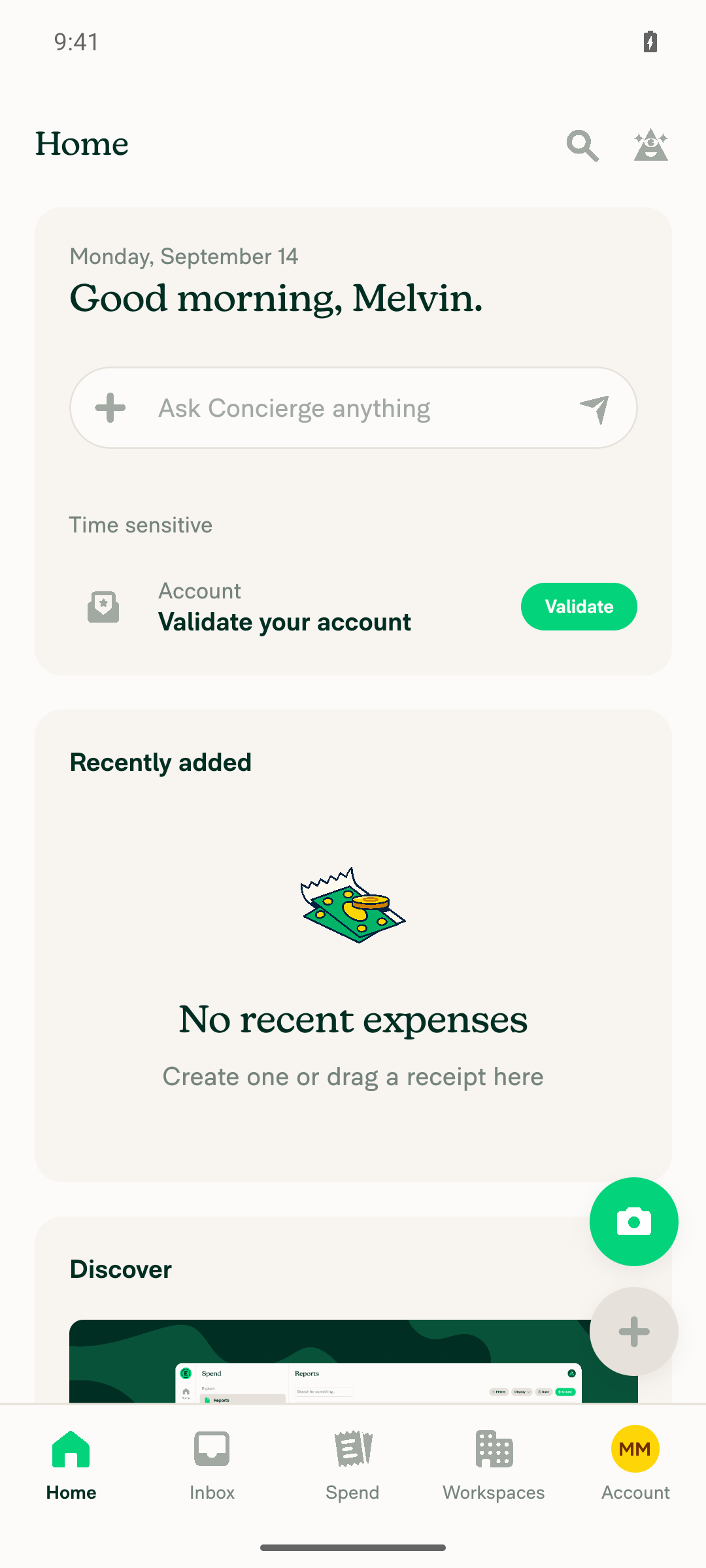
Open the app and land on a signed-in InboxAfter completing a stray onboarding "What's your name?" step, the app showed the Inbox greeting "Good morning, Melvin." with bottom nav (Home/Inbox/Spend/Workspaces/Account).
Signed-in Inbox landing screen
✅
Open a workspace you own, go to Members, invite test@team.expensify.comNo workspaces existed, so a new workspace ("Melvin Melvin's Workspace") was created with the owner role. Invited test@team.expensify.com via Members → Invite member and confirmed the invite.
✅
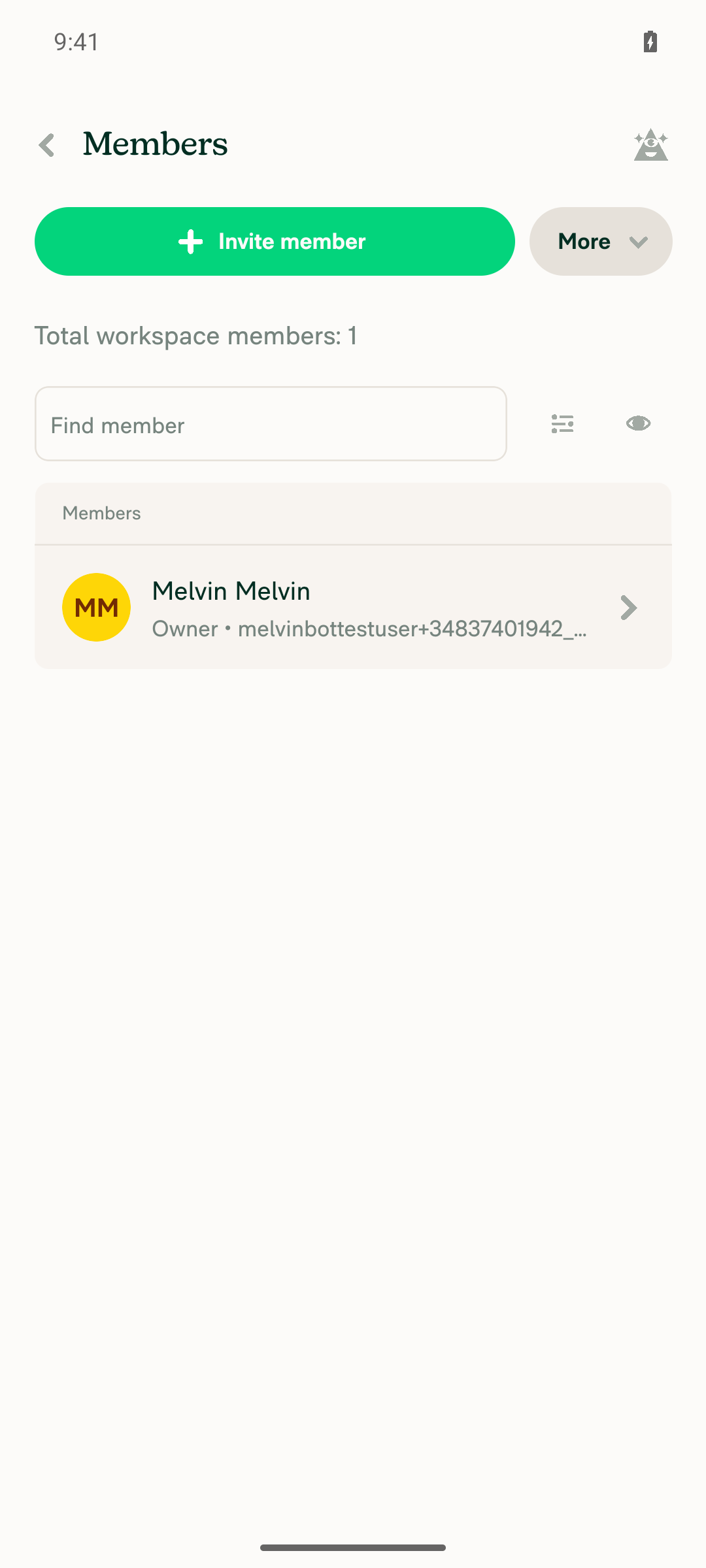
test@team.expensify.com does not show in the workspace Members listAfter the invite completed, the Members page reported "Total workspace members: 1", listing only the owner (Melvin Melvin). test@team.expensify.com was not rendered, matching existing filter behavior.
Workspace Members list showing only the owner, invited @team.expensify.com member hidden
✅
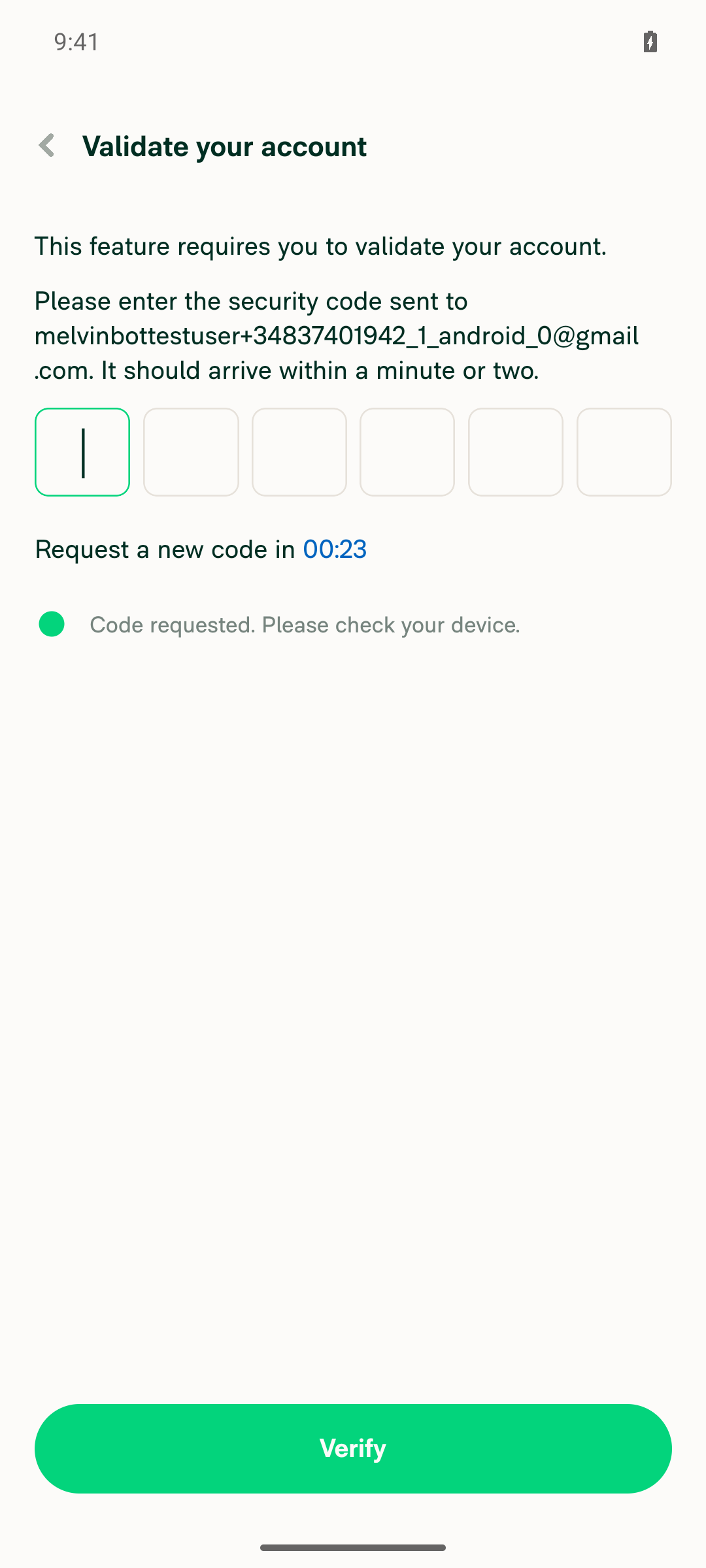
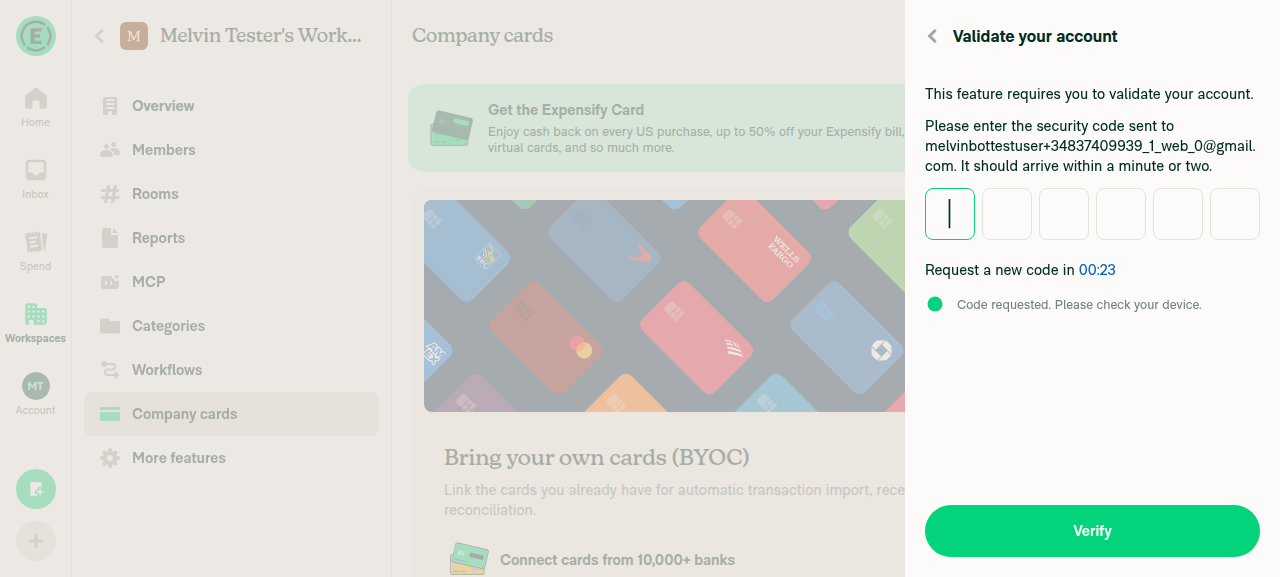
Go to Company cards page and reach the "Choose the cardholder" step of Assign cardBlocked. The workspace has no company card feed connected, and the only entry point ("Add cards") routes to an account-validation screen requiring a 6-digit email code before any feed or bank connection can proceed. No mail inbox is reachable from CI, so the Assign card flow could not be reached.
Account validation magic code screen blocking company-card feed setup
❌
test@team.expensify.com absent, ordinary members present, in the "Choose the cardholder" listBlocked. Could not reach this step because the prerequisite company card feed connection sits behind the same unreachable account-validation screen.
❌
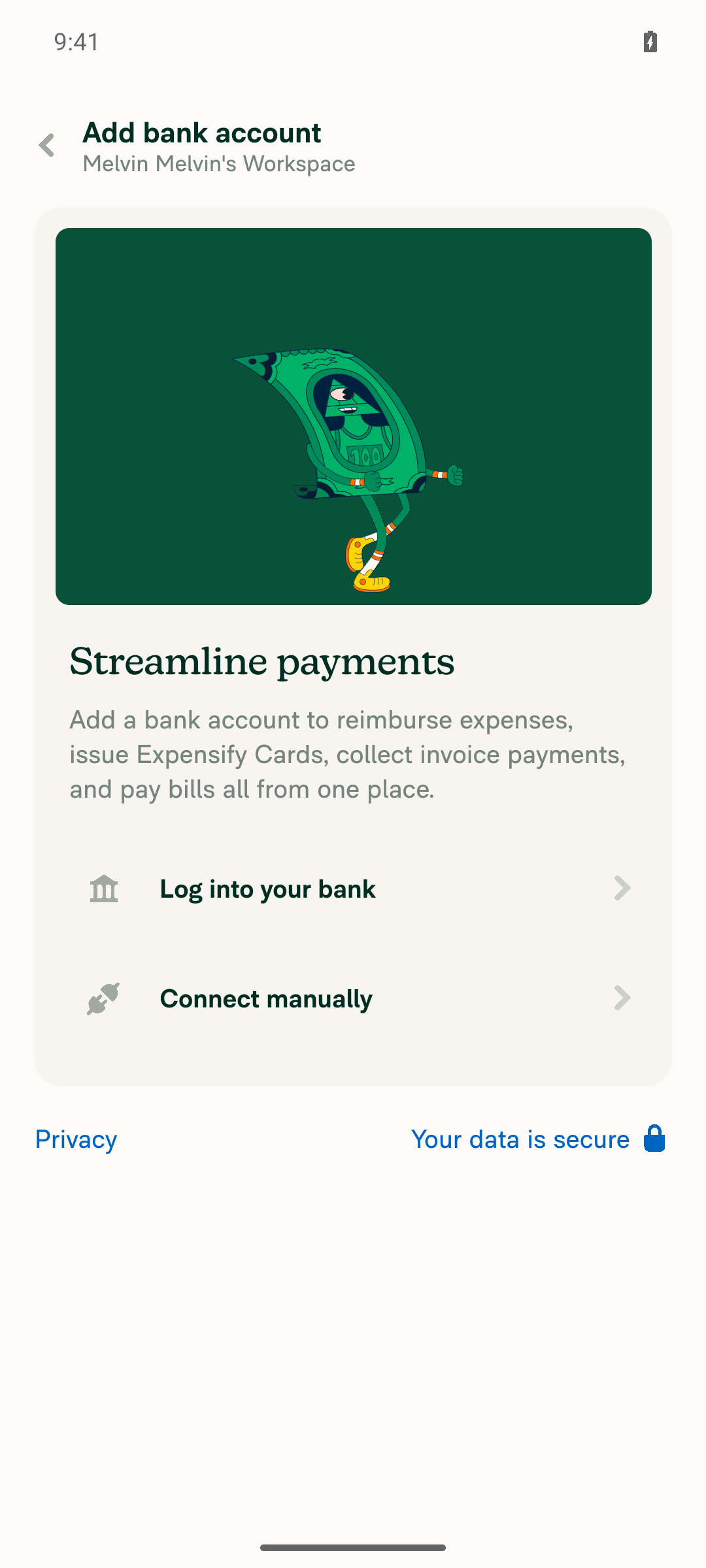
Expensify Card → Issue new card assignee step hides test@team.expensify.com while ordinary members remainBlocked. Enabled the Expensify Card feature and opened "Issue new card", which requires a connected business bank account. Both "Log into your bank" and "Connect manually" led to the same account-validation screen.
Add bank account screen preceding Issue new card, gated behind account validation
❌

Two things worth flagging, eVoloshchak:

  1. There are no documented testing steps on this PR. The Tests and QA Steps sections are still // TODO placeholders for the human co-author. I ran the Action Performed steps from the linked issue [Due for payment 2026-11-05] [$175] [Exploratory] Company card - Can assign card to an Expensify team Members #98941 instead.
  2. The core change is not testable on the CI account as-is. Verifying either picker needs a workspace with a connected card feed (issue [Due for payment 2026-11-05] [$175] [Exploratory] Company card - Can assign card to an Expensify team Members #98941 used Mock Bank) or a connected business bank account. Point me at a pre-provisioned account with one of those and I can rerun and cover steps 4 through 6.

The unit tests added in this PR (tests/ui/AssignCardAssigneeStepTest.tsx, tests/ui/IssueNewCardAssigneeStepTest.tsx) do cover the hidden-member, already-assigned-member, and Expensify-owned-policy cases, but that is not a substitute for the on-device check you asked for.


view run · no recording available

@MelvinBot

MelvinBot commented Sep 14, 2026 •

Copy link
Copy Markdown
Contributor Author

Fixed — Oxfmt check now passes (6bc0e30).

Cause: two shouldFilterExpensifyTeam mock lines in the new test files exceeded the print width, so oxfmt --write . reformatted them and the "no diff" gate failed. Formatting only, no logic change.

The one remaining failure is Check independent approval, which just needs a human reviewer's approval — there's nothing to fix in code.

What ran locally before the push
  • npm run fmt → then re-ran it to confirm it's idempotent and the tree is clean
  • npx eslint on both files → passed
  • npm run typecheck → passed
  • npm test tests/ui/AssignCardAssigneeStepTest.tsx tests/ui/IssueNewCardAssigneeStepTest.tsx → 12/12 passed
  • npm run react-compiler-compliance-check check on both files → passed

npm run lint-changed couldn't run — this checkout is shallow, so its git merge-base against origin/main fails. I ran eslint on the changed files directly instead, and CI's ESLint check passed on the pushed commit.

Post-push CI: every check passes except Check independent approval.


Next Steps: Reply with @MelvinBot <your feedback> if you want anything else adjusted.


view run · no recording available

@MelvinBot

MelvinBot commented Sep 14, 2026 •

Copy link
Copy Markdown
Contributor Author

🤖 Web test steps verification results: ⚠️ partial

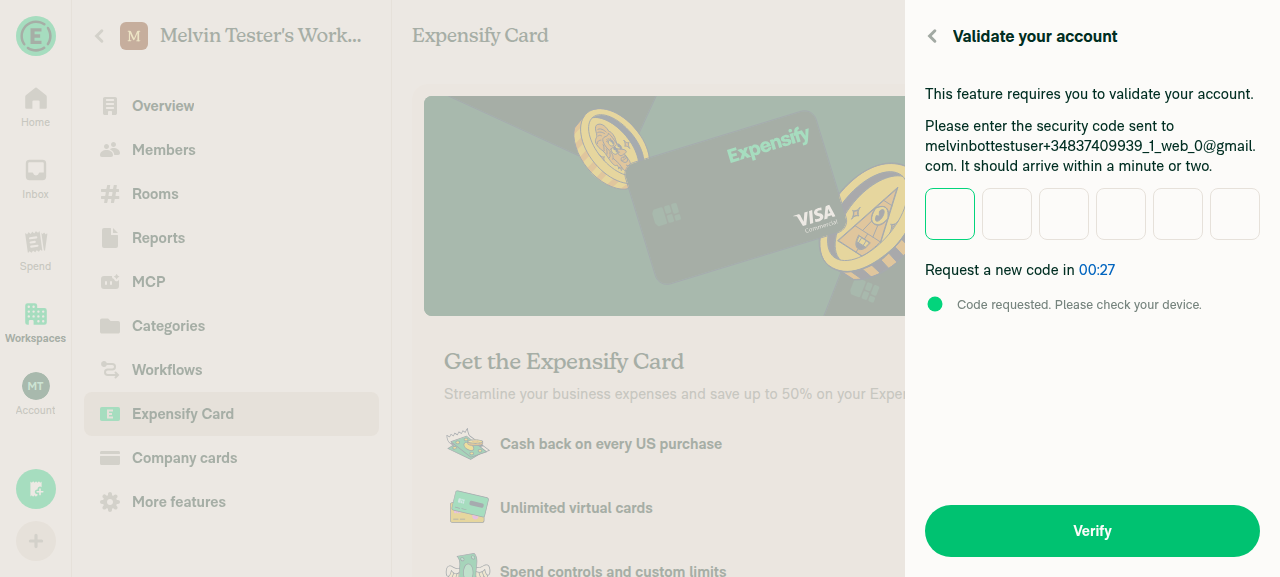
Steps 1–3 verified successfully: I landed on a signed-in Inbox, created an owned workspace, invited test@team.expensify.com alongside an ordinary member, and confirmed only the ordinary member appears in the Members list. Steps 4–6 — the actual PR behavior in the "Choose the cardholder" list — were blocked: both the company card feed connection and the Expensify Card bank account connection require a "Validate your account" email magic code that this session cannot retrieve.

Validate your account screen blocking Expensify Card bank account connection

Step Status
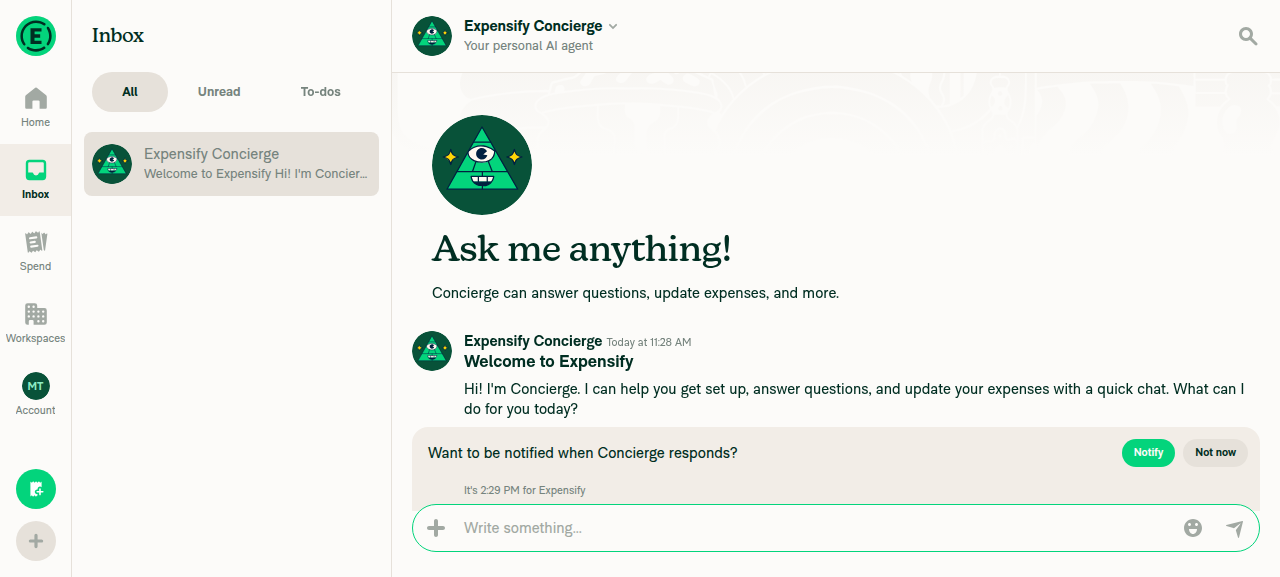
Open the app and land on a signed-in InboxInbox tab showing the Expensify Concierge welcome message.
Signed-in Inbox with Concierge welcome message
✅
Open a workspace you own, go to Members, invite test@team.expensify.comNo workspaces existed, so "Melvin Tester's Workspace" was created. Went to Members, ran the Invite flow, selected test@team.expensify.com, and completed the invite (confirmed by the return to the Members page with no error).
✅
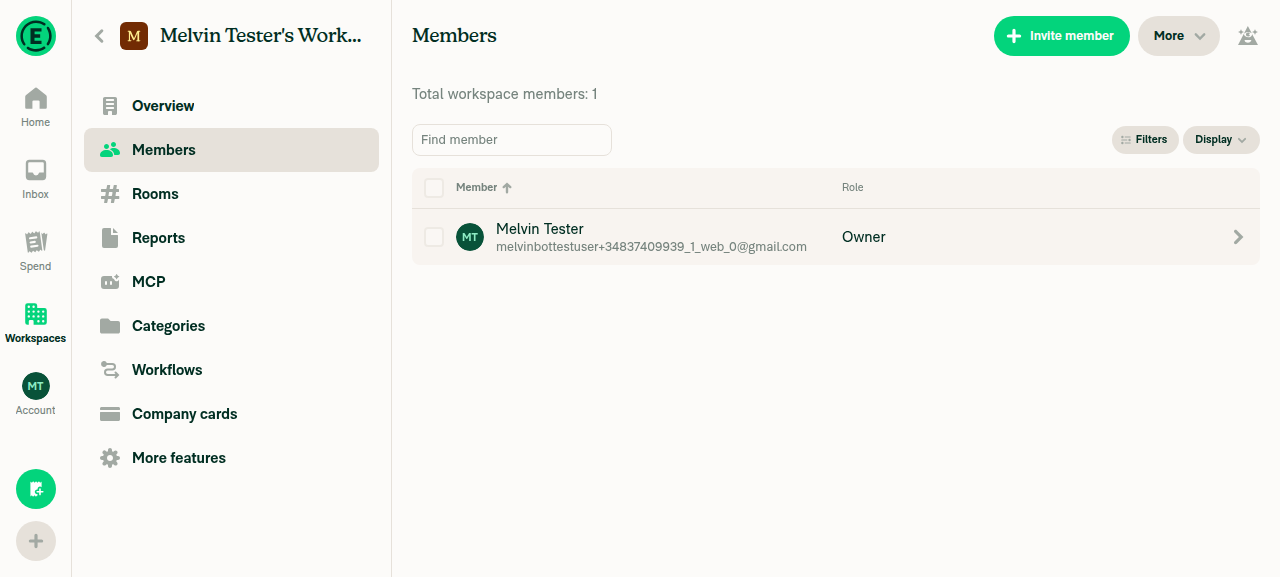
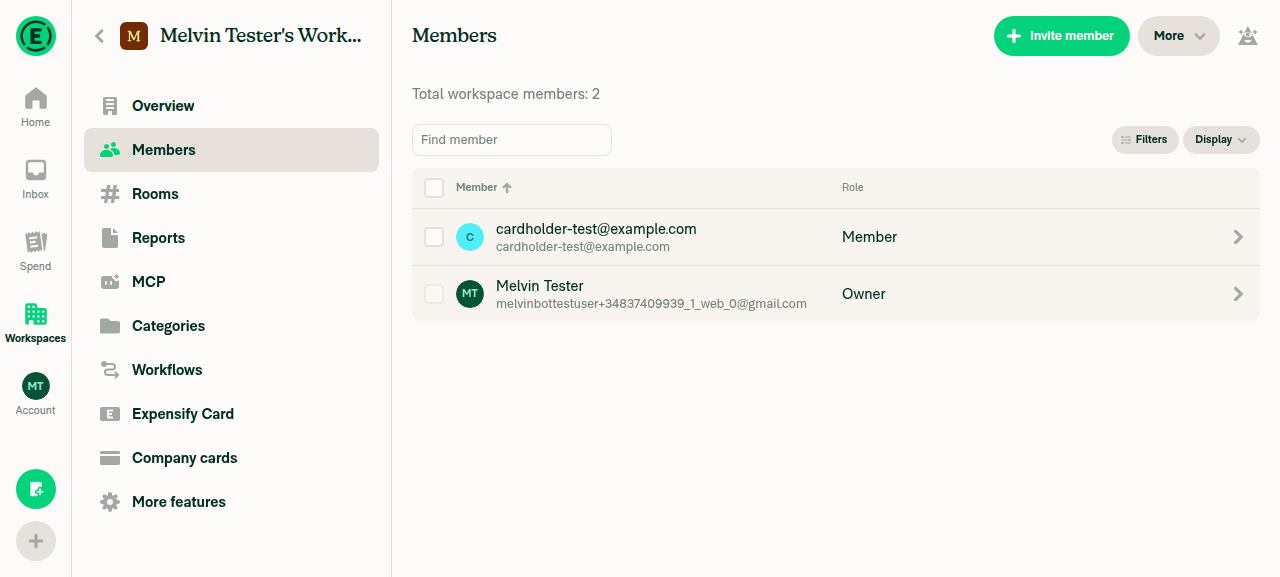
test@team.expensify.com does not show in the workspace Members listAfter inviting test@team.expensify.com and, for comparison, an ordinary member cardholder-test@example.com, the Members list shows "Total workspace members: 2" — only Melvin Tester (owner) and cardholder-test@example.com. The Expensify-domain invitee never appears, confirming existing filter behavior.
Workspace Members list without the team.expensify.com invitee
Workspace Members list showing owner and ordinary member only
✅
Go to Company cards page and reach the "Choose the cardholder" step of Assign cardBlocked. The fresh workspace has no company card feed connected, and clicking "Add cards" immediately triggers a "Validate your account" screen requiring a 6-digit email security code this session cannot retrieve. Precondition failure, unrelated to the code under test.
Validate your account magic code screen blocking company card feed setup
❌
test@team.expensify.com absent, ordinary members present, in the "Choose the cardholder" listBlocked. Could not be reached — the prerequisite company card feed connection sits behind the same account-validation screen.
❌
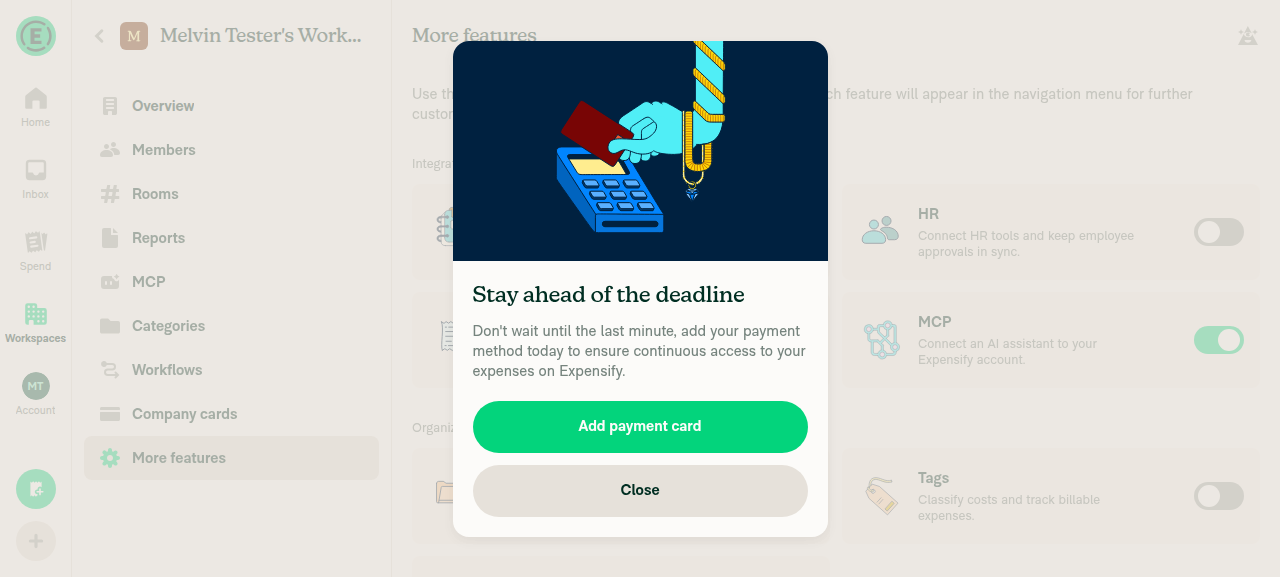
Expensify Card → Issue new card assignee step hides test@team.expensify.com while ordinary members remainBlocked. Enabled the Expensify Card feature via More features and reached the "Issue new card" button. Clicking it requires adding a bank account first, and both "Log into your bank" and "Connect manually" lead to the same "Validate your account" magic-code screen, before the assignee step is ever reached.
Add payment card interstitial before enabling Expensify Card
Validate your account screen blocking Expensify Card bank account connection
❌

No console errors were observed during the driven flows.

Two things worth flagging, eVoloshchak:

  1. There are still no documented testing steps on this PR. The Tests and QA Steps sections remain // TODO placeholders for the human co-author, so I ran the Action Performed steps from the linked issue [Due for payment 2026-11-05] [$175] [Exploratory] Company card - Can assign card to an Expensify team Members #98941 instead.
  2. Web hits the same wall Android did. The account-validation magic code gates every route to a connected card feed or business bank account, so neither picker can be reached on a fresh CI account. This is an environment limitation, not evidence for or against the fix. Point me at a pre-provisioned account with a connected feed (the issue used Mock Bank) or bank account and I can rerun and cover steps 4 through 6 on both platforms.

The unit tests added in this PR (tests/ui/AssignCardAssigneeStepTest.tsx, tests/ui/IssueNewCardAssigneeStepTest.tsx) cover the hidden-member, already-assigned-member, and Expensify-owned-policy cases, but that is not a substitute for the on-device check you asked for.


view run · no recording available

@eVoloshchak

Copy link
Copy Markdown
Contributor

@MelvinBot, merge the latest main
Is this still reproducible? Were there PR's merged that would resolve this?

…eamFromCardAssignees

Co-authored-by: Eugene Voloshchak <eVoloshchak@users.noreply.github.com>
@MelvinBot

Copy link
Copy Markdown
Contributor Author

I merged the latest main with no conflicts (be900ae).

Is it still reproducible? Yes, based on the code. No merged PR fixes it. Current main still builds both cardholder pickers with only filterGuideAndAccountManager. That helper matches exact emails, not the Expensify domain:

The linked issue, [Exploratory] Company card - Can assign card to an Expensify team Members, is still open. I didn't rerun the live test. Earlier runs got blocked at the account-validation magic code before reaching the picker.

CI after merge: typecheck, ESLint, and both of this PR's test files pass. One Jest shard fails in CategoryTagPickerAutoFocusTest.tsx. That failure is unrelated: it fails the same way on other open PRs right now, so main broke it.

What I checked
  • Commits on main since this branch's base that touched both AssigneeStep.tsx files: Card-name keyboard fix, SMS-domain cleanup, personal-details hooks, and Onyx refactors. None of them adds a domain filter.
  • filterGuideAndAccountManager moved to src/libs/PolicyUtils/index.ts on main. The @libs/PolicyUtils import still resolves. isExpensifyTeam and shouldFilterExpensifyTeam are still exported.
  • I searched merged PRs for the issue number and for assignee-picker domain filtering. Nothing relevant came up.
  • I couldn't run Jest locally because the sandbox couldn't finish the install scripts. I relied on CI instead.

@MelvinBot

Copy link
Copy Markdown
Contributor Author

The failing check is unrelated to this PR, so I didn't push a fix.

Analysis: test (job 3) fails only in tests/unit/CategoryTagPickerAutoFocusTest.tsx. Two cases fail, one for CategoryPicker and one for TagPicker, both with ReferenceError: Request is not defined. The error comes from src/libs/HttpUtils.ts calling Expo's fetch polyfill in the Jest environment. This PR doesn't touch category or tag pickers, HttpUtils, or test setup.

Evidence:

The test needs a fix on main. Once that lands, re-run the job or merge main into this branch. Check independent approval is also failing, but that check only needs a reviewer's approval.


view run

@MelvinBot

Copy link
Copy Markdown
Contributor Author

The failing check is still unrelated to this PR, so I didn't push a fix. Nothing has changed since my last check.

Analysis: test (job 3) fails only in tests/unit/CategoryTagPickerAutoFocusTest.tsx. Two cases fail, one for CategoryPicker and one for TagPicker, both with ReferenceError: Request is not defined. The error comes from Expo's fetch polyfill in Jest. This PR doesn't touch those pickers, HttpUtils, or test setup.

Evidence:

Next step: This test needs a fix on main. One option is to mock fetch in the test, as [No QA] Mock fetch in IOURequestRedirectToStartPageTest to stop 'Request is not defined' failures did for another test. Once that fix lands, merge main into this branch or re-run the job. Check independent approval only needs a reviewer's approval.


view run

@eVoloshchak

eVoloshchak commented Oct 12, 2026 •

Copy link
Copy Markdown
Contributor

Reviewer Checklist

  • I have verified the author checklist is complete (all boxes are checked off).
  • I verified the correct issue is linked in the ### Fixed Issues section above
  • I verified testing steps are clear and they cover the changes made in this PR
    • I verified the steps for local testing are in the Tests section
    • I verified the steps for Staging and/or Production testing are in the QA steps section
    • I verified the steps cover any possible failure scenarios (i.e. verify an input displays the correct error message if the entered data is not correct)
    • I turned off my network connection and tested it while offline to ensure it matches the expected behavior (i.e. verify the default avatar icon is displayed if app is offline)
  • I checked that screenshots or videos are included for tests on all platforms
  • I included screenshots or videos for tests on all platforms
  • I verified that the composer does not automatically focus or open the keyboard on mobile unless explicitly intended. This includes checking that returning the app from the background does not unexpectedly open the keyboard.
  • I verified tests pass on all platforms & I tested again on:
    • Android: HybridApp
    • Android: mWeb Chrome
    • iOS: HybridApp
    • iOS: mWeb Safari
    • MacOS: Chrome / Safari
  • If there are any errors in the console that are unrelated to this PR, I either fixed them (preferred) or linked to where I reported them in Slack
  • I verified any copy / text that was added to the app is either coming verbatim from figma or has been approved by marketing (in order to get marketing approval, ask the Bug Zero team member to add the Waiting for copy label to the issue)
  • If a new code pattern is added I verified it was agreed to be used by multiple Expensify engineers
  • I verified other components that can be impacted by these changes have been tested, and I retested again (i.e. if the PR modifies a shared library or component like Avatar, I verified the components using Avatar have been tested & I retested again)
  • If a new component is created I verified that:
    • A similar component doesn't exist in the codebase
    • All props are defined accurately
    • The component has a clear name that is non-ambiguous and the purpose of the component can be inferred from the name alone
    • The only data being stored in the state is data necessary for rendering and nothing else
    • The component has the minimum amount of code necessary for its purpose, and it is broken down into smaller components in order to separate concerns and functions
  • If the PR modifies code that runs when editing or sending messages, I tested and verified there is no unexpected behavior for all supported markdown - URLs, single line code, code blocks, quotes, headings, bold, strikethrough, and italic.
  • If the PR modifies a generic component, I tested and verified that those changes do not break usages of that component in the rest of the App (i.e. if a shared library or component like Avatar is modified, I verified that Avatar is working as expected in all cases)
  • If the PR modifies a component related to any of the existing Storybook stories, I tested and verified all stories for that component are still working as expected.
  • If the PR modifies a component or page that can be accessed by a direct deeplink, I verified that the code functions as expected when the deeplink is used - from a logged in and logged out account.
  • If the PR modifies the UI (e.g. new buttons, new UI components, changing the padding/spacing/sizing, moving components, etc) or modifies the form input styles:
    • I verified that all the inputs inside a form are aligned with each other.
    • I added Design label and/or tagged @Expensify/design so the design team can review the changes.
  • If the PR adds or modifies the UI:
    • I asked an AI agent to review the changes for accessibility issues and addressed its findings.
    • I tested with a screen reader (VoiceOver on macOS) and verified all new/changed elements are reachable with a logical focus order.
    • I verified all new/changed elements have meaningful accessible names and roles.
    • I verified state changes are announced (e.g. checked/unchecked, expanded/collapsed, selected).
  • For any bug fix or new feature in this PR, I verified that sufficient unit tests are included to prevent regressions in this flow.
  • If the main branch was merged into this PR after a review, I tested again and verified the outcome was still expected according to the Test steps.
  • I have checked off every checkbox in the PR reviewer checklist, including those that don't apply to this PR.

Screenshots/Videos

Android: HybridApp
screen-20261012-195322-1791827582575.mp4
Android: mWeb Chrome
Screen.Recording.2026-10-12.at.18.52.19.mov
iOS: HybridApp
Screen.Recording.2026-10-12.at.20.01.37.mov
iOS: mWeb Safari
Screen.Recording.2026-10-12.at.18.40.20.mov
MacOS: Chrome / Safari
Screen.Recording.2026-10-12.at.18.38.50.mov

@eVoloshchak

Copy link
Copy Markdown
Contributor

Preconditions: Create a new account with Manage My Team 1-4, and connect to the Mock Bank company card (or have an account with a workspace, that has a company card already)

  1. Open the New Dot app
  2. Navigate to the Members page -> Invite the test@team.expensify.com
  3. Go to the Company Card page
  4. Click Assign card
  5. Verify that the Expensify team member does not appear in the assigned member list

@MelvinBot, populate the Tests/QA Tests sections with the test steps above

@MelvinBot

Copy link
Copy Markdown
Contributor Author

I added your test steps to the Tests and QA Steps sections of the PR description. Both sections now have the preconditions, steps 1–5, and the existing JS console checkbox. I didn't change anything else in the description.

@eVoloshchak

Copy link
Copy Markdown
Contributor

@codex, review

@chatgpt-codex-connector

chatgpt-codex-connector Bot commented Oct 12, 2026 •

Copy link
Copy Markdown

Codex Review Summary

This comment shows the latest Codex review activity on this pull request.

Review Status Commit Review trigger
📝 Code Review ✅ Completed 2026-10-12T18:30:45.834352Z fb4dabd Draft marked ready
ℹ️ About Codex in GitHub

Your team has set up Codex to review pull requests in this repo. Reviews are triggered when you

  • Open a pull request for review
  • Mark a draft as ready
  • Comment "@codex review" or "@codex security review".

Codex reacts with 👀 while any review is running, comments if it has suggestions, and reacts with 👍 once all reviews finish with no findings.

@chatgpt-codex-connector chatgpt-codex-connector Bot left a comment

Copy link
Copy Markdown

Choose a reason for hiding this comment

The reason will be displayed to describe this comment to others. Learn more.

💡 Codex Review

Here are some automated review suggestions for this pull request.

Reviewed commit: be900aef2b

ℹ️ About Codex in GitHub

Codex has been enabled to automatically review pull requests in this repo. Reviews are triggered when you

  • Open a pull request for review
  • Mark a draft as ready
  • Comment "@codex review".

If Codex has suggestions, it will comment; otherwise it will react with 👍.

When you sign up for Codex through ChatGPT, Codex can also answer questions or update the PR, like "@codex address that feedback".

Comment on lines +237 to +239
if (shouldFilterExpensifyStaff && email !== initialAssigneeEmail && isExpensifyTeam(email)) {
continue;
}

Copy link
Copy Markdown

Choose a reason for hiding this comment

The reason will be displayed to describe this comment to others. Learn more.

P1 Badge Filter team accounts from the merged search results

When an admin who can invite members searches for an Expensify-team login, this guard removes it only from membersDetails; the search branch subsequently appends availableOptions.personalDetails, recentOptions, and userToInvite without applying the domain filter. Because the selector is not given these accounts in excludeLogins, the hidden account reappears and can be selected and assigned a card. The issue-new-card picker has the same gap, so filter the merged search options or hard-exclude team logins while preserving only the initial assignee.

Useful? React with 👍 / 👎.

Copy link
Copy Markdown
Contributor

Choose a reason for hiding this comment

The reason will be displayed to describe this comment to others. Learn more.

@MelvinBot, apply this feedback

Copy link
Copy Markdown
Contributor Author

Choose a reason for hiding this comment

The reason will be displayed to describe this comment to others. Learn more.

Done in fb4dabd. Expensify team accounts no longer come back through search in either picker.

Each picker now runs one check, isHiddenExpensifyStaff, on its member list and on its merged search results. The merged results include recent chats, personal details, and the invite option. The current cardholder stays visible, same as before.

I added a search-results test to each test file. Both new tests fail without the fix and pass with it.

Checks I ran locally
  • npm test on both test files: 14/14 passed
  • npm run lint on all four files: passed
  • npm run typecheck: passed
  • npm run fmt: no extra changes
  • npm run spell-changed didn't run because this checkout is shallow. CI's spellcheck covers it.

expect(props?.data.at(0)?.value).toBe(INITIAL_ASSIGNEE);
});

it('hides Expensify team members, matching the Workspace Members page', () => {

Copy link
Copy Markdown

Choose a reason for hiding this comment

The reason will be displayed to describe this comment to others. Learn more.

P1 Badge Add Given/When/Then documentation to the new tests

The three newly added test cases here, as well as the matching three cases in IssueNewCardAssigneeStepTest.tsx, omit the required // Given, // When, and // Then comments. Add those annotations to each new case so the tests comply with the repository's documented testing requirements.

AGENTS.md reference: AGENTS.md:L1-L3

Useful? React with 👍 / 👎.

@MelvinBot

Copy link
Copy Markdown
Contributor Author

The failing check is still unrelated to this PR, so I didn't push a fix. Re-running test (job 3) should clear it.

Analysis: test (job 3) fails only in tests/unit/CategoryTagPickerAutoFocusTest.tsx. The error is ReferenceError: Request is not defined, thrown when a real fetch call runs during the test. This PR only changes the two AssigneeStep.tsx files and their UI tests, which pass.

Evidence:

checklist and Check independent approval are also failing. They need the reviewer checklist and an approval, not code changes.


view run

@MelvinBot

Copy link
Copy Markdown
Contributor Author

The failing test (job 3) check is still unrelated to this PR, so I didn't push a fix. Please re-run the failed job. I don't have permission to re-run it.

Analysis: Nothing has changed since my last comment. The PR branch is still at the same commit, and the failure comes from the same run. It fails only in tests/unit/CategoryTagPickerAutoFocusTest.tsx with ReferenceError: Request is not defined. This PR changes only the two AssigneeStep.tsx files and their UI tests, and those tests pass.

Evidence:

checklist and Check independent approval are also failing. They need the reviewer checklist and an approval, not code changes.


view run

@MelvinBot

Copy link
Copy Markdown
Contributor Author

The failing test (job 3) check is still unrelated to this PR, so I didn't push a fix. A fix is already open: [NoQA] Mock fetch in `CategoryTagPickerAutoFocusTest`.

Next step: After that PR merges, merge main into this branch or re-run the job.

Details
  • The only failing test is tests/unit/CategoryTagPickerAutoFocusTest.tsx. It fails with ReferenceError: Request is not defined because the test doesn't mock fetch.
  • This PR changes only the two AssigneeStep.tsx files and their UI tests. Those tests pass.
  • The same test fails today on several unrelated branches, including fix/no-cycle-part18-pure-helper-leaves.
  • Check independent approval and checklist also fail. Those checks clear after a reviewer approves and completes the checklist.

view run

@MelvinBot

Copy link
Copy Markdown
Contributor Author

Nothing has changed since my last comment, so I didn't push a fix. The only failing test, test (job 3), is unrelated to this PR.

Status: The fix, [NoQA] Mock fetch in `CategoryTagPickerAutoFocusTest`, is still open and unmerged.

Next step: After that PR merges, merge main into this branch or re-run the failed job. I won't add the same mock fix here because it would duplicate that PR and is outside this PR's scope.

Details
  • tests/unit/CategoryTagPickerAutoFocusTest.tsx fails with ReferenceError: Request is not defined because the test doesn't mock fetch.
  • This PR changes only the two AssigneeStep.tsx files and their UI tests. Those tests pass.
  • Check independent approval and checklist clear after a reviewer approves and completes the checklist.

view run

The member-list filter didn't cover the search branch, which appends recent reports, personal details, and the user-to-invite option. Filter the merged search options with the same check, keeping only the already-assigned cardholder.

Co-authored-by: Eugene Voloshchak <eVoloshchak@users.noreply.github.com>

@eVoloshchak eVoloshchak left a comment

Copy link
Copy Markdown
Contributor

Choose a reason for hiding this comment

The reason will be displayed to describe this comment to others. Learn more.

LGTM!
@MelvinBot, check off every checkbox in the PR author checklist

@melvin-bot

melvin-bot Bot commented Oct 12, 2026

Copy link
Copy Markdown

We did not find an internal engineer to review this PR, trying to assign a random engineer to #98941 as well as to this PR... Please reach out for help on Slack if no one gets assigned!

@melvin-bot
melvin-bot Bot requested a review from MonilBhavsar October 12, 2026 18:14
@codecov

codecov Bot commented Oct 12, 2026 •

Copy link
Copy Markdown

Codecov Report

✅ Changes either increased or maintained existing code coverage, great job!

Files with missing lines Coverage Δ
src/libs/PolicyUtils/members.ts 88.88% <100.00%> (+0.13%) ⬆️
...workspace/companyCards/assignCard/AssigneeStep.tsx 89.65% <100.00%> (+1.36%) ⬆️
.../workspace/expensifyCard/issueNew/AssigneeStep.tsx 76.47% <100.00%> (+1.16%) ⬆️
... and 68 files with indirect coverage changes

@chatgpt-codex-connector chatgpt-codex-connector Bot left a comment

Copy link
Copy Markdown

Choose a reason for hiding this comment

The reason will be displayed to describe this comment to others. Learn more.

💡 Codex Review

Here are some automated review suggestions for this pull request.

Reviewed commit: fb4dabd798

ℹ️ About Codex in GitHub

Codex has been enabled to automatically review pull requests in this repo. Reviews are triggered when you

  • Open a pull request for review
  • Mark a draft as ready
  • Comment "@codex review".

If Codex has suggestions, it will comment; otherwise it will react with 👍.

When you sign up for Codex through ChatGPT, Codex can also answer questions or update the PR, like "@codex address that feedback".

Comment on lines +229 to +230
const shouldFilterExpensifyStaff = shouldFilterExpensifyTeam(policy?.owner, session?.email);
const isHiddenExpensifyStaff = (login: string | null | undefined) => shouldFilterExpensifyStaff && !!login && login !== initialAssigneeEmail && isExpensifyTeam(login);

Copy link
Copy Markdown

Choose a reason for hiding this comment

The reason will be displayed to describe this comment to others. Learn more.

P2 Badge Exempt the saved assignee from the legacy staff filter

When the existing cardholder is also the policy's assigned guide or account manager, this new exception adds them to membersDetails, but the subsequent filterGuideAndAccountManager() call removes them again. The matching Expensify Card picker has the same ordering, so editing those existing assignments still produces a list without the saved assignee, contrary to the preservation this guard is intended to provide; the downstream filter must also exempt the initial assignee.

Useful? React with 👍 / 👎.

@joekaufmanexpensify joekaufmanexpensify left a comment

Copy link
Copy Markdown
Contributor

Choose a reason for hiding this comment

The reason will be displayed to describe this comment to others. Learn more.

Good for product

Comment on lines +226 to +228
// Expensify staff (guides, support) are hidden from the Workspace Members page, so they must not be offered as
// cardholders either, whether they come from the member list or from search results. The already-assigned
// cardholder stays visible so editing an assignment doesn't blank out.

Copy link
Copy Markdown
Contributor

Choose a reason for hiding this comment

The reason will be displayed to describe this comment to others. Learn more.

Suggested change
// Expensify staff (guides, support) are hidden from the Workspace Members page, so they must not be offered as
// cardholders either, whether they come from the member list or from search results. The already-assigned
// cardholder stays visible so editing an assignment doesn't blank out.
// Hide Expensify staff from member and search results, but keep the current cardholder visible while editing.

Copy link
Copy Markdown
Contributor Author

Choose a reason for hiding this comment

The reason will be displayed to describe this comment to others. Learn more.

Done in 7e147d9. Both pickers now use this shorter comment.


view run

Comment on lines +158 to +162
// Expensify staff (guides, support) are hidden from the Workspace Members page, so they must not be offered as
// cardholders either, whether they come from the member list or from search results. The already-assigned
// cardholder stays visible so editing an assignment doesn't blank out.
const shouldFilterExpensifyStaff = shouldFilterExpensifyTeam(policy?.owner, session?.email);
const isHiddenExpensifyStaff = (login: string | null | undefined) => shouldFilterExpensifyStaff && !!login && login !== initialAssigneeEmail && isExpensifyTeam(login);

Copy link
Copy Markdown
Contributor

Choose a reason for hiding this comment

The reason will be displayed to describe this comment to others. Learn more.

This logic/code is repeated. Can we centralize it somewhere?

Copy link
Copy Markdown
Contributor Author

Choose a reason for hiding this comment

The reason will be displayed to describe this comment to others. Learn more.

Done in 7e147d9. I moved the logic into a new shouldHideExpensifyTeamCardholder helper in src/libs/PolicyUtils/members.ts:106, next to isExpensifyTeam and shouldFilterExpensifyTeam. Both AssigneeStep files now call it, and it has unit tests in PolicyUtilsTest.ts.


view run

@eVoloshchak

Copy link
Copy Markdown
Contributor

MelvinBot and others added 2 commits October 25, 2026 19:54
…eamFromCardAssignees

Co-authored-by: Eugene Voloshchak <eVoloshchak@users.noreply.github.com>

# Conflicts:
#	src/pages/workspace/companyCards/assignCard/AssigneeStep.tsx
#	src/pages/workspace/expensifyCard/issueNew/AssigneeStep.tsx
#	tests/ui/AssignCardAssigneeStepTest.tsx
#	tests/ui/IssueNewCardAssigneeStepTest.tsx
Move the duplicated isHiddenExpensifyStaff logic from both card AssigneeSteps into shouldHideExpensifyTeamCardholder and shorten the comment per review feedback.

Co-authored-by: Eugene Voloshchak <eVoloshchak@users.noreply.github.com>
@MelvinBot
MelvinBot requested a review from a team as a code owner October 25, 2026 19:55
@melvin-bot
melvin-bot Bot requested review from eVoloshchak and removed request for a team October 25, 2026 19:55
@melvin-bot

melvin-bot Bot commented Oct 25, 2026

Copy link
Copy Markdown

@eVoloshchak Please copy/paste the Reviewer Checklist from here into a new comment on this PR and complete it. If you have the K2 extension, you can simply click: [this button]

@MelvinBot

Copy link
Copy Markdown
Contributor Author

Merged the latest main and applied both review comments. Pushed in 7e147d9.

  • Latest main: merged in. The only conflicts were import lists and test mocks, because main added canRoleCreateExpenses. I kept both sides.
  • Shorter comment: both pickers now use the suggested one-line comment.
  • Centralized logic: I added shouldHideExpensifyTeamCardholder to src/libs/PolicyUtils/members.ts:106. Both AssigneeStep files now call it instead of repeating the logic. It has new unit tests, and both UI tests now run the real helper instead of a copy in their mocks.
Checks
  • AssignCardAssigneeStepTest, IssueNewCardAssigneeStepTest, and PolicyUtilsTest: 768 of 768 tests passed.
  • Typecheck: no errors in the changed files. The local run showed unrelated errors from outdated camera-library dependencies.
  • ESLint and spellcheck ran out of memory or scanned the whole merge on this runner, so CI will confirm them.

view run

@MelvinBot

Copy link
Copy Markdown
Contributor Author

⚠️ MelvinBot CI Fix Loop Detected

MelvinBot has made 6 consecutive commits trying to fix CI failures. Automatic CI fix dispatches are now paused for this PR.

Next steps: A human should review the recent commits and resolve the conflicting CI errors manually.

@eVoloshchak

Copy link
Copy Markdown
Contributor

@MelvinBot, ESLint check is failing in AssignCardAssigneeStepTest.tsx:5:13 and IssueNewCardAssigneeStepTest.tsx:5:13 due to

error * import is invalid because 'isPaidGroupPolicy' from '@libs/PolicyUtils/members' is restricted from being used by a pattern. isPaidGroupPolicy is billing/paid-only (Collect/Control). For workspace feature gating use isGroupPolicy so free group plans like Submit are not excluded. If this is genuinely a billing/paid-only check, keep it and disable this line with a reason. no-restricted-imports

… assignee tests

Co-authored-by: Eugene Voloshchak <eVoloshchak@users.noreply.github.com>
@MelvinBot

Copy link
Copy Markdown
Contributor Author

Fixed the failing ESLint check in f6a4201.

The no-restricted-imports rule for isPaidGroupPolicy matches everything under PolicyUtils/, and it flags any namespace (* as) import from those files. Both tests now use a named type import of shouldHideExpensifyTeamCardholder instead of import type * as PolicyMemberUtils. The tests didn't use isPaidGroupPolicy at all.

I checked the fix locally: ESLint passes on both files, npm run typecheck passes, and all 14 tests in the two suites pass.


view run

@melvin-bot
melvin-bot Bot requested a review from MonilBhavsar October 26, 2026 22:25
@MonilBhavsar
MonilBhavsar merged commit 51a3168 into main Oct 27, 2026
35 of 37 checks passed
@MonilBhavsar
MonilBhavsar deleted the claude-hideExpensifyTeamFromCardAssignees branch October 27, 2026 06:19
@github-actions

Copy link
Copy Markdown
Contributor

🚧 MonilBhavsar has triggered a test Expensify/App build. You can view the workflow run here.

@github-actions

Copy link
Copy Markdown
Contributor

@OSBotify

Copy link
Copy Markdown
Contributor

✋ This PR was not deployed to staging yet because QA is ongoing. It will be automatically deployed to staging after the next production release.

@OSBotify

Copy link
Copy Markdown
Contributor

🚀 Deployed to staging by https://github.com/MonilBhavsar in version: 9.5.24-1 🚀

platform result
🕸 web 🕸 success ✅
🤖 android 🤖 cancelled 🔪
🍎 iOS 🍎 cancelled 🔪

@MelvinBot

Copy link
Copy Markdown
Contributor Author

No help site update needed. This is a bug fix that hides Expensify team accounts from the company card and Expensify Card assignee lists, matching what the Members page already shows, and no help article sentence becomes incorrect.


view run

@OSBotify

Copy link
Copy Markdown
Contributor

🚀 Deployed to production by https://github.com/jasperhuangg in version: 9.5.24-8 🚀

platform result
🕸 web 🕸 success ✅
🤖 android 🤖 success ✅
🍎 iOS 🍎 success ✅

Bundle Size Analysis (Sentry):

Sign up for free to join this conversation on GitHub. Already have an account? Sign in to comment

Labels

Melvin-Test-Android Melvin-Test-Web Triggers Melvin to run the testing steps of the PR on web

Projects

None yet

Development

Successfully merging this pull request may close these issues.

5 participants