See your whole AI-coding stack in one command.
npx devcat-cli scans this machine for the MCP servers, plugins, skills, and subagents you have installed across Claude Code, Codex, Kimi Code, and Cursor, and prints them grouped in one report. No account, no sign-in, no network call.
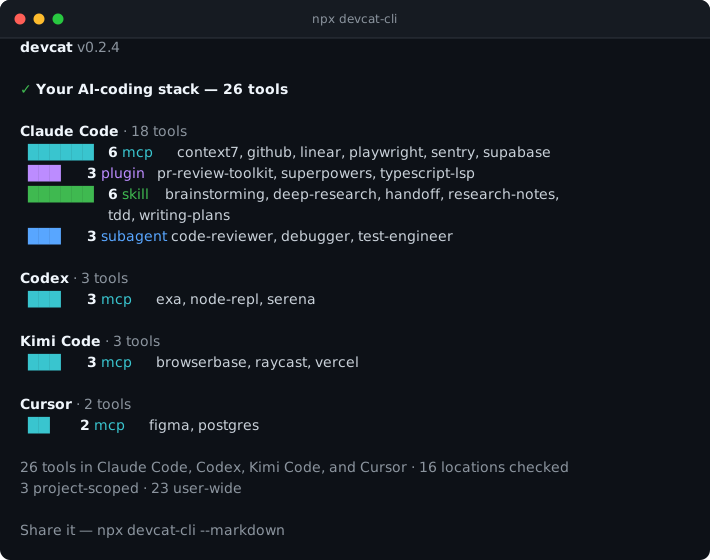
Example output — a real run of this CLI against a small demo machine, captured verbatim. Your report lists whatever you actually have installed.
npx devcat-cliThat's the whole thing — the report above is what it prints.
The same output as text
devcat v0.2.4

✓ Your AI-coding stack — 26 tools

Claude Code · 18 tools
  ██████   6 mcp      context7, github, linear, playwright, sentry, supabase
  ███      3 plugin   pr-review-toolkit, superpowers, typescript-lsp
  ██████   6 skill    brainstorming, deep-research, handoff, research-notes,
                      tdd, writing-plans
  ███      3 subagent code-reviewer, debugger, test-engineer

Codex · 3 tools
  ███      3 mcp      exa, node-repl, serena

Kimi Code · 3 tools
  ███      3 mcp      browserbase, raycast, vercel

Cursor · 2 tools
  ██       2 mcp      figma, postgres

26 tools in Claude Code, Codex, Kimi Code, and Cursor · 16 locations checked
3 project-scoped · 23 user-wide

Share it — npx devcat-cli --markdown
Requires Node.js 20 or later. Works on macOS, Linux, and Windows.
DevCat answers what do I have installed. A security scanner answers is any of it dangerous. Those are different jobs, and the two complement each other rather than compete.
DevCat (devcat report) |
Security scanners | |
|---|---|---|
| What it produces | A list of what is installed | An assessment of what those tools can do — permissions, risks, supply chain |
| Account | None | Often require one |
| Network | None on the default command | May call remote services |
| MCP servers | Never executes one | May start a server to observe how it behaves |
| Config contents | Names only — command, args, env, and every other field are dropped at the parser |
May inspect contents in full |
The right-hand column is hedged on purpose — scanners differ, and none of this describes any particular one. The left-hand column is exactly what this codebase does: every row is spelled out in What it reads and Security, against source anyone can read.
So: to judge whether a tool is safe to run, use a scanner. To find out what is on the machine in the first place, start here.
--markdown prints the same scan as a snippet you can paste into a README, a gist, or an issue comment:
npx devcat-cli --markdown## My AI stack
26 tools across Claude Code, Codex, Kimi Code, and Cursor.
### Claude Code
- **MCP servers (6):** `context7`, `github`, `linear`, `playwright`, `sentry`, `supabase`
- **Plugins (3):** `pr-review-toolkit`, `superpowers`, `typescript-lsp`
- **Skills (6):** `brainstorming`, `deep-research`, `handoff`, `research-notes`, `tdd`, `writing-plans`
- **Subagents (3):** `code-reviewer`, `debugger`, `test-engineer`
### Codex
- **MCP servers (3):** `exa`, `node-repl`, `serena`
### Kimi Code
- **MCP servers (3):** `browserbase`, `raycast`, `vercel`
### Cursor
- **MCP servers (2):** `figma`, `postgres`
<sub>Generated by [devcat-cli](https://www.npmjs.com/package/devcat-cli) — `npx devcat-cli --markdown`</sub>--json prints the same scan as one JSON object — counts, per-client groups, and the scan locations it resolved:
npx devcat-cli --json | jq '.clients[] | {label, total}'{
"cli_version": "0.2.4",
"total": 26,
"project_scoped": 3,
"user_scoped": 23,
"clients": [
{
"client": "claude-code",
"label": "Claude Code",
"total": 18,
"types": [
{ "type": "mcp", "count": 6, "names": ["context7", "github", "..."] },
{ "type": "skill", "count": 6, "names": ["brainstorming", "..."] }
]
}
],
"paths_checked": ["..."]
}--json wins if you pass --markdown too.
| Command | What it does |
|---|---|
devcat |
Scan and print your stack. Same as devcat report. |
devcat report --markdown |
Print the shareable "My AI stack" snippet instead. |
devcat report --json |
Print the scan as one JSON object. |
devcat sync |
Push your manifest to devcat.dev. Retired — see Profile sync. |
devcat logout |
Clear local DevCat credentials. |
devcat --version / --help |
Version, help. |
Two kinds of location, read two different ways:
| Where | How | |
|---|---|---|
| MCP servers | Claude Code ~/.claude.json, ~/.claude/settings.json, .mcp.json (project) · Codex ~/.codex/config.toml, .codex/config.toml (project) · Kimi Code (only when installed — see below) ~/.kimi-code/mcp.json, .kimi-code/mcp.json (project — read from the exact working directory, not found by an upward walk) · Cursor ~/.cursor/mcp.json, .cursor/mcp.json (project) |
The file is read and parsed. Only the server names (the keys) are kept. Kimi Code's config is JSON, same { "mcpServers": {...} } shape as Claude Code and Cursor — config.toml holds Kimi Code's own settings, never MCP servers. |
| Plugins | Claude Code ~/.claude/plugins/installed_plugins.json |
Same — parsed, keys kept. |
| Skills | Claude Code ~/.claude/skills/, .claude/skills/ (project) · Codex ~/.codex/skills/ · Kimi Code (only when installed — see below) ~/.kimi-code/skills/ and ~/.agents/skills/ (user), .kimi-code/skills/ and .agents/skills/ (project) |
The directory is listed. A child counts as a skill if it contains a SKILL.md. No file is opened — not even the SKILL.md, whose presence is all that is checked. The name is the folder's. |
| Subagents | Claude Code ~/.claude/agents/, .claude/agents/ (project) |
The directory is listed. Two shapes count: <name>.md, where the name is the file's; and <name>/<name>.md, where the name is the folder's and the inner filename must match. A folder holding only other markdown — a README, notes — is not a subagent. No file is opened. |
Kimi Code is the one client gated on its own install marker. ~/.agents/skills is not Kimi's directory — it is the shared install target skills.sh uses for several non-Kimi tools (Cline, Warp, Zed, Dexto, Loaf), so its mere presence proves nothing about whether Kimi Code itself is installed. The whole Kimi Code scanner — MCP servers and skills, both scopes — runs only when ~/.kimi-code (user) or .kimi-code under the current directory (project) actually exists on disk; each scope is checked independently, so a project-only marker still scans that project with the user pass gated closed, and vice versa. Without its marker, Kimi Code contributes nothing at all: no section in any report, no entry in paths_checked, no line in the empty-state "Looked in" list below — the same "only what was actually checked" discipline paths_checked follows everywhere else in this doc.
So: config files are read and parsed, and the only thing taken out of their contents is the tool's name. Directory scans open nothing at all.
Nothing else inside a config is retained: environment variable values, command-line arguments, install paths, and every other field are dropped at the parser and never appear in any output. Missing and malformed files are skipped silently — a broken .mcp.json never fails the scan.
Separately from file contents, the CLI records where it looked. Each entry keeps the config location it came from, its scope, its client, and — for skills and subagents — the resolved directory path used to deduplicate. Those are scan facts, not file contents. They appear in --json output (paths_checked, and the locations named in any truncation warning), and the same locations are listed in the terminal report when nothing is found.
paths_checked is the location each detector resolved to — one per config file or directory it consulted, including candidates that turned out not to exist. It is not a trace of the upward walk: finding a project config stats a candidate in each directory the walk passes through, and those intermediate probes are not recorded. None of it is ever transmitted: see Profile sync for the only thing that leaves the machine.
The directory scans are deliberately shallow and doubly bounded. They read a known config root and its immediate children and never recurse, so a symlink cannot lead the scan out into a large tree. Symlinks are resolved to a canonical path — these directories are usually link farms. Broken links, unreadable directories, and entries that disappear mid-scan are skipped. A directory that errors partway through being read is reported as truncated too — a short list caused by an error is still a short list.
| Bound | Value | Effect |
|---|---|---|
| Read ceiling | 10,000 entries | The directory is streamed, and reading stops there. The rest is never read. |
| Examined per root | 500 entries | Of what was read, sorted alphabetically, the first 500 get the per-entry filesystem work. |
Both sit well above the sizes these directories run to in practice — dozens of entries, not thousands — and below them the result is fully deterministic. If either bites, the CLI says so rather than presenting a partial list as complete: a warning naming the root and the counts goes to stderr, the terminal and markdown reports carry a footnote, and --json gets a truncated flag plus a truncations array carrying, per root, entries_read (what the ceiling counts, dot-entries included), entries_seen (candidates among them), entries_kept (examined), hit_read_ceiling, and read_failed.
Project-scoped entries are found by walking up from the current directory, so the report changes depending on where you run it — with one exception: Kimi Code's project-local .kimi-code/mcp.json is read from the exact working directory only, matching Kimi Code's own behavior, never found by walking upward. $HOME is not treated as a project root for any location that also has a user-scope reader — ~/.claude/skills, ~/.claude/agents, ~/.codex/config.toml, ~/.cursor/mcp.json, ~/.kimi-code/mcp.json, ~/.kimi-code/skills, ~/.agents/skills — so those are never double-counted as project config. ~/.mcp.json has no user-scope reader, so it is still picked up by the upward walk and reported as project-scoped.
A tool configured in more than one place is listed once. Identity is deterministic, so an unchanged machine produces the same report every run — as long as no root hit the read ceiling. Above that ceiling, which 10,000 entries were read is the directory's enumeration order, which the CLI does not control; sorting happens after. A run in that state says so rather than implying stability it does not have.
- Anything found as a folder — skills, subagents — is identified by its resolved symlink target. Two links to one directory are one entry however they are named, and two genuinely different skills that happen to share a name both survive.
- MCP servers and plugins are keys in a config file with no path of their own, so they are identified by (type, name) — the same identity the server matches on.
- When two locations do hold the same thing, the first wins in a fixed scan order: project before user, and Claude Code before Codex before Kimi Code before Cursor.
~/.claude/skillsand~/.codex/skillsare commonly link farms into one shared directory that Kimi Code also reads directly at~/.agents/skills— no farm of its own needed — so a skill any of the three can see is listed once under Claude Code. A skill only Codex (or only Kimi Code) has still appears under that client (Kimi Code: only when installed — see above).
Install it globally if you run it often:
npm install -g devcat-cli
devcat| Variable | Default | Purpose |
|---|---|---|
NO_COLOR |
unset | Disable color output (no-color.org standard). |
The four other variables the CLI reads take effect only on devcat sync, whose hosted default is retired — they are documented under Profile sync.
- Nothing leaves your machine on the default command. The scan is local;
npx devcat-climakes no network request at all. - Nothing inside a config file is retained but the tool's name. Environment variable values, command-line arguments, install paths, and every other field are discarded at the parser — they reach no output and no payload.
- Skill and subagent files are never opened at all — those scans only list directories and check that an expected filename exists.
- Local output does include local paths.
--jsonreports the resolved scan locations, and truncation warnings name the oversized directory. That is scan provenance, printed on your own terminal; it is not transmitted. - Only
{type, name}for MCP servers and plugins is ever sent, and only bydevcat sync. A test asserts this on the wire: it plants secrets throughout a fixture machine — including inside aSKILL.mdbody and a subagent file — runs the actual sync against an interceptor, and inspects the received bytes rather than a reconstruction of them. - Tokens live in the OS keychain, no plaintext fallback, and bearer tokens are redacted from
--verboseoutput. - Source is public — read every line at github.com/AnobleSCM/devcat-cli.
The report is empty. It lists the locations each detector resolved to — see What it reads; intermediate parent-directory probes from the upward walk are not recorded. If your config lives somewhere else entirely, that's the gap: open an issue with the location and it can be added.
A tool is missing. Detected today: MCP servers (Claude Code, Codex, Kimi Code, Cursor), Claude Code plugins and subagents, and skills from the Claude Code, Codex, and Kimi Code shelves. Skills bundled inside an installed plugin are not counted separately — the plugin itself is listed.
Every other command in this README works offline and needs no account. This section covers devcat sync — the only command that talks to a server, and the only one whose hosted default is retired.
devcat sync pushed your manifest to a devcat.dev profile. devcat.dev no longer hosts profiles — the hosted service is retired. By default, sync now stops immediately with one line rather than starting a sign-in it can't finish:
✗ Profile sync is retired — devcat.dev no longer hosts profiles. Your local stack report still works — run `npx devcat-cli`.
Nothing else is affected: the scan, --markdown, and logout all work offline as normal.
The sync path itself is intact — RFC 8628 device authorization, tokens in your OS keychain via @napi-rs/keyring, no plaintext token on disk. The hosted service is retired, but the self-host path remains: if you run your own instance, point DEVCAT_API_URL at it and set DEVCAT_SYNC_ENABLED=1 to run the full flow.
Sync sends MCP servers and plugins only. Skills and subagents are local report detections — they are folders on your machine with no catalog entry behind them, and they never enter the sync payload.
These four are read only on the sync and sign-in paths; none of them changes what the report prints.
| Variable | Default | Purpose |
|---|---|---|
DEVCAT_SYNC_ENABLED |
unset | Set to 1 to run devcat sync against a live API instead of stopping at the retired message. |
DEVCAT_API_URL |
https://devcat.dev |
Override the API base URL (staging / self-hosted). HTTPS required except http://localhost:*. |
DEVCAT_TOKEN |
unset | CI escape hatch — bypass keychain and use this access token directly. |
DEVCAT_DEBUG |
unset | Verbose logging without the --verbose flag. |
OS keychain unavailable on Linux. Only affects sync. Install libsecret: sudo apt install libsecret-1-0 (Debian/Ubuntu), sudo pacman -S libsecret (Arch), or sudo dnf install libsecret (Fedora).
MIT — see LICENSE.