Hi, welcome to the project readme file. So sit back and relax, and let me make you go through over the project components.
Students attendance marking system always has been a boring and time consuming process. The process hasn't been updated enough from the past years and also in some areas they still take attendance using a notbook and a pen, which is definitely slow in process and but also there can a several incidents where wrong data has been inserted into the portal or in the datasheets. There can be a multiple discrepancy.
By using this project , we can change this whole process into a automatic way.
- Detecting face using facial_recognition module rather than
looking for it during attendance will make is faster.
- Storing data directly into a database and get attendance details of a specific date through a web page is faster than
going through the data records to find the specific date.
├── images
│   ├── image1.jpg
│   └── image2.jpg
├── static
│   ├── home_styles.css
│   ├── styles.css
├── template
│   ├── home.html
│   ├── index.html
├── main.py
├── app.py
└── README.md- Step 1: First register all the students through the web-page using there NAME , ROLL NO , also upload one picture of them (img file name should their FIRST NAME)
- Step 2: After the registration process , run the
main.pyfile to start the require model which eventuallty will give us face_encodings of all those registered students, which is crucial to recognize faces. After detecting included sql query will insert all those data into mysql database. - Step 3: To show attendance details of a specific date,there is button in the web-page, clicking on which user will be redirected to
home.htmlpage , based on specific date, user can see the data tables.
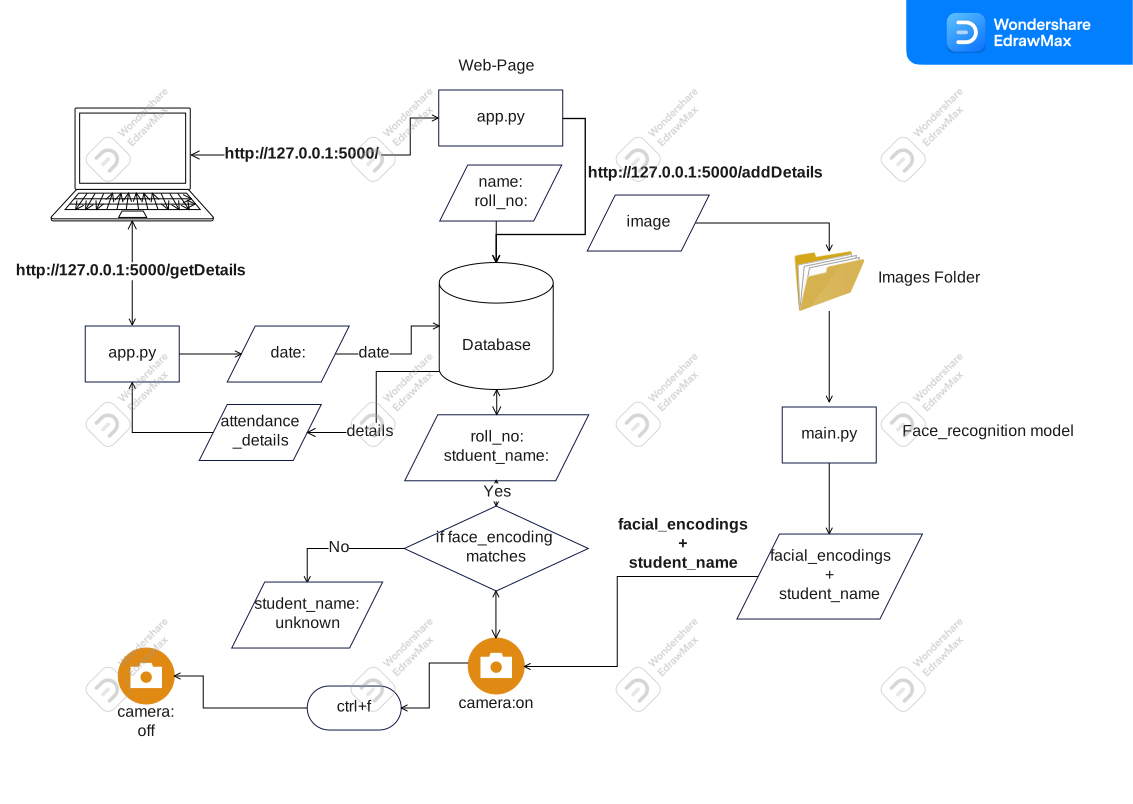
git clone this repo in your system,
cd Student-Attendance-Management-System_Using_Facial_Recognition_Module,
pip install -r requirements.txt,
Create database in mysql workbench,
create details and date tables in mysql work bench,
python app.py First Register with your name,roll and image,
python main.py To start the model,ctrl+f to stop the model.