Here are the core essentials to get the code running:
You can install dependencies with either bash or python (depending on your environment)
pip install -r requirements.txtThis project runs on Python 3.12, not 3.13, only because mediapipe and a few other packages don’t have wheels for 3.13 on Windows yet.
py -3.12 -m venv .venv312
..venv312\Scripts\activate
python -m pip install --upgrade pip setuptools wheelInstall OBS Studio, open it once, and click Start Virtual Camera.
That registers the OBS VirtualCam driver system-wide. You only need to do this once.
Now you can run the main application:
python -m src.auto_framer.appThis starts video and mic input, runs face detection and VAD, and auto-frames around the active speaker.
If you want to verify things are wired correctly (audio input depending on device might change)
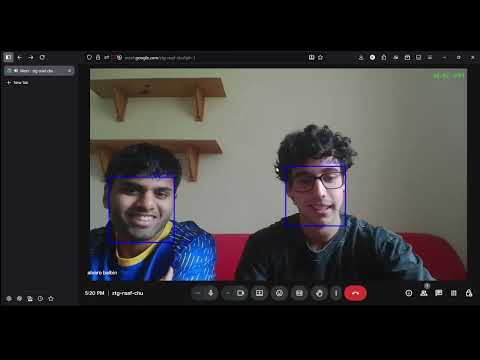
python -c "import sounddevice as sd; print(sd.query_devices())"Once the app is running and you toggle the virtual camera (c key), a virtual video feed named OBS Virtual Camera becomes available system-wide.
You can select it in any video app (Zoom, Google Meet, Discord, etc.) by choosing OBS Virtual Camera as your webcam source.
During runtime you can toggle features via keyboard polling (cv.waitKey):
| Key | Function | Description |
|---|---|---|
| q | Quit | Exit the app |
| m | Mirror | Toggle mirrored view |
| d | Debug | Show or hide debug overlays |
| c | Virtual Cam | Start or stop OBS virtual camera |
| t | Tighter | Increase framing tightness |
| l | Looser | Decrease framing tightness |
| b | BBoxes | Toggle face bounding boxes |
| f | Focus | Focus on current active speaker |
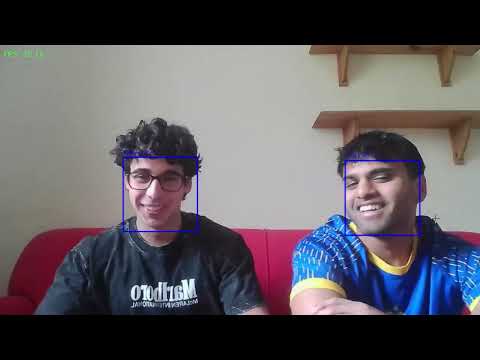
A real-time Python system that keeps your camera centered on whoever is speaking. It uses mediapipe for face landmarks, OpenCV for tracking, and webrtcvad for voice activity, then fuses both signals to pick the active speaker. The crop moves with an EMA smoother so it looks natural. Output goes to an OpenCV preview and an OBS virtual camera so you can use it in Zoom or Meet or Skype(not with us anymore).
Auto-framing around the active speaker using face and voice detection.
Output streamed to an OBS virtual camera for use in video apps.
Video + Audio Input → Face Detection + VAD → Speaker Selection → EMA Crop → Renderer → Virtual Camera
In practice the camera follows the active speaker smoothly without ping-ponging. A small deadband ignores tiny pixel jitter so the frame doesn’t wiggle when you are still. On a decent CPU you can expect roughly 25 to 30 FPS with low visual latency, and the virtual camera mirrors exactly what you see in the preview. EMA gives a gentle easing effect; it avoids harsh snaps when someone else starts talking. You can clearly see bounding boxes and track_id stays consistent all the way through.
-
To check that all the versions were correct I used strict version specifiers using the ones that were released when I was making the project.
-
Code runs on Python 3.12 and not 3.13, that’s only because certain Mediapipe and other packages use wheels and prebuilt wheels do not exist on Windows for Python 3.13 yet.
-
slots does have its own limitations such as it cannot add attributes dynamically; you are stuck with the ones you created in the dataclass. You also lose the flexibility of the dictionary (no dynamic attributes), but it saves a lot of memory and is good for enhancing speed.
-
If you only have one camera, just pass in 0 when using cv2.VideoCapture(). From documentation: “To open default camera using default backend just pass 0.”
-
Honestly, most people like their webcam mirrored: they want it to represent how they look in a mirror, basically horizontally flipped. It’s off by default though.
-
For type hints, after Python 3.9+ one does not have to import typing to apply type hints, it’s just already built into Python, so I decided not to import typing.
-
When calculating the built-in OpenCV .get() to find frames, the cv::CAP_PROP_POS_FRAMES will give you the frames but it might be inaccurate because reading / writing properties involves many layers. Some unexpected results might happen along this chain: VideoCapture -> API Backend -> Operating System -> Device Driver -> Device Hardware
The returned value might be different from what is really used by the device or it could be encoded using device dependent rules (e.g. steps or percentage). Effective behaviour depends on device driver and API backend thereforeI make our own FPS counter. -
time.perf_counter() is the highest precision timer available.
-
if diff_time > 0 realistically this is always going to be the case, but it just guards against division by zero and is overall protection.
-
A good explanation why I are doing object tracking and not object detection: A good tracking algorithm will use all information it has about the object up to that point while a detection algorithm always starts from scratch. Therefore, while designing an efficient system usually an object detection is run on every nth frame while the tracking algorithm is employed in the n-1 frames in between. Don’t start from scratch every time, it’s just inefficient.
-
A frame is a NumPy array representing an image; with many of these NumPy arrays you get a video.
-
Maybe change WINDOW_NORMAL to WINDOW_AUTOSIZE if facing aspect ratio problems.
-
Only using BlazeFace for bounding boxes and face detection (add trackers on the face) but then I will use FaceMesh for facial landmarks and its mouth landmarks to determine who is speaking. Using BlazeFace because it is lightweight and quick.
-
np.multiply returns floats so you have to cast them to int before using BBox.
-
Because of certain edge cases or rounding errors, you might end up with h or w being negative so you gotta skip these degenerate boxes entirely.
-
When using int() I truncate towards zero so I have to use round() beforehand, because if not we might collapse tiny boxes like 0.9 instead of keeping them.
-
The holes to mice documentation https://www.geeksforgeeks.org/dsa/assign-mice-holes/ helps understand the current greedy algorithm issue I are facing when trying to determine how to assign track_id to each BBox.
-
max_distance is pixel dependent, so it can be scale-sensitive.
-
No motion model (Kalman) or appearance cues means less stability on edge cases.
-
Height and width are adaptive so they can change in smoothing.py, this is just for when the face moves closer or farther away so its size changes, or for edge cases where the bounding box shrinks so that it does not get out of bounds.
-
I was using cv.WINDOW_AUTOSIZE but it kept snapping as I dragged and let go, it would snap into the new frame, so I changed it for cv.WINDOW_NORMAL.
-
Since VAD only takes mono 16-bit PCM audio when I are using sounddevice, I need to use InputStream parameters channels=1 and dtype=int16.
-
In audio processing, a buffer is a temporary area of memory that stores audio data to be processed or played back. The buffer size is the duration or number of audio samples the computer uses at once for processing.
-
For the lip points I picked 12 and 15 instead of 13 and 14 only because although 13 and 14 were the inner lip points compared to the outer lip points, I felt like there would be too much noise with 13 and 14 and it would disturb my readings. Therefore I chose 12 and 15 which are a little less responsive but more immune to noise due to the jitteriness of the model noise.
-
.close() is not strictly necessary for the new FaceMesh API.
-
Used frac since relative size with boxes is better to handle proportional noise. For example, a 1-pixel difference in a small BBox is big but in a large box it is nothing.
-
The reason why I added a deadband was so that in every frame there can be a little bit of pixel noise in the size and movement of the BBox, but the small pixel changes can be ignored since that’s not true movement. It smooths the output better. Even with EMA smoothing the box will constantly drift back and forth, so the deadband prevents this.
-
A recurring problem I had was a typical flow: the last detection is half out of frame, so the EMA nudges the box outside by a few pixels -> slice becomes empty -> cv.resize asserts and program exits.
-
In many of my type hints I use the | instead of or, that is because the | operator is used for type hints but also because you want to ensure multiple conditions are truthy, not just the first one.
-
In smoothing.py I use floats because even though we cannot travel half a pixel we want to keep the fractional math still in play. The background movement is smooth and there are no weird jumps. It makes the camera more robust.
-
To explain tightness: basically 1 is super tight (crop = target size) while 0.5 would be crop = 2x the target size, and 0 would be just the whole screen.
-
I used .pop throughout the whole program instead of del when deleting from dictionaries, that was because I could include a default and no system error would be raised if degenerated boxes, missing landmarks or any other issues occurred.
-
Why use sets? Because we can do membership checks in O(1) time complexity in track_id in unmatched_tracks for example. It has fast removal and no duplicates which makes all of them unique, that is important in this project.
-
In this project I used greedy nearest neighbour because it was fast and efficient and I didn’t have more than ~10 faces so the assignments would never truly fail. However, if necessary, Hungarian assignment would try all possible pairings and find the minimum total distance across all matches, but this would be slower O(n³) though optimal. That was outside the scope of the project.
-
Greedy nearest neighbour: for each new detection find the closest existing track by distance and match it if it’s close enough. Do this one detection at a time without trying to find the best global combination. It’s called greedy because it does not reconsider matches after a detection.
-
Definition of a bounding box: a bounding box is an axis-aligned rectangle containing the object of interest (a face in our case).
-
Adding _HAS_MP as an attribute makes the object self-descriptive but also self.available = _HAS_MP becomes an instance-level variable (per object) rather than a module-level one. So you know if THIS specific object is usable. Leading underscore is just a hint to other developers to say that this variable or function or anything else is internal and should not be used outside of this class/module. So it’s not a public API.
-
Mediapipe face detection wrapper: given a BGR image (OpenCV frame), then changes to RGB, runs Mediapipe detector, converts each relative bounding box to absolute pixel coordinates, returns a list of BBox objects clamped to image size. Also .close() isn’t necessary in new Mediapipe updates.
-
I used time.perf_counter() to track time because it’s monotonic so it only goes into the future and it has extremely high precision, the most you’ll find. Also it’s also relative so it is useful in loops.
-
cv.namedWindow using imshow lets you display your image, but I decided to include this to allow users to have more flexibility with their window types, and you can change this in config.py.
-
There are many different forms of interpolation. I checked all out and used linear in the end, but the documentation can help show you more. Shoutout to Computerphile on YouTube.
-
I measured mouth movement using change in mouth aspect ratio instead of just mouth opening ratio because MOR would give you raw values which could change from person to person, while MAR would give you normalized values and I could easily calculate the change of it per frame.
-
For bounding boxes the measurement used was x, y, w, h not x, y, x, y so you get the top-left corner then the width and height instead of the top-left and bottom-right corner coordinates. IMO it is easier to visualize and work with when programming.
-
When using OpenCV I used the most popular webcam backend for all the systems (Windows, macOS, and Linux); these are the ones with the least amount of errors. I don’t recommend changing them unless you explicitly want to.
-
Also for Windows at least, the Mediapipe wheels (which are basically just the installer) don’t exist for Mediapipe at Python 3.13, so you have to downgrade to Python 3.12 to use Mediapipe and therefore the project as a whole. Make sure to use a virtual environment for this.
-
VAD (Voice Activity Detection) is the process of detecting frame by frame whether the audio signal contains speech or just silence/noise.
-
OpenCV is an open-source computer vision library and it’s great for basic image processing, computer vision, and simple input/output image and video capabilities.
-
Mediapipe Face Mesh is a pre-trained model from Google’s Mediapipe library. It helps detect human faces in an image or a video frame and returns 468 3D landmarks on the face.
-
I used EMA smoothing for the crops so that it would “ease” into the new position without abruptly jumping. To make it slower, decrease the EMA alpha, and to make it move into a new position faster, use a larger EMA alpha.
I tracked the documentation I used to complete this. Just shows the websites, blogs, stackoverflows and some youtube videos I used to learn, help, and guide me through this project
Details
- https://pypi.org/project/opencv-python/#history
- https://docs.opencv.org/4.x/
- https://numpy.org/doc/2.3/release.html
- https://pypi.org/project/mediapipe/#history
- https://python-sounddevice.readthedocs.io/en/0.5.1/version-history.html
- https://pypi.org/project/webrtcvad-wheels/#history
- https://pypi.org/project/pyvirtualcam/#history
- https://www.reddit.com/r/learnpython/comments/1agv4ix/how_do_i_downgrade_from_312_to_311/
- https://medium.com/@codelancingg/how-to-downgrade-python-version-fb7b9087e776
- https://docs.python.org/3/library/dataclasses.html#dataclasses.dataclass
- https://stackoverflow.com/questions/50180735/how-can-dataclasses-be-made-to-work-better-with-slots
- https://elshad-karimov.medium.com/pythons-slots-the-hidden-memory-optimization-trick-b7e297441f2b
- https://docs.opencv.org/4.x/dd/d43/tutorial_py_video_display.html
- https://docs.opencv.org/4.x/db/deb/tutorial_display_image.html
- https://www.w3schools.com/python/ref_func_ord.asp
- https://docs.opencv.org/3.4/d2/d75/namespacecv.html
- https://dsp.stackexchange.com/questions/21598/when-is-a-kalman-filter-different-from-a-moving-average
- https://picovoice.ai/blog/audio-sampling-and-sample-rate/
- https://github.com/wiseman/py-webrtcvad/blob/master/README.rst
- https://docs.python.org/3/library/typing.html#typing.Optional
- https://docs.opencv.org/3.4/d4/d15/group__videoio__flags__base.html#ga023786be1ee68a9105bf2e48c700294d
- https://docs.python.org/3/library/sys.html#sys.platform
- https://stackoverflow.com/questions/47533787/type-hinting-tuples-in-python
- https://www.geeksforgeeks.org/python/python-opencv-capture-video-from-camera/
- https://stackoverflow.com/questions/56197011/use-cv2-videocapture-to-capture-a-picture
- https://docs.opencv.org/3.4/d8/dfe/classcv_1_1VideoCapture.html#a9d2ca36789e7fcfe7a7be3b328038585
- https://stackoverflow.com/questions/42210880/python-cv2-videocapture-does-not-work-cap-isopened-returns-false
- https://docs.opencv.org/3.4/d8/dfe/classcv_1_1VideoCapture.html#afb4ab689e553ba2c8f0fec41b9344ae6
- https://docs.opencv.org/3.4/d8/dfe/classcv_1_1VideoCapture.html#a8c6d8c2d37505b5ca61ffd4bb54e9a7c
- https://docs.opencv.org/3.4/d4/d15/group__videoio__flags__base.html#gaeb8dd9c89c10a5c63c139bf7c4f5704d
- https://docs.opencv.org/3.4/d8/dfe/classcv_1_1VideoCapture.html#a8c6d8c2d37505b5ca61ffd4bb54e9a7c
- https://docs.opencv.org/3.4/d8/dfe/classcv_1_1VideoCapture.html#afb4ab689e553ba2c8f0fec41b9344ae6
- https://pypi.org/project/pyvirtualcam/
- https://letmaik.github.io/pyvirtualcam/
- https://stackoverflow.com/questions/1984325/explaining-pythons-enter-and-exit
- https://docs.python.org/3/library/contextlib.html
- https://www.datacamp.com/tutorial/writing-custom-context-managers-in-python
- https://docs.opencv.org/4.x/d7/dfc/group__highgui.html#ga453d42fe4cb60e5723281a89973ee563
- https://numpy.org/devdocs/reference/generated/numpy.ndarray.html
- https://docs.opencv.org/3.4/d8/d01/group__imgproc__color__conversions.html
- https://blog.roboflow.com/opencv-color-spaces/
- https://stackoverflow.com/questions/54189388/opencv-gives-incorrect-fps-and-frame-count-of-a-video
- https://stackoverflow.com/questions/55953489/frame-rate-not-correct-in-videos
- https://docs.python.org/2/library/collections.html#collections.deque
- https://stackoverflow.com/questions/19723459/why-is-python-deque-initialized-using-the-last-maxlen-items-in-an-iterable
- https://forum.opencv.org/t/display-time-in-video/6756/3
- https://www.geeksforgeeks.org/python/python-list-append-method/
- https://docs.python.org/3/library/time.html#time.perf_counter
- https://www.geeksforgeeks.org/python/sum-function-python/
- https://blog.roboflow.com/what-is-a-bounding-box/
- https://d2l.ai/chapter_computer-vision/bounding-box.html
- https://medium.com/@rajdeepsingh/a-quick-reference-for-bounding-boxes-in-object-detection-f02119ddb76b
- https://stackoverflow.com/questions/57068928/opencv-rect-conventions-what-is-x-y-width-height
- https://www.researchgate.net/figure/Formula-for-calculating-Mouth-Aspect-Ratio_fig4_372852414
- https://docs.opencv.org/4.x/d6/d6e/group__imgproc__draw.html#ga5126f47f883d730f633d74f07456c576
- https://docs.opencv.org/4.x/d6/d6e/group__imgproc__draw.html#ga0f9314ea6e35f99bb23f29567fc16e11
- https://docs.opencv.org/4.x/d6/d6e/group__imgproc__draw.html#gaf076ef45de481ac96e0ab3dc2c29a777
- https://www.w3schools.com/python/ref_list_remove.asp
- https://docs.opencv.org/4.x/dc/da5/tutorial_py_drawing_functions.html
- https://docs.opencv.org/4.x/d6/d6e/group__imgproc__draw.html#ga07d2f74cadcf8e305e810ce8eed13bc9
- https://www.w3schools.com/python/numpy/numpy_array_shape.asp
- https://opencv.org/blog/resizing-and-rescaling-images-with-opencv/#h-opencv-function-to-resize-images
- https://www.youtube.com/watch?v=EMNpxfWo9go
- https://www.youtube.com/watch?v=AqscP7rc8_M&t=331s
- https://www.youtube.com/watch?v=poY_nGzEEWM
- https://docs.opencv.org/4.x/d8/dfe/classcv_1_1VideoCapture.html
- https://www.geeksforgeeks.org/python/python-opencv-cv2-flip-method/
- https://docs.opencv.org/3.4/d7/dfc/group__highgui.html
- https://stackoverflow.com/questions/45310254/fixed-digits-after-decimal-with-f-strings
- https://ai.google.dev/edge/mediapipe/solutions/vision/face_detector/python
- https://stackoverflow.com/questions/14556545/why-opencv-using-bgr-colour-space-instead-of-rgb
- https://colab.research.google.com/github/googlesamples/mediapipe/blob/main/examples/face_detector/python/face_detector.ipynb#scrollTo=Iy4r2_ePylIa
- https://ai.google.dev/edge/mediapipe/solutions/vision/face_detector/index
- https://discovery.cs.illinois.edu/guides/Python-Fundamentals/brackets/
- https://storage.googleapis.com/mediapipe-assets/MediaPipe%20BlazeFace%20Model%20Card%20(Short%20Range).pdf
- https://mediapipe.readthedocs.io/en/latest/solutions/face_detection.html
- https://docs.opencv.org/4.x/d3/df2/tutorial_py_basic_ops.html
- https://www.geeksforgeeks.org/python/convert-bgr-and-rgb-with-python-opencv/
- https://medium.com/@aiphile/detecting-face-at-30-fps-on-cpu-on-mediapipe-python-dda264e26f20
- https://numpy.org/doc/2.0/reference/generated/numpy.multiply.html
- https://en.wikipedia.org/wiki/Nearest_neighbor_search
- https://www.statisticshowto.com/greedy-algorithm-matching/
- https://en.wikipedia.org/wiki/Hungarian_algorithm
- https://www.geeksforgeeks.org/dsa/hungarian-algorithm-assignment-problem-set-1-introduction/
- https://www.geeksforgeeks.org/dsa/assign-mice-holes/
- https://www.geeksforgeeks.org/python/python-math-function-hypot/
- https://encord.com/blog/video-object-tracking-algorithms/
- https://www.geeksforgeeks.org/python/python-dictionary-keys-method/
- https://wiki.python.org/moin/TimeComplexity
- https://www.reddit.com/r/learnpython/comments/ia8vyg/why_would_you_want_to_use_a_set_instead_of_a_list/
- https://stackoverflow.com/questions/9056833/python-remove-set-from-set
- https://www.geeksforgeeks.org/python/python-list-pop-method/
- https://stackoverflow.com/questions/488670/calculate-exponential-moving-average-in-python
- https://www.geeksforgeeks.org/python/python-opencv-namedwindow-function/
- https://www.geeksforgeeks.org/python/enumerate-in-python/
- https://www.geeksforgeeks.org/python/python-max-function/
- https://stackoverflow.com/questions/11041405/why-dict-getkey-instead-of-dictkey
- https://www.geeksforgeeks.org/python/abs-in-python/
- https://docs.python.org/3/library/heapq.html
- https://www.geeksforgeeks.org/python/python-list-clear-method/
- https://medium.com/@theclickreader/webrtc-voice-activity-detection-using-python-the-click-reader-9ee3797adbea
- https://python-sounddevice.readthedocs.io/en/0.5.1/usage.html
- https://github.com/wiseman/py-webrtcvad/blob/master/example.py
- https://python-sounddevice.readthedocs.io/en/0.5.1/examples.html
- https://python-sounddevice.readthedocs.io/en/0.5.1/api/streams.html#sounddevice.Stream
- https://www.programiz.com/python-programming/methods/built-in/bytes
- https://developer.mozilla.org/en-US/docs/Web/JavaScript/Reference/Global_Objects/Math/hypot
- https://github.com/google-ai-edge/mediapipe/blob/e0eef9791ebb84825197b49e09132d3643564ee2/mediapipe/modules/face_geometry/data/canonical_face_model_uv_visualization.png
- google-ai-edge/mediapipe#4413
- https://www.geeksforgeeks.org/python/python-next-method/
- https://stackoverflow.com/questions/7102050/how-can-i-get-a-python-generator-to-return-none-rather-than-stopiteration
- https://en.wikipedia.org/wiki/HUD_(video_games)
- https://roboflow.com/use-opencv/draw-a-circle-with-cv2-circle
- https://www.reddit.com/r/learnpython/comments/3a9tlf/what_is_the_use_of_getattr/
- https://stackoverflow.com/questions/31112742/why-should-i-ever-use-getattr
- https://www.geeksforgeeks.org/python/python-getattr-method/
