


Useful Swing components for java 11 or higher (tested with jdk 11, 17, 21, and 25).

With Java 11 or higher, Maven, and Groovy on your PATH, run:
./run-demo.shThe launcher compiles the current checkout (including uncommitted changes) and runs
examples/AllControlsDemo.groovy using target/classes. It disables the demo's
@Grab dependency so the widgets come from your local code. You can also invoke
the launcher by its path from another directory.
A year-month date picker component for java swing.
There are two versions:
- YearMonthPickerCombo - a combobox that return a YearMonth.
- YearMonthPicker - A custom control that resembles DatePicker where the user can click a calendar and then pick the desired year month.
Both work similar to a combo box i.e. you do getValue() to get the value and addListener() to capture a value change e.g.
import se.alipsa.symp.YearMonthPicker;

class Example {
  public static void main(String[] args) {
    JFrame frame = new JFrame("Year month combo");
    JPanel panel = new JPanel();
    frame.add(panel);
    YearMonthPicker ymp = new YearMonthPicker();
    ymp.addListener(e -> System.out.println(ymp.getValue()));
    panel.add(new JLabel("Default Combo: "));
    panel.add(ymp);
    frame.pack();
    frame.setDefaultCloseOperation(JFrame.EXIT_ON_CLOSE);
    frame.setVisible(true);
  }
}
There are no external dependencies, and the jar file is about 40kb so nice and small. You can download the jar file from the release section or add the following to your maven file:
<dependency>
  <groupId>se.alipsa</groupId>
  <artifactId>swing-widgets</artifactId>
  <version>1.1.3</version>
</dependency>
...or the equivalent to you favorite build tool.
The module name for this library is se.alipsa.symp
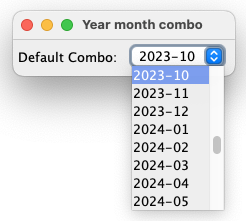
YearMonthPickerCombo() This gives you YearMonths 3 year back and 3 years into the future from now.
YearMonthPickerCombo(YearMonth initial) This gives you YearMonths 3 year back and 3 years into the future from initial.
YearMonthPickerCombo(YearMonth from, YearMonth to, YearMonth initial) This gives you all yearmonths between from and to (both from and to included) with the initial value as the default selected.
YearMonthPickerCombo(YearMonth from, YearMonth to, YearMonth initial, Locale locale) This gives you all yearmonths between from and to (both from and to included) with the initial value as the default selected displayed in the locale specified formatted as "yyyy-MM".
YearMonthPickerCombo(YearMonth from, YearMonth to, YearMonth initial, Locale locale, String format) This gives you all yearmonths between from and to (both from and to included) with the initial value as the default selected, displayed in the locale specified in the format specified.
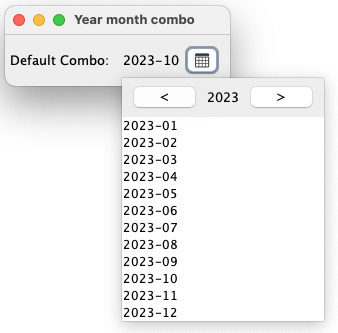
There are 7 constructors:
YearMonthPicker() This gives you YearMonths 3 year back and 3 years into the future from now in the system default locale.
YearMonthPicker(YearMonth initial) This gives you YearMonths 3 year back and 3 years into the future from initial in the system default locale.
YearMonthPicker(YearMonth initial, Locale locale) This gives you YearMonths 3 year back and 3 years into the future from initial in the specified locale. Month names are in full (long) format.
YearMonthPicker(YearMonth from, YearMonth to, YearMonth initial) This gives you all yearmonths between from and to (both from and to included) with the initial value as the default selected in the default locale. The display value (when a year month is chosen) will be displayed in the format "yyyy-MM".
YearMonthPicker(YearMonth from, YearMonth to, YearMonth initial, String monthNameFormat) This gives you all yearmonths between from and to (both from and to included) with the initial value as the default selected in the default locale. MonthNameFormat is how the month names will be displayed in the popup. Set it to "MMM" for the letter short style or include the year with "yyyy-MMM" or whatever. The display value (when a year month is chosen) will be displayed in the format "yyyy-MM".
YearMonthPicker(YearMonth from, YearMonth to, YearMonth initial, Locale locale, String monthNameFormat) This gives you all yearmonths between from and to (both from and to included) with the initial value as the default selected in the locale specified. MonthNameFormat is how the month names will be displayed in the popup. Default is "MMMM" (long format), set to "MMM" for the letter short style or include the year with "yyyy-MMM" or whatever. The display value (when a year month is chosen) will be displayed in the format "yyyy-MM".
YearMonthPicker(YearMonth from, YearMonth to, YearMonth initial, Locale locale, String monthPattern, String yearMonthPattern) This gives you all yearmonths between from and to (both from and to included) with the initial value as the default selected in the locale specified. MonthNameFormat is how the month names will be displayed in the popup. Default is "MMMM" (long format), set to "MMM" for the letter short style or include the year with "yyyy-MMM" or whatever. The display value (when a year month is chosen) will be displayed in the format provided with the yearMonthPattern argument.
Package: se.alipsa.datepicker
A date picker component with a masked text field and calendar popup.
import se.alipsa.datepicker.DatePicker;

class Example {
  public static void main(String[] args) {
    JFrame frame = new JFrame("Date picker");
    JPanel panel = new JPanel();
    frame.add(panel);
    DatePicker dp = new DatePicker();
    dp.addListener(date -> System.out.println(date));
    panel.add(new JLabel("Pick a date: "));
    panel.add(dp);
    frame.pack();
    frame.setDefaultCloseOperation(JFrame.EXIT_ON_CLOSE);
    frame.setVisible(true);
  }
}DatePicker() Uses today as initial date, system locale, locale-derived date pattern, range of +/- 20 years.
DatePicker(LocalDate initial) Uses the specified initial date, system locale, locale-derived date pattern, range of +/- 20 years from initial.
DatePicker(LocalDate initial, Locale locale) Uses the specified initial date and locale, locale-derived date pattern, range of +/- 20 years from initial.
DatePicker(LocalDate from, LocalDate to, LocalDate initial) Custom date range with system locale and locale-derived date pattern.
DatePicker(LocalDate from, LocalDate to, LocalDate initial, Locale locale) Custom date range and locale with locale-derived date pattern.
DatePicker(LocalDate from, LocalDate to, LocalDate initial, Locale locale, String datePattern) Full control over range, locale, and date pattern (e.g. "yyyy-MM-dd", "MM/dd/yyyy", "dd/MM/yyyy").
Dates outside the range, or rejected by the veto policy, cannot be selected or typed; an initial date outside
the range leaves the picker empty. A missing from or to defaults to 20 years before or after the initial date
(or today). The date pattern may only contain numeric fields (yy/yyyy, MM, dd), separators and quoted
literals. Two-digit years are read in the 100-year window that covers the picker's range, so a two-digit-year
pattern cannot be combined with a range longer than 100 years.
In the popup calendar the arrow keys move between days and weeks, Page Up/Page Down change month, Home/End jump to the start/end of the month, Enter or Space selects, and Escape closes the popup.
// Disallow weekends
dp.setVetoPolicy(date -> date.getDayOfWeek().getValue() < 6);

// Highlight holidays
dp.setHighlightPolicy(date -> {
    if (date.getMonthValue() == 12 && date.getDayOfMonth() == 25) {
        return new HighlightInfo(Color.RED, "Christmas");
    }
    return null;
});The CalendarPanel can be used independently without the text field and popup:
import se.alipsa.datepicker.CalendarPanel;
import se.alipsa.datepicker.HighlightInfo;
import java.awt.Color;
import java.time.YearMonth;

CalendarPanel calendar = new CalendarPanel();
calendar.addListener(date -> System.out.println(date));
calendar.setDisplayedYearMonth(YearMonth.of(2026, 12));
calendar.setVetoPolicy(date -> date.getDayOfWeek().getValue() < 6);
calendar.setHighlightPolicy(date -> date.getDayOfMonth() == 24
    ? new HighlightInfo(Color.ORANGE, "Event")
    : null);

calendar.previousMonth();
calendar.nextMonth();
panel.add(calendar);
CalendarPanel supports:
addListener(Consumer<LocalDate>)andremoveListener(Consumer<LocalDate>)getSelectedDate()andsetSelectedDate(LocalDate)getDisplayedYearMonth()andsetDisplayedYearMonth(YearMonth)previousMonth()andnextMonth()setVetoPolicy(DateVetoPolicy)to disable datessetHighlightPolicy(DateHighlightPolicy)to decorate and tooltip dates