fix mobile ux - #6
Conversation


|
The latest updates on your projects. Learn more about Vercel for Git ↗︎
|


|
solved grid click problem |
|
solved animation lag |

|
-make it go into mobile mode based on the width of the device, should be maximum 1024px (tablet in landscape mode) may be a good idea? |

| <Canvas shadows={true} onKeyDown={handleKeyPress}> | ||
| <color attach="background" args={[0.9, 0.9, 0.9]} /> | ||
| <OrbitControls target={cameraTarget} /> | ||
| <OrbitControls target={cameraTarget} onStart={() => { dispatch(toggleOrbiting()) }} onEnd={() => { dispatch(toggleOrbiting()) }} /> |

There was a problem hiding this comment.
ahhhh thanks for solving this one.
Do you mind If I extract your fix and make it a separate PR?
There was a problem hiding this comment.
sure, no problem
There was a problem hiding this comment.
theres a bit of a performance hit doing this via a state. Might need to investage a different solution. I wonder if the faces can store a pointer to the orbit controls and listen directly?
Nov-15-2022.17-17-01.mp4
There was a problem hiding this comment.
I gave it a go using references, but I might have a simpler option... track the delta of the mouse on mouseDown
| </Canvas> | ||
| <Toolbar onZoomExtents={zoomExtents} onTogglePerspective={handleTogglePerspective} onNewFile={handleNewFile}></Toolbar> | ||
| <MobileButton onActivate={() => dispatch(toggleMobileMode())} /> | ||
| {mobileModeActive && <MobileSelector cam={cameraTarget} onClose={() => dispatch(toggleMobileMode())} />} |
There was a problem hiding this comment.
Mobile Button and Mobile Selector should probably exist in their own component now
<MobileTools/>| else { | ||
| setHover(true); | ||
| } | ||
|
|
There was a problem hiding this comment.
this can be orbiting ? setHover(false) : setHover(true); to be more concise
| <ToolbarCommandButton onClick={() => dispatch(ActionCreators.undo())} title={Command[Command.Undo]}><Undo {...ICONPROPS} /></ToolbarCommandButton> | ||
| <ToolbarCommandButton onClick={() => dispatch(ActionCreators.redo())} title={Command[Command.Redo]}><Redo {...ICONPROPS} /></ToolbarCommandButton> | ||
| <ToolbarCommandButton onClick={() => setShowShare(!showShare)} title={Command[Command.Share]}><ShareIos {...ICONPROPS} /></ToolbarCommandButton> | ||
| <ToolbarCommandButton onClick={() => { placedPreview ? dispatch(togglePlacedPreview()) : dispatch(ActionCreators.undo()); }} title={Command[Command.Undo]}><Undo {...ICONPROPS} /></ToolbarCommandButton> |
There was a problem hiding this comment.
how was the preview affecting the undo redo? I wonder if we can simplify

|
|
|
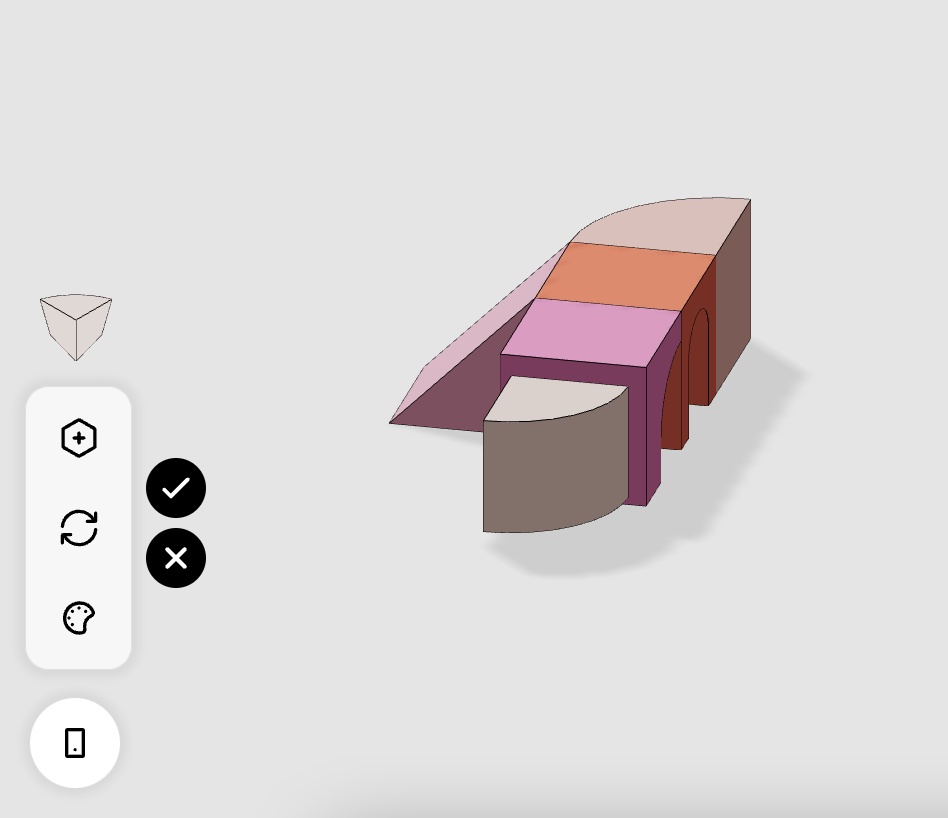
Removed the buttons, now confirm by clicking on the preview block. To remove the preview just click outside the model(it does not immediately create a new preview at the clicked point) |
|
For the undo/redo how do I deal with the preview? |
|
The click to preview/click to place is working well.
I'm not sure the preview should be part of the ui state. Maybe just per block as it is now? |
| }; | ||
|
|
||
| export { MobileButton, MobileSelector }; | ||
| const MobileTools = () => { |
| perspective: false, | ||
| mobileMode: false, | ||
| placedPreview: false, | ||
| previewBlockIds: { |
There was a problem hiding this comment.
not sure if previewBlockIds should be a part of the state
There was a problem hiding this comment.
Should I then remove it from the reducer-ui and put it as an object in Face.tsx?
2 participants


I open this draft pull request to check for bugs.
this pull request attempts to resolve the issue: Mobile - tap to preview.
the mobile mode button allows you to enter a real mobile mode in which mouse hovers are not possible. A tap does not add a block but a preview of it, it is editable until the confirm/cancel button is clicked (black buttons that come out when the preview block is created)
possible problems:
-during the editing of a preview block, upon clicking on a grid point the preview is closed(as if clicking cancel)
-animation lags for a moment when placing a block