https://github.com/ASP-NET-Web-Forms-Club/Hearth-ASPNET-Server
A lightweight, high performance, portable web server designed for ASP.NET applications. A self-contained, IIS-free host for ASP.NET Web Forms applications, built on C# 7.3 / .NET Framework 4.8. It pairs a WinForms launcher with a console / Windows-Service worker process.
| Project | Output | Role |
|---|---|---|
HearthPortableWebServer.Common |
.dll |
Shared IPC names, server.config reader/writer, ACL'd named sync primitives. |
HearthPortableWebServer.Hosting |
.dll |
The ASP.NET runtime: HttpListener + custom HttpWorkerRequest feeding HttpRuntime.ProcessRequest. Loaded into the isolated worker AppDomain. |
HearthPortableWebServer.Host |
.exe |
Console / Windows-Service worker process. Owns the worker AppDomain lifecycle. |
HearthPortableWebServer.Launcher |
.exe |
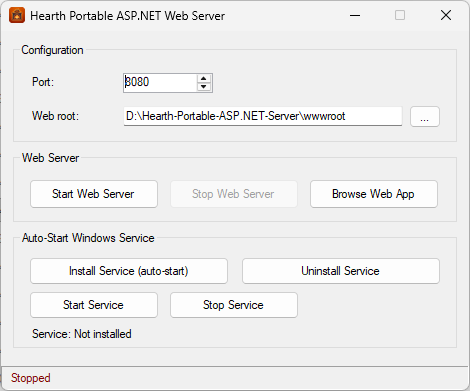
WinForms UI: configure, start/stop, browse, install/uninstall service. |
HearthPortableWebServer.StressTest |
.exe |
Load generator: concurrency sweep, throughput + latency percentiles, writes a timestamped log report. |
All projects build to a shared build\<Configuration>\ folder.
 Launcher.exe (WinForms)              Host.exe (separate process)
 ────────────────────────            ─────────────────────────────
  port / root config                  default AppDomain
  Start ─► launch detached ─────────► ServerController
  Stop  ─► signal named event ──────►   │  ApplicationHost.CreateApplicationHost
  status ◄─ named mutex                 ▼
                                      ASP.NET worker AppDomain  ◄── "w3wp.exe" equivalent
                                        AspNetHost  (MarshalByRefObject)
                                        HttpListener  (32 concurrent accepts)
                                        ListenerHttpWorkerRequest ─► HttpRuntime.ProcessRequest
- Single worker process — one dedicated ASP.NET
AppDomaincreated viaApplicationHost.CreateApplicationHost, exactly how IIS isolates an app pool. - Concurrency — an async
HttpListeneraccept loop keeps 32 outstanding accepts and dispatches each request on the thread pool; Server GC is enabled. - UI independence — the Host is a separate, detached process. Closing the launcher leaves the server running; it is stopped only by an explicit signal, Ctrl+C, or the Service Control Manager.
Run HearthPortableWebServer.Launcher.exe:
- Port (default
8080) and Web root (default<startup path>\wwwroot). - Start / Stop Web Server, Browse Web App.
- Install / Uninstall Service (auto-start with Windows; prompts for UAC).
HearthPortableWebServer.Host.exe --port 8080 --root "C:\site\wwwroot"
HearthPortableWebServer.Host.exe --stop --port 8080
HearthPortableWebServer.Host.exe --install --port 8080 --root "C:\site\wwwroot"   (admin)
HearthPortableWebServer.Host.exe --uninstall                                      (admin)
HearthPortableWebServer.Host.exe --service        (used by the SCM; reads server.config)
Closing the launcher while a server it started is still running prompts: [Yes] stop it, [No] leave it running in the background. A Minimize to taskbar button is also provided.
Run HearthPortableWebServer.StressTest.exe. With no --url it asks for the target host
interactively at runtime (accepts localhost:8080, host:port, or a full URL);
pass --url to script it. It ramps concurrency through several levels, measures
throughput and latency percentiles at each, prints the peak req/sec, and writes a
timestamped report into stress-logs\.
HearthPortableWebServer.StressTest.exe
HearthPortableWebServer.StressTest.exe --url http://localhost:8080/ --duration 10 --levels 1,2,4,8,16,32,64,128,256
The listener tries http://+:<port>/ (all interfaces, IIS-like) first and falls
back to loopback (localhost / 127.0.0.1) when not elevated. Service install
and the all-interfaces binding require Administrator rights.
msbuild HearthPortableWebServer.sln /p:Configuration=Release
- ASP.NET Web Forms page renders with ViewState; server-side button postback
updates a
Label(full page lifecycle). api.aspxechoes GET query and POST form values.- Static files served with
ETag/Last-Modifiedcaching headers. - 200 concurrent requests → 200 × HTTP 200 in ~0.12 s.
--stopsignal shuts the worker down gracefully and frees the port.
Read more details report at: Wiki - Performance Benchmark
The same ASP.NET Web Forms application was load-tested twice on the same
machine — once hosted by this portable server, once by the Windows 11 built-in
IIS (single worker process) — using HearthPortableWebServer.StressTest. Each run
ramped concurrency from 1 → 256 clients, 10 s measured per level (3 s warmup), with
every response body fully read.
Test machine (both client and server ran here, over loopback):
| Component | Spec |
|---|---|
| CPU | Intel Core i7-4770S @ 3.10 GHz (Turbo 3.90 GHz), 4 cores / 8 logical |
| Cache | L1 256 KB · L2 1.0 MB · L3 8.0 MB |
| RAM | 24 GB DDR3 |
| Storage | Samsung SSD 870 EVO 500 GB |
| OS | Windows 11 |
| Concurrent clients | Portable server | IIS (1 worker) |
|---|---|---|
| 1 | 3,346 | 2,825 |
| 2 | 6,088 | 4,698 |
| 4 | 9,847 | 7,777 |
| 8 | 13,460 | 10,783 |
| 16 | 14,494 | 12,349 |
| 32 | 14,700 | 12,456 |
| 64 | 13,849 | 12,683 |
| 128 (peak) | 14,980 | 12,881 |
| 256 | 12,696 | 12,208 |
| Summary | Portable server | IIS (1 worker) |
|---|---|---|
| Peak throughput | ≈ 14,980 req/s (≈ 899K req/min) | ≈ 12,881 req/s (≈ 773K req/min) |
| Peak at concurrency | 128 | 128 |
| Failures | 0 | 0 |
| Total requests served | 1,034,924 | 887,020 |
On this dynamic workload the portable server was ~16 % faster at peak and faster at every concurrency level, with lower latency — because it runs a far leaner request pipeline (no native-module chain, no access logging, no process-management overhead), while sharing the same underlying HTTP.sys kernel driver as IIS.
The full per-level latency breakdown (p50/p90/p95/p99/max) is published on the project wiki. This README keeps the summary only.
Both servers show identical behavior under load: throughput saturates around concurrency 8–16, peaks at 128, eases off at 256, and neither drops a single request. The latency growth past saturation is textbook Little's Law. In short — it behaves like a real server under load.
While the portable server intentionally does not match IIS's full feature set (kernel output caching, web gardens, request filtering, TLS/auth modules, logging, health monitoring, app-pool recycling…), it fully delivers on its core mission: an efficient web server that yields the output — here, matching and slightly exceeding stock single-worker IIS in raw throughput.
Caveats. Client and server shared the same 8 logical CPUs over loopback, so both ceilings are understated; a second-machine test over the network would raise both. The ~16 % gap reflects stock/default configuration of each (e.g. IIS logging enabled) and a non-cacheable dynamic page — a cacheable response would let IIS's kernel cache pull far ahead.