


Ngôn ngữ: English | Tiếng Việt
Một widget Flutter nhỏ gọn, nhanh và dễ tùy biến để tạo hiệu ứng sóng động đẹp mắt. Bạn có thể xây dựng các AppBar dịu nhẹ hoặc những cảnh đại dương chân thực với khả năng vẽ nhiều lớp và điều khiển hoạt ảnh mượt mà, chính xác.
- Hiệu năng sẵn sàng cho production — Vẽ dựa trên CustomPainter với chi phí khung hình thấp (đo trên macOS debug: Raster ~2.5ms/frame, UI ~0.6ms/frame).
- Mô hình sóng thực tế — Các dạng sóng Gerstner nâng cao (nước sâu, nước nông, bão/nhấp nhô), cùng với các dạng cổ điển sine/cosine/triangle và sóng hài.
- Ghép lớp linh hoạt — Chồng nhiều lớp sóng với màu/gradient, chiều cao, thời lượng và hình dạng độc lập để tạo hiệu ứng phong phú.
- An toàn kiểu & linh hoạt — API thuần Dart/Flutter với enum và constructor rõ ràng.
- Đơn giản để dùng — Hoạt động trong bất kỳ widget tree nào; lý tưởng cho AppBar, hero banner và background động.
Nếu bạn muốn cảm ơn, hãy star chúng tôi trên GitHub hoặc like trên pub.dev.
| Cảnh | Mô tả |
|---|---|
| Appbar dịu nhẹ | Một sóng sine mềm mại dưới thanh appbar. |
| Bãi biển gradient | Hai lớp gradient với hiệu ứng khúc xạ nước nông. |
| Đại dương bão tố | Sóng Gerstner nhiều lớp với hiệu ứng bọt biển. |
Đầu tiên, làm theo hướng dẫn cài đặt package và thêm widget WavesWidget vào app của bạn:
WavesWidget(
  size: const Size(400, 200),
  waveLayers: [
    WaveLayer.solid(
      duration: 3000,
      heightFactor: 0.8,
      color: Colors.blue.withOpacity(0.6),
    ),
  ],
)WavesWidget(
size: const Size(400, 300),
amplitude: 25,
frequency: 1.8,
waveLayers: [
WaveLayer.solid(
duration: 3000,
heightFactor: 0.8,
color: Colors.blue.withOpacity(0.6),
waveShape: WaveShape.sine(),
),
WaveLayer.gradient(
duration: 2500,
heightFactor: 0.6,
gradient: LinearGradient(colors: [Colors.cyan, Colors.blue]),
waveShape: WaveShape.cosine(),
),
WaveLayer.solid(
duration: 4000,
heightFactor: 0.4,
color: Colors.lightBlue.withOpacity(0.3),
waveShape: WaveShape.triangle(),
),
],
)Họ sóng Gerstner chân thực + các dạng cổ điển. Bạn có thể chọn hoặc kết hợp:
// Gerstner chân thực (giống sóng biển có đỉnh nhọn)
WaveLayer.solid(
  waveShape: WaveShape.gerstner(steepness: 0.6),
  color: Colors.blue.withOpacity(0.7),
  duration: 3000,
);

// Nước sâu với hiệu ứng khúc xạ
WaveLayer.gradient(
  waveShape: WaveShape.deepWaterGerstner(
    steepness: 0.4,
    depth: 1.2,
    windSpeed: 15,
  ),
  gradient: LinearGradient(colors: [Colors.indigo, Colors.blue]),
  duration: 4000,
);

// Sóng bão với nhiễu loạn
WaveLayer.solid(
  waveShape: WaveShape.stormGerstner(
    steepness: 0.8,
    foamFactor: 0.4,
    turbulence: 0.6,
  ),
  color: Colors.indigo.shade900.withOpacity(0.8),
  duration: 2500,
);

// Sóng hài (hòa âm phức tạp)
WaveLayer.solid(
  waveShape: WaveShape.harmonic(harmonics: [1.0, 0.6, 0.3, 0.15]),
  color: Colors.teal,
  duration: 3500,
);WavesWidget(
size: const Size(400, 200),
initialPhase: 10.0, // độ lệch pha khởi đầu
amplitude: 20.0, // hệ số nhân chiều cao sóng
frequency: 1.6, // mật độ sóng
baseDuration: 3000, // thời lượng hoạt ảnh mặc định cho các lớp
waveLayers: [ /* ... */ ],
)Các loại layer
// Màu đặc
WaveLayer.solid(
  duration: 3000,
  heightFactor: 0.8,
  color: Colors.blue.withOpacity(0.6),
);

// Gradient
WaveLayer.gradient(
  duration: 2500,
  heightFactor: 0.6,
  gradient: LinearGradient(
    colors: [Colors.cyan, Colors.blue],
    begin: Alignment.topCenter,
    end: Alignment.bottomCenter,
  ),
);WavesWidget(
size: const Size(400, 300),
amplitude: 35,
frequency: 1.5,
waveLayers: [
WaveLayer.gradient(
duration: 5000,
heightFactor: 1.0,
gradient: LinearGradient(
colors: [
Colors.indigo.withOpacity(0.4),
Colors.deepPurple.withOpacity(0.6),
],
),
waveShape: WaveShape.deepWaterGerstner(
steepness: 0.3,
depth: 1.5,
windSpeed: 12,
),
),
WaveLayer.solid(
duration: 3500,
heightFactor: 0.8,
color: Colors.blue.withOpacity(0.5),
waveShape: WaveShape.gerstner(steepness: 0.5),
),
WaveLayer.gradient(
duration: 2800,
heightFactor: 0.6,
gradient: LinearGradient(
colors: [
Colors.cyan.withOpacity(0.7),
Colors.white.withOpacity(0.3),
],
),
waveShape: WaveShape.stormGerstner(
steepness: 0.7,
foamFactor: 0.35,
turbulence: 0.4,
),
),
WaveLayer.solid(
duration: 2000,
heightFactor: 0.4,
color: Colors.lightBlue.withOpacity(0.6),
waveShape: WaveShape.harmonic(
harmonics: [1.0, 0.5, 0.25, 0.125],
),
),
],
)WavesWidget(
size: const Size(400, 200),
amplitude: 20,
frequency: 2.2,
waveLayers: [
WaveLayer.gradient(
duration: 4200,
heightFactor: 0.9,
gradient: LinearGradient(
colors: [
Colors.teal.withOpacity(0.5),
Colors.green.withOpacity(0.4),
],
),
waveShape: WaveShape.shallowGerstner(
steepness: 0.4,
shoalingFactor: 1.3,
bottomFriction: 0.15,
),
),
WaveLayer.solid(
duration: 3000,
heightFactor: 0.6,
color: Colors.lightGreen.withOpacity(0.6),
waveShape: WaveShape.gerstner(steepness: 0.6),
),
],
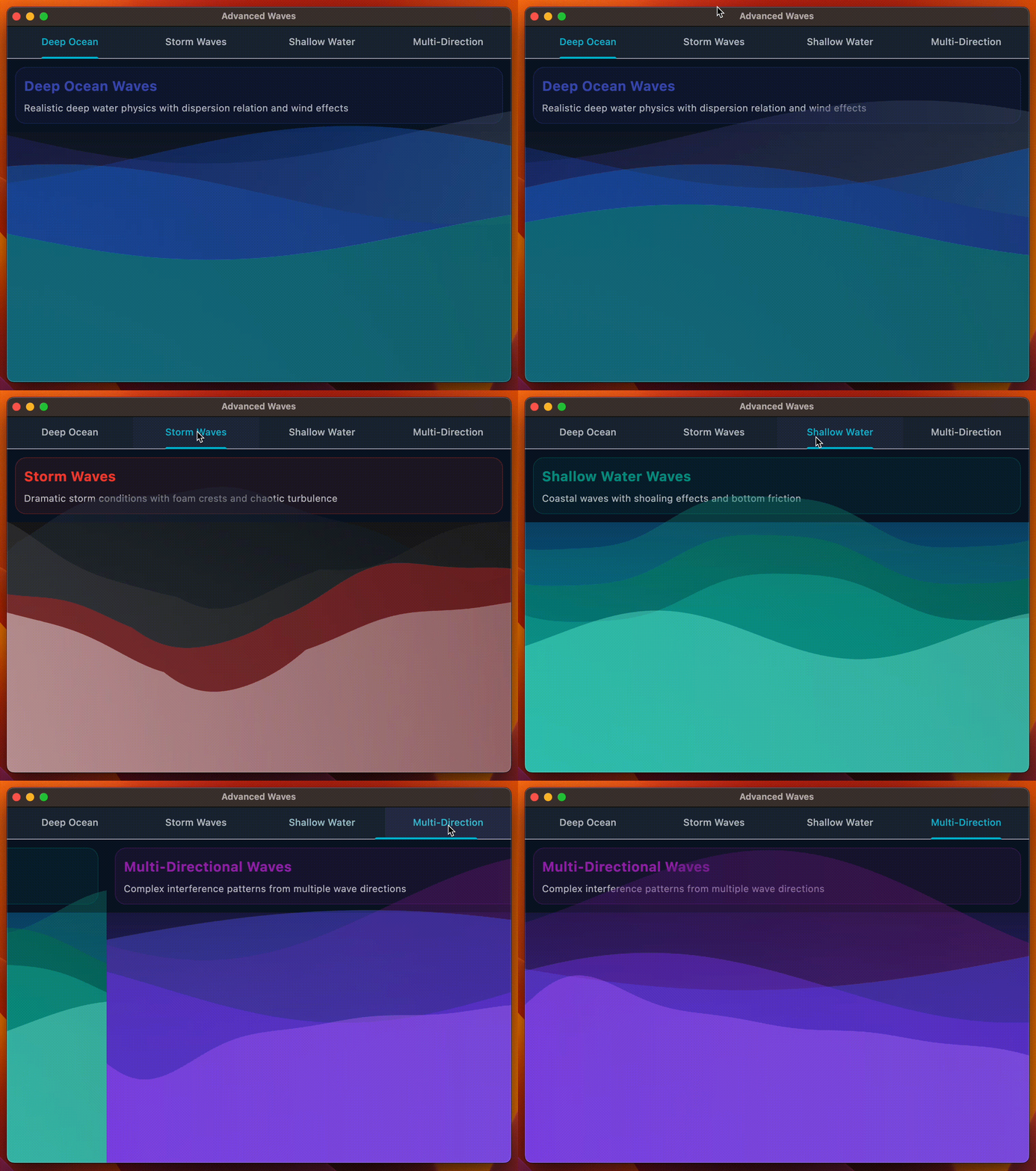
)Gói này đi kèm một demo dạng tab minh họa 4 hiệu ứng sóng dựng sẵn:
| Preset | Mô tả |
|---|---|
| Deep Ocean | Sóng Gerstner nước sâu với khúc xạ và gió. |
| Storm Waves | Điều kiện bão tố với gợi ý bọt và nhiễu loạn. |
| Shallow Water | Sóng ven bờ với hiệu ứng shoaling và ma sát đáy. |
| Multi-Directional | Mẫu giao thoa từ nhiều hướng sóng khác nhau. |
Xem mã nguồn tại example/lib/main.dart và chạy:
flutter run -d macos # hoặc ios / android / web- Fork repo
- Tạo feature branch:
git checkout -b feat/awesome - Commit:
git commit -m "feat: thêm tính năng awesome" - Push:
git push origin feat/awesome - Mở PR
MIT — xem LICENSE.