| id | options |
|---|---|
| title | Options Reference |
| description | Options reference for Urlbox website screenshot API |
| warning | DO NOT EDIT THIS FILE, please EDIT src/lib/options.ts instead, this file is auto-generated by src/lib/options.ts |
The URL of the website you want to screenshot
Examples
url=bbc.co.uk
Example signed URL:
Example unsigned URL:
https://api.urlbox.io/v1/ca482d7e-9417-4569-90fe-80f7c5e1c781/png?url=bbc.co.uk
Example POST request:
curl -X POST \
https://api.urlbox.io/v1/render/sync \
-H 'Authorization: Bearer your-urlbox-secret' \
-H 'Content-Type: application/json' \
-d '{"url":"bbc.co.uk"}'
Example asynchronous POST request:
curl -X POST \
https://api.urlbox.io/v1/render \
-H 'Authorization: Bearer your-urlbox-secret' \
-H 'Content-Type: application/json' \
-d '{"url":"bbc.co.uk"}'
Result
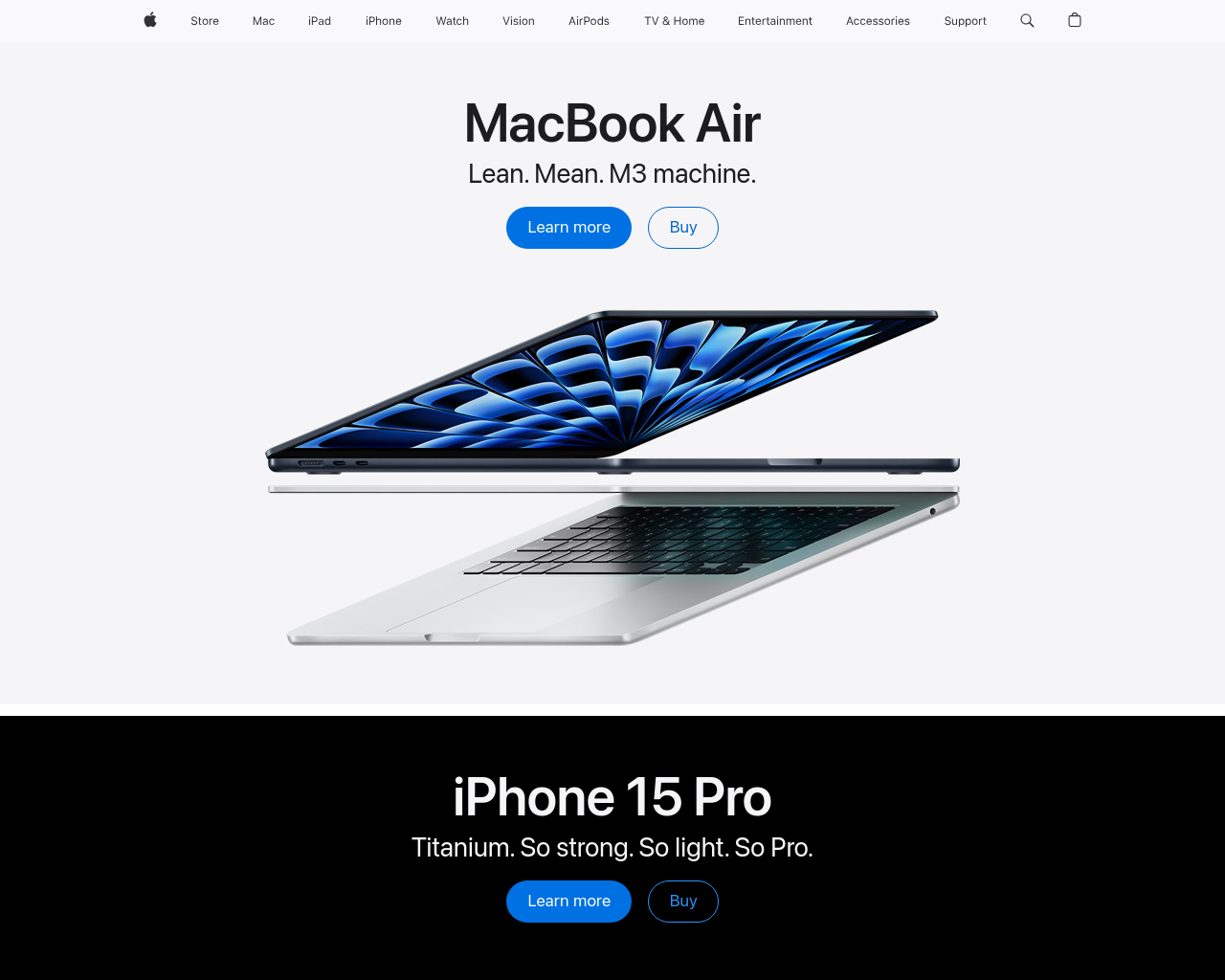
url=apple.com
Example signed URL:
Example unsigned URL:
https://api.urlbox.io/v1/ca482d7e-9417-4569-90fe-80f7c5e1c781/png?url=apple.com
Example POST request:
curl -X POST \
https://api.urlbox.io/v1/render/sync \
-H 'Authorization: Bearer your-urlbox-secret' \
-H 'Content-Type: application/json' \
-d '{"url":"apple.com"}'
Example asynchronous POST request:
curl -X POST \
https://api.urlbox.io/v1/render \
-H 'Authorization: Bearer your-urlbox-secret' \
-H 'Content-Type: application/json' \
-d '{"url":"apple.com"}'
Result
url=google.com
Example signed URL:
Example unsigned URL:
https://api.urlbox.io/v1/ca482d7e-9417-4569-90fe-80f7c5e1c781/png?url=google.com
Example POST request:
curl -X POST \
https://api.urlbox.io/v1/render/sync \
-H 'Authorization: Bearer your-urlbox-secret' \
-H 'Content-Type: application/json' \
-d '{"url":"google.com"}'
Example asynchronous POST request:
curl -X POST \
https://api.urlbox.io/v1/render \
-H 'Authorization: Bearer your-urlbox-secret' \
-H 'Content-Type: application/json' \
-d '{"url":"google.com"}'
Result
The HTML you want to render
Example
html=\
Example signed URL:
Example unsigned URL:
Example POST request:
curl -X POST \
https://api.urlbox.io/v1/render/sync \
-H 'Authorization: Bearer your-urlbox-secret' \
-H 'Content-Type: application/json' \
-d '{"html":"\\<h1>Hello World\\</h1>"}'
Example asynchronous POST request:
curl -X POST \
https://api.urlbox.io/v1/render \
-H 'Authorization: Bearer your-urlbox-secret' \
-H 'Content-Type: application/json' \
-d '{"html":"\\<h1>Hello World\\</h1>"}'
Result
The format of the render
The available values are:
png, jpeg, webp, avif, svg, pdf, html, mp4, webm, md.
Examples
format=png
Example signed URL:
Example unsigned URL:
https://api.urlbox.io/v1/ca482d7e-9417-4569-90fe-80f7c5e1c781/png?url=bbc.com
Example POST request:
curl -X POST \
https://api.urlbox.io/v1/render/sync \
-H 'Authorization: Bearer your-urlbox-secret' \
-H 'Content-Type: application/json' \
-d '{"url":"bbc.com","format":"png"}'
Example asynchronous POST request:
curl -X POST \
https://api.urlbox.io/v1/render \
-H 'Authorization: Bearer your-urlbox-secret' \
-H 'Content-Type: application/json' \
-d '{"url":"bbc.com","format":"png"}'
Result
format=pdf
Example signed URL:
Example unsigned URL:
https://api.urlbox.io/v1/ca482d7e-9417-4569-90fe-80f7c5e1c781/pdf?url=bbc.com
Example POST request:
curl -X POST \
https://api.urlbox.io/v1/render/sync \
-H 'Authorization: Bearer your-urlbox-secret' \
-H 'Content-Type: application/json' \
-d '{"url":"bbc.com","format":"pdf"}'
Example asynchronous POST request:
curl -X POST \
https://api.urlbox.io/v1/render \
-H 'Authorization: Bearer your-urlbox-secret' \
-H 'Content-Type: application/json' \
-d '{"url":"bbc.com","format":"pdf"}'
Result
default: 1280
The viewport width of the browser, in pixels
Examples
width=320
Example signed URL:
Example unsigned URL:
https://api.urlbox.io/v1/ca482d7e-9417-4569-90fe-80f7c5e1c781/png?url=apple.com&width=320
Example POST request:
curl -X POST \
https://api.urlbox.io/v1/render/sync \
-H 'Authorization: Bearer your-urlbox-secret' \
-H 'Content-Type: application/json' \
-d '{"url":"apple.com","width":320}'
Example asynchronous POST request:
curl -X POST \
https://api.urlbox.io/v1/render \
-H 'Authorization: Bearer your-urlbox-secret' \
-H 'Content-Type: application/json' \
-d '{"url":"apple.com","width":320}'
Result
width=768
Example signed URL:
Example unsigned URL:
https://api.urlbox.io/v1/ca482d7e-9417-4569-90fe-80f7c5e1c781/png?url=apple.com&width=768
Example POST request:
curl -X POST \
https://api.urlbox.io/v1/render/sync \
-H 'Authorization: Bearer your-urlbox-secret' \
-H 'Content-Type: application/json' \
-d '{"url":"apple.com","width":768}'
Example asynchronous POST request:
curl -X POST \
https://api.urlbox.io/v1/render \
-H 'Authorization: Bearer your-urlbox-secret' \
-H 'Content-Type: application/json' \
-d '{"url":"apple.com","width":768}'
Result
width=1280
Example signed URL:
Example unsigned URL:
https://api.urlbox.io/v1/ca482d7e-9417-4569-90fe-80f7c5e1c781/png?url=apple.com&width=1280
Example POST request:
curl -X POST \
https://api.urlbox.io/v1/render/sync \
-H 'Authorization: Bearer your-urlbox-secret' \
-H 'Content-Type: application/json' \
-d '{"url":"apple.com","width":1280}'
Example asynchronous POST request:
curl -X POST \
https://api.urlbox.io/v1/render \
-H 'Authorization: Bearer your-urlbox-secret' \
-H 'Content-Type: application/json' \
-d '{"url":"apple.com","width":1280}'
Result
default: 1024
The viewport height of the browser, in pixels
Examples
height=400
Example signed URL:
Example unsigned URL:
https://api.urlbox.io/v1/ca482d7e-9417-4569-90fe-80f7c5e1c781/png?url=apple.com&height=400
Example POST request:
curl -X POST \
https://api.urlbox.io/v1/render/sync \
-H 'Authorization: Bearer your-urlbox-secret' \
-H 'Content-Type: application/json' \
-d '{"url":"apple.com","height":400}'
Example asynchronous POST request:
curl -X POST \
https://api.urlbox.io/v1/render \
-H 'Authorization: Bearer your-urlbox-secret' \
-H 'Content-Type: application/json' \
-d '{"url":"apple.com","height":400}'
Result
height=800
Example signed URL:
Example unsigned URL:
https://api.urlbox.io/v1/ca482d7e-9417-4569-90fe-80f7c5e1c781/png?url=apple.com&height=800
Example POST request:
curl -X POST \
https://api.urlbox.io/v1/render/sync \
-H 'Authorization: Bearer your-urlbox-secret' \
-H 'Content-Type: application/json' \
-d '{"url":"apple.com","height":800}'
Example asynchronous POST request:
curl -X POST \
https://api.urlbox.io/v1/render \
-H 'Authorization: Bearer your-urlbox-secret' \
-H 'Content-Type: application/json' \
-d '{"url":"apple.com","height":800}'
Result
height=1400
Example signed URL:
Example unsigned URL:
https://api.urlbox.io/v1/ca482d7e-9417-4569-90fe-80f7c5e1c781/png?url=apple.com&height=1400
Example POST request:
curl -X POST \
https://api.urlbox.io/v1/render/sync \
-H 'Authorization: Bearer your-urlbox-secret' \
-H 'Content-Type: application/json' \
-d '{"url":"apple.com","height":1400}'
Example asynchronous POST request:
curl -X POST \
https://api.urlbox.io/v1/render \
-H 'Authorization: Bearer your-urlbox-secret' \
-H 'Content-Type: application/json' \
-d '{"url":"apple.com","height":1400}'
Result
default: false
Specify whether to capture the full scrollable area of the website.
For PDFs, full_page mode will attempt to capture the whole website onto one single page PDF document.
Example
full_page=true
Example signed URL:
Example unsigned URL:
https://api.urlbox.io/v1/ca482d7e-9417-4569-90fe-80f7c5e1c781/png?url=urlbox.io&full_page=true
Example POST request:
curl -X POST \
https://api.urlbox.io/v1/render/sync \
-H 'Authorization: Bearer your-urlbox-secret' \
-H 'Content-Type: application/json' \
-d '{"url":"urlbox.io","full_page":true}'
Example asynchronous POST request:
curl -X POST \
https://api.urlbox.io/v1/render \
-H 'Authorization: Bearer your-urlbox-secret' \
-H 'Content-Type: application/json' \
-d '{"url":"urlbox.io","full_page":true}'
Result
Take a screenshot of the element that matches this selector. By default, if the selector is not found, Urlbox will take a normal viewport screenshot. If you prefer Urlbox to fail the request when the selector is not found, pass fail_if_selector_missing=true.
Example
selector=#playground
Example signed URL:
Example unsigned URL:
Example POST request:
curl -X POST \
https://api.urlbox.io/v1/render/sync \
-H 'Authorization: Bearer your-urlbox-secret' \
-H 'Content-Type: application/json' \
-d '{"url":"urlbox.io","selector":"#playground"}'
Example asynchronous POST request:
curl -X POST \
https://api.urlbox.io/v1/render \
-H 'Authorization: Bearer your-urlbox-secret' \
-H 'Content-Type: application/json' \
-d '{"url":"urlbox.io","selector":"#playground"}'
Result
default: false
Enable GPU acceleration to render 3D scenes and heavy WebGL content. This is a beta feature and requires pre-approval. Please contact support to enable this feature on your account
For GET requests, setting this option to json will change the response type of the Urlbox request to JSON.
The available values are:
json.
Options for blocking or dismissing certain page elements, such as cookie banners
Blocks requests from popular advertising networks from loading
Examples
block_ads=true
Example signed URL:
Example unsigned URL:
https://api.urlbox.io/v1/ca482d7e-9417-4569-90fe-80f7c5e1c781/png?url=nytimes.com&block_ads=true
Example POST request:
curl -X POST \
https://api.urlbox.io/v1/render/sync \
-H 'Authorization: Bearer your-urlbox-secret' \
-H 'Content-Type: application/json' \
-d '{"url":"nytimes.com","block_ads":true}'
Example asynchronous POST request:
curl -X POST \
https://api.urlbox.io/v1/render \
-H 'Authorization: Bearer your-urlbox-secret' \
-H 'Content-Type: application/json' \
-d '{"url":"nytimes.com","block_ads":true}'
Result
block_ads=false
Example signed URL:
Example unsigned URL:
https://api.urlbox.io/v1/ca482d7e-9417-4569-90fe-80f7c5e1c781/png?url=nytimes.com
Example POST request:
curl -X POST \
https://api.urlbox.io/v1/render/sync \
-H 'Authorization: Bearer your-urlbox-secret' \
-H 'Content-Type: application/json' \
-d '{"url":"nytimes.com","block_ads":false}'
Example asynchronous POST request:
curl -X POST \
https://api.urlbox.io/v1/render \
-H 'Authorization: Bearer your-urlbox-secret' \
-H 'Content-Type: application/json' \
-d '{"url":"nytimes.com","block_ads":false}'
Result
Block requests from specific urls from loading
Examples
block_urls=api.urlbox.io
Example signed URL:
Example unsigned URL:
Example POST request:
curl -X POST \
https://api.urlbox.io/v1/render/sync \
-H 'Authorization: Bearer your-urlbox-secret' \
-H 'Content-Type: application/json' \
-d '{"url":"urlbox.io","block_urls":"api.urlbox.io"}'
Example asynchronous POST request:
curl -X POST \
https://api.urlbox.io/v1/render \
-H 'Authorization: Bearer your-urlbox-secret' \
-H 'Content-Type: application/json' \
-d '{"url":"urlbox.io","block_urls":"api.urlbox.io"}'
Result
Blocking multiple domains and using wildcard
Example signed URL:
Example unsigned URL:
Example POST request:
curl -X POST \
https://api.urlbox.io/v1/render/sync \
-H 'Authorization: Bearer your-urlbox-secret' \
-H 'Content-Type: application/json' \
-d '{"url":"nytimes.com","block_urls":["*facebook*","*fullstory*","*crisp*","*intercom*","*getdrip*","*olark*","*optimizely.com*","https://shift.com/images/*","*segment.com*","*.optimizely.com","everesttech.net","userzoom.com","doubleclick.net","googleadservices.com","adservice.google.com/*","connect.facebook.com","connect.facebook.net","sp.analytics.yahoo.com"]}'
Example asynchronous POST request:
curl -X POST \
https://api.urlbox.io/v1/render \
-H 'Authorization: Bearer your-urlbox-secret' \
-H 'Content-Type: application/json' \
-d '{"url":"nytimes.com","block_urls":["*facebook*","*fullstory*","*crisp*","*intercom*","*getdrip*","*olark*","*optimizely.com*","https://shift.com/images/*","*segment.com*","*.optimizely.com","everesttech.net","userzoom.com","doubleclick.net","googleadservices.com","adservice.google.com/*","connect.facebook.com","connect.facebook.net","sp.analytics.yahoo.com"]}'
Result
Automatically hides cookie banners from most websites
Examples
hide_cookie_banners=true
Example signed URL:
Example unsigned URL:
Example POST request:
curl -X POST \
https://api.urlbox.io/v1/render/sync \
-H 'Authorization: Bearer your-urlbox-secret' \
-H 'Content-Type: application/json' \
-d '{"url":"bbc.co.uk","hide_cookie_banners":true}'
Example asynchronous POST request:
curl -X POST \
https://api.urlbox.io/v1/render \
-H 'Authorization: Bearer your-urlbox-secret' \
-H 'Content-Type: application/json' \
-d '{"url":"bbc.co.uk","hide_cookie_banners":true}'
Result
hide_cookie_banners=false
Example signed URL:
Example unsigned URL:
https://api.urlbox.io/v1/ca482d7e-9417-4569-90fe-80f7c5e1c781/png?url=bbc.co.uk
Example POST request:
curl -X POST \
https://api.urlbox.io/v1/render/sync \
-H 'Authorization: Bearer your-urlbox-secret' \
-H 'Content-Type: application/json' \
-d '{"url":"bbc.co.uk","hide_cookie_banners":false}'
Example asynchronous POST request:
curl -X POST \
https://api.urlbox.io/v1/render \
-H 'Authorization: Bearer your-urlbox-secret' \
-H 'Content-Type: application/json' \
-d '{"url":"bbc.co.uk","hide_cookie_banners":false}'
Result
Automatically clicks 'Accept' buttons, in order to dismiss popups
Examples
click_accept=true
Example signed URL:
Example unsigned URL:
https://api.urlbox.io/v1/ca482d7e-9417-4569-90fe-80f7c5e1c781/png?url=bbc.co.uk&click_accept=true
Example POST request:
curl -X POST \
https://api.urlbox.io/v1/render/sync \
-H 'Authorization: Bearer your-urlbox-secret' \
-H 'Content-Type: application/json' \
-d '{"url":"bbc.co.uk","click_accept":true}'
Example asynchronous POST request:
curl -X POST \
https://api.urlbox.io/v1/render \
-H 'Authorization: Bearer your-urlbox-secret' \
-H 'Content-Type: application/json' \
-d '{"url":"bbc.co.uk","click_accept":true}'
Result
click_accept=false
Example signed URL:
Example unsigned URL:
https://api.urlbox.io/v1/ca482d7e-9417-4569-90fe-80f7c5e1c781/png?url=bbc.co.uk
Example POST request:
curl -X POST \
https://api.urlbox.io/v1/render/sync \
-H 'Authorization: Bearer your-urlbox-secret' \
-H 'Content-Type: application/json' \
-d '{"url":"bbc.co.uk","click_accept":false}'
Example asynchronous POST request:
curl -X POST \
https://api.urlbox.io/v1/render \
-H 'Authorization: Bearer your-urlbox-secret' \
-H 'Content-Type: application/json' \
-d '{"url":"bbc.co.uk","click_accept":false}'
Result
Comma-delimited string of CSS element selectors that are hidden by setting their style to display: none !important;. Useful for hiding pop-ups.
Customize the look of the page before rendering a screenshot
Inject (and execute) custom JavaScript on the page
Inject custom CSS into the page
default: false
Emulate dark mode on websites by setting prefers-color-scheme: dark
Examples
dark_mode=true
Example signed URL:
Example unsigned URL:
Example POST request:
curl -X POST \
https://api.urlbox.io/v1/render/sync \
-H 'Authorization: Bearer your-urlbox-secret' \
-H 'Content-Type: application/json' \
-d '{"url":"https://dark-mode-baseline.glitch.me/","dark_mode":true}'
Example asynchronous POST request:
curl -X POST \
https://api.urlbox.io/v1/render \
-H 'Authorization: Bearer your-urlbox-secret' \
-H 'Content-Type: application/json' \
-d '{"url":"https://dark-mode-baseline.glitch.me/","dark_mode":true}'
Result
dark_mode=false
Example signed URL:
Example unsigned URL:
Example POST request:
curl -X POST \
https://api.urlbox.io/v1/render/sync \
-H 'Authorization: Bearer your-urlbox-secret' \
-H 'Content-Type: application/json' \
-d '{"url":"https://dark-mode-baseline.glitch.me/","dark_mode":false}'
Example asynchronous POST request:
curl -X POST \
https://api.urlbox.io/v1/render \
-H 'Authorization: Bearer your-urlbox-secret' \
-H 'Content-Type: application/json' \
-d '{"url":"https://dark-mode-baseline.glitch.me/","dark_mode":false}'
Result
Prefer less animations on websites by setting prefers-reduced-motion: reduced
Options relating to the outputted PNG, WebP or JPEG file
default: false
Take a 'retina' or high-definition screenshot, equivalent to setting a device pixel ratio of 2.0 or @2x. Please note that retina screenshots will be double the normal dimensions and will normally take slightly longer to process due to the much bigger image size.
Examples
retina=true
Example signed URL:
Example unsigned URL:
https://api.urlbox.io/v1/ca482d7e-9417-4569-90fe-80f7c5e1c781/png?url=urlbox.io&retina=true
Example POST request:
curl -X POST \
https://api.urlbox.io/v1/render/sync \
-H 'Authorization: Bearer your-urlbox-secret' \
-H 'Content-Type: application/json' \
-d '{"url":"urlbox.io","retina":true}'
Example asynchronous POST request:
curl -X POST \
https://api.urlbox.io/v1/render \
-H 'Authorization: Bearer your-urlbox-secret' \
-H 'Content-Type: application/json' \
-d '{"url":"urlbox.io","retina":true}'
Result
retina=false
Example signed URL:
Example unsigned URL:
https://api.urlbox.io/v1/ca482d7e-9417-4569-90fe-80f7c5e1c781/png?url=urlbox.io
Example POST request:
curl -X POST \
https://api.urlbox.io/v1/render/sync \
-H 'Authorization: Bearer your-urlbox-secret' \
-H 'Content-Type: application/json' \
-d '{"url":"urlbox.io","retina":false}'
Example asynchronous POST request:
curl -X POST \
https://api.urlbox.io/v1/render \
-H 'Authorization: Bearer your-urlbox-secret' \
-H 'Content-Type: application/json' \
-d '{"url":"urlbox.io","retina":false}'
Result
The width of the generated thumbnail, in pixels. Omit for a full-size screenshot.
Examples
thumb_width=100
Example signed URL:
Example unsigned URL:
https://api.urlbox.io/v1/ca482d7e-9417-4569-90fe-80f7c5e1c781/png?url=example.com&thumb_width=100
Example POST request:
curl -X POST \
https://api.urlbox.io/v1/render/sync \
-H 'Authorization: Bearer your-urlbox-secret' \
-H 'Content-Type: application/json' \
-d '{"url":"example.com","thumb_width":100}'
Example asynchronous POST request:
curl -X POST \
https://api.urlbox.io/v1/render \
-H 'Authorization: Bearer your-urlbox-secret' \
-H 'Content-Type: application/json' \
-d '{"url":"example.com","thumb_width":100}'
Result
thumb_width=200
Example signed URL:
Example unsigned URL:
https://api.urlbox.io/v1/ca482d7e-9417-4569-90fe-80f7c5e1c781/png?url=example.com&thumb_width=200
Example POST request:
curl -X POST \
https://api.urlbox.io/v1/render/sync \
-H 'Authorization: Bearer your-urlbox-secret' \
-H 'Content-Type: application/json' \
-d '{"url":"example.com","thumb_width":200}'
Example asynchronous POST request:
curl -X POST \
https://api.urlbox.io/v1/render \
-H 'Authorization: Bearer your-urlbox-secret' \
-H 'Content-Type: application/json' \
-d '{"url":"example.com","thumb_width":200}'
Result
thumb_width=400
Example signed URL:
Example unsigned URL:
https://api.urlbox.io/v1/ca482d7e-9417-4569-90fe-80f7c5e1c781/png?url=example.com&thumb_width=400
Example POST request:
curl -X POST \
https://api.urlbox.io/v1/render/sync \
-H 'Authorization: Bearer your-urlbox-secret' \
-H 'Content-Type: application/json' \
-d '{"url":"example.com","thumb_width":400}'
Example asynchronous POST request:
curl -X POST \
https://api.urlbox.io/v1/render \
-H 'Authorization: Bearer your-urlbox-secret' \
-H 'Content-Type: application/json' \
-d '{"url":"example.com","thumb_width":400}'
Result
The height of the generated thumbnail, in pixels. Omit for a full-size screenshot.
Examples
thumb_height=100
Example signed URL:
Example unsigned URL:
https://api.urlbox.io/v1/ca482d7e-9417-4569-90fe-80f7c5e1c781/png?url=example.com&thumb_height=100
Example POST request:
curl -X POST \
https://api.urlbox.io/v1/render/sync \
-H 'Authorization: Bearer your-urlbox-secret' \
-H 'Content-Type: application/json' \
-d '{"url":"example.com","thumb_height":100}'
Example asynchronous POST request:
curl -X POST \
https://api.urlbox.io/v1/render \
-H 'Authorization: Bearer your-urlbox-secret' \
-H 'Content-Type: application/json' \
-d '{"url":"example.com","thumb_height":100}'
Result
thumb_height=200
Example signed URL:
Example unsigned URL:
https://api.urlbox.io/v1/ca482d7e-9417-4569-90fe-80f7c5e1c781/png?url=example.com&thumb_height=200
Example POST request:
curl -X POST \
https://api.urlbox.io/v1/render/sync \
-H 'Authorization: Bearer your-urlbox-secret' \
-H 'Content-Type: application/json' \
-d '{"url":"example.com","thumb_height":200}'
Example asynchronous POST request:
curl -X POST \
https://api.urlbox.io/v1/render \
-H 'Authorization: Bearer your-urlbox-secret' \
-H 'Content-Type: application/json' \
-d '{"url":"example.com","thumb_height":200}'
Result
thumb_height=400
Example signed URL:
Example unsigned URL:
https://api.urlbox.io/v1/ca482d7e-9417-4569-90fe-80f7c5e1c781/png?url=example.com&thumb_height=400
Example POST request:
curl -X POST \
https://api.urlbox.io/v1/render/sync \
-H 'Authorization: Bearer your-urlbox-secret' \
-H 'Content-Type: application/json' \
-d '{"url":"example.com","thumb_height":400}'
Example asynchronous POST request:
curl -X POST \
https://api.urlbox.io/v1/render \
-H 'Authorization: Bearer your-urlbox-secret' \
-H 'Content-Type: application/json' \
-d '{"url":"example.com","thumb_height":400}'
Result
default: 80
The image quality of the resulting screenshot (JPEG/WebP only)
Examples
quality=40
Example signed URL:
Example unsigned URL:
https://api.urlbox.io/v1/ca482d7e-9417-4569-90fe-80f7c5e1c781/png?url=spotify.com&quality=40
Example POST request:
curl -X POST \
https://api.urlbox.io/v1/render/sync \
-H 'Authorization: Bearer your-urlbox-secret' \
-H 'Content-Type: application/json' \
-d '{"url":"spotify.com","quality":40}'
Example asynchronous POST request:
curl -X POST \
https://api.urlbox.io/v1/render \
-H 'Authorization: Bearer your-urlbox-secret' \
-H 'Content-Type: application/json' \
-d '{"url":"spotify.com","quality":40}'
Result
quality=80
Example signed URL:
Example unsigned URL:
https://api.urlbox.io/v1/ca482d7e-9417-4569-90fe-80f7c5e1c781/png?url=spotify.com&quality=80
Example POST request:
curl -X POST \
https://api.urlbox.io/v1/render/sync \
-H 'Authorization: Bearer your-urlbox-secret' \
-H 'Content-Type: application/json' \
-d '{"url":"spotify.com","quality":80}'
Example asynchronous POST request:
curl -X POST \
https://api.urlbox.io/v1/render \
-H 'Authorization: Bearer your-urlbox-secret' \
-H 'Content-Type: application/json' \
-d '{"url":"spotify.com","quality":80}'
Result
quality=100
Example signed URL:
Example unsigned URL:
https://api.urlbox.io/v1/ca482d7e-9417-4569-90fe-80f7c5e1c781/png?url=spotify.com&quality=100
Example POST request:
curl -X POST \
https://api.urlbox.io/v1/render/sync \
-H 'Authorization: Bearer your-urlbox-secret' \
-H 'Content-Type: application/json' \
-d '{"url":"spotify.com","quality":100}'
Example asynchronous POST request:
curl -X POST \
https://api.urlbox.io/v1/render \
-H 'Authorization: Bearer your-urlbox-secret' \
-H 'Content-Type: application/json' \
-d '{"url":"spotify.com","quality":100}'
Result
default: false
If a website has no background color set, the image will have a transparent background (PNG/WebP only)
For extremely lengthy websites, it may be preferable to limit the screenshot to a maximum height to prevent Urlbox from spending time scrolling and generating an enormous screenshot.
Pass in a filename which sets the content-disposition header on the response. E.g. download=myfilename.png This will make the Urlbox link downloadable, and will prompt the user to save the file as myfilename.png
Example
download=apple.png
Example signed URL:
Example unsigned URL:
https://api.urlbox.io/v1/ca482d7e-9417-4569-90fe-80f7c5e1c781/png?url=apple.com&download=apple.png
Example POST request:
curl -X POST \
https://api.urlbox.io/v1/render/sync \
-H 'Authorization: Bearer your-urlbox-secret' \
-H 'Content-Type: application/json' \
-d '{"url":"apple.com","download":"apple.png"}'
Example asynchronous POST request:
curl -X POST \
https://api.urlbox.io/v1/render \
-H 'Authorization: Bearer your-urlbox-secret' \
-H 'Content-Type: application/json' \
-d '{"url":"apple.com","download":"apple.png"}'
Result

Options relating to PDF document generation
default: A4
Sets the PDF page size.
Setting this option will take precedence over pdf_page_width and pdf_page_height.
The available values are:
A0, A1, A2, A3, A4, A5, A6, Legal, Letter, Ledger, Tabloid.
Examples
pdf_page_size=A0
Example signed URL:
Example unsigned URL:
https://api.urlbox.io/v1/ca482d7e-9417-4569-90fe-80f7c5e1c781/pdf?url=example.com&pdf_page_size=A0
Example POST request:
curl -X POST \
https://api.urlbox.io/v1/render/sync \
-H 'Authorization: Bearer your-urlbox-secret' \
-H 'Content-Type: application/json' \
-d '{"format":"pdf","url":"example.com","pdf_page_size":"A0"}'
Example asynchronous POST request:
curl -X POST \
https://api.urlbox.io/v1/render \
-H 'Authorization: Bearer your-urlbox-secret' \
-H 'Content-Type: application/json' \
-d '{"format":"pdf","url":"example.com","pdf_page_size":"A0"}'
Result
pdf_page_size=A4
Example signed URL:
Example unsigned URL:
https://api.urlbox.io/v1/ca482d7e-9417-4569-90fe-80f7c5e1c781/pdf?url=example.com&pdf_page_size=A4
Example POST request:
curl -X POST \
https://api.urlbox.io/v1/render/sync \
-H 'Authorization: Bearer your-urlbox-secret' \
-H 'Content-Type: application/json' \
-d '{"format":"pdf","url":"example.com","pdf_page_size":"A4"}'
Example asynchronous POST request:
curl -X POST \
https://api.urlbox.io/v1/render \
-H 'Authorization: Bearer your-urlbox-secret' \
-H 'Content-Type: application/json' \
-d '{"format":"pdf","url":"example.com","pdf_page_size":"A4"}'
Result
pdf_page_size=Letter
Example signed URL:
Example unsigned URL:
Example POST request:
curl -X POST \
https://api.urlbox.io/v1/render/sync \
-H 'Authorization: Bearer your-urlbox-secret' \
-H 'Content-Type: application/json' \
-d '{"format":"pdf","url":"example.com","pdf_page_size":"Letter"}'
Example asynchronous POST request:
curl -X POST \
https://api.urlbox.io/v1/render \
-H 'Authorization: Bearer your-urlbox-secret' \
-H 'Content-Type: application/json' \
-d '{"format":"pdf","url":"example.com","pdf_page_size":"Letter"}'
Result
Sets the PDF page width, in pixels
Sets the PDF page height, in pixels
default: None
Sets the margin of the PDF document.
The available values are:
none, default, minimum.
Examples
pdf_margin=none
Example signed URL:
Example unsigned URL:
https://api.urlbox.io/v1/ca482d7e-9417-4569-90fe-80f7c5e1c781/pdf?url=example.com&pdf_margin=none
Example POST request:
curl -X POST \
https://api.urlbox.io/v1/render/sync \
-H 'Authorization: Bearer your-urlbox-secret' \
-H 'Content-Type: application/json' \
-d '{"url":"example.com","format":"pdf","pdf_margin":"none"}'
Example asynchronous POST request:
curl -X POST \
https://api.urlbox.io/v1/render \
-H 'Authorization: Bearer your-urlbox-secret' \
-H 'Content-Type: application/json' \
-d '{"url":"example.com","format":"pdf","pdf_margin":"none"}'
Result
pdf_margin=default
Example signed URL:
Example unsigned URL:
https://api.urlbox.io/v1/ca482d7e-9417-4569-90fe-80f7c5e1c781/pdf?url=example.com&pdf_margin=default
Example POST request:
curl -X POST \
https://api.urlbox.io/v1/render/sync \
-H 'Authorization: Bearer your-urlbox-secret' \
-H 'Content-Type: application/json' \
-d '{"url":"example.com","format":"pdf","pdf_margin":"default"}'
Example asynchronous POST request:
curl -X POST \
https://api.urlbox.io/v1/render \
-H 'Authorization: Bearer your-urlbox-secret' \
-H 'Content-Type: application/json' \
-d '{"url":"example.com","format":"pdf","pdf_margin":"default"}'
Result
pdf_margin=minimum
Example signed URL:
Example unsigned URL:
https://api.urlbox.io/v1/ca482d7e-9417-4569-90fe-80f7c5e1c781/pdf?url=example.com&pdf_margin=minimum
Example POST request:
curl -X POST \
https://api.urlbox.io/v1/render/sync \
-H 'Authorization: Bearer your-urlbox-secret' \
-H 'Content-Type: application/json' \
-d '{"url":"example.com","format":"pdf","pdf_margin":"minimum"}'
Example asynchronous POST request:
curl -X POST \
https://api.urlbox.io/v1/render \
-H 'Authorization: Bearer your-urlbox-secret' \
-H 'Content-Type: application/json' \
-d '{"url":"example.com","format":"pdf","pdf_margin":"minimum"}'
Result
Sets a custom top margin on the PDF.
Example
pdf_margin_top=40
Example signed URL:
Example unsigned URL:
https://api.urlbox.io/v1/ca482d7e-9417-4569-90fe-80f7c5e1c781/pdf?url=example.com&pdf_margin_top=40
Example POST request:
curl -X POST \
https://api.urlbox.io/v1/render/sync \
-H 'Authorization: Bearer your-urlbox-secret' \
-H 'Content-Type: application/json' \
-d '{"url":"example.com","format":"pdf","pdf_margin_top":40}'
Example asynchronous POST request:
curl -X POST \
https://api.urlbox.io/v1/render \
-H 'Authorization: Bearer your-urlbox-secret' \
-H 'Content-Type: application/json' \
-d '{"url":"example.com","format":"pdf","pdf_margin_top":40}'
Result
Sets a custom right margin on the PDF.
Example
pdf_margin_right=100
Example signed URL:
Example unsigned URL:
Example POST request:
curl -X POST \
https://api.urlbox.io/v1/render/sync \
-H 'Authorization: Bearer your-urlbox-secret' \
-H 'Content-Type: application/json' \
-d '{"url":"example.com","format":"pdf","pdf_margin_right":100}'
Example asynchronous POST request:
curl -X POST \
https://api.urlbox.io/v1/render \
-H 'Authorization: Bearer your-urlbox-secret' \
-H 'Content-Type: application/json' \
-d '{"url":"example.com","format":"pdf","pdf_margin_right":100}'
Result
Sets a custom bottom margin on the PDF.
Example
pdf_margin_bottom=50
Example signed URL:
Example unsigned URL:
Example POST request:
curl -X POST \
https://api.urlbox.io/v1/render/sync \
-H 'Authorization: Bearer your-urlbox-secret' \
-H 'Content-Type: application/json' \
-d '{"url":"example.com","format":"pdf","pdf_margin_bottom":50}'
Example asynchronous POST request:
curl -X POST \
https://api.urlbox.io/v1/render \
-H 'Authorization: Bearer your-urlbox-secret' \
-H 'Content-Type: application/json' \
-d '{"url":"example.com","format":"pdf","pdf_margin_bottom":50}'
Result
Set a custom left margin on the PDF.
Example
pdf_margin_left=60
Example signed URL:
Example unsigned URL:
https://api.urlbox.io/v1/ca482d7e-9417-4569-90fe-80f7c5e1c781/pdf?url=example.com&pdf_margin_left=60
Example POST request:
curl -X POST \
https://api.urlbox.io/v1/render/sync \
-H 'Authorization: Bearer your-urlbox-secret' \
-H 'Content-Type: application/json' \
-d '{"url":"example.com","format":"pdf","pdf_margin_left":60}'
Example asynchronous POST request:
curl -X POST \
https://api.urlbox.io/v1/render \
-H 'Authorization: Bearer your-urlbox-secret' \
-H 'Content-Type: application/json' \
-d '{"url":"example.com","format":"pdf","pdf_margin_left":60}'
Result
Automatically remove white space from PDF.
default: 1
Sets the scale factor of the website content in the PDF. Valid values are numbers between 0.1 and 2
Examples
pdf_scale=0.2
Example signed URL:
Example unsigned URL:
https://api.urlbox.io/v1/ca482d7e-9417-4569-90fe-80f7c5e1c781/pdf?url=example.com&pdf_scale=0.2
Example POST request:
curl -X POST \
https://api.urlbox.io/v1/render/sync \
-H 'Authorization: Bearer your-urlbox-secret' \
-H 'Content-Type: application/json' \
-d '{"url":"example.com","format":"pdf","pdf_scale":0.2}'
Example asynchronous POST request:
curl -X POST \
https://api.urlbox.io/v1/render \
-H 'Authorization: Bearer your-urlbox-secret' \
-H 'Content-Type: application/json' \
-d '{"url":"example.com","format":"pdf","pdf_scale":0.2}'
Result
pdf_scale=1.2
Example signed URL:
Example unsigned URL:
https://api.urlbox.io/v1/ca482d7e-9417-4569-90fe-80f7c5e1c781/pdf?url=example.com&pdf_scale=1.2
Example POST request:
curl -X POST \
https://api.urlbox.io/v1/render/sync \
-H 'Authorization: Bearer your-urlbox-secret' \
-H 'Content-Type: application/json' \
-d '{"url":"example.com","format":"pdf","pdf_scale":1.2}'
Example asynchronous POST request:
curl -X POST \
https://api.urlbox.io/v1/render \
-H 'Authorization: Bearer your-urlbox-secret' \
-H 'Content-Type: application/json' \
-d '{"url":"example.com","format":"pdf","pdf_scale":1.2}'
Result
pdf_scale=2
Example signed URL:
Example unsigned URL:
https://api.urlbox.io/v1/ca482d7e-9417-4569-90fe-80f7c5e1c781/pdf?url=example.com&pdf_scale=2
Example POST request:
curl -X POST \
https://api.urlbox.io/v1/render/sync \
-H 'Authorization: Bearer your-urlbox-secret' \
-H 'Content-Type: application/json' \
-d '{"url":"example.com","format":"pdf","pdf_scale":2}'
Example asynchronous POST request:
curl -X POST \
https://api.urlbox.io/v1/render \
-H 'Authorization: Bearer your-urlbox-secret' \
-H 'Content-Type: application/json' \
-d '{"url":"example.com","format":"pdf","pdf_scale":2}'
Result
default: portrait
Sets the orientation of the PDF.
The available values are:
portrait, landscape.
Examples
pdf_orientation=portrait
Example signed URL:
Example unsigned URL:
Example POST request:
curl -X POST \
https://api.urlbox.io/v1/render/sync \
-H 'Authorization: Bearer your-urlbox-secret' \
-H 'Content-Type: application/json' \
-d '{"url":"example.com","format":"pdf","pdf_orientation":"portrait"}'
Example asynchronous POST request:
curl -X POST \
https://api.urlbox.io/v1/render \
-H 'Authorization: Bearer your-urlbox-secret' \
-H 'Content-Type: application/json' \
-d '{"url":"example.com","format":"pdf","pdf_orientation":"portrait"}'
Result
pdf_orientation=landscape
Example signed URL:
Example unsigned URL:
Example POST request:
curl -X POST \
https://api.urlbox.io/v1/render/sync \
-H 'Authorization: Bearer your-urlbox-secret' \
-H 'Content-Type: application/json' \
-d '{"url":"example.com","format":"pdf","pdf_orientation":"landscape"}'
Example asynchronous POST request:
curl -X POST \
https://api.urlbox.io/v1/render \
-H 'Authorization: Bearer your-urlbox-secret' \
-H 'Content-Type: application/json' \
-d '{"url":"example.com","format":"pdf","pdf_orientation":"landscape"}'
Result
default: true
Sets whether to print background images in the PDF
Examples
pdf_background=true
Example signed URL:
Example unsigned URL:
https://api.urlbox.io/v1/ca482d7e-9417-4569-90fe-80f7c5e1c781/pdf?url=bbc.com&pdf_background=true
Example POST request:
curl -X POST \
https://api.urlbox.io/v1/render/sync \
-H 'Authorization: Bearer your-urlbox-secret' \
-H 'Content-Type: application/json' \
-d '{"url":"bbc.com","format":"pdf","pdf_background":true}'
Example asynchronous POST request:
curl -X POST \
https://api.urlbox.io/v1/render \
-H 'Authorization: Bearer your-urlbox-secret' \
-H 'Content-Type: application/json' \
-d '{"url":"bbc.com","format":"pdf","pdf_background":true}'
Result
pdf_background=false
Example signed URL:
Example unsigned URL:
https://api.urlbox.io/v1/ca482d7e-9417-4569-90fe-80f7c5e1c781/pdf?url=bbc.com
Example POST request:
curl -X POST \
https://api.urlbox.io/v1/render/sync \
-H 'Authorization: Bearer your-urlbox-secret' \
-H 'Content-Type: application/json' \
-d '{"url":"bbc.com","format":"pdf","pdf_background":false}'
Example asynchronous POST request:
curl -X POST \
https://api.urlbox.io/v1/render \
-H 'Authorization: Bearer your-urlbox-secret' \
-H 'Content-Type: application/json' \
-d '{"url":"bbc.com","format":"pdf","pdf_background":false}'
Result
Prevents ligatures from being used. Useful when rendering a PDF, and you want to extract text which contains ligatures.
Examples
disable_ligatures=true
Example signed URL:
Example unsigned URL:
Example POST request:
curl -X POST \
https://api.urlbox.io/v1/render/sync \
-H 'Authorization: Bearer your-urlbox-secret' \
-H 'Content-Type: application/json' \
-d '{"url":"https://kubla.fi/yhteystiedot/","format":"pdf","disable_ligatures":true}'
Example asynchronous POST request:
curl -X POST \
https://api.urlbox.io/v1/render \
-H 'Authorization: Bearer your-urlbox-secret' \
-H 'Content-Type: application/json' \
-d '{"url":"https://kubla.fi/yhteystiedot/","format":"pdf","disable_ligatures":true}'
Result
disable_ligatures=false
Example signed URL:
Example unsigned URL:
Example POST request:
curl -X POST \
https://api.urlbox.io/v1/render/sync \
-H 'Authorization: Bearer your-urlbox-secret' \
-H 'Content-Type: application/json' \
-d '{"url":"https://kubla.fi/yhteystiedot/","format":"pdf","disable_ligatures":false}'
Example asynchronous POST request:
curl -X POST \
https://api.urlbox.io/v1/render \
-H 'Authorization: Bearer your-urlbox-secret' \
-H 'Content-Type: application/json' \
-d '{"url":"https://kubla.fi/yhteystiedot/","format":"pdf","disable_ligatures":false}'
Result
default: print
By default, when generating a PDF, the print CSS media query is used. To generate a PDF using the screen CSS, set this option to screen.
Examples
media=screen
Example signed URL:
Example unsigned URL:
https://api.urlbox.io/v1/ca482d7e-9417-4569-90fe-80f7c5e1c781/pdf?url=bbc.co.uk&media=screen
Example POST request:
curl -X POST \
https://api.urlbox.io/v1/render/sync \
-H 'Authorization: Bearer your-urlbox-secret' \
-H 'Content-Type: application/json' \
-d '{"url":"bbc.co.uk","format":"pdf","media":"screen"}'
Example asynchronous POST request:
curl -X POST \
https://api.urlbox.io/v1/render \
-H 'Authorization: Bearer your-urlbox-secret' \
-H 'Content-Type: application/json' \
-d '{"url":"bbc.co.uk","format":"pdf","media":"screen"}'
Result
media=print
Example signed URL:
Example unsigned URL:
https://api.urlbox.io/v1/ca482d7e-9417-4569-90fe-80f7c5e1c781/pdf?url=bbc.co.uk&media=print
Example POST request:
curl -X POST \
https://api.urlbox.io/v1/render/sync \
-H 'Authorization: Bearer your-urlbox-secret' \
-H 'Content-Type: application/json' \
-d '{"url":"bbc.co.uk","format":"pdf","media":"print"}'
Example asynchronous POST request:
curl -X POST \
https://api.urlbox.io/v1/render \
-H 'Authorization: Bearer your-urlbox-secret' \
-H 'Content-Type: application/json' \
-d '{"url":"bbc.co.uk","format":"pdf","media":"print"}'
Result
Options to control how Urlbox caches your screenshots or PDF's
default: false
Generate a fresh screenshot or PDF, instead of getting a cached version.
Pass a unique string such as a UUID, hash or timestamp, to have more control over when to generate a fresh screenshot or PDF. For example, you could do something like unique=${Date.now()} to get a new value for unique each time it is called.
default: 2592000 (30 days - this is also the maximum value)
The duration ('time to live') to keep a screenshot or PDF in the cache, in seconds.
Examples
1 day
Example signed URL:
Example unsigned URL:
https://api.urlbox.io/v1/ca482d7e-9417-4569-90fe-80f7c5e1c781/png?url=nytimes.com&ttl=86400
Example POST request:
curl -X POST \
https://api.urlbox.io/v1/render/sync \
-H 'Authorization: Bearer your-urlbox-secret' \
-H 'Content-Type: application/json' \
-d '{"url":"nytimes.com","ttl":86400}'
Example asynchronous POST request:
curl -X POST \
https://api.urlbox.io/v1/render \
-H 'Authorization: Bearer your-urlbox-secret' \
-H 'Content-Type: application/json' \
-d '{"url":"nytimes.com","ttl":86400}'
Result
1 week
Example signed URL:
Example unsigned URL:
https://api.urlbox.io/v1/ca482d7e-9417-4569-90fe-80f7c5e1c781/png?url=nytimes.com&ttl=604800
Example POST request:
curl -X POST \
https://api.urlbox.io/v1/render/sync \
-H 'Authorization: Bearer your-urlbox-secret' \
-H 'Content-Type: application/json' \
-d '{"url":"nytimes.com","ttl":604800}'
Example asynchronous POST request:
curl -X POST \
https://api.urlbox.io/v1/render \
-H 'Authorization: Bearer your-urlbox-secret' \
-H 'Content-Type: application/json' \
-d '{"url":"nytimes.com","ttl":604800}'
Result
1 month
Example signed URL:
Example unsigned URL:
https://api.urlbox.io/v1/ca482d7e-9417-4569-90fe-80f7c5e1c781/png?url=nytimes.com&ttl=2592000
Example POST request:
curl -X POST \
https://api.urlbox.io/v1/render/sync \
-H 'Authorization: Bearer your-urlbox-secret' \
-H 'Content-Type: application/json' \
-d '{"url":"nytimes.com","ttl":2592000}'
Example asynchronous POST request:
curl -X POST \
https://api.urlbox.io/v1/render \
-H 'Authorization: Bearer your-urlbox-secret' \
-H 'Content-Type: application/json' \
-d '{"url":"nytimes.com","ttl":2592000}'
Result
Options to configure the browser, before navigating to the URL
Pass in a proxy server address to make screenshot requests via that server in the format [address]:[port].
If proxy authentication is required, you can use the following format: [user]:[password]@[address]:[port].
Set a header on the request when loading the URL
Example: To set the header with key X-My-Header to the value SomeValue, you would pass header=X-My-Header%3DSomeValue.
This can be set multiple times, to set more than one header - e.g. header=X-My-Header%3DSomeValue&header=X-My-Other-Header%3DSomeOtherValue.
As with all options passed via the query string, the header value must be URL encoded - so X-My-Header=SomeValue becomes X-My-Header%3DSomeValue in order to be interpreted correctly by Urlbox.
Examples
header=X-My-Header=MyHeaderValue
Example signed URL:
Example unsigned URL:
Example POST request:
curl -X POST \
https://api.urlbox.io/v1/render/sync \
-H 'Authorization: Bearer your-urlbox-secret' \
-H 'Content-Type: application/json' \
-d '{"url":"https://www.whatismybrowser.com/detect/what-http-headers-is-my-browser-sending","full_page":true,"block_ads":true,"header":"X-My-Header=MyHeaderValue"}'
Example asynchronous POST request:
curl -X POST \
https://api.urlbox.io/v1/render \
-H 'Authorization: Bearer your-urlbox-secret' \
-H 'Content-Type: application/json' \
-d '{"url":"https://www.whatismybrowser.com/detect/what-http-headers-is-my-browser-sending","full_page":true,"block_ads":true,"header":"X-My-Header=MyHeaderValue"}'
Result
Setting multiple headers
Example signed URL:
Example unsigned URL:
Example POST request:
curl -X POST \
https://api.urlbox.io/v1/render/sync \
-H 'Authorization: Bearer your-urlbox-secret' \
-H 'Content-Type: application/json' \
-d '{"url":"https://www.whatismybrowser.com/detect/what-http-headers-is-my-browser-sending","full_page":true,"block_ads":true,"header":["X-Header-1=valueOfHeader1","X-Header-2=valueOfHeader2"]}'
Example asynchronous POST request:
curl -X POST \
https://api.urlbox.io/v1/render \
-H 'Authorization: Bearer your-urlbox-secret' \
-H 'Content-Type: application/json' \
-d '{"url":"https://www.whatismybrowser.com/detect/what-http-headers-is-my-browser-sending","full_page":true,"block_ads":true,"header":["X-Header-1=valueOfHeader1","X-Header-2=valueOfHeader2"]}'
Result
Sets a cookie on the request when loading the URL
Example: To set the cookie with key Opt-In to the value yes, you would pass cookie=Opt-In%3Dyes.
This can be set multiple times, to set more than one cookie - e.g.cookie=Opt-In%3Dyes&cookie=Session-Id%3DMTIzNDU.
As with all options passed in the query string, the cookie value must be URL encoded - so OptIn=true becomes OptIn%3Dtrue in order to be interpreted correctly by Urlbox.
Examples
cookie=OptIn=yes
Example signed URL:
Example unsigned URL:
Example POST request:
curl -X POST \
https://api.urlbox.io/v1/render/sync \
-H 'Authorization: Bearer your-urlbox-secret' \
-H 'Content-Type: application/json' \
-d '{"url":"https://www.whatismybrowser.com/detect/what-http-headers-is-my-browser-sending","full_page":true,"block_ads":true,"cookie":"OptIn=yes"}'
Example asynchronous POST request:
curl -X POST \
https://api.urlbox.io/v1/render \
-H 'Authorization: Bearer your-urlbox-secret' \
-H 'Content-Type: application/json' \
-d '{"url":"https://www.whatismybrowser.com/detect/what-http-headers-is-my-browser-sending","full_page":true,"block_ads":true,"cookie":"OptIn=yes"}'
Result
Setting multiple cookies
Example signed URL:
Example unsigned URL:
Example POST request:
curl -X POST \
https://api.urlbox.io/v1/render/sync \
-H 'Authorization: Bearer your-urlbox-secret' \
-H 'Content-Type: application/json' \
-d '{"url":"https://www.whatismybrowser.com/detect/what-http-headers-is-my-browser-sending","full_page":true,"block_ads":true,"cookie":["OptIn=yes","BestScreenshots=urlbox"]}'
Example asynchronous POST request:
curl -X POST \
https://api.urlbox.io/v1/render \
-H 'Authorization: Bearer your-urlbox-secret' \
-H 'Content-Type: application/json' \
-d '{"url":"https://www.whatismybrowser.com/detect/what-http-headers-is-my-browser-sending","full_page":true,"block_ads":true,"cookie":["OptIn=yes","BestScreenshots=urlbox"]}'
Result
Sets the User-Agent string for the request
The presets are:
random- Uses a random user-agent to help avoid bot detectionmobile- Uses a 'mobile-like' user-agent stringdesktop- Uses a 'desktop' user-agent string This can be used in some cases to emulate certain device types, like mobile phones or tablets.
Examples
user_agent=random
Example signed URL:
Example unsigned URL:
Example POST request:
curl -X POST \
https://api.urlbox.io/v1/render/sync \
-H 'Authorization: Bearer your-urlbox-secret' \
-H 'Content-Type: application/json' \
-d '{"url":"https://www.whatismybrowser.com/detect/what-is-my-user-agent","block_ads":true,"user_agent":"random"}'
Example asynchronous POST request:
curl -X POST \
https://api.urlbox.io/v1/render \
-H 'Authorization: Bearer your-urlbox-secret' \
-H 'Content-Type: application/json' \
-d '{"url":"https://www.whatismybrowser.com/detect/what-is-my-user-agent","block_ads":true,"user_agent":"random"}'
Result
user_agent=mobile
Example signed URL:
Example unsigned URL:
Example POST request:
curl -X POST \
https://api.urlbox.io/v1/render/sync \
-H 'Authorization: Bearer your-urlbox-secret' \
-H 'Content-Type: application/json' \
-d '{"url":"https://www.whatismybrowser.com/detect/what-is-my-user-agent","block_ads":true,"user_agent":"mobile"}'
Example asynchronous POST request:
curl -X POST \
https://api.urlbox.io/v1/render \
-H 'Authorization: Bearer your-urlbox-secret' \
-H 'Content-Type: application/json' \
-d '{"url":"https://www.whatismybrowser.com/detect/what-is-my-user-agent","block_ads":true,"user_agent":"mobile"}'
Result
user_agent=desktop
Example signed URL:
Example unsigned URL:
Example POST request:
curl -X POST \
https://api.urlbox.io/v1/render/sync \
-H 'Authorization: Bearer your-urlbox-secret' \
-H 'Content-Type: application/json' \
-d '{"url":"https://www.whatismybrowser.com/detect/what-is-my-user-agent","block_ads":true,"user_agent":"desktop"}'
Example asynchronous POST request:
curl -X POST \
https://api.urlbox.io/v1/render \
-H 'Authorization: Bearer your-urlbox-secret' \
-H 'Content-Type: application/json' \
-d '{"url":"https://www.whatismybrowser.com/detect/what-is-my-user-agent","block_ads":true,"user_agent":"desktop"}'
Result
Google bot
Example signed URL:
Example unsigned URL:
Example POST request:
curl -X POST \
https://api.urlbox.io/v1/render/sync \
-H 'Authorization: Bearer your-urlbox-secret' \
-H 'Content-Type: application/json' \
-d '{"url":"https://www.whatismybrowser.com/detect/what-is-my-user-agent","block_ads":true,"user_agent":"Googlebot/2.1 (+http://www.google.com/bot.html)"}'
Example asynchronous POST request:
curl -X POST \
https://api.urlbox.io/v1/render \
-H 'Authorization: Bearer your-urlbox-secret' \
-H 'Content-Type: application/json' \
-d '{"url":"https://www.whatismybrowser.com/detect/what-is-my-user-agent","block_ads":true,"user_agent":"Googlebot/2.1 (+http://www.google.com/bot.html)"}'
Result
Facebook crawler
Example signed URL:
Example unsigned URL:
Example POST request:
curl -X POST \
https://api.urlbox.io/v1/render/sync \
-H 'Authorization: Bearer your-urlbox-secret' \
-H 'Content-Type: application/json' \
-d '{"url":"https://www.whatismybrowser.com/detect/what-is-my-user-agent","block_ads":true,"user_agent":"facebookexternalhit/1.1"}'
Example asynchronous POST request:
curl -X POST \
https://api.urlbox.io/v1/render \
-H 'Authorization: Bearer your-urlbox-secret' \
-H 'Content-Type: application/json' \
-d '{"url":"https://www.whatismybrowser.com/detect/what-is-my-user-agent","block_ads":true,"user_agent":"facebookexternalhit/1.1"}'
Result
Custom
Example signed URL:
Example unsigned URL:
Example POST request:
curl -X POST \
https://api.urlbox.io/v1/render/sync \
-H 'Authorization: Bearer your-urlbox-secret' \
-H 'Content-Type: application/json' \
-d '{"url":"https://www.whatismybrowser.com/detect/what-is-my-user-agent","block_ads":true,"user_agent":"Mozilla/5.0 (Macintosh; Intel Mac OS X 11_2_3) AppleWebKit/537.36 (KHTML, like Gecko) Chrome/89.0.4389.90 Safari/537.36"}'
Example asynchronous POST request:
curl -X POST \
https://api.urlbox.io/v1/render \
-H 'Authorization: Bearer your-urlbox-secret' \
-H 'Content-Type: application/json' \
-d '{"url":"https://www.whatismybrowser.com/detect/what-is-my-user-agent","block_ads":true,"user_agent":"Mozilla/5.0 (Macintosh; Intel Mac OS X 11_2_3) AppleWebKit/537.36 (KHTML, like Gecko) Chrome/89.0.4389.90 Safari/537.36"}'
Result
default: en-US
Sets an Accept-Language header on requests to the target URL
Examples
accept_lang=de-CH
Example signed URL:
Example unsigned URL:
Example POST request:
curl -X POST \
https://api.urlbox.io/v1/render/sync \
-H 'Authorization: Bearer your-urlbox-secret' \
-H 'Content-Type: application/json' \
-d '{"url":"microsoft.com","accept_lang":"de-CH"}'
Example asynchronous POST request:
curl -X POST \
https://api.urlbox.io/v1/render \
-H 'Authorization: Bearer your-urlbox-secret' \
-H 'Content-Type: application/json' \
-d '{"url":"microsoft.com","accept_lang":"de-CH"}'
Result
accept_lang=ko-KR
Example signed URL:
Example unsigned URL:
Example POST request:
curl -X POST \
https://api.urlbox.io/v1/render/sync \
-H 'Authorization: Bearer your-urlbox-secret' \
-H 'Content-Type: application/json' \
-d '{"url":"microsoft.com","accept_lang":"ko-KR"}'
Example asynchronous POST request:
curl -X POST \
https://api.urlbox.io/v1/render \
-H 'Authorization: Bearer your-urlbox-secret' \
-H 'Content-Type: application/json' \
-d '{"url":"microsoft.com","accept_lang":"ko-KR"}'
Result
Sets an Authorization header on requests to the target URL.
Can be used to pass an auth token through to the site in order to 'login' before rendering.
Examples
authorization=Basic my_base64_auth_token
Example signed URL:
Example unsigned URL:
Example POST request:
curl -X POST \
https://api.urlbox.io/v1/render/sync \
-H 'Authorization: Bearer your-urlbox-secret' \
-H 'Content-Type: application/json' \
-d '{"url":"https://www.whatismybrowser.com/detect/what-http-headers-is-my-browser-sending","full_page":true,"block_ads":true,"authorization":"Basic my_base64_auth_token"}'
Example asynchronous POST request:
curl -X POST \
https://api.urlbox.io/v1/render \
-H 'Authorization: Bearer your-urlbox-secret' \
-H 'Content-Type: application/json' \
-d '{"url":"https://www.whatismybrowser.com/detect/what-http-headers-is-my-browser-sending","full_page":true,"block_ads":true,"authorization":"Basic my_base64_auth_token"}'
Result
authorization=Bearer my_bearer_token
Example signed URL:
Example unsigned URL:
Example POST request:
curl -X POST \
https://api.urlbox.io/v1/render/sync \
-H 'Authorization: Bearer your-urlbox-secret' \
-H 'Content-Type: application/json' \
-d '{"url":"https://www.whatismybrowser.com/detect/what-http-headers-is-my-browser-sending","full_page":true,"block_ads":true,"authorization":"Bearer my_bearer_token"}'
Example asynchronous POST request:
curl -X POST \
https://api.urlbox.io/v1/render \
-H 'Authorization: Bearer your-urlbox-secret' \
-H 'Content-Type: application/json' \
-d '{"url":"https://www.whatismybrowser.com/detect/what-http-headers-is-my-browser-sending","full_page":true,"block_ads":true,"authorization":"Bearer my_bearer_token"}'
Result
default: UTC
Sets the local timezone to use for the screenshot
Example: tz=Europe/London
Examples
tz=Europe/London
Example signed URL:
Example unsigned URL:
Example POST request:
curl -X POST \
https://api.urlbox.io/v1/render/sync \
-H 'Authorization: Bearer your-urlbox-secret' \
-H 'Content-Type: application/json' \
-d '{"url":"https://www.google.com/search?q=what+is+my+timezone","tz":"Europe/London"}'
Example asynchronous POST request:
curl -X POST \
https://api.urlbox.io/v1/render \
-H 'Authorization: Bearer your-urlbox-secret' \
-H 'Content-Type: application/json' \
-d '{"url":"https://www.google.com/search?q=what+is+my+timezone","tz":"Europe/London"}'
Result
tz=America/New_York
Example signed URL:
Example unsigned URL:
Example POST request:
curl -X POST \
https://api.urlbox.io/v1/render/sync \
-H 'Authorization: Bearer your-urlbox-secret' \
-H 'Content-Type: application/json' \
-d '{"url":"https://www.google.com/search?q=what+is+my+timezone","tz":"America/New_York"}'
Example asynchronous POST request:
curl -X POST \
https://api.urlbox.io/v1/render \
-H 'Authorization: Bearer your-urlbox-secret' \
-H 'Content-Type: application/json' \
-d '{"url":"https://www.google.com/search?q=what+is+my+timezone","tz":"America/New_York"}'
Result
default: 0
The amount of time to wait before Urlbox takes the screenshot or PDF, in milliseconds.
default: ``30000 (30 seconds)
The amount of time to wait for the requested URL to respond, in milliseconds.
Waits until the specified DOM event has fired before taking a screenshot or PDF
The available options are:
domloaded(theDOMContentLoadedevent is fired)mostrequestsfinished(consider navigation to be finished when there are no more than 2 network connections for at least 500 ms)requestsfinished(there are no more than 0 network connections for at least 500 ms)loaded(theloadevent is fired)
Examples
wait_until=domloaded
Example signed URL:
Example unsigned URL:
Example POST request:
curl -X POST \
https://api.urlbox.io/v1/render/sync \
-H 'Authorization: Bearer your-urlbox-secret' \
-H 'Content-Type: application/json' \
-d '{"url":"example.com","wait_until":"domloaded"}'
Example asynchronous POST request:
curl -X POST \
https://api.urlbox.io/v1/render \
-H 'Authorization: Bearer your-urlbox-secret' \
-H 'Content-Type: application/json' \
-d '{"url":"example.com","wait_until":"domloaded"}'
Result
wait_until=mostrequestsfinished
Example signed URL:
Example unsigned URL:
Example POST request:
curl -X POST \
https://api.urlbox.io/v1/render/sync \
-H 'Authorization: Bearer your-urlbox-secret' \
-H 'Content-Type: application/json' \
-d '{"url":"example.com","wait_until":"mostrequestsfinished"}'
Example asynchronous POST request:
curl -X POST \
https://api.urlbox.io/v1/render \
-H 'Authorization: Bearer your-urlbox-secret' \
-H 'Content-Type: application/json' \
-d '{"url":"example.com","wait_until":"mostrequestsfinished"}'
Result
wait_until=requestsfinished
Example signed URL:
Example unsigned URL:
Example POST request:
curl -X POST \
https://api.urlbox.io/v1/render/sync \
-H 'Authorization: Bearer your-urlbox-secret' \
-H 'Content-Type: application/json' \
-d '{"url":"example.com","wait_until":"requestsfinished"}'
Example asynchronous POST request:
curl -X POST \
https://api.urlbox.io/v1/render \
-H 'Authorization: Bearer your-urlbox-secret' \
-H 'Content-Type: application/json' \
-d '{"url":"example.com","wait_until":"requestsfinished"}'
Result
wait_until=loaded
Example signed URL:
Example unsigned URL:
https://api.urlbox.io/v1/ca482d7e-9417-4569-90fe-80f7c5e1c781/png?url=example.com&wait_until=loaded
Example POST request:
curl -X POST \
https://api.urlbox.io/v1/render/sync \
-H 'Authorization: Bearer your-urlbox-secret' \
-H 'Content-Type: application/json' \
-d '{"url":"example.com","wait_until":"loaded"}'
Example asynchronous POST request:
curl -X POST \
https://api.urlbox.io/v1/render \
-H 'Authorization: Bearer your-urlbox-secret' \
-H 'Content-Type: application/json' \
-d '{"url":"example.com","wait_until":"loaded"}'
Result
Waits for the element specified by this selector to be present in the DOM before taking a screenshot or pdf
By default, Urlbox will take a screenshot or PDF if the wait_for element is not found after waiting for the time specified by the wait_timeout option.
If you prefer Urlbox to fail the request when the wait_for element is not found, pass fail_if_selector_missing=true
Examples
Without wait_for
Example signed URL:
Example unsigned URL:
Example POST request:
curl -X POST \
https://api.urlbox.io/v1/render/sync \
-H 'Authorization: Bearer your-urlbox-secret' \
-H 'Content-Type: application/json' \
-d '{"url":"test-site.urlbox.io/loads_in/10/seconds"}'
Example asynchronous POST request:
curl -X POST \
https://api.urlbox.io/v1/render \
-H 'Authorization: Bearer your-urlbox-secret' \
-H 'Content-Type: application/json' \
-d '{"url":"test-site.urlbox.io/loads_in/10/seconds"}'
Result
wait_for=#loaded_element
Example signed URL:
Example unsigned URL:
Example POST request:
curl -X POST \
https://api.urlbox.io/v1/render/sync \
-H 'Authorization: Bearer your-urlbox-secret' \
-H 'Content-Type: application/json' \
-d '{"url":"test-site.urlbox.io/loads_in/10/seconds","wait_for":"#loaded_element"}'
Example asynchronous POST request:
curl -X POST \
https://api.urlbox.io/v1/render \
-H 'Authorization: Bearer your-urlbox-secret' \
-H 'Content-Type: application/json' \
-d '{"url":"test-site.urlbox.io/loads_in/10/seconds","wait_for":"#loaded_element"}'
Result
Waits for the element specified by this selector to be absent from the DOM before taking a screenshot or PDF.
A typical use-case would be waiting for loading spinners to be absent before taking a screenshot.
By default, Urlbox will take a screenshot or PDF if the wait_to_leave element is still present after the time specified by the wait_timeout option.
If you prefer Urlbox to fail the request when the wait_to_leave element is still present, pass fail_if_selector_present=true
Examples
Without wait_to_leave
Example signed URL:
Example unsigned URL:
Example POST request:
curl -X POST \
https://api.urlbox.io/v1/render/sync \
-H 'Authorization: Bearer your-urlbox-secret' \
-H 'Content-Type: application/json' \
-d '{"url":"test-site.urlbox.io/loads_in/10/seconds"}'
Example asynchronous POST request:
curl -X POST \
https://api.urlbox.io/v1/render \
-H 'Authorization: Bearer your-urlbox-secret' \
-H 'Content-Type: application/json' \
-d '{"url":"test-site.urlbox.io/loads_in/10/seconds"}'
Result
wait_to_leave=#loading_element
Example signed URL:
Example unsigned URL:
Example POST request:
curl -X POST \
https://api.urlbox.io/v1/render/sync \
-H 'Authorization: Bearer your-urlbox-secret' \
-H 'Content-Type: application/json' \
-d '{"url":"test-site.urlbox.io/loads_in/10/seconds","wait_to_leave":"#loading_element"}'
Example asynchronous POST request:
curl -X POST \
https://api.urlbox.io/v1/render \
-H 'Authorization: Bearer your-urlbox-secret' \
-H 'Content-Type: application/json' \
-d '{"url":"test-site.urlbox.io/loads_in/10/seconds","wait_to_leave":"#loading_element"}'
Result
default: ``30000 (30 seconds)
The amount of time to wait for the wait_for element to be available before continuing, in milliseconds
Options to modify the page state before taking a screenshot or PDF
Scroll, to either an element or to a pixel offset from the top, before taking a screenshot of PDF
Examples
scroll_to=#playground
Example signed URL:
Example unsigned URL:
Example POST request:
curl -X POST \
https://api.urlbox.io/v1/render/sync \
-H 'Authorization: Bearer your-urlbox-secret' \
-H 'Content-Type: application/json' \
-d '{"url":"urlbox.io","scroll_to":"#playground"}'
Example asynchronous POST request:
curl -X POST \
https://api.urlbox.io/v1/render \
-H 'Authorization: Bearer your-urlbox-secret' \
-H 'Content-Type: application/json' \
-d '{"url":"urlbox.io","scroll_to":"#playground"}'
Result
scroll_to=1024
Example signed URL:
Example unsigned URL:
https://api.urlbox.io/v1/ca482d7e-9417-4569-90fe-80f7c5e1c781/png?url=urlbox.io&scroll_to=1024
Example POST request:
curl -X POST \
https://api.urlbox.io/v1/render/sync \
-H 'Authorization: Bearer your-urlbox-secret' \
-H 'Content-Type: application/json' \
-d '{"url":"urlbox.io","scroll_to":1024}'
Example asynchronous POST request:
curl -X POST \
https://api.urlbox.io/v1/render \
-H 'Authorization: Bearer your-urlbox-secret' \
-H 'Content-Type: application/json' \
-d '{"url":"urlbox.io","scroll_to":1024}'
Result
scroll_to=5000
Example signed URL:
Example unsigned URL:
https://api.urlbox.io/v1/ca482d7e-9417-4569-90fe-80f7c5e1c781/png?url=urlbox.io&scroll_to=5000
Example POST request:
curl -X POST \
https://api.urlbox.io/v1/render/sync \
-H 'Authorization: Bearer your-urlbox-secret' \
-H 'Content-Type: application/json' \
-d '{"url":"urlbox.io","scroll_to":5000}'
Example asynchronous POST request:
curl -X POST \
https://api.urlbox.io/v1/render \
-H 'Authorization: Bearer your-urlbox-secret' \
-H 'Content-Type: application/json' \
-d '{"url":"urlbox.io","scroll_to":5000}'
Result
Specifies an element selector to click before generating a screenshot or PDF
Example: #clickme would click an element with id="clickme".
Can be used multiple times to simulate multiple sequential click events.
If the selector matches multiple elements, only the first element will be clicked.
Specifies an element selector to click before generating a screenshot or PDF
Example: .clickme would click all elements with class="clickme".
Can be used multiple times to simulate multiple sequential click events.
If the selector matches multiple elements, all elements will be clicked.
Specifies an element selector to hover over before generating a screenshot or PDF
Example: #hoverme would hover over the element with id="hoverme"
Specify a hex code or CSS color string to use as the background color
Some websites don't set a body background colour, and will show up as transparent backgrounds with PNG, or black when using JPG. Use this setting to set a background colour. If the website explicitly sets a transparent background on the html or body elements, this setting will be overridden.
default: false
Turns off javascript on the target URL.
~> Enabling this option will prevent full_page=true and many other options, because having javascript disabled prevents Urlbox from evaluating code inside the page's context.
Examples
disable_js=true
Example signed URL:
Example unsigned URL:
https://api.urlbox.io/v1/ca482d7e-9417-4569-90fe-80f7c5e1c781/png?url=nytimes.com&disable_js=true
Example POST request:
curl -X POST \
https://api.urlbox.io/v1/render/sync \
-H 'Authorization: Bearer your-urlbox-secret' \
-H 'Content-Type: application/json' \
-d '{"url":"nytimes.com","disable_js":true}'
Example asynchronous POST request:
curl -X POST \
https://api.urlbox.io/v1/render \
-H 'Authorization: Bearer your-urlbox-secret' \
-H 'Content-Type: application/json' \
-d '{"url":"nytimes.com","disable_js":true}'
Result
disable_js=false
Example signed URL:
Example unsigned URL:
https://api.urlbox.io/v1/ca482d7e-9417-4569-90fe-80f7c5e1c781/png?url=nytimes.com
Example POST request:
curl -X POST \
https://api.urlbox.io/v1/render/sync \
-H 'Authorization: Bearer your-urlbox-secret' \
-H 'Content-Type: application/json' \
-d '{"url":"nytimes.com","disable_js":false}'
Example asynchronous POST request:
curl -X POST \
https://api.urlbox.io/v1/render \
-H 'Authorization: Bearer your-urlbox-secret' \
-H 'Content-Type: application/json' \
-d '{"url":"nytimes.com","disable_js":false}'
Result
Advanced options to control how Urlbox takes full page screenshots, when full_page=true
default: false
When full_page=true, specify whether to capture the full width of the website, for example if the site is horizontally scrolling.
By default, when Urlbox detects an infinite scrolling page, it does not attempt to continue scrolling to the bottom, as this could result in infinite scrolling! If you want to override this behaviour, pass true for this option.
default: false
Enabling skip_scroll will speed up renders by skipping an initial scroll through the page, which is used to trigger any lazy loading elements.
Examples
skip_scroll=true
Example signed URL:
Example unsigned URL:
Example POST request:
curl -X POST \
https://api.urlbox.io/v1/render/sync \
-H 'Authorization: Bearer your-urlbox-secret' \
-H 'Content-Type: application/json' \
-d '{"url":"urlbox.io","full_page":true,"skip_scroll":true}'
Example asynchronous POST request:
curl -X POST \
https://api.urlbox.io/v1/render \
-H 'Authorization: Bearer your-urlbox-secret' \
-H 'Content-Type: application/json' \
-d '{"url":"urlbox.io","full_page":true,"skip_scroll":true}'
Result
skip_scroll=false
Example signed URL:
Example unsigned URL:
https://api.urlbox.io/v1/ca482d7e-9417-4569-90fe-80f7c5e1c781/png?url=urlbox.io&full_page=true
Example POST request:
curl -X POST \
https://api.urlbox.io/v1/render/sync \
-H 'Authorization: Bearer your-urlbox-secret' \
-H 'Content-Type: application/json' \
-d '{"url":"urlbox.io","full_page":true,"skip_scroll":false}'
Example asynchronous POST request:
curl -X POST \
https://api.urlbox.io/v1/render \
-H 'Authorization: Bearer your-urlbox-secret' \
-H 'Content-Type: application/json' \
-d '{"url":"urlbox.io","full_page":true,"skip_scroll":false}'
Result
Some pages have full-height backgrounds whose heights are set to 100% of the viewport. This can cause the backgrounds to get stretched when making a full page screenshot. If you are seeing this behaviour in your full page screenshots, pass true for this option.
default: 4096
When Urlbox takes a full_page screenshot, the maximum height of each image section is set to 4096 pixels. If a sites height is greater than this value, Urlbox will start splitting the screenshot into sections. Sometimes it is worthwhile experimenting with this number.
Sets how many pixels to scroll when scrolling the page to trigger lazy loading elements. By default, the scroll increment is set to the browser viewport height. Some pages' lazy loading elements only trigger when the scroll increment is smaller than this, however, e.g. 400px.
When Urlbox decides to split a screenshot into multiple sections, the scroll delay is the time to wait between taking the screenshots of each individual section, in milliseconds. While Urlbox does detect animations, and attempts to wait for them before taking a screenshot, this option could be used to force Urlbox to wait for a certain amount of time after scrolling to the next section, to wait for things like animations to finish.
Warning This is an experimental option. Used to speed up full page screenshots, but at the expense of accuracy.
Options for highlighting a given string on the page
Specify a string to highlight on the page before capturing a screenshot or PDF. To highlight multiple words, separate words with a pipe character e.g. Hello|World
default: white
Specify the text color of the highlighted word
default: red
Specify the background color of the highlighted word
Options for the geolocation API
Sets the latitude used to emulate the Geolocation API
Example
latitude=74.006
Example signed URL:
Example unsigned URL:
Example POST request:
curl -X POST \
https://api.urlbox.io/v1/render/sync \
-H 'Authorization: Bearer your-urlbox-secret' \
-H 'Content-Type: application/json' \
-d '{"url":"https://www.infobyip.com/browsergeolocation.php","longitude":40.7128,"latitude":74.006}'
Example asynchronous POST request:
curl -X POST \
https://api.urlbox.io/v1/render \
-H 'Authorization: Bearer your-urlbox-secret' \
-H 'Content-Type: application/json' \
-d '{"url":"https://www.infobyip.com/browsergeolocation.php","longitude":40.7128,"latitude":74.006}'
Result
Sets the longitude used to emulate the Geolocation API
Example
longitude=40.7128
Example signed URL:
Example unsigned URL:
Example POST request:
curl -X POST \
https://api.urlbox.io/v1/render/sync \
-H 'Authorization: Bearer your-urlbox-secret' \
-H 'Content-Type: application/json' \
-d '{"url":"https://www.infobyip.com/browsergeolocation.php","latitude":74.006,"longitude":40.7128}'
Example asynchronous POST request:
curl -X POST \
https://api.urlbox.io/v1/render \
-H 'Authorization: Bearer your-urlbox-secret' \
-H 'Content-Type: application/json' \
-d '{"url":"https://www.infobyip.com/browsergeolocation.php","latitude":74.006,"longitude":40.7128}'
Result
Sets the accurate of the Geolocation API, in metres
Examples
accuracy=100
Example signed URL:
Example unsigned URL:
Example POST request:
curl -X POST \
https://api.urlbox.io/v1/render/sync \
-H 'Authorization: Bearer your-urlbox-secret' \
-H 'Content-Type: application/json' \
-d '{"url":"https://www.infobyip.com/browsergeolocation.php","latitude":74.006,"longitude":40.7128,"accuracy":100}'
Example asynchronous POST request:
curl -X POST \
https://api.urlbox.io/v1/render \
-H 'Authorization: Bearer your-urlbox-secret' \
-H 'Content-Type: application/json' \
-d '{"url":"https://www.infobyip.com/browsergeolocation.php","latitude":74.006,"longitude":40.7128,"accuracy":100}'
Result
accuracy=5000
Example signed URL:
Example unsigned URL:
Example POST request:
curl -X POST \
https://api.urlbox.io/v1/render/sync \
-H 'Authorization: Bearer your-urlbox-secret' \
-H 'Content-Type: application/json' \
-d '{"url":"https://www.infobyip.com/browsergeolocation.php","latitude":74.006,"longitude":40.7128,"accuracy":5000}'
Example asynchronous POST request:
curl -X POST \
https://api.urlbox.io/v1/render \
-H 'Authorization: Bearer your-urlbox-secret' \
-H 'Content-Type: application/json' \
-d '{"url":"https://www.infobyip.com/browsergeolocation.php","latitude":74.006,"longitude":40.7128,"accuracy":5000}'
Result
Options related to storing the screenshots in Amazon S3
default: false
Save the screenshot directly to the S3 bucket configured on your account
Sets the S3 path, including subdirectories and the filename, to use when saving the screenshot in your S3 bucket.
~> The extension (.png, .jpg or .pdf) will be provided automatically, and should not be included in s3_path.
Overrides the configured S3 bucket to use when saving the screenshot.
You can change the S3 endpoint URL to use an S3 compatible storage provider e.g. DigitalOcean Spaces, Minio, Wasabi, Cloudflare R2 and more.
Sometimes the S3 region is required to be set manually.
If your custom bucket is fronted by a CDN, you can set the host name here.
default: standard
Sets the s3 storage class.
The available values are:
standard, standard_ia, reduced_redundancy, onezone_ia, intelligent_tiering, glacier, deep_archive, outposts.
Options to dictate how Urlbox handles certain scenarios
default: false
Fails the request if the elements specified by selector or wait_for options are not found on the page after waiting for wait_timeout.
default: false
Fails the request if the element specified by wait_to_leave option is found on the page after waiting for wait_timeout.
default: false
If fail_on_4xx=true and the requested URL returns a status code between 400 and 499, Urlbox will fail the request with error code 400 and the message: Failed to render. Requested URL returned a 4xx error code and fail_on_4xx was true
default: false
If fail_on_5xx=true and the requested URL returns a status code between 500 and 599, Urlbox will fail the request with error code 400 and message: Failed to render. Requested URL returned a 5xx error code and fail_on_5xx was true