
A fast, native database client for every database you run.
Postgres, MySQL, SQLite, MongoDB, Redis and 16 more engines in one app for macOS, Windows and Linux.
Built in Rust, with no Electron and no JVM: it starts in about a second, stays light on memory, and keeps scrolling smoothly through millions of rows.


Download · Website · Features · Changelog · Docs
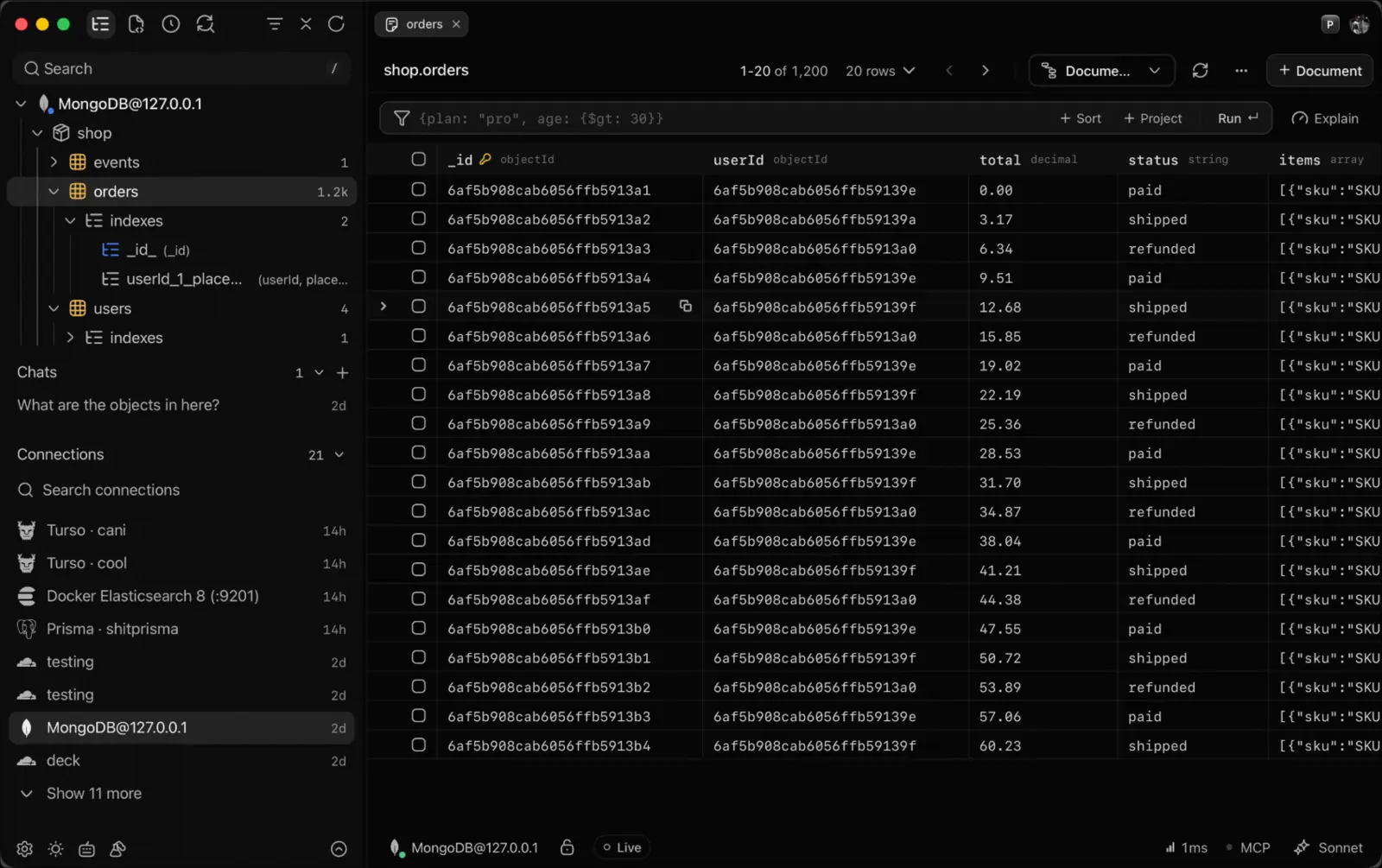
Any client can draw a grid. Stroke is built for the moments where most of them fall over.
- Huge results don't freeze it. Rows stream to disk as they arrive, so a 2 GB result fills the grid at once and memory stays flat.
- Stop means stopped. Cancelling a query cancels it on the server, on every engine that can, and the connection is ready for the next one.
- Nothing changes by accident. Edits are staged in the grid until you press Apply, transactions show how long they've held their locks, and read-only connections refuse every write.
- Plans you can read.
EXPLAINbecomes a tree of steps with their time, the slow one marked, for SQL and document engines alike. - Lost tunnels come back. If SSH drops, Stroke reconnects it on the same port and tells you it happened.
- Your credentials stay yours. Stroke connects straight from your machine, and passwords live in your OS keychain.
| Kind | Engines |
|---|---|
| Relational | PostgreSQL · MySQL · MariaDB · SQLite · SQL Server · Oracle · CockroachDB · Turso / libSQL · Cloudflare D1 |
| Document | MongoDB · CouchDB · Firestore · Cassandra · ScyllaDB |
| Key-value | Redis · Valkey · DynamoDB |
| Analytics | DuckDB · ClickHouse · PostHog |
| Search | Elasticsearch · OpenSearch |
Oracle needs Oracle Instant Client installed.
Sign in and pick a database, no connection string needed:
| Provider | Engine |
|---|---|
| Neon, Supabase, Prisma Postgres, Nile | Postgres |
| PlanetScale, TiDB Cloud | MySQL |
| Turso | libSQL |
| Cloudflare D1 | SQLite |
| Railway | Postgres, MySQL, Redis |
| Upstash, Xata, SingleStore, PostHog | with an API token |
Stroke also finds databases already running on your machine (Docker containers, local Postgres and MySQL, the SQLite file your ORM points at), so a local connection is usually one click. Any connection can go through an SSH tunnel.
Browse and edit
- A data grid that paints millions of rows, with filters that write the
WHERE, multi-column sort, pinned columns and foreign-key jumps - Inline editing, including Postgres arrays and JSON, staged until you apply it
- Seven views of the same rows: table, JSON, record, text, chart, schema diagram and structure
Query
- A SQL editor with schema-aware autocomplete, a result tab per statement, history, saved queries and
.sqlnbnotebooks - Explicit transactions on Postgres, MySQL, SQLite, DuckDB, SQL Server and Oracle
- Query plans as readable steps, with the slowest one marked
Beyond SQL
- MongoDB aggregations built stage by stage, Redis keys with a live server overview, DynamoDB with your AWS profile
- Viewers for JSON, pgvector embeddings and PostGIS geometry, plus a map of every spatial layer
Schema and data
- ER diagrams, a relation tree, a schema timeline and data diff
- Prisma and Drizzle codegen
- Backup and restore as SQL dumps, across providers (D1 to Postgres included)
Share
- Rows, charts, JSON, queries or a schema as an end-to-end encrypted link that expires when you say. Mask the sensitive columns first
AI and agents
- An AI chat that runs queries and draws charts: the free tier, your own key, local models (Ollama, LM Studio) or GitHub Copilot
- A built-in MCP server, so Claude Code, Codex, Cursor and other agents query the same databases, held to the access level you set per connection. Destructive statements always ask first
Everywhere
- A command palette on
Cmd/Ctrl+K, split panes, themes and extensions - Encrypted sync of connections and settings between your computers
macOS with Homebrew
brew install --cask stroke-app/tap/strokeWindows with Scoop
scoop bucket add stroke https://github.com/stroke-app/stroke
scoop install stroke
Any system from a terminal
curl -fsSL https://stroke.click/install.sh | sh          # macOS and Linux
irm https://stroke.click/install.ps1 | iex               # Windows (PowerShell)
Or download an installer from Releases:
| System | Package |
|---|---|
| macOS | .dmg for Apple Silicon or Intel |
| Windows | -setup.exe |
| Ubuntu 22.04+, Debian 12+ | .deb |
| Fedora 41+, RHEL 10 | .rpm |
| Arch and any distro with glibc 2.35+ | .AppImage |
Every feature is free for 30 days. After that, Stroke Pro is $9.99 once, with every update included.
Stroke Nightly: try what's coming
Built every night from the nightly branch, it installs as a separate app beside Stroke with its own settings, so you can try new work without risking your setup. It updates itself whenever something lands. Download the nightly.
First launch warnings and Linux display notes
- If macOS blocks the first launch, run
xattr -cr /Applications/Stroke.app. - If Windows SmartScreen warns, choose More info → Run anyway. Sponsoring pays for the certificates that remove both warnings.
- On Wayland, Stroke runs natively. If a launch can't draw there (some GPU and driver setups), the next one falls back to X11 by itself.
STROKE_X11=1forces X11;STROKE_WAYLAND=1forces Wayland and forgets the fallback.
| Keys | Action |
|---|---|
Cmd/Ctrl+K |
Command palette |
Cmd/Ctrl+Enter |
Run the query |
Cmd/Ctrl+T |
Search tables |
Cmd/Ctrl+B |
Toggle the sidebar |
Cmd/Ctrl+W |
Close the tab |
Alt+wheel |
Scroll the grid a few rows at a time |
Cmd/Ctrl+? |
Every shortcut |
Stroke is a Tauri app: a Rust core for every database driver, query and stream, and a Svelte interface drawn by the system's own webview.
You need Node.js 20.19+ (CI uses 22) and the Rust toolchain.
git clone https://github.com/stroke-app/stroke
cd stroke
npm install
npm run tauri          # run in development
npm run tauri:build    # build a release
On Arch, npm run tauri:build:arch avoids an AppImage linker issue. npm run tauri:build:mac and npm run tauri:build:win build release installers locally; scripts/build-local.mjs lists what each one needs.
Fixes, features and docs are welcome. CONTRIBUTING.md covers the dev setup, including one-command Docker test databases, and the PR checklist. Bugs and ideas go in issues, and the roadmap shows what's next.
Stroke is built by one developer. Sponsors keep it signed on macOS and Windows.
Stroke is source-available under the Stroke License. You can do anything you like with the source code, including reusing it in your own free or paid projects. If you publish a work derived from it, say that it comes from Stroke. If you publish a compiled app built from it, it must not contain malware, must not be called Stroke or look like it, and must keep Stroke's trial and license-key payments intact and free to users, unless it is a substantial improvement in its own right. Stroke is not open source by the OSI definition. A Stroke Pro license buys a key for the app and funds development.