- Path Objects
- Instantiation
- Combination
- Special Directories
- Components
- Validity
- Directory Manipulations
- File Manipulations
- Link Manipulations
- File Objects
- Initialization
- Properties
- Methods
- JSON Convertion
- CSV I/O
- Shelf Objects
- Features
- Initialization
- Methods
- Archive Files
- File System Interfaces
- Common Pathname Manipulations
- Shell Utilities
- Environment Variables
The path presents the location of a file on the computer. There are two ways to specify a file path:
- An absolute path, which always begins with the root folder (
C:\for Windows with a drive letter C, and/for POSIX); - A relative path, which is relative to the current working directory.
The pathlib module offers classes representing filesystem paths with semantics appropriate for different operating systems.
Multiple arguments can be provided to specify the hierarchy.
from pathlib import Path
rel = Path('Documents', 'Dev', 'Python', 'main.py')
The slash operator / can combine Path objects and strings and helps create child paths.
It is equvalent to the path.joinpath(*other) method which combines the path with each of the other arguments in turn.
rel = Path('Documents') / 'Dev' / 'Python' / 'main.py'
rel = Path('Documents').joinpath('Dev', 'Python', 'main.py')
Class method Path.home() returns the absolute path of the home directory.
abs = Path.home() / rel
Class method Path.cwd() returns the absolute path of the current working directory.
abs = Path.cwd() / rel
path.parts is a tuple giving access to the various components of a path.
abs = Path(*abs.parts)
Several object properties can be used to extract a certain part:
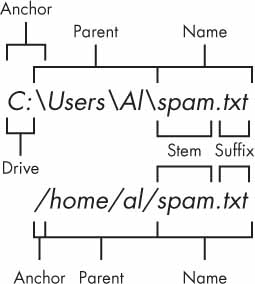
path.driveis a string representing the drive letter or name, if any;path.rootis a string representing the root, if any;path.anchoris the concatenation of the drive and root.path.parentis the logical parent of the path.path.nameis a string representing the final path component;path.suffixis the file extension of the final component;path.stemis the final path component, without its suffix.
Type and existence
path.exists()returnsTrueif the path exists orFalseif not.path.is_file()returnsTrueif the path exists and is a file, orFalseotherwise.path.is_dir()returnsTrueif the path exists and is a directory, orFalseotherwise.path.is_symlink()returnsTrueif the path points to a symbolic link, orFalseotherwise.Path.is_mount()returnsTrueif the path is a mount point, orFalseotherwise.
Absolute and relative paths
path.is_absolute()returns whether the path is absolute or not.path.is_relative_to(*start)returns whether or not this path is relative to the start path.path.relative_to(*start)computes a version of this path relative to the start path, or raisesValueErrorif not possible.path.resolve(strict=False)makes the path absolute, resolving any symlinks, and returns the resulting path object.
Ownership
path.group()returns the name of the group owning the file, or raisesKeyErrorif not found in the system database.path.owner()returns the name of the user owning the file, or raisesKeyErrorif not found in the system database.
Create
path.mkdir(mode=0o777, parents=False, exist_ok=False) creates a new directory at this path, with mode if given.
If parents is True, any missing parents of this path are created as needed, with the default permissions; otherwise, a missing parent raises FileNotFoundError.
If the path already exists, FileExistsError will be raised when exist_ok is False.
Remove
path.rmdir() removes this directory. The directory must be empty.
Rename
path.rename(target) renames this directory to the given target, and return a new Path instance pointing to target.
List contents
path.iterdir() yields path objects of the directory contents.
path.glob(pattern) globs the given relative pattern string in the directory, yielding all matching files.
A ** in the pattern literal means this directory and all subdirectories, recursively.
Create
path.touch(mode=0o666, exist_ok=True) creates a file at this path, with mode if given.
If the path already exists, FileExistsError will be raised when exist_ok is False.
Remove
path.unlink(missing_ok=False) removes this file.
If the path does not exist, FileNotFoundError will be raised when missing_ok is False.
Rename
path.rename(target) renames this file to the given target, and return a new Path instance pointing to target.
Open
path.open(mode='r', buffering=-1, encoding=None, errors=None, newline=None) opens the file the path points to and returns a file object.
Read and write
Computer files can be categorized into two types:
- Plaintext files contain only basic text characters and do not include font, size, or color information;
- Binary files are all other file types.
# text files
path.write_text('Text file contents')
content = path.read_text()

# binary files
path.write_bytes(b'Binary file contents')
content = path.read_bytes()
Create
path.symlink_to(target, target_is_directory=False)makes this path a symbolic link to target.path.hardlink_to(target)makes this path a hard link to the same file as target.
Remove
path.unlink(missing_ok=False) removes this symbolic link.
If the path does not exist, FileNotFoundError will be raised when missing_ok is False.
Read
path.readlink() returns a string representing the path to which the symbolic link points.
The Python build-in open() function returns a File object.
open(path, mode='r', buffering=-1, encoding=None, errors=None, newline=None) opens the file the path points at or raises OSError if the file cannot be opened.
An optional mode string specifies the mode in which the file is opened, including:
| Mode | Description |
|---|---|
'r' |
Open for reading |
'w' |
Open for writing, truncating the file first |
'a' |
Open for writing, appending to the end of file if it exists |
'x' |
Open for exclusive creation, failing if the file already exists |
'b' |
Open as binary |
't' |
Open as Plaintext (default if unspecified) |
'+' |
Open for updating (both reading and writing) |
file.modeis the file access mode used while opening this file.file.closedisTrueif a file is closed.file.nameis the name of this file.file.encodingis the encoding this file uses.file.newlineis the types of newlines encountered while reading the file.
Read
file.readable()returns whether the file can be read or not.file.read()reads the entire contents of a file as a string value, with at most size characters (in text mode) or size bytes (in binary mode).file.readlines()gets a list of string values from the file, one string for each line of text.
A file object is iterable with each line as a member.
file = open(path)
lines = list(l for l in file)
file.close()
Write
file.writable()returns whether the file can be written to or not.file.write(string)writes the contents of string to the file, returning the number of characters written.file.writelines(strings)writes a list of strings to the file.
import pprint

file = open('main.py', 'r+')
file.read()
file.write('dictionary = ' + pprint.pformat(dictionary) + '\n')
file.close()
Seek
file.tell()returns an integer giving the current position of the file object in the file.file.seekable()returns whether the file allows us to change the file position.file.seek(offset, whence=0)changes file object position in the file. The position is computed from adding offset to a reference point.
| Whence Value | Reference Point |
|---|---|
| 0 | The beginning of the file |
| 1 | The current file position |
| 2 | The end of the file |
Close
file.close() closes an opened file.
The json module provides supports to encode and decode JSON according to the convertion table:
| JSON | Python |
|---|---|
| object | dict |
| array | list |
| string | str |
| number | int, float |
| true | True |
| false | Flase |
| null | None |
Serialization
json.dump(obj, file)serializes obj as a JSON formatted stream to file (.write()-supporting file object).json.dumps(obj)serializes obj to a JSON formatted string as return.
Deserialization
json.load(file)deserializes file (.read()-supporting) to a Python object as return, or raisesJSONDecodeErrorif JSON document invalid.json.loads(string)deserializes string to a Python object as return, or raisesJSONDecodeErrorif JSON document invalid.
The csv module can be used to read and write CSV files.
import csv
csvfile = open('user.csv', 'w', newline='')
DictWriter = csv.DictWriter(, ['ID', 'Name', 'Gender', 'Privilege'])
DictWriter.writeheader()
DictWriter.writerow({'Name': 'Seth', 'Gender': 'M', 'ID': '1', 'Privilege': 'High'})
csvfile.close()
Read
csv.reader(file, *, delimiter=',', lineterminator='\n')returns areaderobject that maps each row in a file object file to a list.csv.DictReader(file, fieldnames=None, *, delimiter=',', lineterminator='\n')returns an object that maps each row to a dict. The keys are given by fieldnames or the values in the first row of file.
Write
csv.writer(file, *, delimiter=',', lineterminator='\n')returns awriterobject that converts data into delimited strings on the given file object file.writer.writerow(values)takes a list argument and returns the number of characters written for that row including the newline.
csv.DictWriter(file, fieldnames=None, *, delimiter=',', lineterminator='\n')returns an object that maps dictionaries to output rows. The keys are given by fieldnames which is a sequence that identify the order in which values in dictionaries are written to file.DictWriter.writeheader()writes a row with the field names as specified in the constructor.DictWriter.writerow(pairs)takes a dict argument and returns the number of characters written for that row including the newline.
The shelve module offers a way to save variables in your Python programs to binary shelf files.
import shelve
shelf = shelve.open('pydata')
shelf['path'] = {'type': ['absolute', 'relative'], 'component': ['anchor', 'parent', 'stem']}
shelf.close()
A shelf object is a persistent, dictionary-like object, with ordinary strings as keys. The values in a shelf can be arbitrary Python objects.
shelve.open(filename, *, writeback=False) opens a persistent dictionary. By default, the file is opened for reading and writing.
shelf.sync()writes back all entries in the cache if the shelf was opened with writeback set toTrue.shelf.close()synchronizes and closes the persistent dict object.
Multiple files with the same name and different extensions might be created.
The zipfile module provides supports for file compression.
Open
zipfile.ZipFile(file, mode='r', compression=zipfile.ZIP_STORED) opens a ZIP file and returns a ZipFile object used to read and write the ZIP;
file can be a string representing a path, a path object or a file object.
Read
archive.namelist()returns a list of archive members by name.archive.infolist()returns a list containing aZipInfoobject for each archive member.archive.getinfo(name)returns aZipInfoobject with information about the archive member name.
Extract
archive.open(name, mode='r', pwd=None)accesses a member specified by name as a binary file object.archive.extract(member, path=None, pwd=None)extracts a member to the current working directory or path; member must be its full name or a ZipInfo object.archive.extractall(path=None, members=None, pwd=None)extracts all members to the current working directory or path; members must be a list of archive names.
Write
archive.write(filename, arcname=None, compress_type=None)writes the file named filename to archive, with an archive name arcname.archive.writestr(arcname, data, compress_type=None)writes a file into archive, whose contents is a string or a bytes instance data.
Close
archive.close() closes the archive file.
The os module includes a group of functions and properties about the file system.
Working directory
os.getcwd()returns a string representing the current working directory.os.listdir(path=os.curdir)returns a list containing the names of the entries in the directory given by path.os.chdir(path)changes the current working directory to path.
File and directory information
os.chmod(path, mode, *, follow_symlinks=True)changes the mode of path to the numeric mode.os.chown(path, uid, gid, *, follow_symlinks=True)changes the owner and group of path to the numeric uid and gid (-1 leaves unchanged).os.stat(path, *, follow_symlinks=True)returns information about path as anos.stat_resultobject.
Miscellaneous system information
os.curdiris the constant string used by the operating system to refer to the current directory. This is'.'for Windows and POSIX.os.pardiris the constant string used by the operating system to refer to the parent directory. This is'..'for Windows and POSIX.os.sepis the character used by the operating system to separate pathname components. This is'/'for POSIX and'\\'for Windows.os.pathsepis the character used by the operating system to separate path components. Such as':'for POSIX or';'for Windows.os.linesepis the string used by the operating system to separate (i.e. terminate) lines. Such as'\n'for POSIX or'\r\n'for Windows.
The os.path module implements a few useful functions on pathnames.
Combination
os.path.join(path, *paths) returns the concatenation of path and any members of paths with exactly one separator following each non-empty part except the last.
Components
os.path.dirname(path)returns a string of everything that comes before the last slash in path;os.path.basename(path)returns a string of everything that comes after the last slash in path.os.path.split(path)splits path into everything leading up the last without trailing slashes, and the last pathname component;os.path.splitdrive(path)splits path into the drive, and everything following up the drive;os.path.splitext(path)splits path into everything leading up the extention, and the file extension.
Home path
os.path.expanduser(path) returns the argument with an initial component of ~ replaced by the absolute path of the home directory.
Absolute and relative paths
os.path.isabs(path)returns a normalized absolutized version of the pathname path.os.path.abspath(path)returnsTrueif path is an absolute pathname.os.path.relpath(path, start=os.curdir)returns a relative filepath to path from the start directory.
Path information
os.path.getctime(path)returns the time of the last metadata change or the creation time for path;os.path.getmtime(path)returns the time of last modification of path;os.path.getatime(path)returns the time of last access of path.os.path.getsize(path)returns the size, in bytes, of path, or raisesOSErrorif the file does not exist or is inaccessible.
The shutil module offers a number of high-level operations on files and collections of files.
Copy
shutil.copy(src, dst, *, follow_symlinks=True)copies the file src to the file or directory dst and returns the path to the newly created file. If dst is a directory, the file will be copied into dst using the filename from src. If dst is a file that already exists, it will be replaced.shutil.copytree(src, dst, symlinks=False)recursively copies an entire directory tree rooted at src to a directory named dst and returns the destination. All intermediate directories needed to contain dst will also be created by default.
Move
shutil.move(src, dst) recursively move a file or directory src to another location dst and returns the destination.
If the destination is an existing directory, then src will be moved inside. If the destination already exists but is not a directory, it may be overwritten.
Remove
shutil.rmtree(path) deletes an entire directory tree; path must point to a directory (but not a symbolic link to a directory).
The os module offers properties and functions to interact with the system environment.
Integrated operational object
os.environ is a mapping object where keys and values are strings that represent the process environment.
Access
os.getenv(key, default=None) returns the value of the environment variable key if it exists, or default if not.
This method uses os.environ and may not reflect environment changes in real time.
Insertion
os.putenv(key, value) sets the environment variable named key to the string value.
Assignments to items in os.environ are automatically translated into calls to this method; however, calls to this method do not update os.environ.
Deletion
os.unsetenv(key) deletes the environment variable named key.
Deletions of items in os.environ are automatically translated into calls to this method; however, calls to this method do not update os.environ.
Sweigart, A. (2015). Automate the Boring Stuff With Python: Practical Programming for Total Beginners. San Francisco, CA: No Starch Press.