SIMPLE, INTUITIVE, HOSTS FILE EDITING
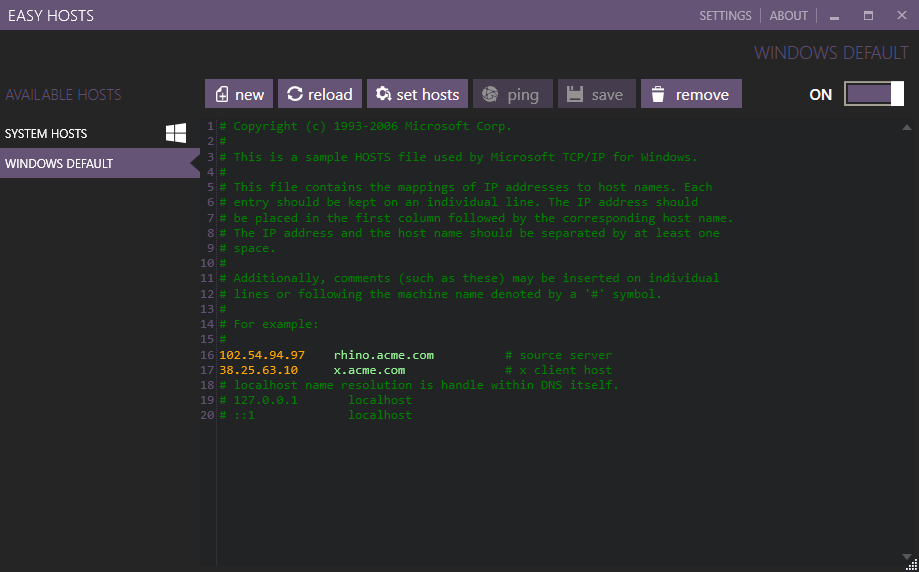
The hosts file is a computer file used by an operating system to map hostnames to IP addresses. The hosts file is a plain text file, and is conventionally named hosts. (Wikipedia)
Developers who frequently need to switch their hosts entries between development, testing and other environments will find the convention based approach of Easy Hosts both intuitive and simple.
Easy Hosts 2.1 is available for download
- Upgrade dependency libraries
- Code cleanup
- New xcopy deployment. Extract and use Easy Hosts without the need for installation.
- Ability to add new hosts file
- Ability to delete selected host file
- Other improvements.
-
If you already maintain separate hosts file for your different environments, simply rename those files with ".host" extension (eg. DEV.host, QA.host) and drop them into the Easy Hosts installation directory. Restart the application and the files will show up in the available hosts list for quick switching.
-
Need to quickly create hosts file from selected text? Select the required host entries in the editor, right click, and select "Save selection as new file...". Provide the file name and the new host file is added to the available hosts list.
-
Based on user feedback, ability to add new hosts file is now available.
Try it out today.