I've been having an issue for a longer while already where my icons in OBS with the SE.Live plugin were broken like this:
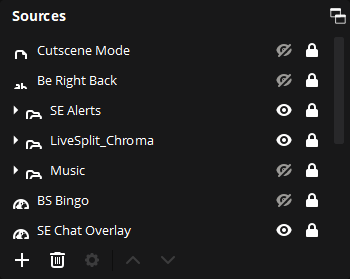
I've been told by the OBS team through initial testing that this is a display scaling issue since I have 2 monitors at 1440p and 1 monitor at 4K (which I've set to 150% scaling).
However, I've not got 3 monitors that are all 1440p, meaning they're at 100% display scaling, so this shouldn't be an issue anymore. But it persists.
The issue appears to be with the "windowState" variable inside the "config\obs-studio\plugin_config\obs-streamelements-core\obs-streamelements-core.ini".
When I remove that folder, or just that .ini file, and start up OBS the icons show correctly, but it reinitializes all the StreamElements windows again (Activity feed and chat).
If I now close OBS and start it again, the icons are once again broken. I've tested this on a fresh OBS instance as well and the issue persists.
I've currently got a setup where I can reproduce this issue and would be happy to help with a test build of the plugin to try and get this resolved.

I've been having an issue for a longer while already where my icons in OBS with the SE.Live plugin were broken like this:

I've been told by the OBS team through initial testing that this is a display scaling issue since I have 2 monitors at 1440p and 1 monitor at 4K (which I've set to 150% scaling).
However, I've not got 3 monitors that are all 1440p, meaning they're at 100% display scaling, so this shouldn't be an issue anymore. But it persists.
The issue appears to be with the "windowState" variable inside the "config\obs-studio\plugin_config\obs-streamelements-core\obs-streamelements-core.ini".
When I remove that folder, or just that .ini file, and start up OBS the icons show correctly, but it reinitializes all the StreamElements windows again (Activity feed and chat).
If I now close OBS and start it again, the icons are once again broken. I've tested this on a fresh OBS instance as well and the issue persists.
I've currently got a setup where I can reproduce this issue and would be happy to help with a test build of the plugin to try and get this resolved.