diff --git a/i18n/en/docusaurus-plugin-content-docs/current/01_Quick_start/02_install_os/rdk_s100/03_burn.md b/i18n/en/docusaurus-plugin-content-docs/current/01_Quick_start/02_install_os/rdk_s100/03_burn.md
index 5b8ed8cb0..cad1279dd 100644
--- a/i18n/en/docusaurus-plugin-content-docs/current/01_Quick_start/02_install_os/rdk_s100/03_burn.md
+++ b/i18n/en/docusaurus-plugin-content-docs/current/01_Quick_start/02_install_os/rdk_s100/03_burn.md
@@ -70,9 +70,9 @@ Use this for a first-time flash or system recovery. It flashes the complete syst
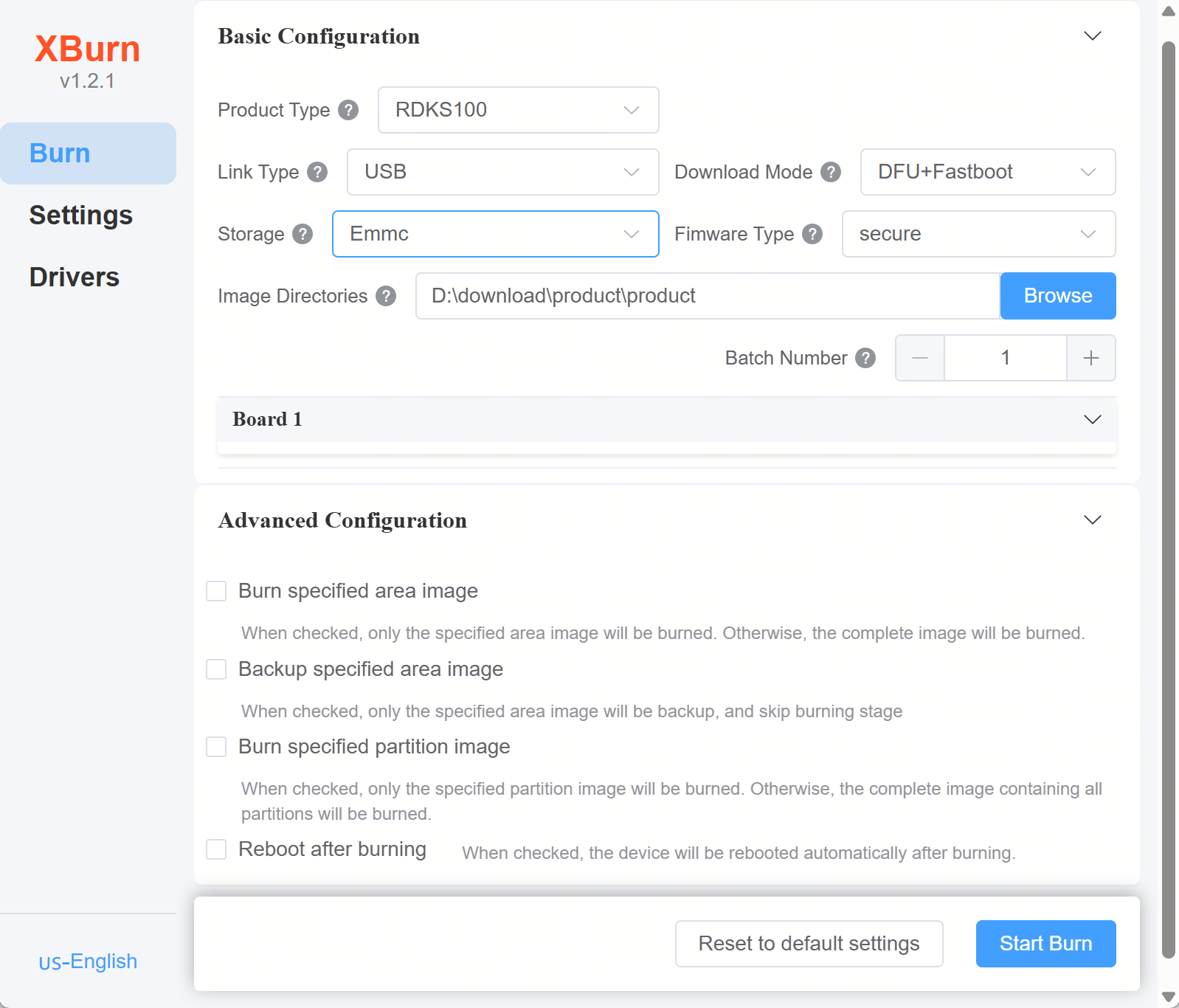 -5. (Optional) To flash multiple devices at once, see the XBurn Manual [Batch flashing](https://developer.d-robotics.cc/xburn_doc/basics/batch-burn) (software limit 8 devices, recommended ≤4; the more devices, the higher the failure rate, and stability depends on the cable, USB hub, power supply, and other hardware. The software provides no guarantee). For batch flashing, turn off **Reboot after flashing** so that one device rebooting does not affect the others.
+5. (Optional) To flash multiple devices at once, see the XBurn Manual [Batch flashing](https://developer.d-robotics.cc/xburn_doc/en/basics/batch-burn) (software limit 8 devices, recommended ≤4; the more devices, the higher the failure rate, and stability depends on the cable, USB hub, power supply, and other hardware. The software provides no guarantee). For batch flashing, turn off **Reboot after flashing** so that one device rebooting does not affect the others.
-6. (Optional) Expand **Advanced configuration** and select **Reboot after flashing**. After flashing, the device reboots automatically, so you do not need to power off, exit download mode, and power on again manually. For details, see the XBurn Manual [Auto-reboot and boot check after flashing](https://developer.d-robotics.cc/xburn_doc/basics/auto-reboot).
+6. (Optional) Expand **Advanced configuration** and select **Reboot after flashing**. After flashing, the device reboots automatically, so you do not need to power off, exit download mode, and power on again manually. For details, see the XBurn Manual [Auto-reboot and boot check after flashing](https://developer.d-robotics.cc/xburn_doc/en/basics/auto-reboot).
7. Click **Start Burn**. The device powers on and flashing starts. Wait for the progress to complete.
@@ -85,7 +85,7 @@ Use this for a first-time flash or system recovery. It flashes the complete syst
- **Green** LED: Lit means the hardware is powered on normally.
:::
- If the device produces no display output for a long time (over 2 minutes) after power-on, the boot failed and you need to debug over a serial cable. For boot failure troubleshooting, see the XBurn Manual [Boot issues](https://developer.d-robotics.cc/xburn_doc/troubleshooting/boot-issues).
+ If the device produces no display output for a long time (over 2 minutes) after power-on, the boot failed and you need to debug over a serial cable. For boot failure troubleshooting, see the XBurn Manual [Boot issues](https://developer.d-robotics.cc/xburn_doc/en/troubleshooting/boot-issues).
 diff --git a/i18n/en/docusaurus-plugin-content-docs/current/01_Quick_start/02_install_os/rdk_s100/04_backup.md b/i18n/en/docusaurus-plugin-content-docs/current/01_Quick_start/02_install_os/rdk_s100/04_backup.md
index cf18d5e12..31da18300 100644
--- a/i18n/en/docusaurus-plugin-content-docs/current/01_Quick_start/02_install_os/rdk_s100/04_backup.md
+++ b/i18n/en/docusaurus-plugin-content-docs/current/01_Quick_start/02_install_os/rdk_s100/04_backup.md
@@ -30,11 +30,11 @@ Confirm that the source board boots normally and that ADB is enabled.
### XBurn version requirement
-XBurn 1.2.2 or later is required. For installation, see [Install XBurn](https://developer.d-robotics.cc/xburn_doc/install).
+XBurn 1.2.2 or later is required. For installation, see [Install XBurn](https://developer.d-robotics.cc/xburn_doc/en/install).
### SDK version requirement
-- On SDK 4.0.5 or later, start backing up directly.
+- On SDK versions later than 4.0.5, start backing up directly.
- On SDK 4.0.5 or earlier, U-Boot does not support backing up partitions larger than 4 GB, so update it first.
Update U-Boot on the **source board** before backing up: