A tool to convert Powerpoint pptx file into markdown.
This fork exists for personal maintenance and day-to-day use because the upstream project has accumulated unmerged PRs and unreleased fixes. It includes local fixes for PPTX files whose presenter notes have no text frame, safer temporary file handling when purging broken NULL relationships, and removal of parser-level mutable image numbering state.
Install from this fork instead of the PyPI package if you need these fixes.
Preserved formats:
- Titles. Custom table of contents with fuzzy matching is supported.
- Lists with arbitrary depth.
- Text with bold, italic, color and hyperlink
- Pictures. They are extracted into image file and relative path is inserted.
- Tables with merged cells.
- Top-to-bottom then left-to-right block order.
Supported output:
- Markdown
- Tiddlywiki's wikitext
- Madoko
- Quarto
Please star this repo if you like it!
This fork contains fixes that may not be available in the PyPI package. Do not install it with
pip install pptx2md, because that command installs the published upstream package.
Install this fork directly from Git:
pip install --upgrade "git+https://github.com/BinaryHusk/pptx2md.git"For local development, clone the fork and install it in editable mode:
git clone https://github.com/BinaryHusk/pptx2md.git
cd pptx2md
pip install -e .Once you have installed it, use the command pptx2md [pptx filename] to convert pptx file into markdown.
The default output filename is out.md, and any pictures extracted (and inserted into .md) will be placed in /img/ folder.
Note: older .ppt files are not supported, convert them to the new .pptx version first.
Upgrade & Remove:
pip install --upgrade "git+https://github.com/BinaryHusk/pptx2md.git"

pip uninstall pptx2mdBy default, this tool parse all the pptx titles into level 1 markdown titles, in order to get a hierarchical table of contents, provide your predefined title list in a file and provide it with -t argument.
This is a sample title file (titles.txt):
Heading 1
  Heading 1.1
    Heading 1.1.1
  Heading 1.2
  Heading 1.3
Heading 2
  Heading 2.1
  Heading 2.2
    Heading 2.1.1
    Heading 2.1.2
  Heading 2.3
Heading 3
The first line with spaces in the begining is considered a second level heading and the number of spaces is the unit of indents. In this case, Heading 1.1 will be outputted as ## Heading 1.1 . As it has two spaces at the begining, 2 is the unit of heading indent, so Heading 1.1.1 with 4 spaces will be outputted as ### Heading 1.1.1. Header texts are matched with fuzzy matching, unmatched pptx titles will be regarded as the deepest header.
Use it with pptx2md [filename] -t titles.txt.
-t [filename]provide the title file-o [filename]path of the output file-i [path]directory of the extracted pictures--image-width [width]the maximum width of the pictures, in px. If set, images are put as html img tag.--disable-imagedisable the image extraction--disable-escapingdo not attempt to escape special characters--disable-notesdo not add presenter notes--disable-wmfkeep wmf formatted image untouched (avoid exceptions under linux)--disable-colordisable color tags in HTML--enable-slidesdeliniate slides\n---\n, this can help if you want to convert pptx slides to markdown slides--try-multi-columntry to detect multi-column slides (very slow)--min-block-size [size]the minimum number of characters for a text block to be outputted--wiki/--mdkif you happen to be using tiddlywiki or madoko, this argument outputs the corresponding markup language--qmdoutputs to the qmd markup language used for quarto powered presentations--page [number]only convert the specified page--keep-similar-titleskeep similar titles and add "(cont.)" to repeated slide titles
Note: install wand for better chance of successfully converting wmf images, if needed.
Data Link Layer Design Issues
  Services Provided to the Network Layer
  Framing
  Error Control & Flow Control
Error Detection and Correction
  Error Correcting Code (ECC)
  Error Detecting Code
Elementary Data Link Protocols
Sliding Window Protocols
  One-Bit Sliding Window Protocol
  Protocol Using Go Back N
  Using Selective Repeat
Performance of Sliding Window Protocols
Example Data Link Protocols
  PPP
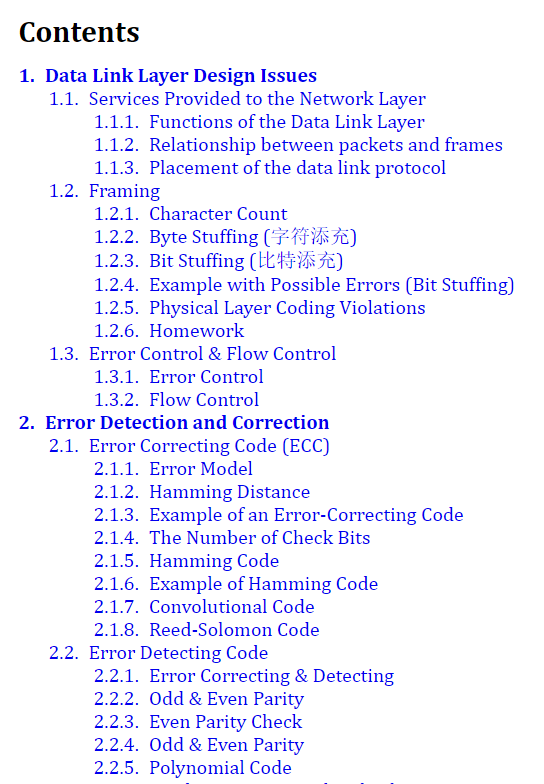
- Top: Title list file content.
- Bottom: The table of contents generated.
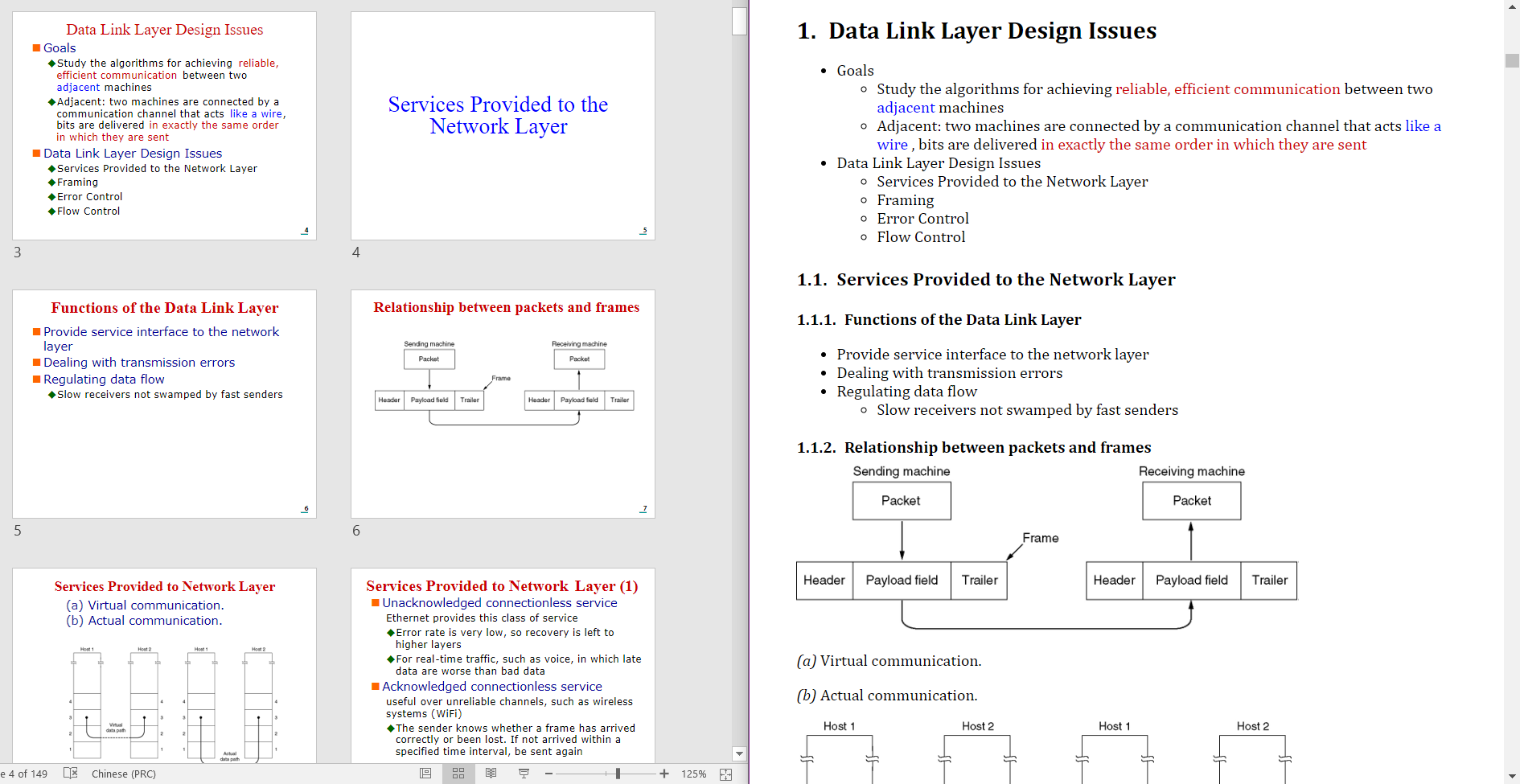
- Left: Source pptx file.
- Right: Generated markdown file (rendered by madoko).
You can also use pptx2md programmatically in your Python code:
from pptx2md import convert, ConversionConfig
from pathlib import Path

# Basic usage
convert(
    ConversionConfig(
        pptx_path=Path('presentation.pptx'),
        output_path=Path('output.md'),
        image_dir=Path('img'),
        disable_notes=True
    )
)
The ConversionConfig class accepts the same parameters as the command line arguments:
pptx_path: Path to the input PPTX file (required)output_path: Path for the output markdown file (required)image_dir: Directory for extracted images (required)title_path: Path to custom titles fileimage_width: Maximum width for images in pxdisable_image: Skip image extractiondisable_escaping: Skip escaping special charactersdisable_notes: Skip presenter notesdisable_wmf: Skip WMF image conversiondisable_color: Skip color tags in HTMLenable_slides: Add slide delimiterstry_multi_column: Attempt to detect multi-column slidesmin_block_size: Minimum text block sizewiki: Output in TiddlyWiki formatmdk: Output in Madoko formatqmd: Output in Quarto formatpage: Convert only specified page numberkeep_similar_titles: Keep similar titles with "(cont.)" suffix
- Text blocks are identified in two ways:
- Paragraphs marked as "body" placeholders in the slide
- Text shapes containing more than the minimum block size (configurable)
- Lists are generated when paragraphs in a block have different indentation levels
- Single-level paragraphs are output as regular text blocks
- Multi-column layouts can be detected with
--try-multi-columnflag - Grouped shapes are recursively flattened to process their contents
- Shapes are processed in top-to-bottom, left-to-right order
- When using custom titles:
- Fuzzy matching is used to match slide titles with the provided title list
- Matching score must be > 92 for a match to be accepted
- Unmatched titles default to the deepest header level
- Similar titles (matching score > 92) are omitted by default unless
--keep-similar-titlesis used
- Text formatting is preserved through markdown syntax:
- Bold text from PPT is converted to
**bold** - Italic text is converted to
_italic_ - Hyperlinks are preserved as
[text](url)
- Bold text from PPT is converted to
- Color handling:
- Theme colors marked as "Accent 1-6" are preserved
- RGB colors are converted to HTML color codes
- Dark theme colors are converted to bold text
- Color tags can be disabled with
--disable-color
- Images:
- Extracted to specified image directory
- WMF images are converted to PNG when possible
- Image width can be constrained with
--image-width - HTML img tags are used when width is specified
- Tables:
- Merged cells are supported
- Complex formatting within cells is preserved
- Special characters are escaped by default (can be disabled with
--disable-escaping) - Presenter notes are included unless disabled with
--disable-notes